Repository navigation
Reviewer Walkthrough
An operator can see a change in a chart but still needs to write a handover or decide what to check next. Intelligence Gateway sends selected Grafana query results, reviewed dashboard images, and configurable operational context to an administrator-selected AI model and displays its assessment beside the chart. This walkthrough uses panel and companion 1.1.0 or later.
Example uses include comparing traffic across sites, summarizing an incident window, and drafting a handover from supplied metrics and runbook context. The input is Grafana DataFrames, not a particular database or CSV format. CSV is only the portable fixture in this example.
The panel assembles the bounded data and instructions and renders the response. The data source supplies server-side provider access, encrypted credential storage, and administrator policy. The data source does not independently collect dashboard metrics, train a model, detect incidents in the background, or prove a root cause.
| Mode | What runs | What it demonstrates |
|---|---|---|
| Supplied default mock | A small local HTTP server returning a fixed, clearly labeled receipt | Panel-to-backend-to-provider connectivity and response rendering; no model runs and no data or image analysis occurs |
| Real provider | A loaded model in LM Studio or another configured compatible provider | An actual assessment generated from the selected query results and instructions; output varies |
The supplied instance is named DEMO ONLY - Mock AI (no inference). Its response is a connectivity receipt, not an assessment. Read the AI connection label on the analysis panel to identify the instance currently selected. The dashboard introduction describes the supplied default; it must not be treated as the active provider status after switching to a real connection.
| Component or setting | What it provides | Does it provide AI inference? |
|---|---|---|
| TestData DB and the synthetic chart | The fixture's measured rows, rendered as a chart. | No. |
| Analysis panel Queries → Dashboard → Source panel | Reuses the chart's query rows as evidence. Required only when using query data. | No. |
| Analysis panel AI provider → Secure AI data source | Chooses the configured provider connection by UID. | Only when that instance points to a real approved provider. |
| DEMO ONLY - Mock AI (no inference) | Exercises the secure transport and returns a fixed receipt. | No model and no analysis. |
| A separate configured real provider instance | Routes the prompt and selected evidence to its approved model or agent. | Yes, when configured and validated; quality and vision capability remain model-dependent. |
The secure companion plugin is not a bundled model. Installing it, selecting a CSV data source, or pressing Save & test does not start an AI model. Images-only analysis still needs a real AI connection but does not require Queries → Dashboard.
Build both sibling plugins using the commands in Local provisioning, then start the panel repository's Docker Compose stack. Open http://localhost:3004 and choose Intelligence Gateway: traffic-shift walkthrough under Dashboards.
- Read Mock demo: no AI analysis. This describes the supplied default.
- Inspect Synthetic traffic: requests/minute by data center.
- In Explain the traffic shift, confirm the connection label says Mock connection — no AI analysis and names DEMO ONLY - Mock AI (no inference), then select Analyze.
- Confirm the result says MOCK MODE — no AI inference performed. Changing the data will not change this receipt.
- Continue to Phase 2 for genuine analysis. Do not treat a receipt as evidence of model or vision quality.
The original larger CSV remains in testdata/datasource.csv. The new default fixture is testdata/reviewer-traffic.csv; npm run sync:test-data synchronizes that file into the provisioned source panel.
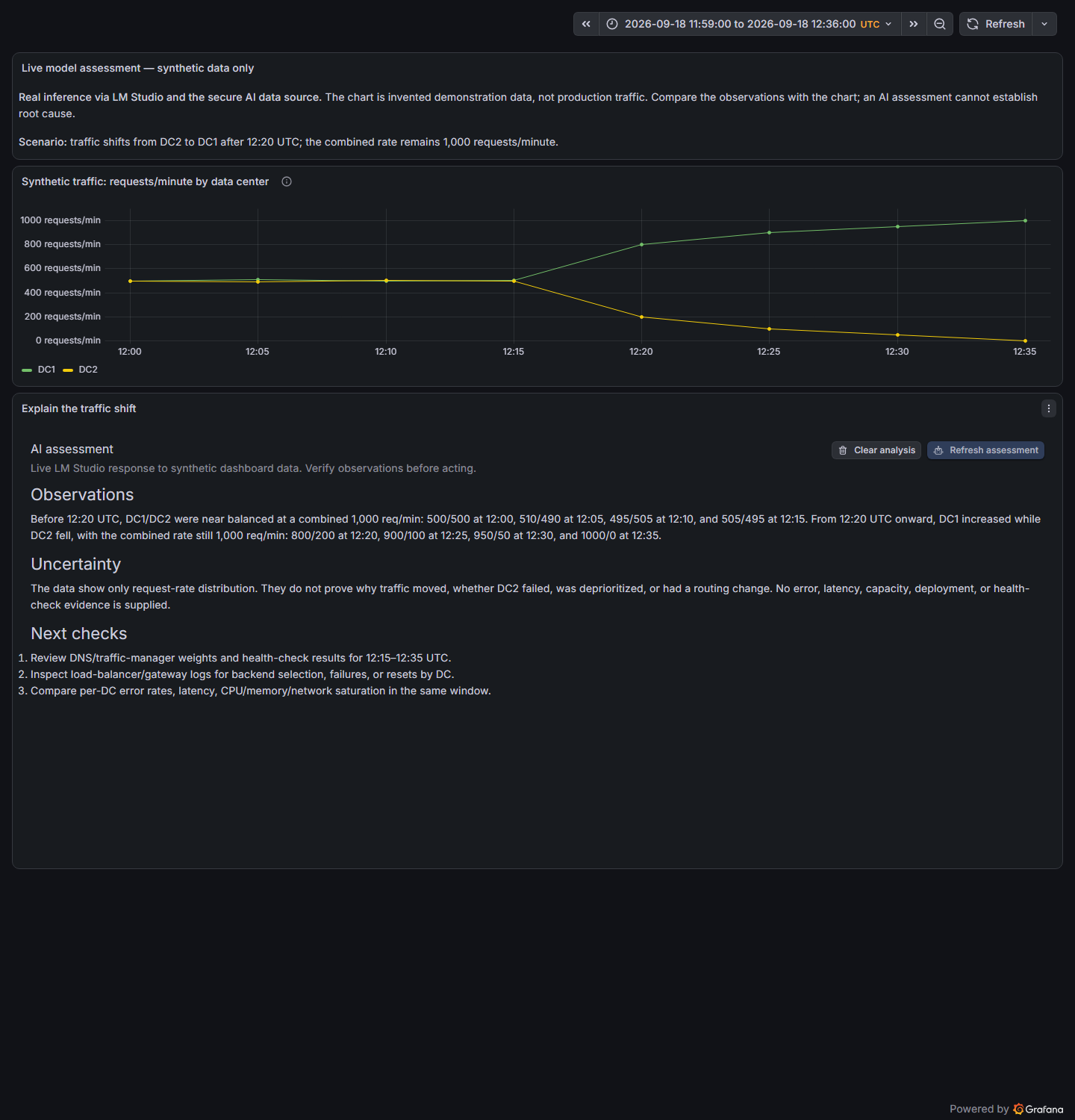
All eight rows are invented demonstration data, sampled every five minutes on September 18, 2026, in UTC. DC1 and DC2 are request rates in requests/minute, not interval totals.
| UTC sample | DC1 | DC2 | Combined rate |
|---|---|---|---|
| 12:00 | 500 | 500 | 1,000 |
| 12:15 | 505 | 495 | 1,000 |
| 12:20 | 800 | 200 | 1,000 |
| 12:35 | 1,000 | 0 | 1,000 |
At 12:20 the distribution shifts toward DC1. By 12:35 DC1 carries all observed traffic; every sample still totals 1,000 requests/minute. No error, latency, capacity, deployment, or routing records are supplied. The data alone cannot establish a DC2 outage, failover, or a routing change.
These are human-checkable fixture facts, not canned AI output.
Use an existing approved provider, or coordinate suitable limited test API access privately with DigitalRCS through the existing Grafana review conversation before starting this phase. No hosted service or credentials are currently bundled or promised; any access must be arranged and confirmed separately. Never publish credentials or private endpoint details. The mock connection check alone does not complete real-provider review.
- Confirm the agreed provider is reachable and has a compatible model. For a local LM Studio test, start its server and load a chat-capable model.
- Open Connections → Data sources → Add new data source. Choose Intelligence Gateway Secure AI and create a separate instance named Reviewer live AI. Do not repurpose DEMO ONLY - Mock AI (no inference); keep it for reproducible smoke tests.
- Select the provider and its documented base URL reachable from Grafana's server/container. For LM Studio on the Docker Desktop host, use
http://host.docker.internal:1234/v1. Containerlocalhostmeans the Grafana container, not the LM Studio host. On another computer, use its reachable hostname and port, enable the LM Studio server's approved network access, and allow the connection through the network/firewall. Other providers have different paths: see AI Providers. Prefer HTTPS. A trusted HTTP-only lab requires the explicit Allow insecure HTTP setting; it does not bypass backend model, address, redirect, payload, or credential policy. Never disable TLS certificate validation. - Enter the exact loaded model ID as the default and allowed model. Choose a bounded output ceiling appropriate for that model; a local reasoning-model test might use 8,192 tokens and a 300-second deadline. If authentication is required, enter it only in the data-source secure credential fields.
- Select Save & test. Success verifies connection/model access, not inference quality. For LM Studio, leave credentials empty only if that server does not require authentication. Do not put keys in the dashboard or URL.
- Duplicate the provisioned dashboard for your experiment. Edit Explain the traffic shift and open AI provider. Select Reviewer live AI under Secure AI data source, then Load models securely or enter the exact approved real model. The mock ID
review-modelis not a real model. Queries → Dashboard still shares measurements; it is not the AI provider selector. Keep it for data-only or combined assessment, or omit query data for images-only use. - Change the panel's response description to Live model response to synthetic data and retain manual analysis. Match the panel request cap to the approved test budget, for example 8,192 tokens, with a 500-token soft answer target and 300-second panel timeout. A smaller panel cap still wins over the administrator ceiling; reasoning may use that cap before visible text appears. Apply the panel changes.
- Apply the panel changes and confirm its AI connection label names Reviewer live AI and the selected model, rather than the mock connection. Select Analyze. A real data assessment should discuss DC1/DC2, numeric evidence, uncertainty, and next checks; it must not return the mock receipt.
The plugin does not remove security restrictions for a demo. Endpoint allow-lists, encrypted secrets, approved models, vision policy, request-size limits, deadlines, and network controls remain in force. The shorter panel/backend/provider deadline wins; a larger timeout or token cap does not guarantee model completion. For the optional Grafana LLM app and Copilot preview, review their separate limits before using these examples.
The panel already includes this task: compare the periods before and after 12:20 UTC, explain distribution and combined rate, cite evidence, state uncertainty, and suggest three verification steps in at most 200 words. The full constructed prompt can be inspected in panel configuration.
For this data-only example, only selected query results and prompt context are sent. Image modes additionally send the images you explicitly preview and attach. Model/provider choice determines where the inputs are processed. No external AI account is required when using a local model without authentication.
| Mode | Setup | What to verify |
|---|---|---|
| Data only | Leave images unattached and keep Queries → Dashboard → Source panel connected. Select Analyze. | The model cites supplied rows and does not claim to have received an image. |
| Images only | Use a separate test panel without query results. Turn Include query data with images off. Preview a chart capture or approved synthetic image, then Use images → Analyze images. | The model describes known visible facts without refusing solely because query rows are absent. |
| Data and images | Reconnect query results, leave Include query data with images on, and preview the chart capture before Analyze images. | Precise values come from supplied rows; visual observations and missing evidence are distinguished. |
All three need Secure AI data source. Image modes also need an administrator-enabled vision policy and a genuinely vision-capable model. Capture supplies pixels, not every pictured panel's raw rows. Use Remove or Remove all images to discard staged attachments; Clear analysis cancels a request and clears the answer, errors, and pending images without modifying source measurements. A successful image assessment releases attachments, so capture again before another image request.
The mock can verify image counts, controls, and transport but cannot assess the chart. A model-list check or a successful data-only answer does not prove vision. Record a separate approved synthetic vision test before claiming that a provider/model combination understands images. Copilot remains a Direct Line preview, not a verified enterprise SSO connection.
In your duplicate dashboard, edit source panel 1's TestData CSV. Change the final DC2 value from 0 to 300, apply, and select Refresh assessment in panel 2 (or Analyze if there is no existing response). The final combined rate is now 1,300 and DC2 still has traffic. Confirm the constructed prompt includes the changed value and evaluate whether the model reflects it. Do not treat exact wording as a test oracle.
The mock will still return the same receipt. A real model can also make arithmetic or interpretation errors; compare its statements with the source chart and fixture. The plugin provides an assessment for human review, not an authoritative incident diagnosis or automated remediation.
A genuine live-provider capture and its model/settings provenance are documented in Live Review Evidence. Screenshots of mock mode are labeled as mock; no canned answer is presented as live inference.
The maintainer's LM Studio example uses an explicit HTTP override on a trusted network, a loaded model allow-list, a 300-second deadline, and an 8,192-token administrator/panel ceiling. An initial 2,400-token request was truncated because the model consumed reasoning tokens; the larger ceiling allowed complete answers. Use limits appropriate to your own model and budget. The evidence page includes the reusable hostname placeholder and exact captured settings.
The panel owns the visualization and prompt construction. The data source owns credentials, provider routing, and shared administrator limits. Multiple dashboards can reuse one configured provider without embedding its credential in dashboard JSON. The data source can also submit a supplied prompt through its normal query editor and return an answer DataFrame.
The updated provisioning follows Grafana's test-environment guidance. These demo/documentation changes are in the current source; previously published ZIPs and source tags remain unchanged.