Repository navigation
Eon Commando 2.7.0 — menus on touch

The menus work on a phone now. Until this release, everything past the title screen assumed a keyboard — a touch player could start a run and never reach settings, controls, or restart.
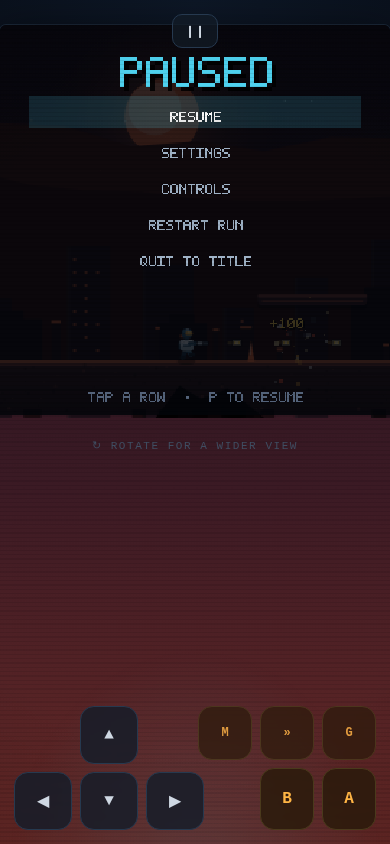
Pause is a real menu
Resume / Settings / Controls / Restart Run / Quit to Title. Reachable from the ❙❙ button, navigable by tap or arrow keys.
Every menu is tappable
Pause, Settings and Controls build a hit-map as they draw, so what you see is exactly what responds — the layout and the touch targets can't drift apart the way hand-maintained hit boxes do.
Settings rows respond to position: tap the right half to increase, the left half to decrease. No hunting for an arrow button. Keyboard and tap share one nudgeSetting() so the two paths can't diverge.
Sized for fingers
Pause rows step 25 px apart in portrait — about 36 px on a 390-wide screen — instead of 18, and every menu's hit band is wider than its text. My first pass shipped 23 px rows, which looks fine and taps badly.
Two bugs found on the way
fitCanvas computed the portrait view height after the screenshot early-return, so ?shot=1 on a phone silently rendered the old 16:9 layout. The mobile screenshot in this release was wrong before I caught it — the harness showed a 390×390 canvas where it should have been 390×844.
And the HUD's era banner overlapped the pause menu, because the HUD was still drawing behind it.
Still true
Rebinding is keyboard-only, and the touch pads are fixed-position. But you can now reach the settings that matter on a phone, which you could not before.
Numbers
| Game | index.html — 171 KB, single file |
| Gzipped | 47 KB |
| Screen fill | 100% × 100% at every viewport |
| Dependencies | 0 |
Full notes in CHANGELOG.md.