Repository navigation
Releases: edward1987/opendgus
Release list
OpenDGUS 0.6.3

OpenDGUS 0.6.3
This release expands the visual editor and opens more of the DGUS toolset to everyday projects.
What's new
- Add live text, clock, QR code, choice, and live curve controls.
- Add a universal control panel and a status dashboard, bringing the template gallery to 22 designs.
- Save selected items as reusable presets within a project.
- Clone and edit controller board profiles for additional hardware.
- Import backgrounds and compatible compiled controls from DGUS V7.651 projects. The importer reports items that need manual review.
- Show estimated flash use during validation, render QR codes in the emulator, and give the AI designer clearer validation and emulator guidance.
- Add a versioned widget plugin entry point for Python packages.
Testers and contributors wanted
Some functions may not work as expected, especially on display and controller hardware we have not tested. We need testers. Please feel free to try this release and open an issue with the display model, board, steps to reproduce, and what happened. Reports about successful hardware tests are welcome too.
If you want to contribute to the project, open an issue describing how you would like to help, and we will discuss it there.
Downloads
Choose the Windows installer or portable app below. macOS and Linux builds are attached as the release workflow finishes. These builds are not code-signed; Windows SmartScreen and macOS Gatekeeper may ask you to confirm before opening them. SHA-256 checksums are provided in SHA256SUMS.txt.
Full changelog: v0.6.2...v0.6.3
OpenDGUS 0.6.2
OpenDGUS 0.6.2: Codex works with OpenDGUS
A fix release: OpenAI Codex can now reliably use OpenDGUS through MCP, including from the portable .exe, and
setting it up is one click.
⬇️ Downloads
| File | For |
|---|---|
OpenDGUS-Setup-0.6.2-x64.exe |
Windows 10/11, installer (recommended) |
OpenDGUS-0.6.2-portable-x64.exe |
Windows, portable: runs without installing |
OpenDGUS-0.6.2-mac-*.dmg |
macOS (added by the build workflow a few minutes after release) |
OpenDGUS-0.6.2-linux-*.AppImage |
Linux (added by the build workflow a few minutes after release) |
Not code-signed yet. Windows SmartScreen may warn the first time: click More info → Run anyway.
On macOS, right-click the app and choose Open. Checksums are inSHA256SUMS.txt.
🔧 Fixed
- Codex lost OpenDGUS after the portable app was closed. The portable
.exeruns from a temporary folder that
is deleted when it closes, and that path was the one given to Codex, so the MCP server stopped working. OpenDGUS
now copies the server once per version to a lasting folder (%APPDATA%\OpenDGUS\mcp-server\) and gives that path
instead. The same applies to the Linux AppImage and to a macOS app opened straight from the.dmg. - Codex didn't realise OpenDGUS was there. Recent Codex versions can hide MCP tools until the model looks for
them, so it sometimes searched the web instead. OpenDGUS now also installs a small Codex skill that tells it the
OpenDGUS tools exist and how to use them.
✨ New
- One-click Codex setup: AI tab → plug button (Connect an AI app) → Codex → Add to Codex.
- It writes the OpenDGUS entry in
~/.codex/config.toml, keeps a backup of the file and leaves the rest of your
settings as they were. - The dialog shows whether Codex has no OpenDGUS entry, a broken one, or one pointing at another copy, and
Update Codex fixes it. Remove takes it out again. - The Codex CLI, desktop app and IDE extension share this setting. Start a new Codex chat afterwards.
- It writes the OpenDGUS entry in
⬆️ Upgrading from 0.6.0 / 0.6.1
If you added OpenDGUS to Codex before, open Connect an AI app → Codex once and press Update Codex.
📚 Docs
MCP / AI setup, with Codex troubleshooting ·
README
Full changelog: v0.6.1...v0.6.2
GPL-3.0-or-later. DWIN and DGUS are trademarks of Beijing DWIN Technology Co., Ltd.; OpenDGUS is not affiliated with
DWIN and contains no DWIN code.
OpenDGUS 0.6.1
OpenDGUS 0.6.1: auto-dim, screensaver and controller code
Wall-panel features and the other half of the project: OpenDGUS now also writes the program for the board that
drives the display, for Arduino, Raspberry Pi Pico, ESP32, MicroPython or a Raspberry Pi / PC, and the AI can
build both sides from one request.
⬇️ Downloads
| File | For |
|---|---|
OpenDGUS-Setup-0.6.1-x64.exe |
Windows 10/11, installer (recommended) |
OpenDGUS-0.6.1-portable-x64.exe |
Windows, portable: runs without installing |
OpenDGUS-0.6.1-mac-*.dmg |
macOS (added by the build workflow a few minutes after release) |
OpenDGUS-0.6.1-linux-*.AppImage |
Linux (added by the build workflow a few minutes after release) |
Not code-signed yet. Windows SmartScreen may warn the first time: click More info → Run anyway.
On macOS, right-click the app and choose Open. Checksums are inSHA256SUMS.txt.
✨ What's new
🌙 Auto-dim (no controller needed)
- New Settings button in the toolbar → Backlight & auto-dim: dim to e.g. 10 % after a time without a
touch (up to 655 s). The display does it by itself; the next touch only wakes the screen and does not press a
button. - Checked on real hardware. After a USB upload OpenDGUS switches it on directly (the display keeps the setting until
power-off; from an SD card it is permanent throughT5LCFG.CFG).
🖼️ Screensaver
- Settings → Screensaver: choose a picture or an animated GIF (up to 30 frames), the idle time, the frame
speed, the page to return to and the brightness while it shows. - The DGUS firmware cannot change pages by itself, so the controller shows the screensaver and brings the screen
back on the next touch (the generated code does this for you). Without a controller, a touch on the screensaver
page still leaves it. - Run mode simulates both: dimming in real time, plus Simulate controller and Go idle buttons.
🔌 Controller code
- New Controller button: pick a board and OpenDGUS writes a ready-to-build project with the wiring:
- Arduino C++: Nano, Uno, Mega, Raspberry Pi Pico, Pico 2, Pico 2 W, ESP32
- MicroPython: Pico, Pico 2 W, ESP32
- Python: Raspberry Pi or a PC (pyserial)
- Includes a small OpenDGUS library (write/read variables, pages, brightness, auto-dim, screensaver, touch
events), every variable address, and one handler per button/slider/toggle. - Your code goes between
USER CODE BEGIN/ENDmarkers and survives "Update code" after you change the design. - Compile and Upload from the dialog: Arduino through
arduino-cli(or Arduino IDE 2), MicroPython with no
extra tools. - 6 samples for any board: counter, button → LED, slider → PWM dimmer, analog gauge, home panel with auto-dim and
screensaver, Home Assistant panel.
🏠 Home Assistant
- On Pico 2 W, ESP32, Raspberry Pi and PC, switch on MQTT + Home Assistant: every switch and value appears in
Home Assistant automatically (MQTT discovery). Wi-Fi and broker settings stay in asecretsfile that OpenDGUS
never overwrites.
🤖 AI builds both sides
- Ask e.g. "build an Arduino Nano sketch that turns on a relay when I press a button": the AI designs the screen,
writes the controller code, compiles it until it builds and tells you the wiring. You press Upload yourself. - Code in the chat now has syntax blocks with a Copy button, and an Open the controller code shortcut.
- The same tools are available to Claude Desktop, Codex and other MCP clients.
⚠️ Good to know
- The generated code is tested against the display emulator and compiled in CI, but has not yet run on a real
Arduino or Pico. The animated (GIF) screensaver control is not yet checked on hardware either. Reports are very
welcome in Issues. - Arduino Nano / Uno talk to the display through SoftwareSerial, which is reliable only up to 38400 baud. The
Controller dialog offers a one-click fix. - Older projects open unchanged; auto-dim and the screensaver are off until you switch them on.
📚 Docs
Controller code, auto-dim and screensaver ·
README ·
MCP / AI setup
Full changelog: v0.6.0...v0.6.1
GPL-3.0-or-later. DWIN and DGUS are trademarks of Beijing DWIN Technology Co., Ltd.; OpenDGUS is not affiliated with
DWIN and contains no DWIN code.
OpenDGUS 0.6.0
OpenDGUS 0.6.0: first public release 🎉
The open-source designer for DWIN T5L (DGUS II) touch displays, with an AI designer built in.
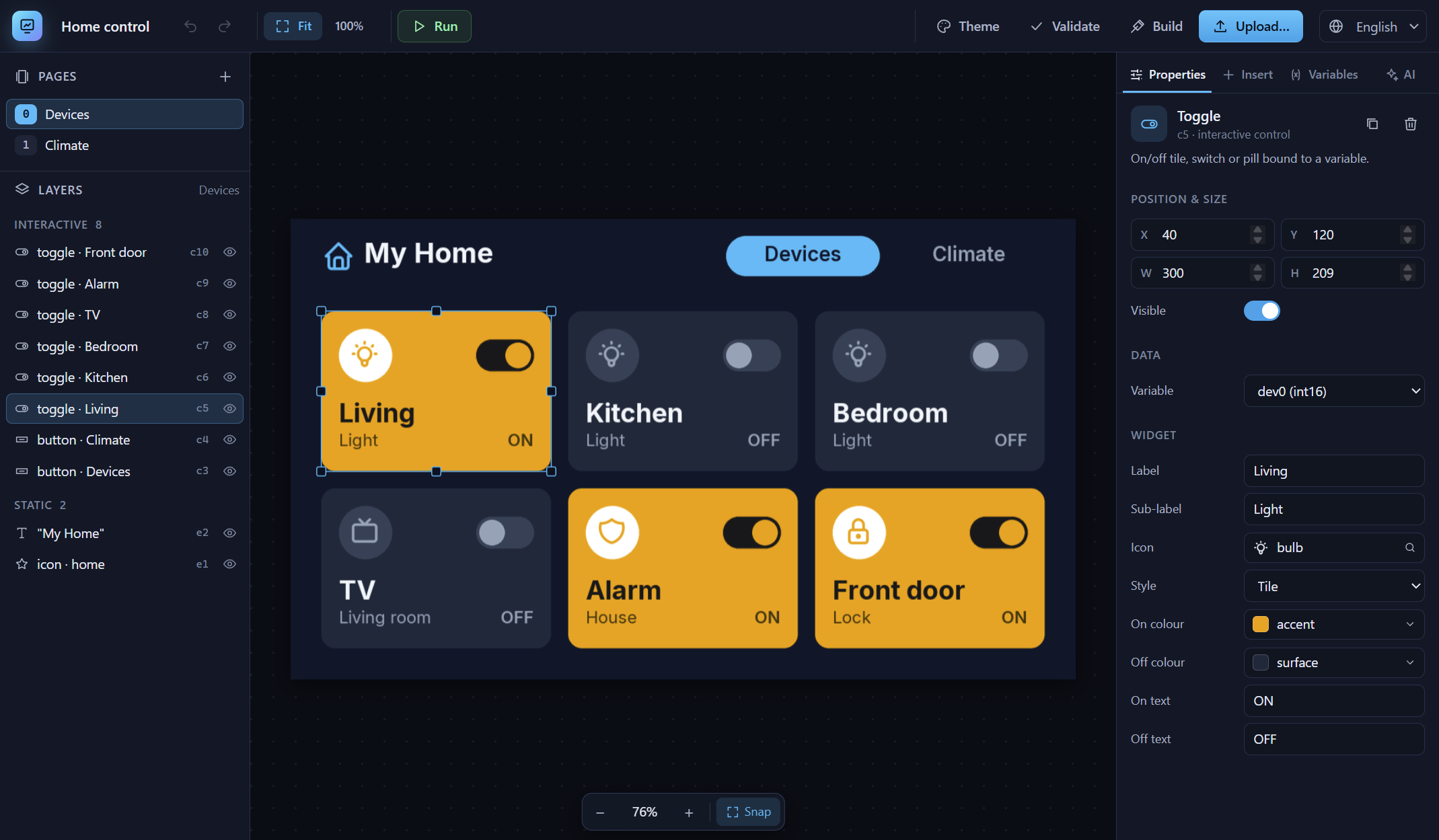
Design the screens visually (or ask an AI to), try them in the emulator, and flash them to the display over USB, all
in one app. No DWIN tools needed.
⬇️ Downloads
| File | For |
|---|---|
OpenDGUS-Setup-0.6.0-x64.exe |
Windows 10/11, installer (recommended) |
OpenDGUS-0.6.0-portable-x64.exe |
Windows, portable: runs without installing |
OpenDGUS-0.6.0-mac-*.dmg |
macOS (added by the build workflow a few minutes after release) |
OpenDGUS-0.6.0-linux-*.AppImage |
Linux (added by the build workflow a few minutes after release) |
Not code-signed yet. Windows SmartScreen may warn the first time: click More info → Run anyway.
On macOS, right-click the app and choose Open. Checksums are inSHA256SUMS.txt.
✨ What's inside
- Visual editor: pages, cards, text, icons and smart widgets (buttons, toggles, numbers, sliders, gauges,
progress rings, indicators) with a pixel-exact preview, layers, undo/redo, snapping and theme colours. - AI designer: describe the screen and the AI builds it, looks at its own renders and fixes what looks wrong.
- Providers: Claude, OpenRouter, any OpenAI-compatible API, or Ollama locally (no key).
- Paste an API key and the provider's model list loads automatically into a searchable dropdown, with
the price per million tokens when the provider reports it (OpenRouter: 450+ models). - API keys are stored encrypted by your operating system.
- MCP server (
opendgus-mcp) for Claude Desktop, OpenAI Codex, Google Antigravity and other MCP clients.
- Emulator: tap through the UI, change variables like your MCU would, and watch the UART frames.
- Upload to the display over the USB/UART adapter with a live progress bar (step, KB written, time left),
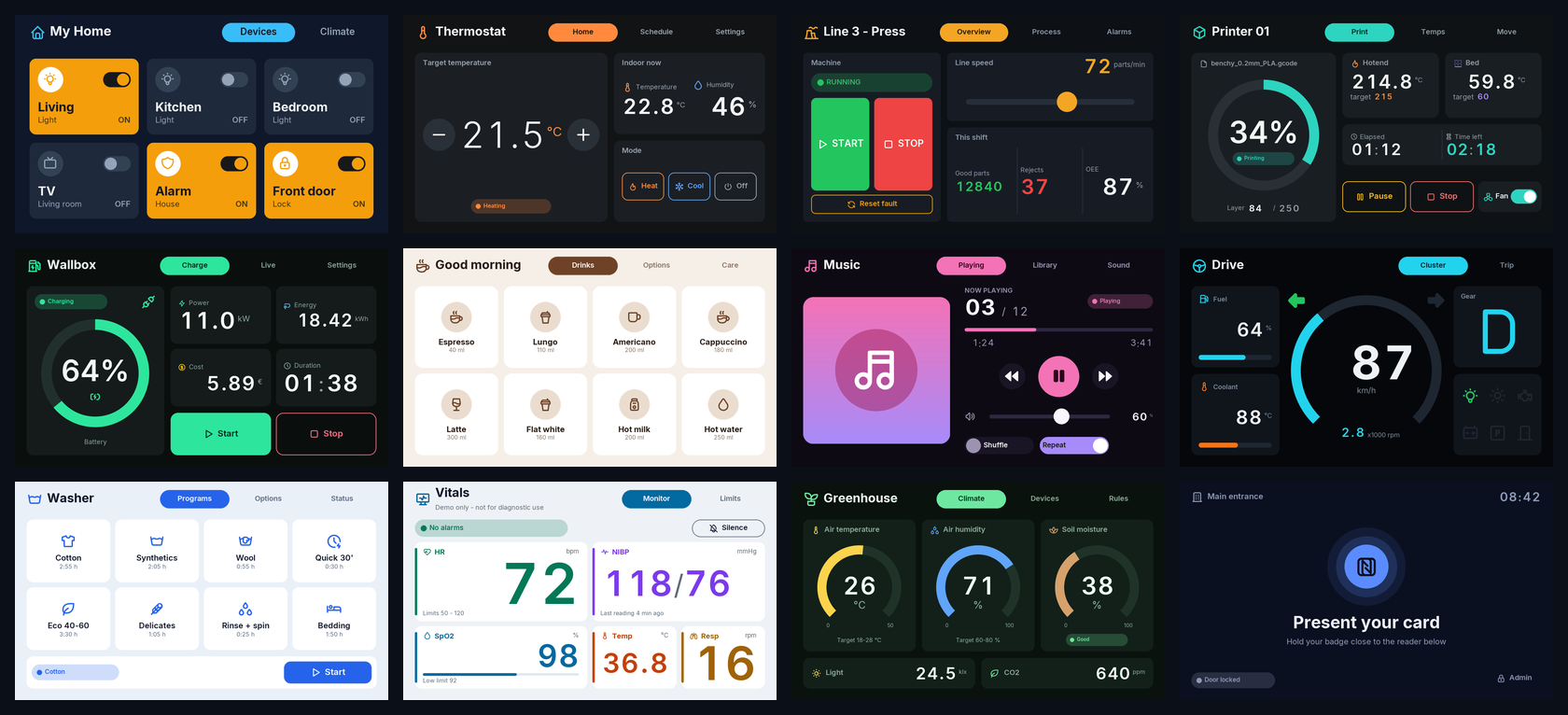
using the exact timing of DWIN's own downloader. Or export aDWIN_SETfolder for a microSD card. - 20 responsive templates: home control, thermostat, industrial HMI, 3D printer, EV charger, coffee machine,
music player, car dashboard, washing machine, vitals monitor and more. - 26 DWIN display models plus part-number decoding and custom resolutions, landscape or portrait.
- All 47 native DGUS II controls for experts, byte-checked against the DGUS editor's own code.
vars.hfor your firmware with every variable address (Arduino, STM32, ESP32…).- English and Romanian UI.
🚀 Getting started
- Install, then create a project: pick your display (or type its part number, e.g.
DMG10600C070_03WTC) and a
template. - Edit it, or open the AI tab and describe what you want.
- Press Run to try it in the emulator.
- Plug in the display's USB/UART adapter, press Upload…, choose the COM port, and flash.
🔧 Hardware notes
- Tested on a 1024×600 T5L display (firmware 0x5120). Controls marked "byte-matched to DGUS" are not yet tested on
hardware: reports and photos are very welcome in Issues. T5LCFG.CFG(system configuration) can only be applied from an SD card; everything else uploads over UART.
📚 Docs
README ·
MCP / AI setup ·
Widgets ·
DGUS controls ·
Reverse-engineering notes
GPL-3.0-or-later. DWIN and DGUS are trademarks of Beijing DWIN Technology Co., Ltd.; OpenDGUS is not affiliated with
DWIN and contains no DWIN code.