Repository navigation
Releases
0.9.0

Compatible with Atlas VTT 0.12.0, and 0.11. Needs Obsidian 1.8.7 or newer. The GM and players in Obsidian should update together; the web join page updates by itself. Pairs with Tabletop for Atlas 1.3.0.
Added
- Turned doors reach players on Tabletop's 3D board. A door the GM turned with Rotate 180° or Mirror is hung the same way for players (two optional flags,
hingeandside, on each door). - The GM's daylight tint reaches players. The colour picked in Tabletop's lighting menu (an optional
#rrggbb, or none) goes with the board's extras. - Stacked scenes reach players. Each scene stacked with the one you present is sent as a layer: its floor image, walls, doors (as hung, a closed secret door arrives as plain wall), lights and props, at its height and place. Players fetch the images and props by asset id like the rest of the board. A layer is sent only once its image has been hashed.
- Limits. At most 8 layers, 400 walls, 60 lights and 100 props each, and about 110 KB in all; a layer over the limit is left out. Layers ride on the first board part only.
Notes
- All the new fields are optional, so an older player or an older Tabletop simply ignores them and sees the board as before.
- Players see none of this unless the GM runs Tabletop 1.3.0 or newer. Tabletop's setting Show layers to Connect players (on by default) turns the stacked scenes off.
- A stacked scene is not hidden by its own fog: Connect can only read the scene Atlas is presenting. Tokens, pins, notes and fog of a stacked scene are never sent.
- Not done yet: the GM's camera is not converted to a stacked scene's frame, so Follow GM can be off by that scene's height; players have no ruler to switch layers.
- Checked by tests and builds only; not yet used in a live session.
0.8.2
Compatible with Atlas VTT 0.12.0 (TrueScale and the player window bar), and 0.11. Needs Obsidian 1.8.7 or newer. The GM and players in Obsidian should update together; the web join page updates by itself.
Fixed
- Room pins from a generated dungeon reach players when you make them readable. Atlas 0.11 changed the rule: a pin's readable switch now wins over
gmOnly, the mark the dungeon generator gives every room pin. Connect still dropped those pins, so a readable room pin never reached players, and opening its note was refused. Both now follow Atlas. A pin that is not readable stays hidden.
Added
- Initiative cards show a token's conditions and number, as Atlas's own list does: up to four condition chips (then "+n") and the
#nlook-alike number. They are drawn from the token Connect already sends, so there is no protocol change and older pages are unaffected.
The compatibility backlog (docs/BACKLOG-atlas-compat.md) records what the Atlas 0.12 audit found still open: the turn banner and its switch, the token flash on a turn, HP numbers on cards, and explored areas (ground just left can stay dark until Atlas saves it).
0.8.1
Compatible with Atlas VTT 0.12.0 (TrueScale and the player window bar), and 0.11. Needs Obsidian 1.8.7 or newer. The GM and players in Obsidian should update together; the web join page updates by itself.
Atlas 0.12.0
- The curtain reaches hosted players. Atlas 0.12's player window bar has Hide the map, which blacks out the local player window only. Atlas Online players are not blacked out by it, so a GM who hid the map still showed it to hosted players. Connect now follows Atlas's curtain: while it is down, players get no map image, grid, tokens, fog, initiative, widgets, handout, texts, drawings or pins, only black, and Tabletop's 3D board gets none of the walls, lights or props. Because the data is withheld, older player pages leak nothing either.
- A curtain of Connect's own. The command Hide the map from players (while you host) does the same without the player window; run it again to show the map.
- Checked against the 0.12.0 source: nothing Connect reads from Atlas was removed or changed. Name uniqueness (Atlas Online refuses a second player of the same name): a waiting join whose name is taken already shows the GM a warning and the GM decides, so nothing to change.
Added
- Players on Tabletop's 3D board see the same material relief. Each material's settings (relief, shine, depth, displacement) travel with the board extras, validated and optional. An older Tabletop ignores them.
The compatibility backlog (docs/BACKLOG-atlas-compat.md) is updated for Atlas 0.12.
Connect 0.8.0 — Atlas 0.11.0 and Mosaic Canvas
Compatible with Atlas VTT 0.11.0 (Mosaic Canvas). Needs Obsidian 1.8.7 or newer. The GM and players in Obsidian should update together; the web join page updates by itself.
Atlas 0.11.0 (Mosaic Canvas)
- Huge maps reach players. Atlas 0.11 takes maps of up to 1,000 megapixels and 65,535 pixels a side, and files of hundreds of megabytes, which a browser cannot decode and the old route could not always read. The smaller copy players get (at most 8,192 pixels on a side) is now made from Atlas's own tile service when Atlas can give it, so the file is never read whole. If the tiles are still being cut, a quicker, smaller picture is used after a wait.
- Maps under the size limit but with more than 144 megapixels (what Atlas held before Mosaic Canvas) are now also sent as that smaller copy, so a dense small file no longer fails on a player's device. Maps of up to 144 megapixels go as before. This closes an item the compatibility backlog had left open.
- Older Atlas (before 0.11) and no open map view: the file is read and cut as before.
- Checked against the Atlas 0.11.0 release: the members Connect reads from Atlas are present.
Added
- Rerolls for dice thrown on Tabletop's board. Atlas's reroll notation (
2d6r<2,1d20ro1,4d6rr<=2) is thrown on the board: a die meeting the condition is thrown again (once forrandro, up to ten times forrr), the die thrown away stays in the roll markedrerolledand counts for nothing. The GM re-derives the rule from its own copy of the roll, so the two sides agree. A board that does not support rerolls is not asked for one, and the roll goes to the GM's Atlas as before. - Related changes to how sheet rolls and dice are handed to Tabletop's board and back.
Not tested
- The Mosaic Canvas route (the player copy made from Atlas's tiles) was covered by unit tests against a fake of the service. It has not yet been run against a real 200 MB+ map in Atlas 0.11.0, and what players see over a session with such a map has not been checked live.
- Atlas 0.11's new river and crayon-style details are not drawn by the player view; water still shows, without the new flow detail.
0.7.0
Changed: read this first
Your own dice rolls are now private to players unless you share them. This matches Atlas. With Atlas's default setting, your rolls no longer appear in players' log until you turn on Show my rolls to players in the dice tray. Before this, every roll you made behind the screen reached every online player as "GM". Rolls made for a player are always shared.
Matches Atlas 0.10 better
Map and scene
- A map Atlas aligned (turned or shifted) is drawn where Atlas draws it, also on Tabletop's 3D board.
- Animated maps (MP4, WebM up to 64 MB) play on the web page; the still shows until the video is ready.
- Generated dungeons' water, lava and acid are drawn (still, not animated).
- Huge raster maps over 64 MB are sent as a smaller copy instead of a blank map.
- Players see the level Atlas shows them, not the floor you are browsing.
- Token numbers follow Atlas 0.10.2. A resource of 0 (an AC of 0) shows on tokens.
- Rulers measure with the collection's rules (units, range bands, cone angle).
Initiative
- Delayed combatants are listed apart under "Delayed"; a number not rolled yet shows a dash.
- A defeated combatant's card is greyed and marked with a skull.
- Collections can name up to eight sides and roll for the order each round (sides with an equal roll act together). Players see each side's name and roll, and every side that acts is marked. "Your turn", "your turn is next" and the move-on-your-turn hold follow them. Older player pages keep working with two sides. Only sides that have a combatant in the list are named to players.
- Players can click a combatant to find its token (also on Tabletop's 3D board).
- You can hold players to their turn (Atlas's setting): a player moves a token only while it has the turn.
Dice
- Players can roll a d20 with advantage or disadvantage from the tray.
- Dropped and rerolled dice are struck through; Fate dice, success counts and the other marks Atlas logs show in the log and card.
- Dice in text stat blocks are linked as Atlas 0.10.2 does.
Needs a republished player page
The player page (GitHub Pages) was republished with this release. Older GMs still work with the new page, but the new initiative, dice and map features show only when the GM runs 0.7.0.
Not done yet
Dice Lab sets in the player tray, built-in stat block templates and @ references, Atlas Online's campaign and player-sheet features. Tabletop's own initiative panel still knows two sides. Nothing here has been run against a live Atlas yet; please report anything that looks different from Atlas.
0.6.2
Release notes to follow: the maintainer replaces this line with what changed.
0.6.1
Release notes to follow: the maintainer replaces this line with what changed.
0.6.0
Connect for Atlas VTT 0.6.0
Plugin id change: this release uses the id
connect-for-atlas(the plugin was listed asatlas-vtt-connect). Install it fresh; the old plugin does not update to it.
New
- Physical dice for players on the 3D view. With Tabletop for Atlas VTT installed, a player's Roll and stat sheet rolls lay real 3D dice on their board. They pick each die up and throw it, and the numbers the dice land on go to the GM.
- The GM logs a player's physical roll in Atlas's roll log, with each die's colour, and in every player's dice log. Crits and exploding dice follow the collection's dice rules.
- The 2D view, the web join page and GMs on an older Connect keep rolling as before.
Fixed
- Atlas 0.9.1: Atlas made dynamic lighting standard and moved its lighting. Connect now reads it there; without this, a lit scene was sent to players unlit on Atlas 0.9.1.
0.5.0
Custom character sheets (fixes #9)
- Tokens whose stat block uses an Atlas template now show players their sheet: the template's fields and rolls, without hidden fields. A note with
statblock: trueand no template shows its fields. - In Obsidian, players see Atlas's own card for their token, as the GM does: layout, images, token art and ring, in the player's own theme. Click a number on it to roll on the GM's Atlas.
- The card replaces the duplicate resource bars in the sheet drawer. Older players and the web page get the text sheet.
3D minis (Tabletop extension)
- With the Tabletop extension, minis stand on tokens for players in the Obsidian player tab. Players need Tabletop too; minis never appear on the web join page. Without Tabletop nothing changes.
Updating: the GM and every player in Obsidian should update together. The web join page updates by itself.
0.4.0
Readable pins players can open, "Your turn is next", Present to on the scene tabs, and note sharing on any Atlas.
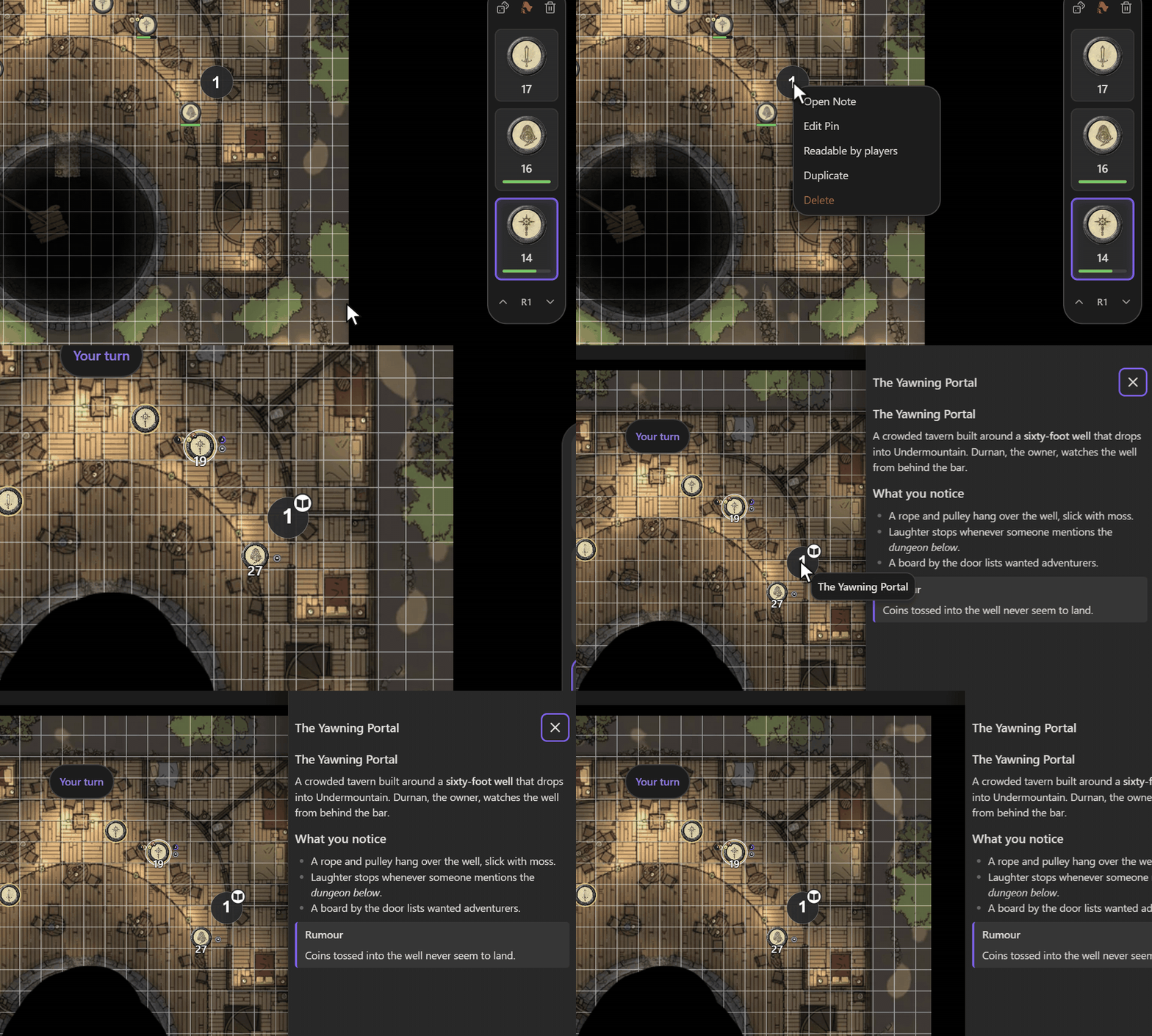
Update together: the GM and every player in Obsidian should be on 0.4.0. The web join page has already updated. With an older GM, clicking a readable pin says the note couldn't be opened, and a note sent with Send to… never arrives.
For players
- Read a pin: click a readable note pin with Move and the GM's note opens in a side panel: the whole note, or only the heading the pin links. Frontmatter, the GM's
%% %%comments and embeds are never sent. - Your turn is next: shows on the turn before yours, beside "Your turn".
- Fixed: a player let in while their Obsidian window was in the background no longer stays frozen on the Join dialog until they click.
- Fixed: Escape in the Online scene tab no longer sends you to your last note.
For the GM
- Present to from the scene tabs: right-click a scene tab → Present to, and tick players.
- Scenes menu: the lists fold from the chevron, and every scene shows an eye, open when presented.
- Simpler toolbar: the session panel's Present to button and the ⋯ More options button are gone. What they offered is on the scene tabs, in the Scenes menu, the session panel and the command palette.
Sharing notes
- Notes share on any Atlas: Share with…, Ask to pull… and Shared with me… now work on Atlas from Community plugins. Maps still need an Atlas with the extension API.
- Send to…: during a session, right-click a note → Send to… and pick anyone who plays in Obsidian. They're asked "Game Master is sending you a note: title" with Allow and Decline. Players can send notes too.
- Game Master: notes from the GM always come from "Game Master" and land in
Shared/Game Master/.
A README you can watch
The README now shows every feature as a short GIF.