Repository navigation
Pokopia Recomp 0.6.0 (build J: Jaguar)

Highlights
- The 3D world is drawn in the right place again below 100% scene size on Steam Deck, Legion Go S, 1440p and ultrawide screens.
- No more getting stuck on the Poké Ball wipe when you leave an area above 60 fps. Frame limits above 60 and unlimited work again.
- Lamp lights no longer show a ghost copy at 16:10 or 1440p.
- The in-game clock shows your real time.
- New one-click presets: Steam Deck, Legion Go S, Laptop and Desktop PC.
- Steam Deck: smoother play, plus a batch of anti-stutter changes.
Bug fixes
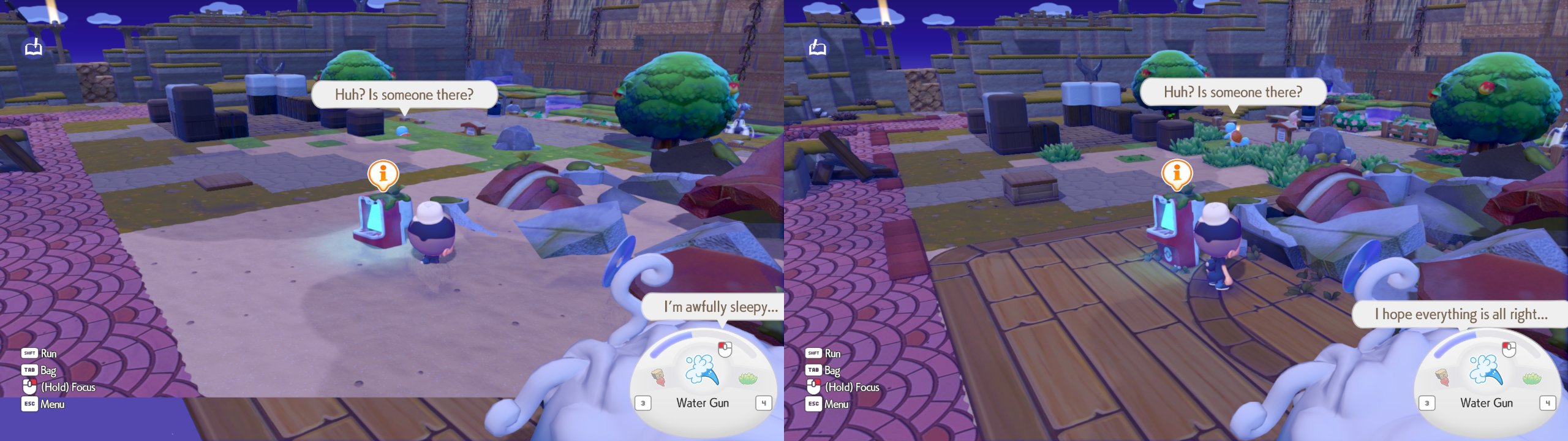
The world was drawn in the wrong spot below 100% scene size (#163)
What was wrong: with Scene size under 100% (FSR 3 / DLSS quality presets and dynamic resolution count too) on any screen that is
not exactly 1920x1080, the 3D world went into the wrong part of the screen. On 16:10 (Steam Deck, Legion Go S) the player and objects
stood at the wrong height, floors such as the planks by the Pokémon Center were missing and a blank band sat under the picture. At
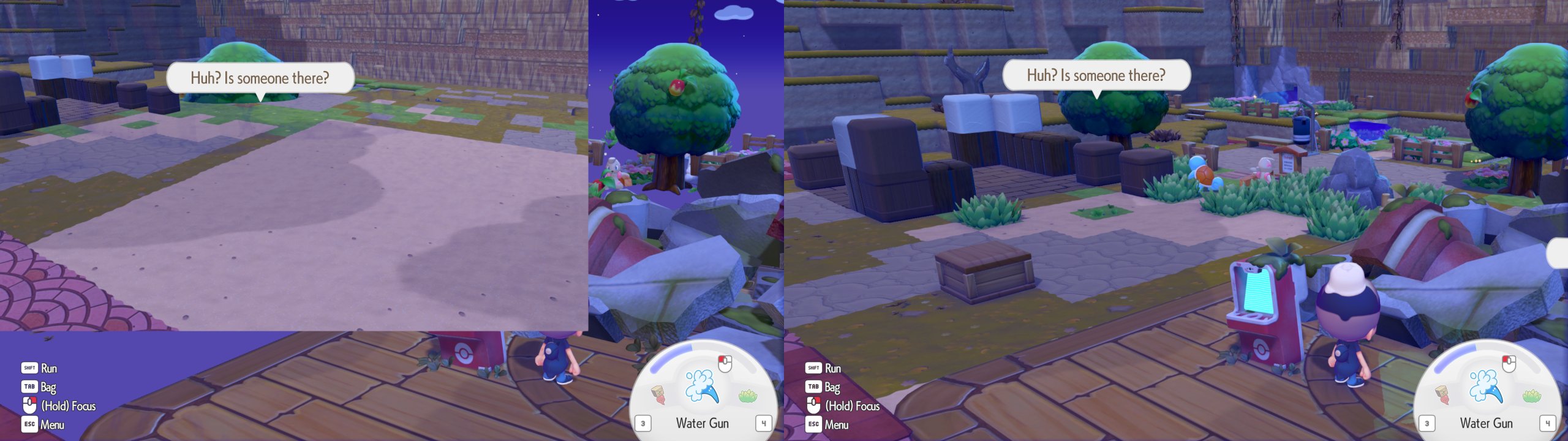
1440p and wider, only a corner of the screen showed the world.
Now: the world fills the frame. Left = before, right = 0.6.0 (16:10, scene size 75%):
1440p, scene size 75%:
Stuck on the Poké Ball wipe when leaving an area (#144)
What was wrong: above 60 fps (or unlimited), leaving an area could leave the Poké Ball wipe half open with your controls locked.
Now: fixed. The stopgap that held everyone to 60 fps is gone, so frame limits above 60 and unlimited work normally again.
Ghost lights at 16:10, 1440p and other sizes (#44)
What was wrong: lamp light and other glows showed up shifted, or as a second copy, whenever the picture was not 1920x1080.
Now: lighting follows your render size.
Wrong time of day in the game (#120)
What was wrong: the in-game clock was off by however long your PC or handheld had been switched on (a whole day ahead on a
handheld left on for days).
Now: the game shows your real local time. Times saved by older versions count as coming from another clock, like a console whose
clock was reset.
Missing placement outline (#120)
The dashed outline when you place an item shows up again.
Crash on Pokédex pictures (NVIDIA) (#121)
Some Pokédex pictures crashed the game with a "GPU lost" error. Fixed.
Freeze at start with an incomplete game dump (#128)
Some update dumps are missing the base game's files, and the game froze at start ("exited with code 4"). If your dump also has the base
game, the launcher now combines the two for you; otherwise it tells you which files are missing and what to do.
Silent crash when Windows' page file is off (error 1455)
The game now tells you what is wrong and how to turn the page file back on, instead of closing without a word.
D-pad prompts all looked the same (#95)
With Xbox or PlayStation icons, "press up" and "press left" showed the same picture. Each direction now lights up its own arm.
Smaller fixes
- Setup checks that it can write to your game folder (Windows "Controlled folder access" and some antivirus block it) and says so
plainly instead of failing halfway. - A rare GPU hang caused by garbage draw data is prevented.
- If the GPU is lost anyway, the log records what it was doing, which makes bug reports much more useful.
New
Device presets (F1 > Graphics)
One pick sets view distance, texture sharpness, render scale and frame limit:
| Preset | Render scale | Frame limit |
|---|---|---|
| Steam Deck | 75% | 40 fps |
| Legion Go S | 80% | 60 fps |
| Laptop | 75% | 60 fps |
| Desktop PC | auto | your screen's refresh rate |
Change any value and it becomes Custom. 40 and 45 fps are now in the frame limit list.
Scene size now works (#116)
The Scene size slider used to do nothing. Now FSR 1, NIS, FSR 3 and DLSS can draw the world smaller and scale it up, and the F1 page
tells you what is in effect.
F1 shows your real render resolution (#117)
The Display page shows the size actually being drawn, and what scales it up to your screen.
Link Play: Interact everywhere (experimental)
Outside Palette Town the game puts every Link Play player in Spectator Mode. A new toggle on the launcher's Link Play page lets you
interact in the story areas too. Everyone in the room needs the same setting: a player whose setting differs is refused with a
message. Off by default.
Steam Deck: smoother play
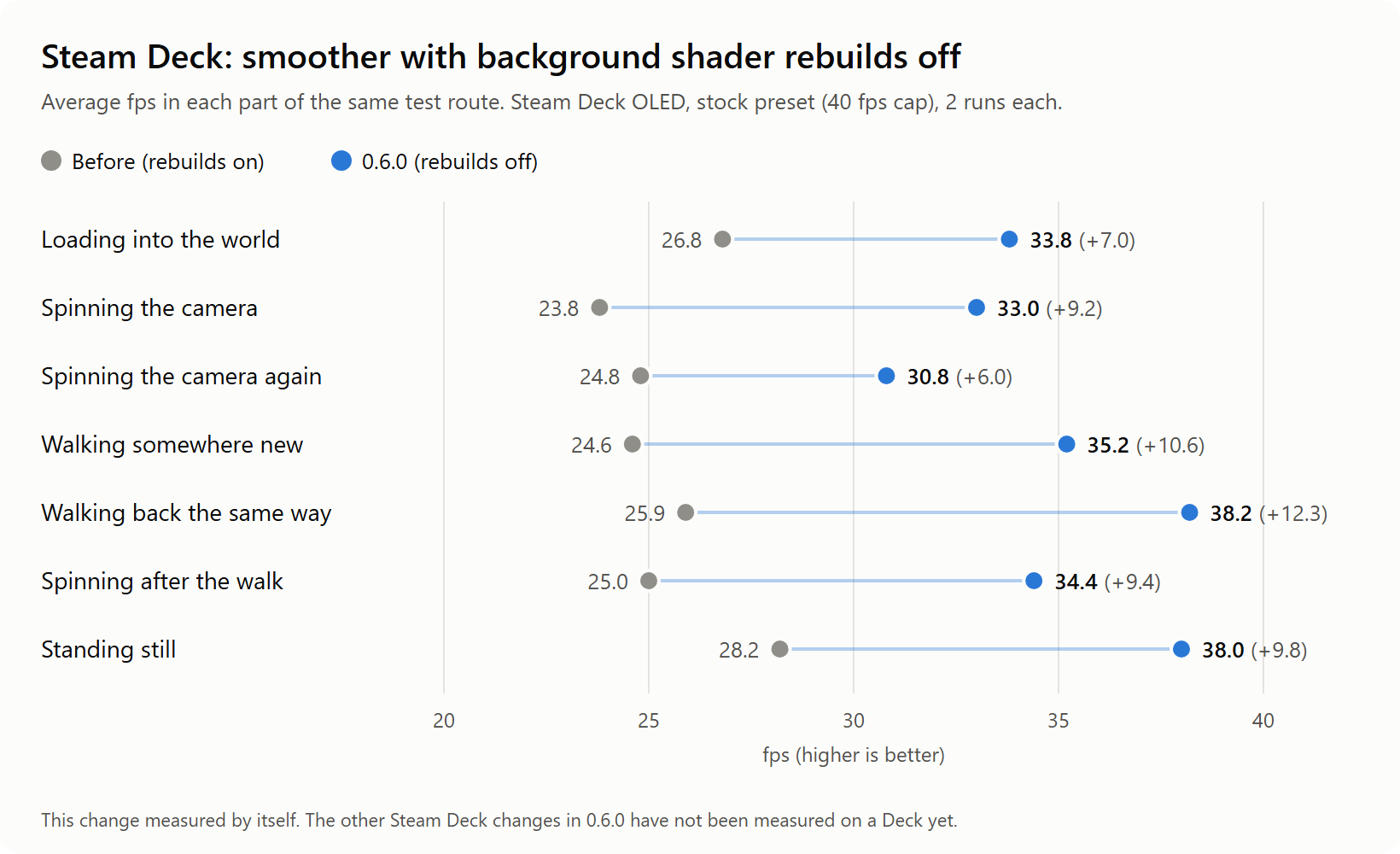
Shaders are no longer rebuilt in the background while you play. On a Steam Deck's 4 cores that work fought with the game itself.
Measured on a Steam Deck OLED with this change alone:
Steam Deck and Linux: less stutter (not yet measured on a Deck)
- No more hitch about once a second: reading a picture back from the GPU no longer pauses the game.
- Something new on screen no longer freezes the game while its shader builds: it pops in a frame or two later instead. This is on for
every platform now. - The game's memory is handed to the GPU in a cheaper way, and each frame is sent to the GPU in one go instead of two.
These should help, but we haven't measured them on a Deck yet. Tell us how it plays.
Steam Deck: "Cap FPS to 30" box (F1 > Display)
On the 90 Hz Deck OLED, a 40 fps limit runs at an even 30, because frame rates that divide the refresh rate look smoother. Pick 80 Hz in
Steam's Performance menu if you want a real 40. Ticked by default only on a Steam Deck; untick it to keep your limit as set.
Known issues
- The Steam Deck changes under "less stutter" are not measured on a Deck yet.
- On some Windows PCs the slowest frames may be a little less smooth than in 0.5.0. The average frame rate is unchanged.
- Some players crash at 4K in the Ditto jumping scene (#119). Not fixed yet.
- The launcher doesn't start under Proton / Linux (it needs WebView2), so handheld players don't see the update banner.
For tinkerers: switching things back
Every change above can be undone in pkp.ini (details in CONFIG.md): [pkp] scene_viewport_fix = 0, [pkp] target_fix = off,
[nvn] gpl_upgrade = whole, [nvn] readback_async = false, [nvn] gpl_gate = time, [nvn] async_whole = false, [nvn] async_compute = false,
[nvn] compute_prewarm = false, [nvn] pool_copy = off, [nvn] one_submit = off, [display] fps_snap = false. New:
[pkp] link_interact_everywhere, [gfx] gpu_checkpoints, [fs] romfs_base, [fs] romfs_check.