Repository navigation
Guide connecting a domain
A domain is the address your campaign links live on: https://go.example.com/5i5pvic4. The tracker works without one (by the server IP), but:
- ad networks and messengers trust a domain with HTTPS much more than a bare IP;
- if a domain gets flagged, you replace the domain and keep the campaigns;
- each domain can have its own settings: hide the admin panel, open a campaign on the root, catch 404s.
You can park as many domains on one tracker as you like. Every campaign picks one of them.
Any registrar works. If you use Cloudflare, Namecheap or Dynadot, connect the account under ⚙ → Integrations first — then Orbitra writes the DNS record for you and you can skip step 3.
Domains → Add domain. Type the domain (go.example.com) or several at once separated by commas — https:// and slashes are cleaned automatically. Press Add.
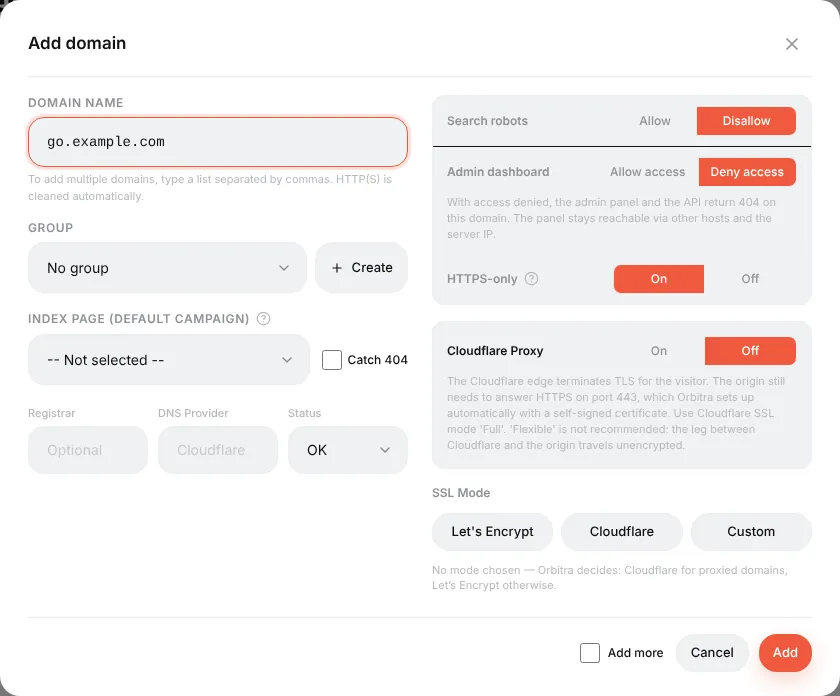
The defaults are safe for a tracking domain, so for the first domain you can leave everything as is. What the switches mean:
| Setting | What it does | Typical value |
|---|---|---|
| Group | Just for sorting the list | — |
| Index page | The campaign shown when someone opens the domain without a path (https://go.example.com/) |
Usually empty |
| Catch 404 | Unknown paths also open the Index page campaign instead of a 404 | Off |
| Search robots |
Disallow adds noindex and a robots.txt that closes the site |
Disallow |
| Admin dashboard | Deny access makes the panel and API answer 404 on this domain. Tracking keeps working, the panel stays reachable on other domains and by IP | Deny for tracking domains |
| HTTPS-only | Redirects http:// to https://
|
On |
| Cloudflare Proxy | Turn on only if the domain is proxied by Cloudflare (orange cloud) | Off |
| SSL Mode | Leave unselected: Orbitra picks Let's Encrypt, or Cloudflare for proxied domains | — |
At your DNS provider, create an A record:
| Type | Name | Value |
|---|---|---|
| A |
go (or @ for the root domain) |
the server IP shown at the top of the Domains page |
Orbitra checks DNS by itself and, as soon as the A record points to the server, issues a free Let's Encrypt certificate (a background job runs every 5 minutes; Issue SSL starts it right away). The SSL status column tells you what it is waiting for — usually "the domain does not point at the server yet", which fixes itself once DNS propagates (minutes to a few hours).
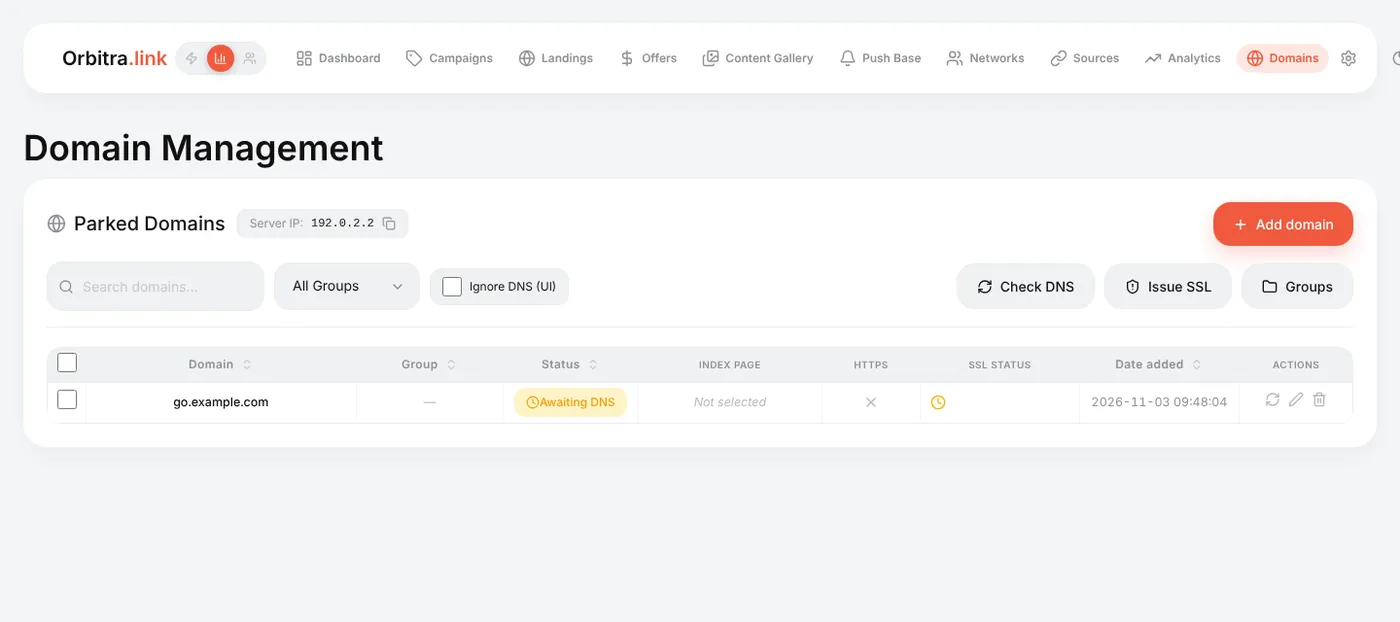
Open a campaign → General → Domain. The campaign URL changes to the new domain immediately. Moving many campaigns at once: select them in the campaign list and use the bulk action.
-
Keep the panel on a separate domain. Use one domain for the panel (
track.example.com, admin access allowed) and other domains for campaigns (admin access denied). A moderator who opens your campaign domain never sees a login page. - Cloudflare: if the domain is proxied (orange cloud), switch Cloudflare Proxy on. Orbitra puts a self-signed certificate on the server for Cloudflare's Full mode. For Full (strict) see Cloudflare Full Strict SSL.
- The domain shows "Disabled" — someone set its status to Disabled; such a domain answers 404 to everything, tracking included.
- Need a PWA on the root of a domain? Bind the domain to the PWA landing: see PWA apps.
Reference: Domains and SSL, Cloudflare.