Repository navigation
Releases: grassmann-it/MeowChan
Release list
MeowChan 1.0.2 🐾

MeowChan 1.0.2 — reliable startup, downloads and viewing
What improves
- Improved media features. Usually open your downloads in VLC or a separate image viewer? Try the gallery for images, GIFs, WebM and MP4, with remembered looping, media focus and mixed slideshows. Feedback from gooners and /gif/ power users is especially welcome.
- Remembered viewing choices. Repeat, media focus and layout survive restart. Manual, Repeat and mixed Slideshow keep looping separate from navigation. Slideshow starts explicitly, never just because its mode was saved; images use their display period and videos advance at their actual end. GIFs animate with pause/resume and zoom.
- More predictable controls. Autoplay governs first/manual video playback without starting automatic next. Seeking, volume and panel interaction preserve play/pause intent. Paired overlay/auto-hide reveals controls at the bottom edge and post context at the right, with brief borderless chevrons and a docked fallback. Hidden controls do not consume the first navigation key. After video-to-image transitions, the first arrow also navigates when native focus is briefly empty instead of moving focus to unrelated shell controls; text fields and native dialogs retain their own keys.
- Safer native viewing and reading. Windows overlay clipping and stop/close handling are tightened. Moving controls between the video overlay and the main window now drains pending layout work in the old window before reattaching them, preventing the native LayoutManager crash when switching overlay/docked controls. The separate video overlay is hidden on image/Reader transitions. macOS fullscreen restoration preserves observed entry frames while respecting new user resizes. The narrow Reader keeps its full height, last posts remain reachable, and pagination no longer intercepts gallery clicks. Reading post context stops automatic navigation until explicitly restarted, not the video itself.
- Less disruptive errors. Gallery errors use central, dismissible feedback rather than pinning transport controls. Acknowledgement suppresses matching session repeats without deleting diagnostics; integrity, codec and cleanup failures still fail closed.
- No bundled-plugin confirmation loop after a compatible rebuild. Known, verified in-place app/development rebuilds—including
dotnet runand a proven new selection rebuilt before its first activation—retain exact settings, enabled/disabled choices and rollback history without another confirmation/restart cycle. Missing provenance, changed declarations, pins, special rights and ambiguous candidates remain protected. General live activation of explicitly changed plugin selections still requires restart. - Dependable startup and downloads. Preference saves wait for readiness and preserve newer field changes. Known local titles return after restart, with a cleaned opening-post fallback when needed. Startup resumes only after proven initial admission that sent no request; genuine HTTP, body and transport failures retain their history.
- Bounded scheduling. Defaults stay 1 MiB/s and 5 parallel transfers, with 256 pending jobs. Effective concurrency is capped at 32, without rewriting larger saved settings. Multiple High watches fairly share next whole-file slots; under contention, Normal gets a slot after at most three High reservations. Priority does not interrupt active files or resume paused watches. This is not a universal throughput promise.
No new Chans/sources or unselected CSV extras are included.
Downloads
All desktop variants include .NET. Choose the package for your platform.
| Platform / package | Download |
|---|---|
| Windows x64 (.zip) | 01-MeowChan-1.0.2-win-x64.zip |
| macOS Apple Silicon (.dmg) | 02-MeowChan-1.0.2-osx-arm64.dmg |
| macOS Intel (.dmg) | 03-MeowChan-1.0.2-osx-x64.dmg |
| Linux x64 (.AppImage) | 04-MeowChan-1.0.2-linux-x64.AppImage |
| Linux ARM64 (.AppImage) | 05-MeowChan-1.0.2-linux-arm64.AppImage |
| Linux x64 — bundled VLC (.tar.gz) | 06-MeowChan-1.0.2-linux-x64-bundled-vlc.tar.gz |
| Linux x64 — system VLC (.tar.gz) | 07-MeowChan-1.0.2-linux-x64-system-vlc.tar.gz |
| Linux ARM64 — bundled VLC (.tar.gz) | 08-MeowChan-1.0.2-linux-arm64-bundled-vlc.tar.gz |
| Linux ARM64 — system VLC (.tar.gz) | 09-MeowChan-1.0.2-linux-arm64-system-vlc.tar.gz |
SHA256 checksums · Original CI inventory
Linux system-VLC archives require compatible LibVLC 3 ≥ 3.0.20 plus media/output plugins. The bundled-VLC variants include the private runtime.
Upgrade safely
Stop the application and back up your entire profile and referenced media before upgrading. Plugin-state snapshots are not full-profile backups.
For missing old bundled-plugin candidates, open Plugins → review → NEW selection → preview → explicit confirmation → restart. Select only supported, unambiguous currently delivered bundles and confirm their exact schema-valid settings. This is a new choice, not recovery of an unproven former origin or silent name/path remapping. Pins, rights/owner conflicts and ambiguous or unsupported rows still require your own action; attribution, pins, grants and ownership are not transferred.
Two safeguards remain distinct: the immutable original valid pre-v2 plugin-state backup, made before its first mutation, and a retained backup of the actual current state before the first confirmed new selection. The former does not replace the latter; later selections do not refresh that first snapshot. An already-v2 profile cannot manufacture missing v1 history.
Older executables cannot read the v2 plugin envelope. Do not downgrade against the upgraded profile. Revert using a separate full-profile backup compatible with the older version; changes since that backup are not automatically retained.
Validation boundaries
Release packages are bound to one exact-source stable-candidate / all / all run, with all 13 required jobs, 18 original same-run assets, and verification of source identity, upgrade/package evidence, inventory and checksums. The accepted source and run are recorded below under Build provenance. Public download hashes are checked separately after publication; focused checks and assets from earlier runs are not mixed into this release.
Decoded audio without output and functional native output are different checks. Neither proves audible physical-speaker output, every GPU/audio device, physical Windows/USB behavior or everyday-use acceptance. The manual Windows field test follows publication, without waiving pre-publication technical gates; bounded follow-up fixes may use 1.0.3.
See the user guide and platform requirements.
Build provenance
Source: eec6c0169f8d52f7481ea0bf7febfd20981e97c3. Successful stable-candidate / all / all run.
The unchanged candidate-inventory.json records original CI filenames. The nine application downloads use 01-–09- prefixes; SHA256SUMS covers public filenames. Automated runner checks do not establish physical Windows/USB or everyday-use acceptance.
MeowChan 1.0.1 🐾

MeowChan 1.0.1 🐾 — Less waiting while downloads run
This performance maintenance release improves responsiveness when downloads,
archive updates and gallery navigation happen together.
What's improved
- Keep using the workspace during slow saves. Download state is prepared in
the background, so UI queries no longer wait on slow download commits.
Interactive work is bounded, and repeated preference changes retain the latest
pending value. - Less repeated UI work. Progress updates are coalesced, download rows update
incrementally, and covered archive and reader views defer expensive refreshes
until needed. Status, errors and controls can still request prompt updates. - Less filter staging overhead. Temporary-file accounting replaces repeated
directory scans for each data block, retaining conservative storage limits,
recovery and cancellation handling. - More focused gallery work. Indexed media associations and on-demand context
preparation reduce repeated work. Covered views stop starting unnecessary
thumbnails. Originals are still fully verified before cached video posters
are used. - Better coordinated video switching and closing. Playback changes share
actual cleanup completion, keep resources owned until native work finishes,
and prevent stale operations from controlling a newer video. - More stable reader and window transitions. Late reply-count updates retain
the visible reader post, archive favorites stop querying a closed session, and
macOS fullscreen restoration respects a later request to return to Normal.
Media integrity checks, explicit saves, final preference saves and selection
identity remain enforced.
Get MeowChan 1.0.1
All five primary packages include .NET and VLC; no .NET SDK installation is needed.
| Platform | Download |
|---|---|
| Windows x64 | ZIP |
| macOS — Apple Silicon | DMG |
| macOS — Intel | DMG |
| Linux x64 | AppImage |
| Linux ARM64 | AppImage |
All packages, source archives and checksums
include Linux bundled-VLC and system-VLC tar alternatives. The system-VLC variant
requires compatible system VLC. Make AppImages executable before launching.
macOS apps are ad-hoc signed and not notarized; see the
first-launch guidance.
Close older application instances and back up your profile and media before
upgrading. Archive schema 5 and media manifest 4 are unchanged from 1.0.0.
Performance feedback
Early user feedback reports better responsiveness. The original Windows hang
with an external USB SSD has not been formally demonstrated fixed; improvements
vary with storage and workload.
Report a problem with the
exact version/package, OS, enabled plugins and reproduction steps. For performance
issues, include whether downloads are active and whether profile and media
storage are internal or connected through USB.
Build provenance
Source: 2518feb60928977f3ebf16cb656dbdf6b2060bfe. Successful stable-candidate / all / all run.
The unchanged candidate-inventory.json records original CI filenames. The nine application downloads use 01-–09- prefixes; SHA256SUMS covers public filenames. Automated runner checks do not establish physical Windows/USB or everyday-use acceptance.
MeowChan 1.0.0 🐾
MeowChan 1.0 🐾 — Your offline archive, upgraded
More chans. Better reading. A whole lot more control.
MeowChan 1.0 is here! This is a big update: a major desktop UI rework, 11 imageboard
sources, five local media filters, and new ways to find, read, organize and
clean up your collection. There is plenty to explore whether you want a compact
downloader or a full offline reading workspace.
Before upgrading, back up your whole profile and media. See the
upgrade and fallback notes below.
The good stuff
- A fresh workspace that still feels like MeowChan. The Semi + Ursa UI
rework brings clearer layouts, roomier controls, better spacing and more
consistent dialogs across Downloads, Archive, Settings and Plugins. Keep it
compact in Barebones, or bring more controls into view with Simple and
Advanced. Settings now has eight focused categories, with drafts kept as
you switch pages. Light and Dark, English and German are built in. - Eleven sources. One collection. The 16 supplied plugins include eleven
sources and five local filters. Alongside 4chan and 8kun, the source plugins
cover Lainchan, Kohlchan, Wizchan, Endchan, 2ch, Leftypol, Uboachan, ZZZchan
and SushiChan. The plugin overview puts descriptions and everyday
actions first. Want to tinker? 14 editable C# examples and the bundled
compiler let you get started without installing the .NET SDK. Experimental
sources are clearly marked and start disabled; see the permission notes below. - Keep the media you actually want. Choose from dimensions, file-size and
original-name rules, a SHA-256 blocklist, animation/actual-format checks
and PNG metadata-field detection. Filters work on locally staged files
before they enter the archive. One filter applies per effective rule. - Make time for the reading. Save named reader groups, navigate captured
posts with the keyboard, and use optional Continue reading to pick up at
your saved place through the topbar book button. Keep post bookmarks and
notes, and make the app's shortcuts your own. - Find it again. Combine source, board, state and date filters, then save
searches you use often. Star threads and media, rate media, and return to the
parts of your archive you care about. - Less clutter, more collection. Clean up archive… previews threads with
0–2 saved media versions while protecting favorites, ratings, bookmarks,
notes, reader groups, reading positions and entries still in use. Review the
losses and choose what to delete. Archive counts now reflect stored media
rather than an empty current download job. - Give the media some room. The gallery follows your theme and offers an
optional media focus view that folds away tools and details while keeping
navigation close at hand. Video gets a compact Play/Pause, seek, audio and
repeat strip. Repeat applies to the current medium; audio controls explain
when a track or usable output is unavailable.
Try a reader group, save your favorite archive search, or finally clear out the
threads you never meant to keep. Portable HTML exports remain a way to take your
saved posts and verified originals with you.
Get MeowChan 1.0.0
All five primary packages include .NET and VLC; no .NET SDK installation is needed.
| Platform | Download |
|---|---|
| Windows x64 | ZIP |
| macOS — Apple Silicon | DMG |
| macOS — Intel | DMG |
| Linux x64 | AppImage |
| Linux ARM64 | AppImage |
Linux bundled-VLC and system-VLC tar archives are also supplied. The system-VLC
variant requires compatible system VLC. Make an AppImage executable before
launching it. macOS apps are ad-hoc signed and not notarized; first launch may
require approval in Privacy & Security. See the
first-launch guidance.
candidate-inventory.json records the package source and validation run;
SHA256SUMS covers the downloads. Developer NuGet packages and native dependency
source archives accompany the desktop packages. The unchanged
MeowChan-0.9.0-video-sources.tar.gz is the common upstream source base, not an
old application build; use it together with the macOS source overlay. Separate
source companions cover Linux.
Application filenames use 01- to 09- prefixes to keep the main downloads first.
The unchanged CI inventory records their original filenames without those prefixes;
SHA256SUMS uses the published filenames.
Reading, filters and archive counts: the details
Reader groups contain manually selected threads and do not change watches or
downloads. Continue reading is optional: enable it in Settings to remember
one explicitly read place per profile. Archive date filters use local
registration dates. Rule templates copy selected values into an editable draft;
saving remains explicit. Filters do not chain or automatically tag media.
The Saved versions column counts archived media versions across a thread's
recorded media folders, independently of the current download job and media
filters. Missing files and files whose length differs from the manifest are not
counted; unreadable storage appears as unavailable. This count checks presence
and length; opening media still verifies its checksum.
Cleanup previews threads with 0–2 verified saved media versions. Unknown storage
is excluded. Review the current losses and explicitly confirm permanent local
deletion. The first full inventory can take time on a large archive; back up
before deleting.
Plugin enable/disable applies to the selected valid build immediately; saved
settings and candidate choices apply at the next start. See the
first-session guide
and filter guide.
Experimental sources and integrity permissions
Kohlchan, Wizchan, Endchan, 2ch, Leftypol, Uboachan, ZZZchan and SushiChan
are Experimental. These sources start disabled when first registered in a
profile. Existing profiles retain saved activation and permission choices. The
Experimental label itself grants no exception.
For 2ch, Uboachan, ZZZchan and SushiChan, submitting a matching URL offers
activation with strict integrity checks. These four sources have no
provider-mismatch permission. Uboachan's supplied per-attachment SHA-1 values
are verified. Approximate provider sizes remain separate raw hints rather than
invented exact byte expectations. 2ch original redirects are checked against
explicitly declared original-media hosts at every hop.
For Kohlchan, Wizchan, Endchan and Leftypol, provider size or MD5 can differ
from delivered bytes. Activate and allow differences
(Aktivieren und Abweichungen erlauben) explicitly activates the source and
permits provider size/MD5 differences for the current profile, plugin owner and
source. Cancel grants nothing. Activation and permission are saved separately:
existing watches may resume after activation, while submitted URLs wait for both
steps to succeed. If permission saving fails, activation may already be saved;
review the state and retry explicitly. Closing does not undo saved activation.
Use Sources to review or revoke Allow provider size and MD5 mismatches.
Manual Enable plugin grants no exception; a later URL for an active source
does not restore a revoked permission. Retry previous failed media explicitly
through Downloads → thread details → Retry missing media; granting permission
does not automatically retry old failures.
Provider metadata and measured local values stay separate. Supplied provider
SHA-1/SHA-256, local verification, complete transfers, actual byte/pixel/storage
limits, filters and cancellation remain enforced. Revoking permission blocks new
acceptance that needs it; previously accepted archive media remains readable
when its local length and SHA-256 verify. New attachment revisions need their
own valid binding. See the
permission guide.
Upgrading — and what to do if something breaks
Please report bugs as GitHub issues.
If 1.0 gives you trouble, 0.9.0 is still available.
Use an untouched profile or a pre-upgrade backup when going back.
Close every older writer before upgrading. Back up the whole profile and media,
and keep exports separately. Do not let 0.9.0 and 1.0 write to the same data
simultaneously. Trying a separate profile (MEOWCHAN_PROFILE) and media directory
first is useful.
1.0 writes archive schema 5 and media manifest 4. Older records remain
readable in 1.0, including bindings without the new optional evidence. There is
no supported downgrade of a profile changed by 1.0: to try 0.9.0 after a problem,
use an untouched profile or restore your pre-upgrade backup to a separate
location. Keep the 1.0 data available when reporting the...
MeowChan 0.9.0 — the UI relaunch is here 🐾
MeowChan 0.9.0 — the UI relaunch is here 🐾
New name. New desktop. Welcome to MeowChan. 🐾
0.9.0 is the first release under the MeowChan name and our biggest desktop relaunch yet: a redesigned Avalonia interface for Windows, macOS and Linux, a new cat identity, dark and light themes, and a connected offline experience for downloading, reading and browsing your archive.
From the full-window thread reader to the image/video gallery, from board-filter previews to portable HTML collections, this release makes saved threads feel at home on your desktop. Barebones stays the simple default for new profiles. Want more? Simple and Advanced reveal more detail without interrupting your downloads.
Thank you to everyone who tested, reported rough edges and helped shape this release. Time to give your archive a new home. 🎉
Download MeowChan 0.9.0
| Platform | Download |
|---|---|
| Windows x64 | Download ZIP |
| Mac — Apple Silicon | Download DMG |
| Mac — Intel | Download DMG |
| Linux x64 | Download AppImage |
| Linux ARM64 | Download AppImage |
All five packages include .NET and VLC. See other Linux packages, first-launch instructions and checksums below.
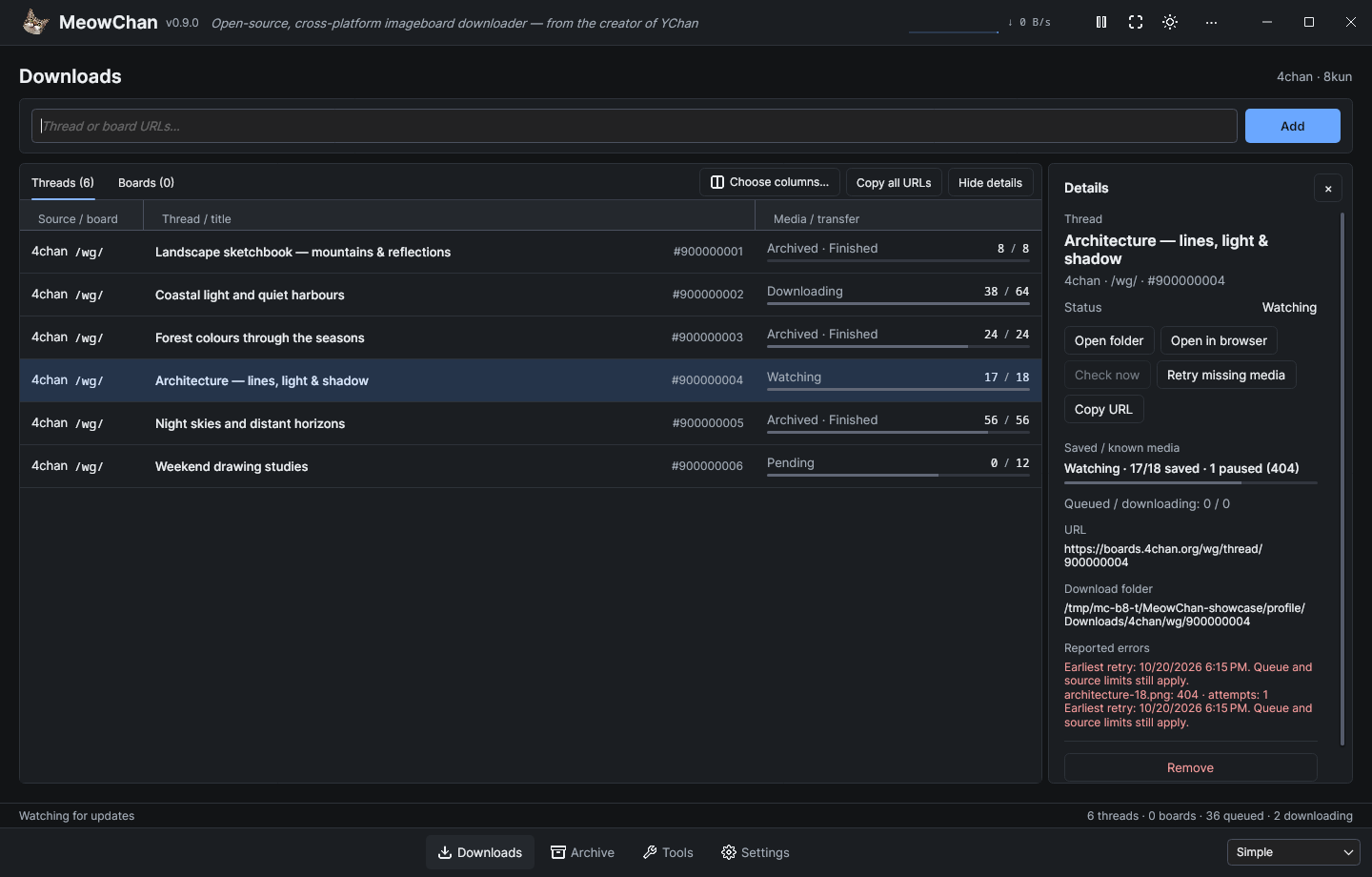
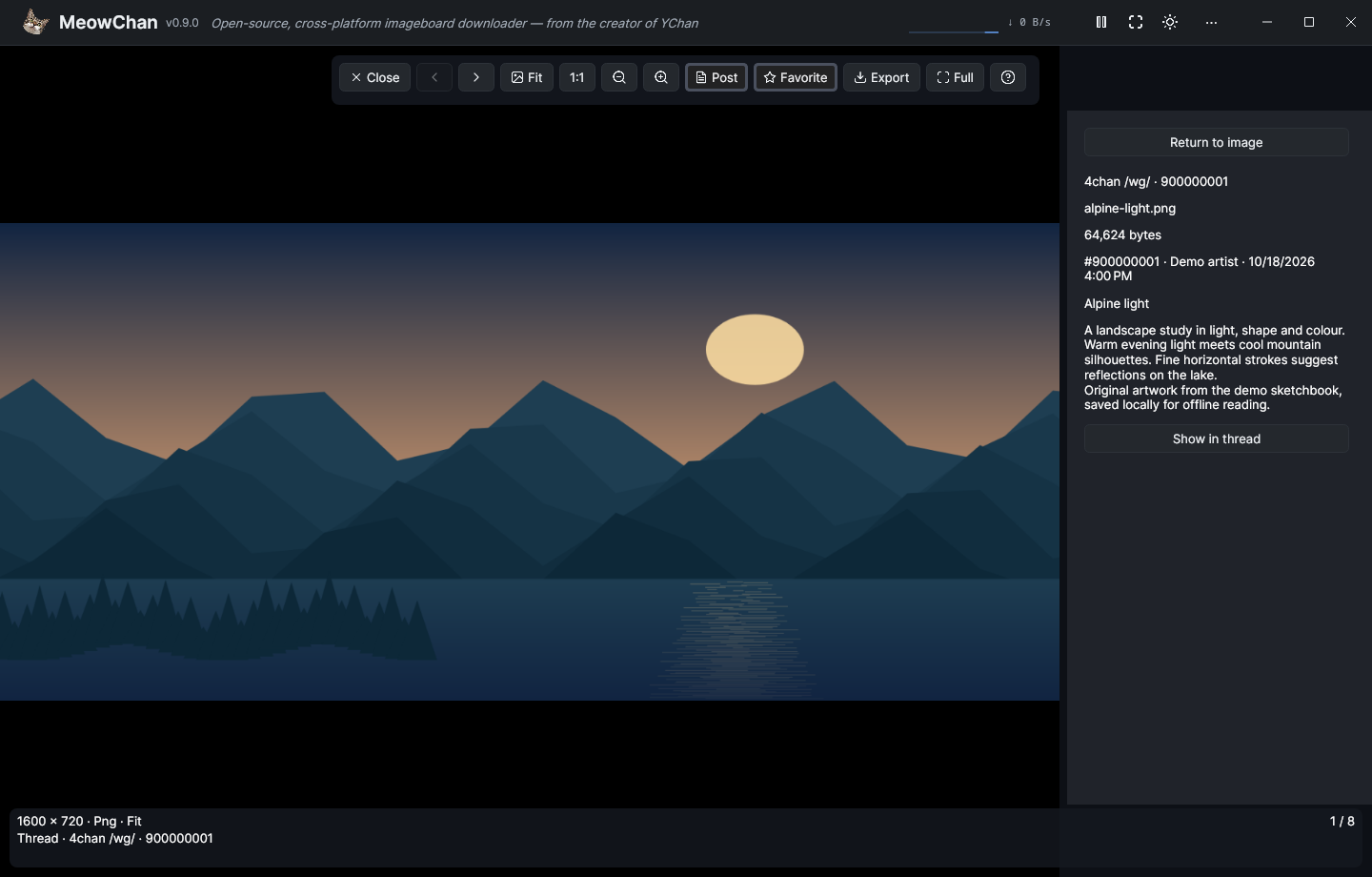
Compare Barebones and Advanced in the workspace showcase. These source-built interface captures are documented in the screenshot gallery.
Highlights
- Make the workspace yours. Barebones, Simple and Advanced each remember their own table columns, order and widths, archive layout, density and reading size. Downloads, Archive, Sources, Rules, Diagnostics and Settings share one workspace; navigation keeps your input, selection and running downloads. Click the cat in the header to open About.
- Read and browse offline. Search saved threads, captured posts and media; follow local quotes and backlinks; and move between the full-window reader and shared image/video gallery. Gallery navigation offers Fit/1:1, zoom, pan and saved-post context. Fullscreen works across the workspace, reader and gallery. Closing the gallery returns to the saved post associated with the media currently shown, while list and search origins keep their place.
- Act on several threads at once. Multi-select watches or archived threads to copy links, remove watches or export selected threads as one portable HTML collection. Favorites retain exact saved-media revisions, and verified originals can be exported without downloading again. Permanent archive deletion shows the local files to be removed and asks for confirmation; ordinary Delete keeps the archive.
- Control what gets saved. A board-admission wizard previews discovered threads, title/opening-post filters and individual choices before adding a batch. Inherited media rules, persistent Pause/Resume, bounded missing-media retries, manual repair and Diagnostics make downloads easier to manage. Repeat HTML exports can update a recognized earlier result, with backup protection for changed or reduced output.
- Use the desktop your way. Dark, Light and System themes; built-in English and German; optional JSON language packs; keyboard help; and separate Close to tray and Minimize to tray settings are available.
MeowChan watches supported 4chan and 8kun threads and boards, saves selected original media and can capture posts for offline reading. See the user guide for controls, rules, export, retry and upgrade details.
Help shape 1.0.0
1.0.0 is planned for later in 2026, with extensibility and further UI refinement as its focus. 0.9.0 lays the desktop foundation; your feedback will help shape what comes next.
Please test MeowChan on Windows, macOS and Linux. Try your everyday downloads, board filters, WebM/video playback, fullscreen, tray behavior and offline exports. Found a bug or a platform-specific quirk? Have a feature idea? Open a GitHub issue. For bugs, include your OS and architecture, MeowChan version, steps to reproduce, and relevant logs or screenshots. For feature requests, tell us what you want to achieve and how MeowChan could make it easier.
Downloads
All desktop packages include .NET. Keep the complete package together, including native libraries and legal notices.
- Windows x64: ZIP with VLC.
- Mac — Apple Silicon: ARM64 DMG with VLC.
- Mac — Intel: x64 DMG with VLC.
- Linux x64: AppImage with VLC.
- Linux ARM64: AppImage with VLC.
- Linux x64 tar archives: bundled VLC or smaller system-VLC package.
- Linux ARM64 tar archives: bundled VLC or smaller system-VLC package.
The Linux system-VLC archives require LibVLC 3.0.20 or newer with the media/output plugins supplied by your distribution. All Linux variants require a compatible native desktop, including glibc and X11/XWayland. See the Linux package instructions.
The macOS apps are ad-hoc signed, without Apple Developer ID signing or notarization. On first launch, macOS may require manual approval in Privacy & Security; see the macOS instructions.
Required legal notices accompany the binary packages. Corresponding native video source assets are the common Windows/macOS base, the macOS overlay paired with both DMGs, and the separate Linux x64 and Linux ARM64 companions. The Windows, macOS and Linux source records explain the matching components and replacement options.
Use SHA256SUMS to verify the 13 binary and source downloads.
Upgrading
Back up your profile and media directories before upgrading. Existing watches, settings and assigned media paths remain usable, but do not run an older application against the same profile or media destination concurrently. New profiles use .MeowChan and Downloads/MeowChan; a sole existing legacy profile is used in place. If both profile directories exist, select one with MEOWCHAN_PROFILE. New profile and media formats do not support downgrading.
The reusable library is renamed libmeowchan with MeowChan.* namespaces. Consumers must update package, assembly and namespace references; binary compatibility and an automatic NuGet redirect are not provided. The .NET 10 baseline remains.
MeowChan 0.8.0 — stabilization preview (released as oChan)
MeowChan 0.8.0
This version was released as oChan. Its original source and release files retain that name.
Preview release focused on downloader reliability and independent library use.
This update rebuilds download and session handling for 4chan and 8kun and makes libochan usable independently of the desktop app.
What's new
- More reliable source checks. Updated 8kun media URLs, canonical URL handling and conditional thread requests reduce broken or duplicate work. Archived or missing sources remain distinguishable from unfinished media downloads.
- Controlled HTTP requests. Shared request pacing, bounded retries, server cooldowns and request/body deadlines handle rate limits and temporary failures. Stopping a watch cancels its requests and waits for cleanup.
- Verified downloads. Size and checksum checks, atomic file publication and manifests prevent partial files from appearing complete. Existing unrelated files are preserved. Rechecks retry failed media and repair missing or changed files even when the thread response is unchanged; cached verification reduces repeated disk reads.
- One shared download queue. Parallel-download and bandwidth limits apply across all watched threads. Duplicate jobs are suppressed, and removal waits for the affected downloads to stop. Removing a board leaves its admitted threads running; removing a thread prevents automatic rediscovery until it is explicitly added again.
- Durable sessions and settings. With session restore enabled, watch changes are saved as they happen. Saved sessions retain removed-thread suppression and assigned download roots. Settings are validated before use, save failures are visible, and recovery preserves damaged files. Changing the output root keeps existing watches in their assigned directories.
- Desktop fixes. Thread rows show source state, media progress and queued/active counts. Sorting handles numeric values correctly, context actions target the clicked row, and folder actions open the assigned destination. Clipboard import, settings dialogs and tray fallback are more reliable; Exit remains accessible without a working tray.
- Standalone library.
libochanis a separate library project with local NuGet packaging, without Avalonia or desktop configuration. It provides explicit provider registration, asynchronous session control, typed snapshots and isolated state notifications. Logging is optional and silent by default. A package consumer sample verifies download and reuse through public APIs.
Upgrade notes
- .NET 10 replaces .NET 8. Source builds use the SDK pinned in
global.json; library consumers require .NET 10. Self-contained desktop packages include the runtime. - Download paths now separate providers:
<root>/<source>/<board>/<thread>/<media ID>.<extension>. The default root is nowDownloads/oChanunder the user home directory; existing settings retain their configured root. Legacy files discovered through current provider metadata are imported only when size and MD5 match, leaving the originals untouched. Old completion markers alone are not trusted; interrupted transfers restart from the beginning. - Profiles keep their existing locations:
%APPDATA%/.oChanon Windows and$HOME/.oChanon macOS/Linux. Older saved URL lists are accepted when session restore is enabled. Only one application instance may own a profile; use an absoluteOCHAN_PROFILEdirectory for a separate instance. - Library integration changes are breaking. Source integrations must adopt explicit dependencies, asynchronous session operations and snapshot notifications. Desktop configuration is no longer part of the library. See the session API and package consumer sample.
Packages and validation
Packaging targets Windows x64, Linux x64/Arm64 and macOS Intel/Apple Silicon. Release builds use a pinned SDK and reviewed dependency locks, with expanded offline tests, graphical checks and package validation. Extract the complete archive, including its native libraries and notices.
Final native acceptance of the extracted packages is still outstanding across the target matrix. macOS bundles are unsigned and not notarized; native launch and Gatekeeper validation remain open. Linux requires glibc and an X11 or XWayland desktop. The platform validation record lists prerequisites and the evidence available for each target.
Build provenance
The attached desktop archives and libochan.0.8.0.nupkg are built from commit e0d18b0. Verify the downloaded files against SHA256SUMS. This is a self-contained desktop distribution; extract the complete archive before launching it.
Validation record
Cross-platform CI passed all nine jobs: 406 .NET tests, 22 packaging fixtures and four graphical modes on each of Windows Server 2022 x64, Ubuntu 24.04 x64 and macOS 15 Arm64, plus the library consumer and five archive jobs. That run tested the production source at 49d994c; the release commit adds only documentation updates. The attached Linux x64 archive also passed actual extracted-app startup and normal exit on Manjaro x64, with its profile lock released afterward. Full native package workflows across the intended matrix remain open.
MeowChan 0.6.1 (released as oChan)
This version was released as oChan. Its original source and release files retain that name.
Full Changelog: v0.6.0...v0.6.1
MeowChan 0.6.0 (released as oChan)
This version was released as oChan. Its original source and release files retain that name.
What's Changed
- Re-Engineered Base (Interfaces, Seperation of Concernes, Logging) by @tfgrass in #1
- generated docs by @tfgrass in #2
- Better typing & thread rechecker by @tfgrass in #3
- 8kun thread downloader and better status updater by @tfgrass in #4
- Typs and namespaces by @tfgrass in #5
- Better UI, BoardList, Settings, About by @tfgrass in #6
- Themin & DataGrid by @tfgrass in #7
- added settings, dont cancel on 404, openindir, nicer resice by @tfgrass in #8
- Tray, Nicenames, AboutWindow by @tfgrass in #9
- 0.7 First Release by @tfgrass in #10
New Contributors
Full Changelog: https://github.com/tfgrass/MeowChan/commits/v0.6.0
