Repository navigation
en/level-3-release-manager/3-8-monitor-your-production-org/ #196
 giscus[bot]
Bot
Replies: 2 comments 7 replies

|
I'm stuck on setting up the auth variables. The docs say that "Configure Org Monitoring" will guide me through creating each variable - but it has the same inputs/outputs as "Install Org Monitoring" and now I'm stuck with this error, with no env variables configured in my monitoring repo: GitHub refused this push: the credentials git used are not allowed to create or update workflow files (.github/workflows), they lack the workflow scope. Sign in to GitHub again with credentials that have it (in VS Code: Accounts menu, sign out of GitHub, then sign in again and accept the requested permissions, or use a personal access token with the workflow scope), then run this command again. |


|
ok- this was on me for not initialising the new local git repo first... GitHub refused this push: the credentials git used are not allowed to create or update workflow files (.github/workflows), they lack the workflow scope. Sign in to GitHub again with credentials that have it (in VS Code: Accounts menu, sign out of GitHub, then sign in again and accept the requested permissions, or use a personal access token with the workflow scope), then run this command again. |
|
Worked this one out too - I got a successful push to remote - but i was on a new branch created, so not main. Once i created a PR, merged, then i was able to continue and run the workflow. |

|
Thanks for writing down each step as you went: that is what showed me the bug, and it was ours. When GitHub refuses the push of the workflow to Lab 3.8 now says not to merge the monitoring branch into Nothing to redo on your side: last night's scheduled run passed. Your |

|
a) "Clone it the way Lab 1.2 cloned this one: File > Open Folder on an empty folder" is not quite as lab used Clone Repo option instead? Options provided by Source Control are different ("Initialize repository" and "Publish to GitHub") when empty folder is open. Also "green Code button of your new repository"? 10 min is barely enough to read all the text. Will avoid further drift and reset monitoring repo to start over (after removing extra app in prod). Discarding thousand of changes can take time, for me it was faster to stash all and discard that (or clean/commit+reset). |
|
Thanks for writing down each step, it made both problems easy to find. a) You are right, Lab 3.8 contradicted Lab 1.2. Lab 1.2 clones with no folder open, and with an empty folder open Source Control only offers Initialize Repository and Publish to GitHub, as you saw. An empty repository has no green Code button either: the address is in the Quick setup box. Step 1 now says File > New Window, then Clone Repository with the address from Quick setup. The "35 minutes" in Before you start was wrong too. Both are on the site once #351 is merged. b) The names and values of the two secrets only exist once the command reaches the certificate: it stops there (step 5) and prints them, and that is when the doc page means you to create them. GitHub refused this push is the |

|
I got confused by "The second answer ... opens that page and ends the command" part, as if not to press it, got stuck and went sideways (ignoring the rest of step 2). |
|
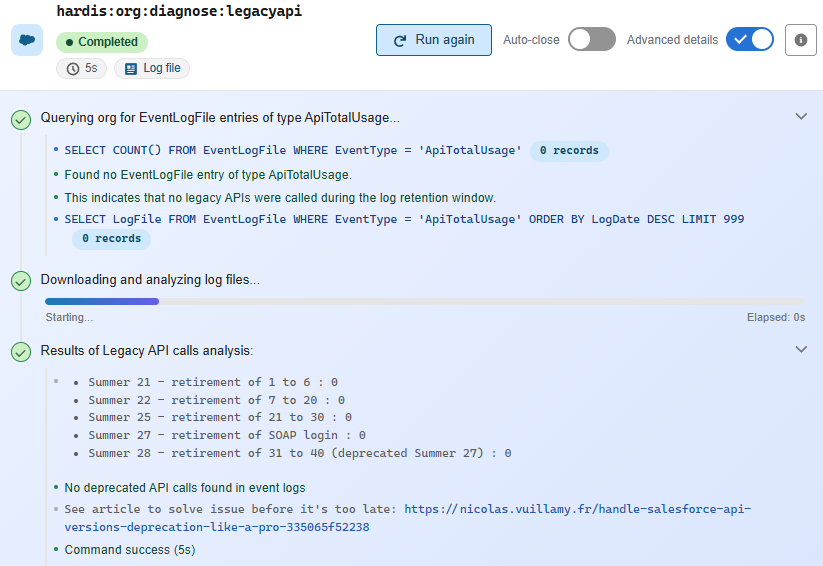
Few more things that were unclear to me and required a pause to consider whether it is as expected, part of my deviated setup, etc. |
|
Thanks for keeping notes all the way through Lab 3.8. Several of these were wrong for everybody, not just your setup. About step 2 (your October 31 comment): you read it right, the lab never said which answer to take. The answer is Yes: the prerequisites are the two secrets, and the command gives their names and values on the way. The step now says so. a) gbshahaq hit the same refused push a few days before you, so it is not you. It does not happen to everybody though: it depends on how git signs in to GitHub on your computer. The lab now warns about it before you click Install Org Monitoring, with the way out. b) Right, Edit monitoring config in the Org Monitoring panel opens the same one. c) That one is a bug in sfdx-hardis. The monitoring repository is meant to ignore d) Also right. Many checks send an email at Warning by default, so 9 emails on a first run is normal. Steps 3 and 5 now say so. e) A bug in the extension: a check with nothing to download (no event logs on a Developer Edition org) leaves its progress bar at "Starting...". The next version of the extension shows it as finished: hardisgroupcom/vscode-sfdx-hardis#605. f) This one explains the reports of c) too. A card does not open a report: it runs the check again from your computer. Answer No to both questions: ignoring an app is the decision of step 6, and deleting the Salesforce CLI tokens could log your own g) Yes, that is the file. h) i) Yes, a decision with nothing to click. On a real project it would become a backlog story. Here, deciding is the exercise. The lab changes are on the site now: #354. |


Uh oh!
There was an error while loading. Please reload this page.
en/level-3-release-manager/3-8-monitor-your-production-org/
Set up nightly sfdx-hardis monitoring on your Salesforce production org, read its first report, and decide which alerts are worth receiving.
https://sfdx-hardis-training.cloudity.com/en/level-3-release-manager/3-8-monitor-your-production-org/
All reactions