Repository navigation

Replies: 2 comments

|
The relevant scope is Create inherits = "jetbrains_dark"
"ui.cursor" = { fg = "#1e1f22", bg = "#ffffff" }
"ui.cursor.primary.select" = { fg = "#1e1f22", bg = "#ffffff" }Then activate it with: If it looks right, set
Reference: https://docs.helix-editor.com/themes.html |
0 replies

|
Awesome, thanks! I looked at the reference, and the original JetBrains, but got lost a bit. |
0 replies
Sign up for free
to join this conversation on GitHub.
Already have an account?
Sign in to comment


Uh oh!
There was an error while loading. Please reload this page.
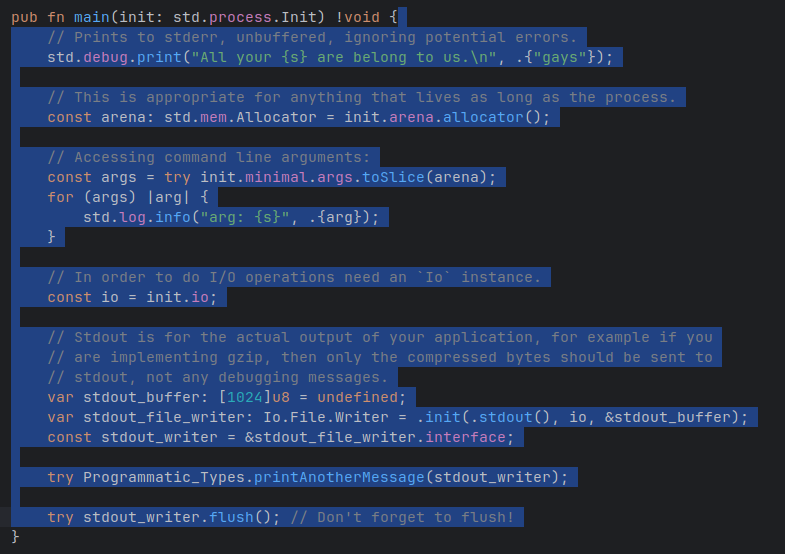
I'm using the default JetBrains Dark theme for Helix, but with it, the selection cursor isn't visible. Like so:
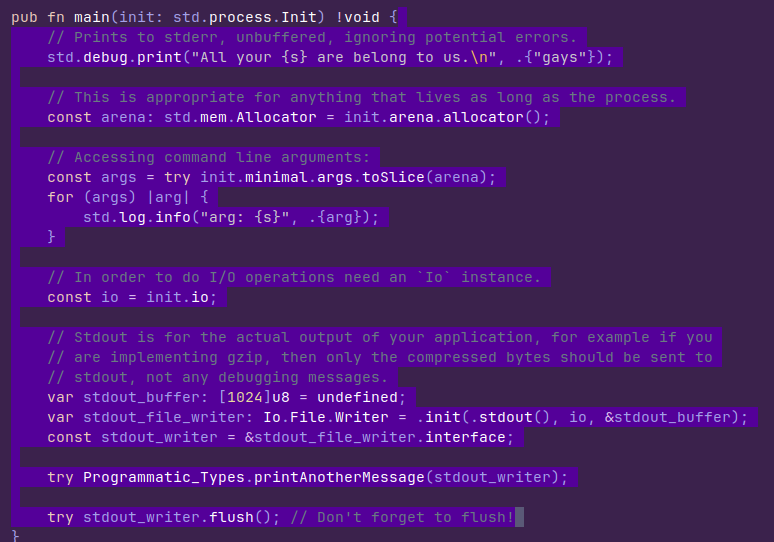
While the default theme, and others, do, in fact, highlight the cursor well enough:
What cursor parameter should I tweak for the cursor colour?
All reactions