Repository navigation

Replies: 4 comments 3 replies

|
@MrGNV Thanks for the kind words and for the clear description. The image texture is repeating tiles at the moment, and a single image placed where you want it would be a good addition. @marcus040473 could you please have a look at this? layerling is free, and small donations from people who like it keep it going, if you want to support it. |

|
@MrGNV thanks for the kind words and the clear description! @henmedia sure, I'll take it. The plan: Tiles in the image texture gets a fourth choice, Once. The image is then pressed on a single time, like the text texture's label, where you put it (Around, Height, Turned) and as wide as you set, its height following the image. Around it the surface stays smooth. I'll try it in my preview first and come back here. Until then, for a drawing with clear outlines like your Santa: add the picture to a sketch, Trace it, extrude the outline and set it on the box, or cut it in as a hole. That gives one Santa exactly where you want it. |
|
@MrGNV it's in my preview now: https://marcus040473.github.io/?editor=1 (not an official Layerling version yet).
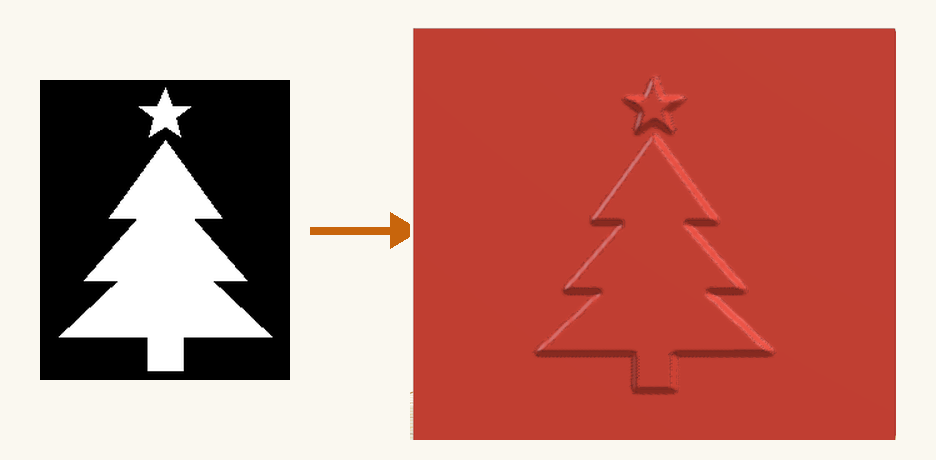
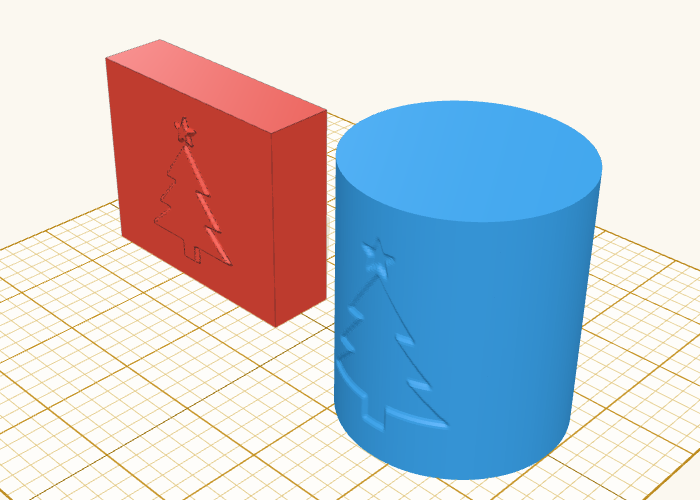
Around the image the surface stays smooth, and on a round body it wraps round the side like a label pressed on:
A motif with clear areas works best, white on black or the other way round; shades of grey become gentle heights. @henmedia once it has been tried a bit, I'll offer it to you as a pull request. |

|
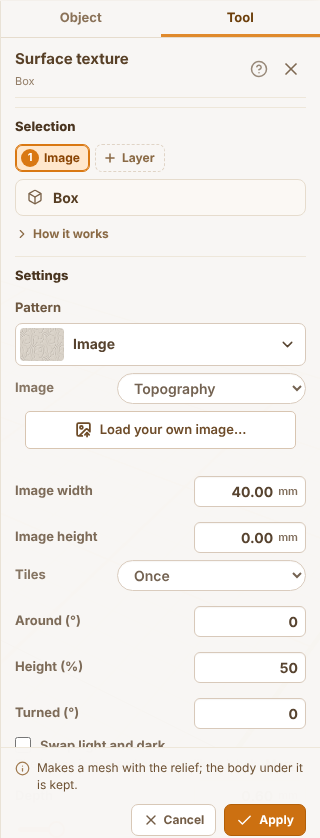
@MrGNV the single image is out in layerling 1.133.0, built by @marcus040473. Under the image texture, Tiles now has Once: the image is pressed on a single time where you put it (Around, Height, Turned), as wide as you set, and the surface stays smooth around it. Your Santa can now sit exactly where you want it. |

|
Hey @marcus040473 & @henmedia , ive loaded up and followed your instructions, but I either encountered a bug, or im doing something very wrong, ive played with some settings and I consistently get 2 things happening (please see the images) |


|
@MrGNV thanks for the screenshots and for trying it out so quickly. @marcus040473, could you please have a look at this? If you can, please send a bug report from the editor, that shows what happened to the shape. |

|
Wow, honestly, I wasn't expecting this kind of response, let alone having the feature implemented and released so quickly! 😂 A massive thank you to both of you for taking the time to look into my suggestion and actually make it happen. I'm genuinely blown away by how quickly you've done this! I've been really enjoying Layerling, and seeing developers who actively listen to their users and act on feedback like this makes me appreciate it even more. You've made my Christmas printing projects a whole lot easier, and I'm sure plenty of other people will benefit from this feature too! Seriously, thank you both! Absolutely fantastic work! 🎅👏 |


Uh oh!
There was an error while loading. Please reload this page.
Hi!
First off, I just want to say I'm really enjoying Layerling! I've used Tinkercad quite a bit, and Layerling is quickly becoming my preferred software for designing 3D prints.
I've been experimenting with the image engraving and embossing feature, which is fantastic, but I've run into one limitation.
Currently, imported images appear to be treated as repeating textures. I'd love an option to place a single image onto a surface without tiling, with the ability to resize, reposition and centre it exactly where I want.
For example, I've been trying to engrave a Santa design onto a rectangular object, but the image keeps repeating or getting cropped when I adjust its size.
It would be brilliant to have a simple option to switch between repeating textures and single-image placement.
I'm really enjoying the software and just wanted to suggest something that would make an already great feature even more useful.
Thanks for all the hard work!
All reactions