Repository navigation

Replies: 3 comments 6 replies

|
@TmTigran welcome, and thanks for the idea. Constraints that keep a hole 5 mm from one edge and 10 mm from another while the body changes size are not in layerling: there is no constraint solver, and a hole stays where you put it, so after resizing the body you move it again. What helps today: you can type the exact position of a shape in the properties, and the framing square in the camera bar measures from a corner or an edge and lets you type the distance, so placing the hole 5 mm and 10 mm from the edges takes a moment. Could you tell me the case where you need it most, for example a box you resize often with holes in it? That tells me whether something smaller than constraints would help. If layerling is useful to you, you can support it at https://layerling.com/support.html. |

|
I would love to see constraints in Layerling! I make a lot of display stand type things that have various sizes, and the ability to keep all the attachment points in tact when resizing would be a huge time/sanity saver. |

|
@maxwellsauber, thank you for the example, that is the case I asked about. Constraints are not in layerling: there is no solver that keeps a distance when the body changes. What exists today is the Scale in percent tool with its two modes: with "each" every part grows where it stands and the gaps between the parts stay the same, with "together" the gaps grow with them. That may be close to what you need for attachment points on a stand, but I have not tried it on a display stand, so please see whether it fits. A hole 5 mm from an edge still has to be moved by hand or typed in after the body is resized. If layerling saves you time, you can support it at https://layerling.com/support.html, as everything here is free. |

|
Thanks for the clarification! I understand that a constraint solver would be a pretty significant undertaking. I'd love to see basic sketch constraints make their way into Layerling someday. I think they'd be an incredibly useful addition, especially for people coming from Tinkercad who want to start designing more precisely. If you ever decide to explore adding a constraint solver, I'd be more than happy to help test it and provide feedback with real-world designs. Either way, I really appreciate what you're building here and how responsive you've been! |

|
I agree if at all possible this would make this really compete with Fusion! |

|
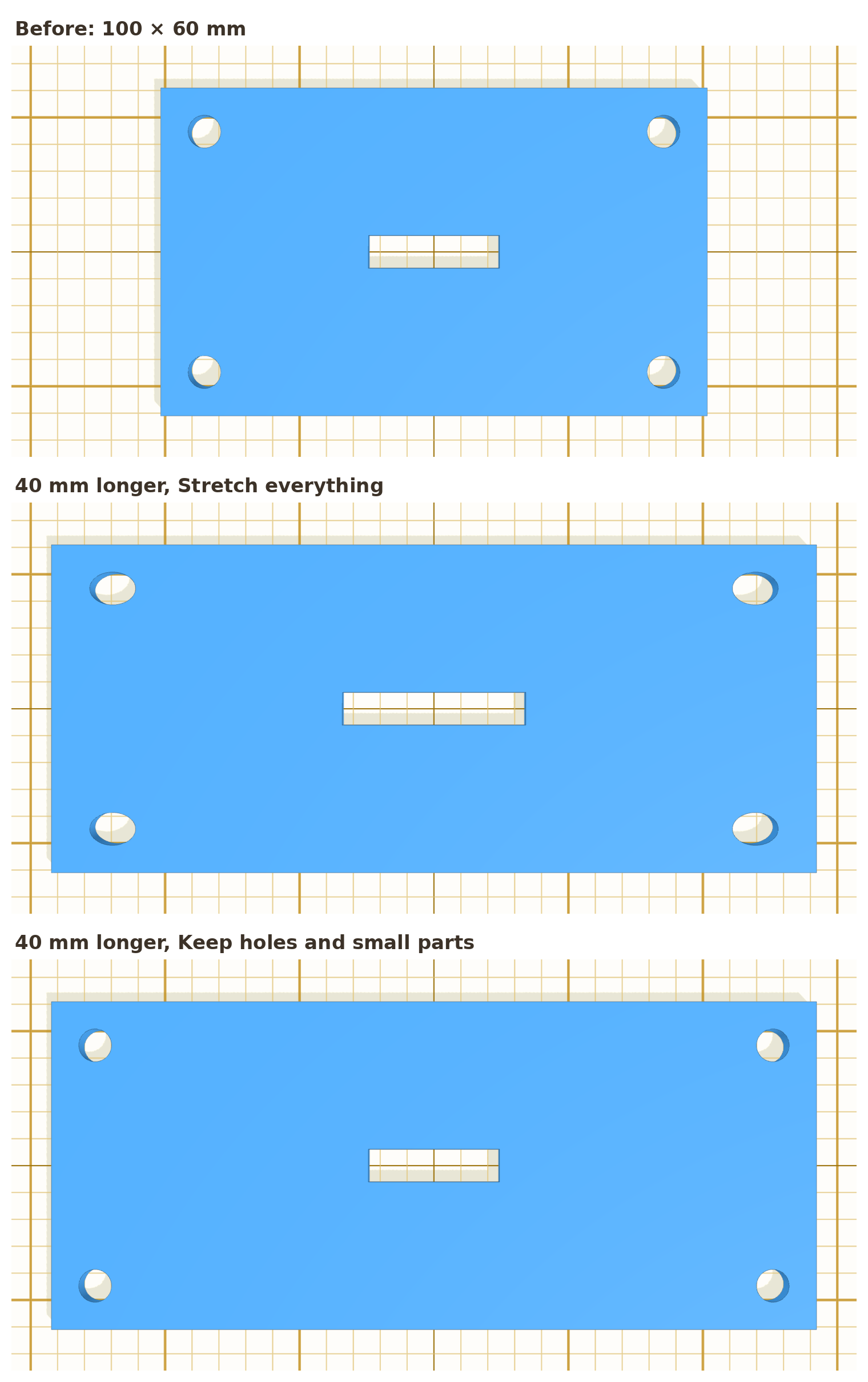
@TmTigran @maxwellsauber this is not a constraint solver, but it covers the case you described (holes that should stay put when a stand or plate is resized). It is in my demo to try: https://marcus040473.github.io/?editor=1 A group now has a setting When resized: Stretch everything (as before) or Keep holes and small parts. With the second one, when you make the group longer, wider or taller, the plate and anything else reaching across the group grows, while every hole and small part keeps its size and its distance to the nearer edge, and a part in the middle stays in the middle. It works with the handles, the size fields, the dimension labels and Scale by percent, and one Ctrl+Z undoes it.
A plate 100 × 60 mm made 40 mm longer: on top as before (oval holes, the slot stretched), below with Keep holes and small parts (round holes 5 mm from the corners, the slot as it was). I would like to hear whether this helps with your stands, and what it still gets wrong. |
|
@marcus040473, thanks, this is exactly the case from this thread, and it is good to have it as a concrete tool rather than a solver. It is in your PR #1372. |
|
@TmTigran @maxwellsauber this is out now in layerling 1.146.0: a group has the setting When resized. With Keep holes and small parts, holes keep their size and their distance to the nearer edge while the group is resized, and walls keep their thickness. It isn't a constraint solver, but it covers stands and plates in many sizes. If layerling saves you time, a small donation helps me keep it going. Thank you! |
|
This is super helpful! Thank you! |


Uh oh!
There was an error while loading. Please reload this page.
Something I've really liked in other cad programs are constraints. So if I place a hole 5mm from one edge and 10mm away from another, even if I adjust the size of the main object the hole says those dimensions. This seems like it would be easiest to do in the sketch mode.
All reactions