Repository navigation
Change distance with Tape measure #610

Replies: 2 comments 8 replies

|
@9ballrider thank you for the idea. The tape measure only reads distances, it cannot set one yet. The ruler from the shape list is different: its number can be edited right there. For snapping to the middle: right-click a body and mark its centre, corners or edge middles as reference points, and the tape measure snaps to them. The middle of a single face is not among them. For the typed distance: in Tinkercad the number moves the object. Is that what you would want here, that the second body moves until the distance is the number you typed? Tell me how you work with it. |

|
@9ballrider thank you, that is a clear picture: click the centre of one body, click the centre of the other, type the distance, and the second body moves to it. Today the tape measure only reads, and the centre of a body needs a reference point first (right-click the body), so your way is quicker and I understand why the ruler feels less direct. |

|
this would be a major improvement for the guys moving from tinkercad close to cad. i have been wanting this in tinkercad and here. i use onshape daily for work etc but i love seeing these features come into play for younger users and people who enjoy cad style operation starting from a 3d rather than 2d plane. this software is getting so close. @henmedia how are the donations coming in and have you thought of a fundraising site as well? |
|
@structurednewstore-rgb thank you for the kind words and for the support so far. Donations help a lot: I work on layerling for several hours almost every day at the moment, and they make that possible. There is a page for it with the ways to donate. I have not planned a separate fundraising site. |
|
@henmedia if you want to do a quick fund raise blast on your page for new users for today or tomorrow let me know. ill match the first $100 USD that comes in |
|
@structurednewstore-rgb that is a really generous offer, thank you. I'd rather not run a fundraising push on the page, though: I don't want to bother people while they are designing. There is only a small card that shows up on the third day someone uses layerling, and that is as far as I want to go. Your support so far already means a lot, and so does the idea behind this offer. |

|
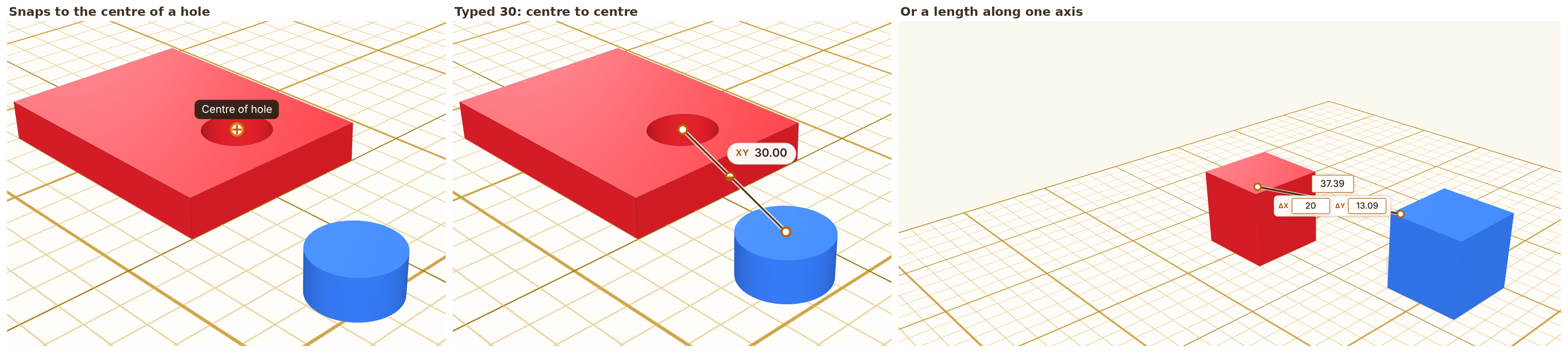
@9ballrider @structurednewstore-rgb in case you missed it: typing a distance is in layerling since 1.107.0. Measure from one body to another with the tape measure, click the number, type the length you want and press Enter, and the body at the second point moves along the line (a negative length takes it past the first point). In my demo the rest of this request works too: https://marcus040473.github.io/?editor=1
I would like to hear whether this is what you had in mind. |
|
@marcus040473, thanks for the pointer and for building the centre snap and the per-axis fields. |
|
@9ballrider this is out now in layerling 1.146.0: the tape measure snaps to the centre of a face or a hole, so you can click one centre, then another, type a distance, and the second body moves. The field also has boxes for X, Y and Z to move along one axis only. If layerling saves you time, a small donation helps me keep it going. Thank you! |


Uh oh!
There was an error while loading. Please reload this page.
As the name implies, would it be possible to be able to set a custom distance with the tape measure tool? For instance, if I am measuring the distance between two points and I need to change it, could we just click on the text bubble that says what the distance is and override it to whatever number we need? Tinkercad has that feature. Also, maybe even a snap-to-center-of-face option?
All reactions