Repository navigation
unpredictable sketch edits #629

Replies: 3 comments 3 replies

|
@RobbieKnobbie thank you for the clear pictures and the steps, that makes it easy to follow. The sketch has no constraints yet: all shapes are plain points, and a typed length or angle moves points without holding anything else, which is why the rectangle turns into a trapezoid. Three ways give you an exact rectangle: (1) add a Rectangle from the Shapes menu, select it, and click the width or height pill at its frame to type 59.5 and 41.5, it stays a rectangle; (2) draw it with lines by numbers: set the first point with the Line tool and type "59.5<0", then "41.5<90", "59.5<180" and "41.5<270" (Enter after each); (3) take a Box in the 3D editor with the sizes in the properties, if you do not need a sketch. Locking a line to horizontal or a corner to 90° is not possible at the moment. I have noted it as an idea. |

|
Thanks for looking into this. The rectangle was just an easy example (or a "silly example" as I put in the first post) for illustration. The need for constraints comes into play much moreso for complicated profiles or instances where two sketches are positioned relative to each other and need to maintain a specific gap and orientation. perhaps in the future |

|
I'm hitting this issue as well. I think locking a node in place would solve the issue until/if full constraints are ever added. You could lock the first node in place, set the line length and angle, then lock the next node. Move around the sketch until everything is correct. Yes, I'm sure it's a bit more complicated than that :-) |

|
@pmarkham good idea, and half of it is already there: select a point (or several) in the sketch and press Ctrl+L, and it stays where it is until you unlock it. What was missing is that a typed length or angle took no notice of the lock. With the next update it does: a typed length keeps the locked end and moves the free one, and a typed angle turns the line whose far end is free. So you can go round the outline just as you describe: lock a corner, type the length and the angle of the next line, lock its end, and go on. @RobbieKnobbie this gives you a way to hold the part that is already right while you fix the rest. And if layerling is useful to you, you can support the project here. Thank you! |
|
@pmarkham @RobbieKnobbie this is out now in 1.140.0: a typed length or angle no longer moves a locked point (Ctrl+L). The length moves the free end of the line, the angle turns the line whose far end is free, so you can lock a corner, type the next line's length and angle, lock its end and go on. Reload layerling (or update the app) to get it. |
|
@HEMedia, that works perfectly for my need. Thanks for the awesome response! Keep up the great work. |


Uh oh!
There was an error while loading. Please reload this page.
While trying to make a simple rectangle in SKETCH, I am running into a lot of difficulty when I try to bring it from the sketched dimensions to the required dimensions. For example, I'm going to try to sketch a 59.5 x 41.5mm box...
first I draw a rectangle close to the desired size using standard snap settings:
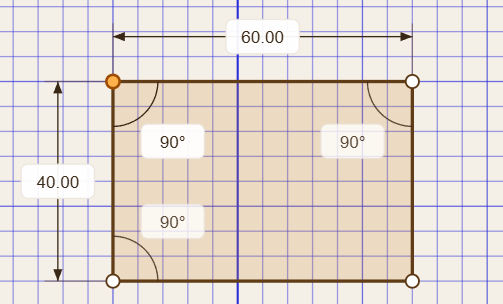
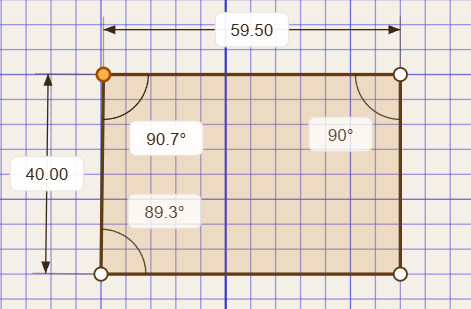
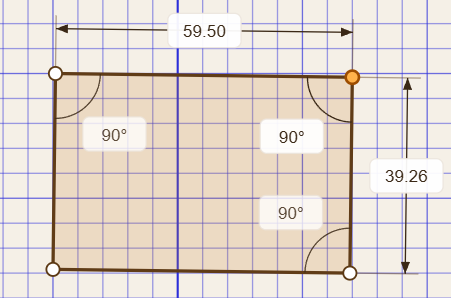
manually setting the top horizontal to 59.5 pulls the shape into a trapezoid, which is understandable:
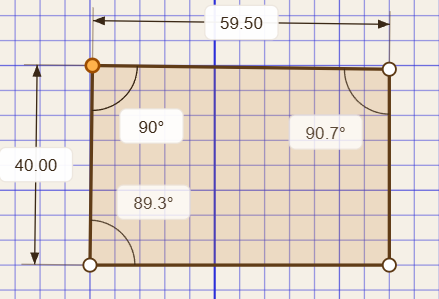
To correct this I change the top left angle back to 90, which throws off the adjacent angles:
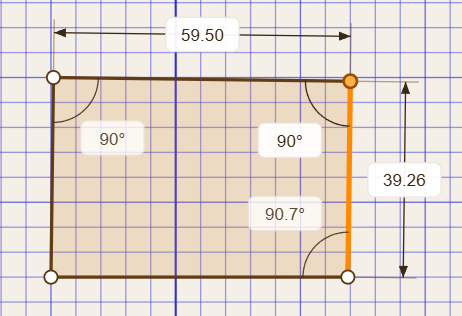
and correcting the top right angle throws the entire shape askew:
then correcting the bottom right angle, I have a rectangle again, but its not parallel to the grid;
adjusting the opposing side lengths sometimes results in the correct geometry (a rectangle) and sometimes results in a parallelogram.
This may be a silly example, but when working on a more complicated shape, this gets frustrating.
Is there a way to anchor some entities into a characteristic, like locking a line to horizontal, or two lines to a right angle? Or perhaps prioritizing the dimensions that were entered manually over those that were just set with the mouse, so thats when a change is entered, the results would eb more predictable?
thank you!
All reactions