Repository navigation
Releases: hungry-detective/downloadcraft
Release list
Download Craft 0.9.12

What's new
Setting up
- Get ready: a small window lists what Download Craft needs — the browser connection, the
browser extension, yt-dlp, FFmpeg and Deno — with what each is for and whether it is ready. Each has
its own Install / Set up button, and Fix everything does them all. The extension row shows the
three steps to add it, with Open folder and Copy path. The window opens at start-up only when
something is missing (it fixes what it can by itself) and any time from Help → Get ready….
Downloads
- A head start, as in IDM: while the Download File Info window is open, a plain file already
downloads in the background. Press Download and it continues under the name and folder you chose,
so the progress window opens partway through. Cancel deletes what was fetched. (Video pages and
streams still start when you press Download.) - "Download Craft isn't running" now shows as soon as the Download File Info window opens, and
goes away by itself once the app starts. A file already in the list starts and the window closes. - Drag finished downloads out of the list onto a folder, the desktop, a chat or a mail; select
several to drag them together. - Opening the browser no longer captures downloads from its last session again.
Windows
- About & Updates is its own small window: up to date, update available (with highlights from the
release notes), installing (each step), ready to restart. An Update automatically switch decides
whether new versions install by themselves. It also lists your helpers and links to GitHub,
release notes, issues and licenses. - Progress window: a bolder progress bar; the Speed tab has one row for the speed limit with a
KB/s / MB/s choice (the unit used to be unstated) and a clearer graph with the current and peak
speed. - Download all links: search, type chips and "Hide web pages" in one aligned row that wraps only
when it must, so more files fit; the main list's outline file icons; dragging a column moves the
ones after it, and nothing runs outside the table; the status line spans the window. - Download complete uses the app's dark colours.
- An update also removes files the new version no longer has (an old Firefox .xpi, for example).
Look
- Dark mode: the sidebar and the list are a step brighter than the window, as in light mode; the
title bar keeps the window's colour. - The Name column has an icon like the others; Settings → Appearance → Hide column icons shows the
titles alone, at once. - Search opens when you click the magnifier (pointing at it no longer opens it).
Browser extension
- The video button says just Download; its menu opens with the quality you use most selected.
- It stays inside the player when you point at it, is a little shorter, and hides while a site's
pinned header (Facebook's top bar) covers it, as IDM's does.
Updating from 0.9.11
Use Update now in the app: it downloads this release, checks it and restarts. Then reload the browser
extension (chrome://extensions → reload) with the files from this release.
Install
Windows 10/11. Extract DownloadCraft-0.9.12-windows-x64-portable.zip and run download_craft.exe —
nothing to install. Your queue and settings in %APPDATA%\download_craft carry over.
macOS 12+. Unzip DownloadCraft-0.9.12-macos-Universal.zip and move Download Craft.app into
Applications. This development build is not notarized: right-click → Open the first time.
Linux (x86-64, glibc 2.28+).
- Ubuntu, Debian, Mint, Pop!_OS:
sudo apt install ./downloadcraft_0.9.12_amd64.deb - Fedora:
sudo dnf install ./downloadcraft-0.9.12-1.x86_64.rpm - Other distributions:
DownloadCraft-0.9.12-x86_64.AppImage(mark it executable; without FUSE run it
with--appimage-extract-and-run).
Browser extension (0.9.12).
- Chrome / Edge / Brave: extract
DownloadCraft-Chrome-0.9.12.zip, openchrome://extensions, enable
Developer mode, Load unpacked → thebrowser-extensionfolder. Already installed? Press reload on
the extension and refresh open tabs. - Firefox:
about:debugging#/runtime/this-firefox→ Load Temporary Add-on… →
DownloadCraft-Firefox-0.9.12.xpi(unsigned). - Then in the app: Settings → Browser Integration → Install for your browser.
Media helpers
Settings → Plugins downloads and updates yt-dlp, FFmpeg + ffprobe and a portable
JavaScript runtime (Deno) into the app's own folder — no installers, no PATH changes, no sudo.
System copies on PATH or a custom file can be chosen instead.
RAR archives are read with the UnRAR source code (freeware licence, extraction only); see NOTICE.md.
Download Craft 0.9.11
What's new
App
- Updates itself: when a new release is out, the portable app downloads it, checks it against the
checksum GitHub publishes, replaces every file in its folder and restarts into the new version — after
the downloads that are running have finished. If anything fails, nothing is changed and the Update
button stays for another try. - Ready on first start: yt-dlp, FFmpeg and Deno (the JavaScript runtime YouTube needs) download in the
background the first time the app opens, so the first video download does not stop to fetch them.
This also fixes YouTube videos arriving in 360p when 1080p was picked: without FFmpeg, YouTube only
offers 360p as a single file. Helpers you pointed at your own copy in Settings are left alone. - Progress window: Cancel while downloading (it stops like the main window's Stop and keeps the
partial file); closing the window pauses the download; minimising it keeps it going. - "Download Craft isn't running": pressing Download in the browser's download window while the app is
closed now says so and queues nothing. Clicks made while the app was closed no longer all start the
next time it opens. - DRM-protected videos (Widevine and the like, e.g. paid streaming sites) are recognised: instead of a
file with no picture or sound, the download stops with a clear message and the broken file is removed.
Protected videos are never worked around.
Browser extension
- Qualities in the popup: the files a video player loaded are one card with a quality list — 1080p,
720p, 480p… — read from each file's header, instead of several cards that all said "MP4". - The video button opens its menu with the quality you picked last already selected; picking another
one changes the button to "Download 720p" right away. The separate ▾ is gone. - DRM-protected videos show a short explanation instead of a download that would not play.
Updating from 0.9.10
Use Update now in the app: it downloads this release, checks it and restarts. Then reload the browser
extension (chrome://extensions → reload) with the files from this release.
Install
Windows 10/11. Extract DownloadCraft-0.9.11-windows-x64-portable.zip and run download_craft.exe —
nothing to install. Your queue and settings in %APPDATA%\download_craft carry over.
macOS 12+. Unzip DownloadCraft-0.9.11-macos-Universal.zip and move Download Craft.app into
Applications. This development build is not notarized: right-click → Open the first time.
Linux (x86-64, glibc 2.28+).
- Ubuntu, Debian, Mint, Pop!_OS:
sudo apt install ./downloadcraft_0.9.11_amd64.deb - Fedora:
sudo dnf install ./downloadcraft-0.9.11-1.x86_64.rpm - Other distributions:
DownloadCraft-0.9.11-x86_64.AppImage(mark it executable; without FUSE run it
with--appimage-extract-and-run).
Browser extension (0.9.11).
- Chrome / Edge / Brave: extract
DownloadCraft-Chrome-0.9.11.zip, openchrome://extensions, enable
Developer mode, Load unpacked → thebrowser-extensionfolder. Already installed? Press reload on
the extension and refresh open tabs. - Firefox:
about:debugging#/runtime/this-firefox→ Load Temporary Add-on… →
DownloadCraft-Firefox-0.9.11.xpi(unsigned). - Then in the app: Settings → Browser Integration → Install for your browser.
Media helpers
Settings → Plugins downloads and updates yt-dlp, FFmpeg + ffprobe and a portable
JavaScript runtime (Deno) into the app's own folder — no installers, no PATH changes, no sudo.
System copies on PATH or a custom file can be chosen instead.
RAR archives are read with the UnRAR source code (freeware licence, extraction only); see NOTICE.md.
Download Craft 0.9.10
Download Craft 0.9.10 — archives, Google Drive, and a smarter video button
What's new
Downloads
- Google Drive and Google Docs links: paste a Drive share link and the file itself downloads, with its
real name and resume, including big files behind Drive's "can't scan for viruses" page. Docs, Sheets and
Slides links download as Word, Excel and PowerPoint files. - Extract archives automatically: Settings → On completion → Extract archives when they finish unpacks
ZIP, RAR (multi-part sets too) and 7z, into a new folder or next to the archive, optionally deleting the
archive afterwards. Right-click a finished archive → Extract works any time. Nothing is written outside
the folder, existing files are kept, and password-protected archives are left alone. - Audio only: the video menu's ♪ MP3 choice saves just the sound, as MP3.
Browser extension
- Instagram, TikTok, X and Reddit: the video button finds the post the video belongs to (even in a feed)
and offers Best / 1080p / 720p / 480p / 360p or MP3; the app fetches it with its sound. - One click in your quality: the button remembers the quality you picked last ("Download 720p"); its ▾
opens the full menu. Turn it off in the popup's Settings. - Right-click → Download video with Download Craft on the video under the pointer.
- YouTube Shorts: a small round button in the Short's own control row; it hides while you scroll and comes
back for the next Short, and it can be dragged anywhere. - Download in browser now writes a normal, indexed MP4: the sound no longer drops out partway through or
after skipping ahead. - The popup lists videos again (a translation step had emptied it), scrolls in one place, and its badge
counts the same videos the list shows. - Smaller things: the button is never cut off, waits for the player while a page loads, lights up as a whole
on hover; the menu has a sun / moon theme switch and one Cancel. - Self-check: when a site changes its layout so the button cannot find what it needs, a line appears in
the app's log.
App
- Site Grabber redesign: clear sections, file-type chips, a levels stepper, and a results list.
- List headers with icons (Size, Status, Speed, Time left, Date), centred with their values; a selected row is
a soft tint without an outline; Add URL looks like the other toolbar buttons. - The toolbar fits narrow windows (icons only, then fewer buttons) and never covers Settings; Settings opens
even while a dialog is open. - Double-click a running download, or right-click → Show download window, to open its progress window.
Updating from 0.9.9
Use Update now in the app: it downloads this release, checks it and restarts. Then reload the browser
extension (chrome://extensions → reload) with the files from this release.
Install
Windows 10/11. Extract DownloadCraft-0.9.10-windows-x64-portable.zip and run download_craft.exe —
nothing to install. Your queue and settings in %APPDATA%\download_craft carry over.
macOS 12+. Unzip DownloadCraft-0.9.10-macos-Universal.zip and move Download Craft.app into
Applications. This development build is not notarized: right-click → Open the first time.
Linux (x86-64, glibc 2.28+).
- Ubuntu, Debian, Mint, Pop!_OS:
sudo apt install ./downloadcraft_0.9.10_amd64.deb - Fedora:
sudo dnf install ./downloadcraft-0.9.10-1.x86_64.rpm - Other distributions:
DownloadCraft-0.9.10-x86_64.AppImage(mark it executable; without FUSE run it
with--appimage-extract-and-run).
Browser extension (0.9.10).
- Chrome / Edge / Brave: extract
DownloadCraft-Chrome-0.9.10.zip, openchrome://extensions, enable
Developer mode, Load unpacked → thebrowser-extensionfolder. Already installed? Press reload on
the extension and refresh open tabs. - Firefox:
about:debugging#/runtime/this-firefox→ Load Temporary Add-on… →
DownloadCraft-Firefox-0.9.10.xpi(unsigned). - Then in the app: Settings → Browser Integration → Install for your browser.
Media helpers
Settings → Plugins downloads and updates yt-dlp, FFmpeg + ffprobe and a portable
JavaScript runtime (Deno) into the app's own folder — no installers, no PATH changes, no sudo.
System copies on PATH or a custom file can be chosen instead.
RAR archives are read with the UnRAR source code (freeware licence, extraction only); see NOTICE.md.
Download Craft 0.9.9
What's new
Download engine
- Dynamic segmentation: idle connections take over the slowest part's remaining bytes, so a download
finishes together instead of waiting on one slow part. Up to 32 connections, mirrors (url | mirror
in Add URL), a temporary folder setting, and a log per download (Log tab in the progress window). - More protocols and logins: segmented FTP with resume, FTPS (
ftpes://explicit,ftps://
implicit), HTTP Digest, saved site logins (password encrypted for your Windows account), and
NTLM / Kerberos logins for company servers through Windows' own HTTP stack. - Recovers from more: refresh an expired link by clicking the download again in the browser,
HTTP/2 when a server refuses HTTP/1.1, a retry that allows IPv6 when a host cannot be reached, plain
words for redirect loops and bad certificates, and Windows proxy scripts (PAC / auto-detect).
App
- Redesigned main window: toolbar and list in one rounded card, a filled Add URL button, outline
icons for every category and state, statuses as a dot or a percentage over a thin bar, slim scroll
bars, Windows 11 rounded corners, and a search box that opens when you point at it. - IDM-style columns: dragging a divider changes only that column and moves the others along.
- Compact right-click menu with icons, shortcuts, Convert (MP3, MP4, smaller 720p) and Move to queue
submenus, plus ZIP: pick files (download single files out of a remote ZIP). - Progress window: a livelier progress bar, cleaner tabs, and at most six connection rows before the
list scrolls. - Queues and finding files: named queues with their own schedules and limits, queue sync, download
quota, YouTube playlists and channels, batch patterns likeimg(001-200).jpg, a Site Grabber that
follows links several levels deep and saves projects, and import of IDM.ef2lists. - One-click update (portable Windows): Update now downloads the new version, checks it against the
release's checksum, replaces this copy's files and restarts. If anything fails, nothing is changed. - Start with Windows (on by default): opens in the tray at sign-in, from wherever the portable
folder is now. Turn it off in Settings → Appearance → Window. - Bengali translation (Settings → Appearance → Language), statistics, sounds, keyboard shortcuts in
the list (Ctrl+A, Delete, Space, Enter), and subtitles saved next to videos.
Browser extension
- New video button: a glass pill that stays see-through over the video and shows fully for a few
seconds when it appears; its quality menu opens on the page, so the player never cuts it off. - Facebook feed: the button downloads the video it sits on, not a neighbouring one.
- The popup, the in-page panels and the right-click menu follow the browser's language (English,
Bengali).
Updating from 0.9.8
0.9.8 does not have one-click updates yet: download this release and extract it over your old folder
once (your list and settings in %APPDATA%\download_craft carry over). From 0.9.9 on, the app updates
itself.
Install
Windows 10/11. Extract DownloadCraft-0.9.9-windows-x64-portable.zip and run download_craft.exe —
nothing to install. Your queue and settings in %APPDATA%\download_craft carry over.
macOS 12+. Unzip DownloadCraft-0.9.9-macos-Universal.zip and move Download Craft.app into
Applications. This development build is not notarized: right-click → Open the first time.
Linux (x86-64, glibc 2.28+).
- Ubuntu, Debian, Mint, Pop!_OS:
sudo apt install ./downloadcraft_0.9.9_amd64.deb - Fedora:
sudo dnf install ./downloadcraft-0.9.9-1.x86_64.rpm - Other distributions:
DownloadCraft-0.9.9-x86_64.AppImage(mark it executable; without FUSE run it
with--appimage-extract-and-run).
Browser extension (0.9.9).
- Chrome / Edge / Brave: extract
DownloadCraft-Chrome-0.9.9.zip, openchrome://extensions, enable
Developer mode, Load unpacked → thebrowser-extensionfolder. Already installed? Press reload on
the extension and refresh open tabs. - Firefox:
about:debugging#/runtime/this-firefox→ Load Temporary Add-on… →
DownloadCraft-Firefox-0.9.9.xpi(unsigned). - Then in the app: Settings → Browser Integration → Install for your browser.
Media helpers
Settings → Plugins downloads and updates yt-dlp, FFmpeg + ffprobe and a portable
JavaScript runtime (Deno) into the app's own folder — no installers, no PATH changes, no sudo.
System copies on PATH or a custom file can be chosen instead.
Download Craft 0.9.8
Download Craft 0.9.8 — download in the browser, Download all links, a new popup
What's new
Browser extension
- Download in the browser — no app needed. Every video card has a second home under
Download in browser. Plain files use the browser's own downloader; a separate video + audio pair
(Facebook 720p+, many players) is fetched and joined into one MP4 without re-encoding; HLS and DASH
streams are fetched piece by piece (standard AES-128 HLS decrypted) and joined. DRM and live streams
are named as such instead of failing. Saved files go to the app's category folders inside the
browser's Downloads folder, under their real names, and appear in the app's list when it runs. - New popup: toolbar (type filter, title search, auto-send, detection on/off, pause all app
downloads, rescan, clear), Download with Download Craft and Download in browser sections, and a
Downloads tab with browser jobs (progress, cancel, history) and the app's queue (pause, resume,
cancel). - Download all links: right-click a page → Download all links with Download Craft.
- Facebook reels: one card per reel from Facebook's own data — every quality with its sound track,
duration, thumbnail and size, H.264 preferred so files play everywhere. - The video bar waits for the page ("Resolving…") when clicked early, shows once per Facebook reel,
and stays at the player's corner in fullscreen. - YouTube refuses downloads made by the browser itself (its links only work inside YouTube's player),
so its cards hand the video to the app.
App
- Download all links window: types, sizes, type chips, search, sortable and resizable columns,
Shift-click ranges, category folders or one folder. - Streams show honest progress: HLS/DASH downloads through yt-dlp count fragments instead of a size
estimate that keeps changing; pausing and resuming no longer inflates the downloaded size; temporary
pieces stay in a hidden.download_craft_partsfolder. - One-click JavaScript runtime (portable Deno) for yt-dlp in Settings → Plugins.
- Resizable list columns with visible dividers; the Download File Info dialog keeps the browser's file
name; long names in Bengali and other scripts keep their quality tag; a finished video + audio merge is
never reported as "connection ended early".
Install
Windows 10/11. Extract DownloadCraft-0.9.8-windows-x64-portable.zip and run download_craft.exe —
nothing to install. Your queue and settings in %APPDATA%\download_craft carry over.
macOS 12+. Unzip DownloadCraft-0.9.8-macos-Universal.zip and move Download Craft.app into
Applications. This development build is not notarized: right-click → Open the first time.
Linux (x86-64, glibc 2.28+).
- Ubuntu, Debian, Mint, Pop!_OS:
sudo apt install ./downloadcraft_0.9.8_amd64.deb - Fedora:
sudo dnf install ./downloadcraft-0.9.8-1.x86_64.rpm - Other distributions:
DownloadCraft-0.9.8-x86_64.AppImage(mark it executable; without FUSE run it
with--appimage-extract-and-run).
Browser extension (0.9.8).
- Chrome / Edge / Brave: extract
DownloadCraft-Chrome-0.9.8.zip, openchrome://extensions, enable
Developer mode, Load unpacked → thebrowser-extensionfolder. Already installed? Press reload on
the extension and refresh open tabs. - Firefox:
about:debugging#/runtime/this-firefox→ Load Temporary Add-on… →
DownloadCraft-Firefox-0.9.8.xpi(unsigned). - Then in the app: Settings → Browser Integration → Install for your browser.
Media helpers
Settings → Plugins downloads and updates yt-dlp, FFmpeg + ffprobe and now a portable
JavaScript runtime (Deno) into the app's own folder — no installers, no PATH changes, no sudo.
System copies on PATH or a custom file can be chosen instead.
Download Craft 0.9.7
What Changed
This release integrates pull request #51 from @dazzlejacket.
- Adds macOS and Linux support, including native packaging for both platforms.
- Improves browser video detection and automatic download takeover, with draggable video controls.
- Includes helper/settings persistence and download handling fixes resolved during integration with Download Craft 0.9.7.
- Fixes the Windows release linker by resolving the title bar API at runtime; the Windows build now passes.
- Updates the browser extension to 0.9.7.1. Chrome skips Firefox-only blocking webRequest registration, while Firefox retains its attachment handoff.
The desktop application remains version 0.9.7.
The download window, rebuilt. The progress window now follows its new concept. The tabs are a short segmented track with small icons, the Speed tab is a compact transfer block — three rows, a slim cap field and a slim accent Apply — and the Settings tab is a 2×2 grid of option cards (radio, icon, label) with the queue-drain choice picked in the accent. Part Info is no longer Info-only: its collapse toggle, the Pause/Close actions, the part strip and the per-part table belong to the card itself, so the Speed and Settings tabs can open them too. The Info tab is exactly as it was — same rows, same progress bar, same part table.
A copied link points the way instead of pushing the list down. The "Link copied from clipboard" banner is gone. When you copy a download link, the toolbar's Add URL button lights up in the accent colour and breathes gently; click it and the link is pasted into the Add download dialog for you. Nothing takes a row of the list any more.
The Add download dialog reads properly. The two small square buttons next to the file name — refresh and advanced — now sit on the field surface, with the same fill, border and radius as the inputs, so they belong to the row instead of floating over it. The advanced button shows a real cog instead of a spoked circle that read as a sunburst.
A toolbar that stays clickable. Fixed a bug where list rows that were scrolled out of view kept their clickable rectangles: a scrolled list could swallow clicks meant for the toolbar, leaving Add URL and Site Grabber dead. Row hits are now clipped to the visible part of the list.
Item details, tidy. The details dialog was rebuilt so every row ends on one common right edge, the meta strip names the type, status and size, and the referer is an editable field that remembers what you typed. The dialog keeps its 480px width.
Queue v2. Items can carry a priority and a start-at time, and each host gets its own connection cap. The Settings writers now merge into ui.json instead of replacing it, so a shared write can never drop your live preferences.
Settings and the rest. yt-dlp and ffmpeg are managed from Settings (the app's own copy by default, one from PATH, or an executable you pick), the live HLS recorder is in, the Download complete window is more compact, and the main window has a new title bar with slightly larger window-control glyphs.
Install
Windows. Download DownloadCraft-0.9.7-windows-x64-portable.zip, extract download_craft.exe and run it — nothing to install. Your queue and settings in %APPDATA%\download_craft carry over.
macOS. Download DownloadCraft-0.9.7-macos-Universal.zip and move Download Craft.app into Applications. This development build is not notarized.
Linux. Download the DEB, RPM, or AppImage for your distribution. Packages target x86-64 and glibc 2.28 or newer; see RELEASE-0.9.7.md for install details.
Browser extensions (0.9.7.1).
- Chrome / Edge: download and extract
DownloadCraft-Chrome-0.9.7.1.zip; inchrome://extensions, enable Developer mode and choose Load unpacked, then select the extractedbrowser-extensionfolder. Refresh open tabs. - Firefox: download
DownloadCraft-Firefox-0.9.7.1.xpi. It is unsigned, so load it fromabout:debugging#/runtime/this-firefox→ Load Temporary Add-on… (or sign it with your own Mozilla account).browser-extension/README.mdcovers the one-time native-host install.
Source. The integrated source is master at commit c6ca86f. The original v0.9.7 tag is retained.
Download Craft 0.9.6
What's new
Names in any script, shaped properly. Bengali, Devanagari and Tamil text now goes through a real shaper (rustybuzz), so conjuncts join and matras sit on the right side of their consonant instead of being drawn one codepoint at a time. A Bengali file name no longer shows a dangling mark or a visible hasanta. Emoji are drawn from the emoji face again, and a mixed string (a Windows path plus a Bengali name) keeps each script in its own face. This covers the list rows, the progress window, the Download complete dialog, and the editable name box in Download File Info — that box still edits normally (caret, selection, Ctrl+A/C/V, undo, IME); only the painting changed.
A resolution only when the file has video in it. ffprobe decodes a JPEG, PNG or GIF as a stream and reports its pixel size, and it does the same for the cover art embedded in an MP3 — so a downloaded photo or album track announced a "resolution" it does not have. The probe now reads the codec and the frame count and rejects an attached picture, a still-image codec and a single frame; a yt-dlp leg must carry a real video codec before its height/width count. The Info tab also drops the Resolution: row entirely when there is none, so a ZIP, PDF or photo shows no resolution row at all instead of -.
Settings, rebuilt from the new concept. The Download Engine section is now collapsible cards: where yt-dlp comes from (the app's own copy by default, the one on PATH, or an executable you pick), ffmpeg with what it unlocks, what the YouTube helper fetches, and the runtime note. Plugins shows the 14-tile line-up with the 1,000+ sites tile, browser integration and About are in the same language, cards start collapsed, and nothing clips when the window is short.
The rest of the window. The main window opens centred at its design size, the brand icon is no longer clipped, the taskbar icon is larger, closing goes to the tray, nothing flashes a console, size numbers match what is on disk, and the title bar, progress window and complete dialog all follow the app theme.
Extension 0.9.6. Firefox now has its own build — a Manifest V3 manifest with an event page, a .xpi script and a README section — and the Facebook Reels fix follows the reel you are actually watching (the URL's reel key, the visible player and the recency of the captured streams all decide which legs are offered), so scrolling no longer offers the previous video. A video-only leg is sent together with the newest audio leg of the same reel, so a captured row still saves with sound. Names come from the caption, thumbnails from the player, and the quality you pick is the one that downloads. 58 extension tests and 60 Rust tests pass.
Install
Windows. Download DownloadCraft-0.9.6-windows-x64-portable.zip, extract download_craft.exe and run it — nothing to install. Your queue and settings in %APPDATA%\download_craft carry over.
Browser extension (0.9.6).
- Chrome / Edge: reload the unpacked extension (or point it at the new copy), then refresh any open tab.
- Firefox:
DownloadCraft-Firefox-0.9.6.xpi— it is unsigned, so load it fromabout:debugging#/runtime/this-firefox→ Load Temporary Add-on… (or sign it with your own Mozilla account).browser-extension/README.mdcovers the one-time native-host install.
Source. The Source code (zip / tar.gz) links below build the app with cargo build --release; the same tree is the v0.9.6 tag.
Download Craft 0.9.5
What's new
The main window, rebuilt from the new design. A compact toolbar across the top (Add URL, Open Queues, then Resume / Stop / Stop All), a Delete button that goes live as soon as you check a row, a tighter column-header band so the list starts higher, denser rows that fit more downloads in the same window, and the counters moved into the sidebar footer where they belong. Add URL is a plain button until you hover it. The window opens at 920x500 instead of 1050x600, and the layout keeps its spacing down to the 840x480 minimum.
Bulk actions stay out of the way. Checking downloads enables Delete next to Stop All - no selection strip appears above the list, so nothing jumps under the pointer while you pick rows.
Wider plugin line-up. Settings -> Plugins is now 14 tiles in two flush rows: YouTube, Facebook, TikTok, Instagram, X (Twitter), Twitch, Reddit, Discord, Vimeo, Snapchat, Dailymotion, LinkedIn, SoundCloud, and a 1,000+ / More sites tile standing for the rest of yt-dlp's extractor list. The helper's busy spinner moved out from between the buttons and now trails "Show in folder".
Real streams from player pages. A capture from a jwplayer/dooplay page such as /jwplayer/?source=... is now followed to the actual media instead of saving the player's HTML shell, HLS (.m3u8) playlists are recognised as media, and Facebook Reels captures carry their thumbnail.
Title bar matches the window. The caption is painted in the page's own background colour for the current theme instead of the system default, and it is re-asserted after restoring from the tray. Icon glyphs also get their own font family now, so a system font can no longer shadow one (no more phone where a download arrow belongs).
One window only. Launching Download Craft again from the Start menu, a pinned shortcut or the taskbar wakes and raises the window you already have, instead of opening a second copy behind it.
Install
Download the portable zip, extract download_craft.exe, and run it - nothing to install. The browser extension is version 0.9.5: reload it in chrome://extensions (or point the unpacked folder at the new copy) and refresh any open tab, so the player/stream unwrapping takes effect.
Download Craft 0.9.4
What's new
Item details, rebuilt. Double-clicking a download now opens the compact single-page panel from the new design: file icon and name, Type / Status / Size / Save To (with Move), Address and Web page with copy buttons, description, login and password fields, a live progress/ETA line while it runs, and Open / OK at the bottom. No more Info/Settings tabs.
Better names for direct videos. When a video streams from a URL like ...Pooja.Meri.Jaan.2026.1080p.x264.AAC.Hin.BTs.VTL.mp4, the capture now uses the release name from the address instead of video.mp4. Generic page titles ("Video", "Watch online") lose to a descriptive URL, while real page titles still beat hashed CDN filenames. Audio extensions are not duplicated.
Title bar follows the app theme. Choosing Light while Windows itself is dark now gives a light title bar too (and the reverse). The caption colours are re-applied after restoring from the tray and whenever Windows rebuilds the window frame.
Tray really comes to the front. Left-clicking the tray icon now restores and raises the window above other applications, with the native foreground workaround instead of opening behind them.
Smaller fixes. The Downloading / Download complete windows follow theme changes while they are open. The sidebar no longer repeats the MANAGE block and Queues row - queues remain one click away in the toolbar.
Install
Download the portable zip, extract download_craft.exe, and run it. The browser extension is version 0.9.4: reload it in chrome://extensions (or update the unpacked folder) so the new filename logic takes effect.
Download Craft 0.9.3
Download Craft 0.9.3 — pick the file you want, right on the video
Portable Windows build: one download_craft.exe, no installer. Settings, queue and history carry over from 0.9.2 and earlier — just replace the exe.
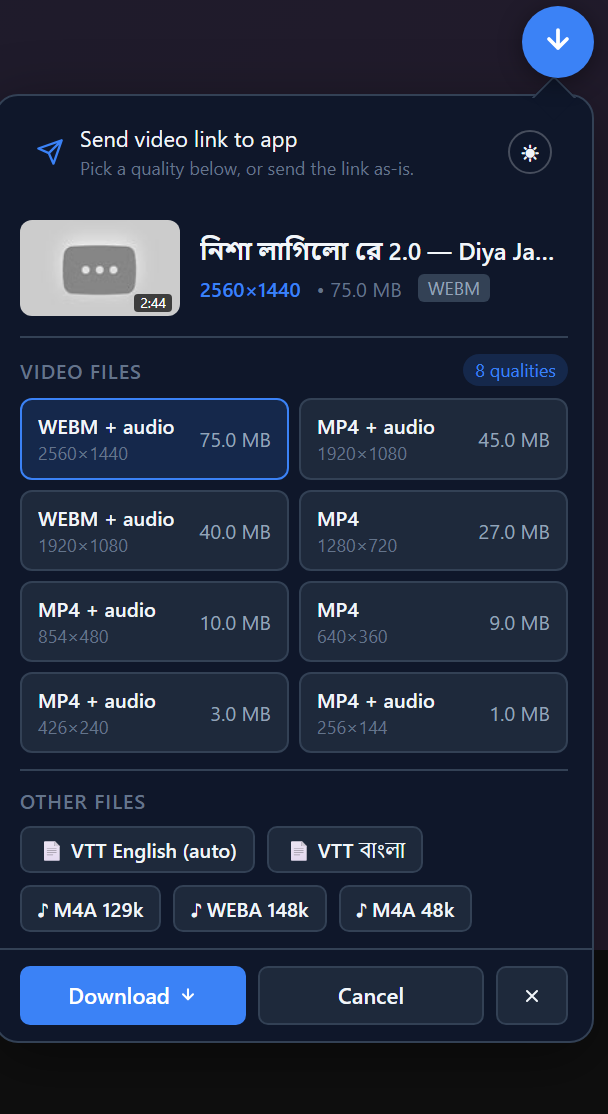
New: the picker lives on the video
The floating pill is gone. On a YouTube watch page (and on Facebook reels) a small circular button sits at the player's top-right and opens a message-bubble panel:
- Send video link to app — sends the page URL itself, for when no direct stream URL is exposed.
- Video Files — every quality found on the page with container, resolution and size, highest pre-selected. Pick a row and press Download; video-only rows carry the best audio track with them, so the app merges one file.
- Other Files — subtitle tracks (VTT, one chip per language) and audio-only tracks, e.g.
♪ M4A 128k. - Streams the player fetches while a video plays are folded in as they appear: a row that reads "via app" turns into a real download the moment its deciphered URL shows up. Ciphered pages say so plainly — press play, then reopen for fresh qualities.
- Light/dark toggle in the send row; click-away and Escape close the panel without touching the player.
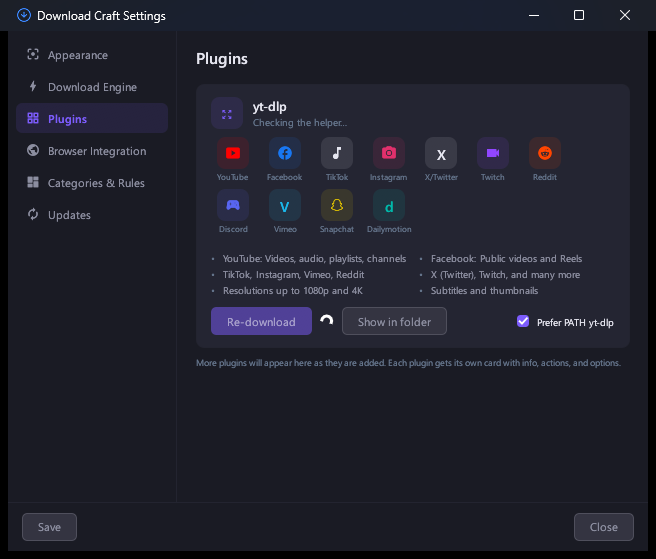
New: Settings is a window of its own
Appearance, Download Engine, Plugins, Browser Integration, Categories & Rules and Updates in a section rail, with iconed rows, themed cards and buttons that draw their own hover, focus and selected states in both themes. The plugins pane lists the sites the yt-dlp helper covers (YouTube, Facebook, TikTok, Instagram, X/Twitter, Twitch, Reddit, Discord, Vimeo, Snapchat, Dailymotion) and keeps its re-download / show-in-folder actions beside it.
Fixed
- Tray menu actions were dead once the window stopped painting. Windows hands out no
WM_PAINTfor a parked or fully covered window, so eframe stopped running frames — and Show/Exit are handled in that loop, which is why they did nothing. A watchdog now nudges one real paint when frames stall, menu clicks are acted on as they arrive, and Exit removes the tray icon before the window closes so no ghost icon is left behind. - A short Settings window no longer clips a pane.
Notes
- The extension is now 0.9.3: hit reload in
chrome://extensions, then reload your open YouTube tabs (Ctrl+R) — a page still running the old script cannot talk to the app. - Everything else is unchanged: segmented downloads, resume, the queue, the scheduler and the CLI keep working, and existing history is reused.