Repository navigation
Home

The commec package is a free, open-source, globally available tool for DNA sequence screening. More information about the tool is available on commec.ibbis.bio and the IBBIS project page on the Common Mechanism.
The package offers several sub-commands through the commec entrypoint:
setup   Download or update the reference databases required for screening
screen  Run Common Mechanism screening on an input FASTA.
flag    Parse .screen or .json files in a directory and create CSVs of flags raised
list    Display information on available annotated control lists
gui     Run the browser-based screening interface
This GitHub Wiki has documentation for the package, including including how to install commec and interpret screening results.
- Install Guide - quickstart, set up commec and required databases
- Tutorial - Step-by-step guide to your first screening run
- Command Line Usage - Detailed reference for all commands
- Browser GUI - Run screens locally or from another trusted computer
commec v2.0 — see Transitioning to v2.0 and documentation for the previous release in the v1.0 Wiki Archive
The commec screen command runs an input FASTA through the following screening steps:
- Biorisk search: Fast HMM-based search against curated sequence profiles
-
Best Match / Taxonomy Search: look for best matches to regulated pathogens using a two-step process:
- Protein search: BLASTX search against custom-filtered UniRef clusters
- Nucleotide search: BLASTN search against curated viral reference genomes
- Low concern search: Clear earlier flags based on matches to common or conserved sequences
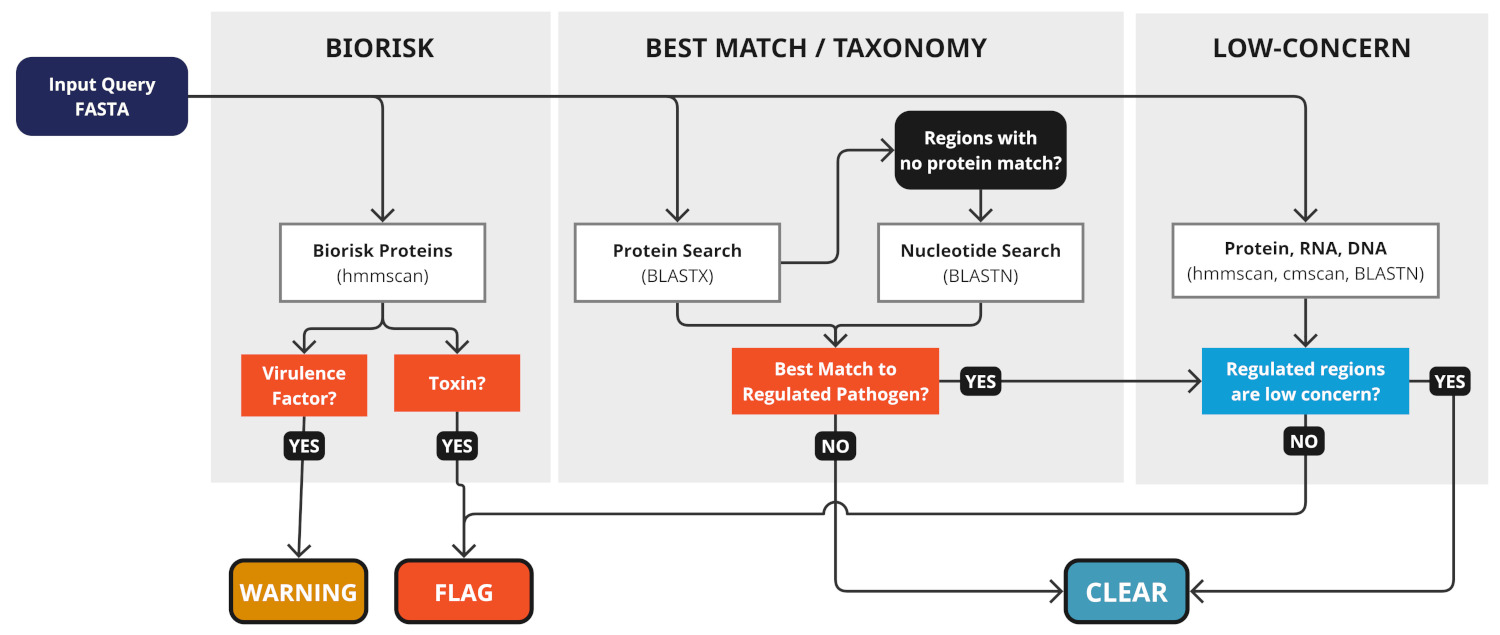
Protein (amino acid) FASTA files can be screened directly using the --protein flag. Protein sequences are passed to hmmscan and BLASTP without 6-frame translation; nucleotide-only steps (BLASTN taxonomy and low-concern) are skipped. See Command Line Usage for details.

In the best match / taxonomy search, commec flags regulated pathogens and sequences of concern using annotated control lists, which currently cover US and UK synthesis screening guidance and export controls from Brazil, China, the EU, India, the Australia Group, and Russia. You can tailor results to a particular jurisdiction with commec screen --regions, and inspect the available lists with commec list.
See the Install Guide for full details.
Screening with commec requires downloading a set of custom databases. In v2.0 the reference database set is roughly 8 GB to download (~40 GB on disk) and commec runs comfortably on a modern laptop.
For any questions or issues:
- Email: screening@ibbis.bio
- Open an issue: GitHub Issues