Repository navigation
Live Position
Group: Live. The main screen, updated every second. It shows where the Moon is now (or at any moment within the chosen day), whether your antenna can reach it and whether the DX can see it too.
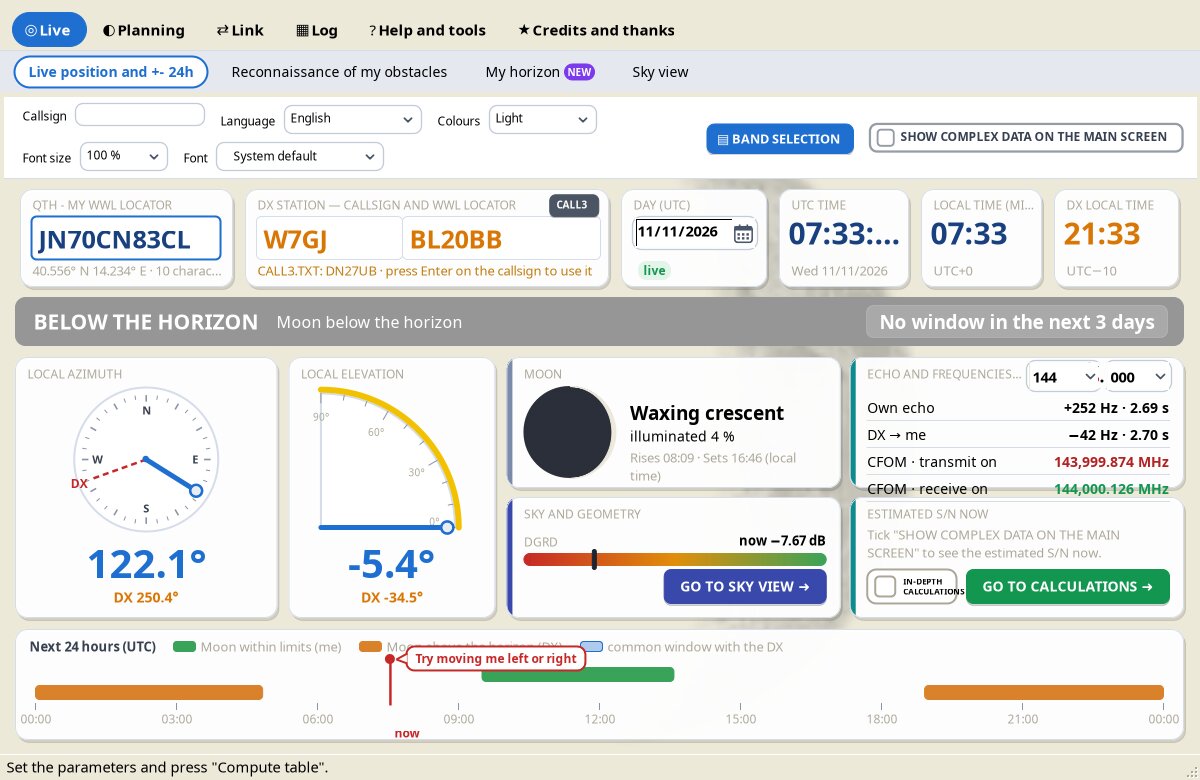
Callsign, Language, Colours, Font size, Font, the BAND SELECTION button and the SHOW COMPLEX DATA ON THE MAIN SCREEN box. See Settings and data folder.
- QTH - My WWL locator – your locator (4 to 14 characters) with the accuracy of the position; the card says whether it is suitable for obstacles (8 or 10 characters recommended).
-
DX station — callsign and WWL locator – the DX callsign and locator. With the callsign, the locator comes from CALL3.TXT (press Enter to use it). Two buttons in this card:
- CALL3 – update CALL3.TXT or copy it into the WSJT-X folder;
- GRAVES – set the French GRAVES radar (JN27SI) as the DX (GRAVES radar).
- DATE, UTC TIME, LOCAL TIME and DX LOCAL TIME (the DX time zone is derived from its locator).
A full-width coloured band with a countdown:
| Colour | Meaning |
|---|---|
| Green | MOON POINTABLE – inside your antenna limits |
| Blue | COMMON WINDOW WITH THE DX – pointable by you and above the DX horizon / inside the DX limits |
| Orange | MOON OUTSIDE THE LIMITS – above the horizon but outside your azimuth or elevation limits |
| Grey | MOON BELOW THE HORIZON |
The text says how long the current window lasts or when the next one starts (looking up to 3 days ahead).
Azimuth compass and elevation arc with your antenna limits in yellow and the DX direction in orange; LOCAL AZIMUTH, LOCAL ELEVATION, DX AZIMUTH, DX ELEVATION.
| Card | Contents |
|---|---|
| MOON | Phase and illuminated %, rise and set (local time). |
| ECHO AND FREQUENCIES (CFOM) | The working frequency (MHz + kHz), own echo Doppler, Doppler DX → me, and the CFOM frequencies: CFOM · transmit on and CFOM · receive on. |
| SKY AND GEOMETRY | Tsky behind the Moon, distance, declination, hour angle, the DGRD bar (from the minimum to the maximum of the Distance and Dgrd chart, with the current value) and GO TO SKY VIEW. |
| ESTIMATED S/N NOW | With SHOW COMPLEX DATA ON THE MAIN SCREEN ticked: S/N me → DX and DX → me in the chosen bandwidth and in 2500 Hz, with the typical threshold of the mode as a reference, the DX data (Dpol, MNR, Dgrd), the IN-DEPTH CALCULATIONS box and GO TO CALCULATIONS. Needs a valid locator and an active DX. |
At the bottom, the bar of the 24 hours of the UTC day with the useful windows and the common windows with the DX.
- Open the calendar to choose another day (past or future).
- Drag the red line in the 24-hour bar to choose the time.
- ▶ Now returns to live tracking with the current time.
- Possible ionospheric absorption – when you or the DX are in the polar cap or the auroral zone; the warning stays on the main screen.
- Polarization between the two stations – when Dpol reaches 60° or more within 24 hours.
See Warnings.
| Value | Meaning |
|---|---|
| Doppler / echo | One-way Doppler between you and the Moon is positive when the Moon approaches (rising). Your own echo is shifted by twice that. |
| CFOM | Constant Frequency On the Moon: transmit on f0 − my Doppler and receive on f0 + my Doppler. If both stations do it they always meet on f0 "on the Moon", without knowing each other's Doppler. WSJT-X uses the same scheme ("Constant frequency on Moon" Doppler tracking). |
| Tsky | Sky temperature behind the Moon at your frequency (K). High values = Moon in front of the Milky Way. |
| Dgrd | Degradation relative to ideal conditions (WSJT-X formula): Moon distance + sky noise. 0 dB = ideal; more negative = worse. See Distance and Dgrd. |
| Dpol | Spatial polarization offset between the two stations, −90° to +90° (linear antennas). |
| MNR | Maximum non-reciprocity, −20·log|cos 2·Dpol|: how much worse one direction can be than the other with unfavourable Faraday rotation. |
| Hour angle | Negative = east and rising, 0 = culmination, positive = descending; 15° = 1 hour. |
Approximate Doppler of the own echo by band (Theory manual § 1.10, from Bob Atkins KA1GT):
| Band | Maximum echo Doppler | Compensation |
|---|---|---|
| 50 MHz | ≈ ±120 Hz | not needed |
| 70 MHz | ≈ ±165 Hz | not needed |
| 144 MHz | up to ≈ 340 Hz | recommended |
| 222 MHz | ≈ ±525 Hz | needed |
| 432 MHz | up to ≈ 1000 Hz | needed |
For CFOM the radio must accept frequency changes via CAT also during transmission; some rigs do not. With a transverter, set the transverter offset in your digital program so that the frequency shown is the real one. References: Doppler 101, CFOM (KA1GT).