Repository navigation
v3.3.1 — Custom dictionary on local transcription

Download
|
Windows |
Linux — AppImage |
Linux — Debian/Ubuntu |
macOS — Apple Silicon and Intel builds are being finalized and will be added to this release shortly.
What changed
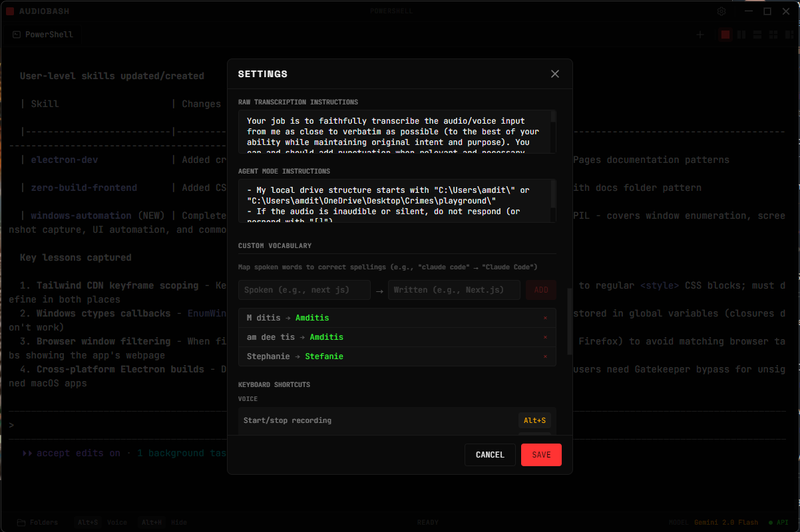
v3.3.1 fixes the custom dictionary on local transcription.
Fixed
- Custom dictionary now applies to local Whisper and Parakeet — your configured spoken-to-written corrections are applied to local-model transcripts, matching the Gemini, OpenAI, and Anthropic providers. The correction step previously ran only on the cloud raw-mode paths, so local models silently ignored the dictionary. (#42)
Tests
- Added regression coverage asserting a configured dictionary entry is applied on both local transcription paths.
Test results
440 passed · 18 skipped · 0 failures across 20 test files.
Installation notes
Windows
- Download and run the
.exeinstaller. - Windows SmartScreen may warn — click More info -> Run anyway.
- Launch AudioBash from the desktop or Start menu.
macOS
- Download the
.dmgfor your Mac type (Apple Silicon or Intel). - Drag AudioBash to Applications.
- Launch normally — these builds are signed and notarized, so Gatekeeper allows them on first open.
- Grant microphone permission when prompted.
Linux
- AppImage:
chmod +x AudioBash-3.3.1.AppImagethen run it. - Debian/Ubuntu:
sudo apt install ./AudioBash-3.3.1.deb. - For global shortcuts on Wayland, see the Wayland note in the manual.
Full changelog: v3.3.0...v3.3.1