Repository navigation
Releases: kemptonburton/dartwic-example-workspace
Release list
example-workspace-v2.1.0

Release artifacts
This is a bundled DARTWIC release. Each artifact is versioned and delivered separately.
| Artifact | Version | Minimum Engine | Minimum Interface |
|---|---|---|---|
| DARTWIC Engine | 2.1.0 | — | — |
| Desktop Interface | 2.1.0 | 2.1.0 | — |
| Webserver Interface | 2.1.0 | 2.1.0 | — |
| React Client | 3.0.0 | 2.1.0 | — |
| Python Client | 3.0.0 | 2.1.0 | — |
| TEMPEST Peer | 3.0.0 | 2.1.0 | — |
| Engine Plugin SDK | 3.0.0 | 2.1.0 | — |
| Interface Plugin SDK | 2.1.0 | — | 2.1.0 |
| DARTWIC Engine Protocol SDK | 3.0.0 | 2.1.0 | — |
| DARTWIC Example Workspace | 2.1.0 | 2.1.0 | 2.1.0 |
| DARTWIC Example Plugin | 2.1.0 | 2.1.0 | 2.1.0 |
| DARTWIC Node.js Client | 3.0.0 | 2.1.0 | — |
| DARTWIC C++ Client | 3.0.0 | 2.1.0 | — |
| Modbus TCP Plugin | 1.1.0 | 2.1.0 | 2.1.0 |
| LabJack T7 Plugin | 1.1.0 | 2.1.0 | 2.1.0 |
| EtherCAT Plugin | 2.1.0 | 2.1.0 | 2.1.0 |
| F Prime Bridge | 2.1.0 | 2.1.0 | 2.0.0 |
| Checklists | 2.1.0 | 2.0.0 | 2.0.0 |
| Documentation | 2.1.0 | — | — |
Overview
DARTWIC 2.1 brings together the changes made since DARTWIC 2.0: a simpler way to build connected applications, shared configuration editors, improvements to DCode and channel ownership, and a lot of smaller fixes across the Interface.
A lot of this update started with the documentation. Working through the guides showed where explanations were hard to follow—and where the software itself was asking people to do too much. We improved both, and will keep doing that!
Config Maps: less work to configure a plugin
Config Maps give plugin settings, modules, and tasks a shared configuration editor. A plugin describes its fields and mapping rows; DARTWIC handles the forms, validation, and saving.
Search for a channel in the Channel Searcher to trace it back to hardware bindings or plugin settings:
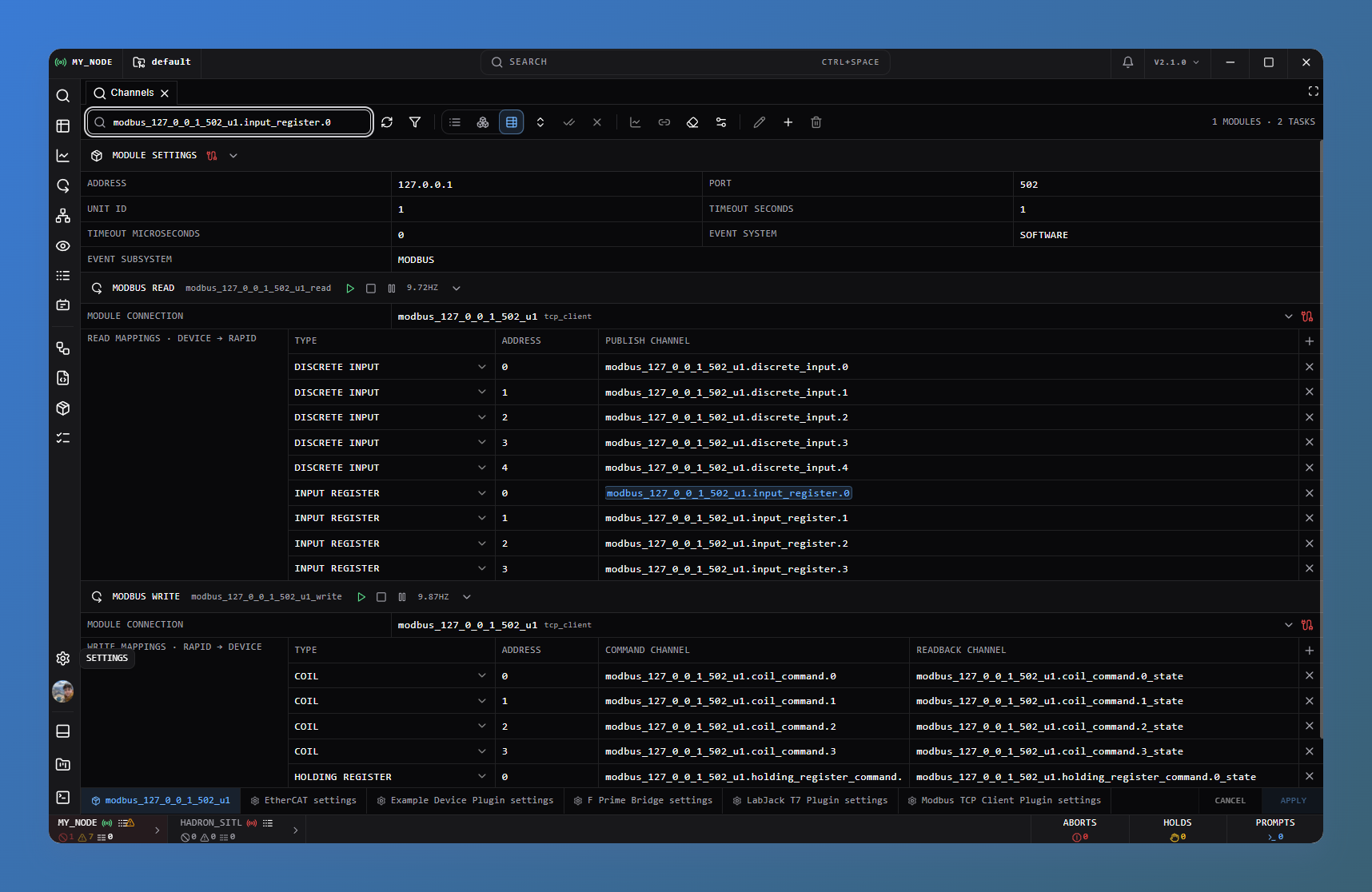
Keep a device's settings, linked tasks, and channels together. Search across configuration sheets and jump to the matching field without opening every task. Long sheet lists have a searchable overflow picker, and narrow panels make better use of their space.
Shared editors preserve drafts during saves and report conflicting changes. Existing Apply/Cancel and automatic-save workflows remain in place.
The Example, Modbus, LabJack, and EtherCAT plugins now use Config Maps. Plugin authors can also reuse them inside custom layouts.
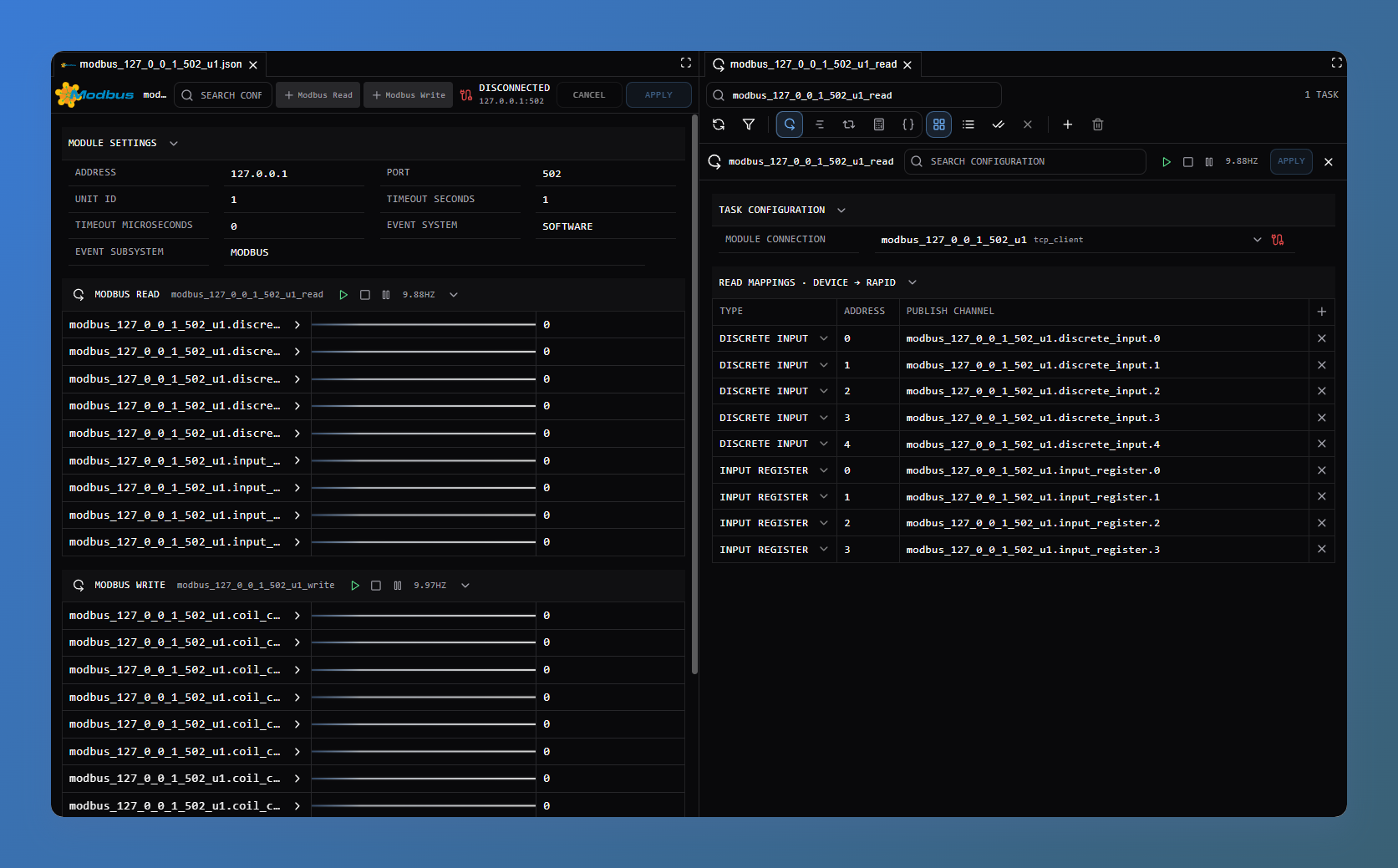
A simpler way to connect nodes
TEMPEST peer integrations now use the same three main objects throughout DARTWIC:
- Transport moves messages over the link.
- Peer handles registration, heartbeats, requests, replies, and dispatch.
- EngineProtocol provides channels, events, logs, and their handlers.
The Engine and C++ applications now share EngineProtocolPeer. Use the built-in ZeroMQ/TCP transport or supply your own, without creating a database just to connect. Existing PeerClient names remain supported.
The Network Map's Connection type selector explains the choices: an Engine Protocol Peer shares channels, events, and logs; a TEMPEST Protocol Peer supports custom operations and telemetry.
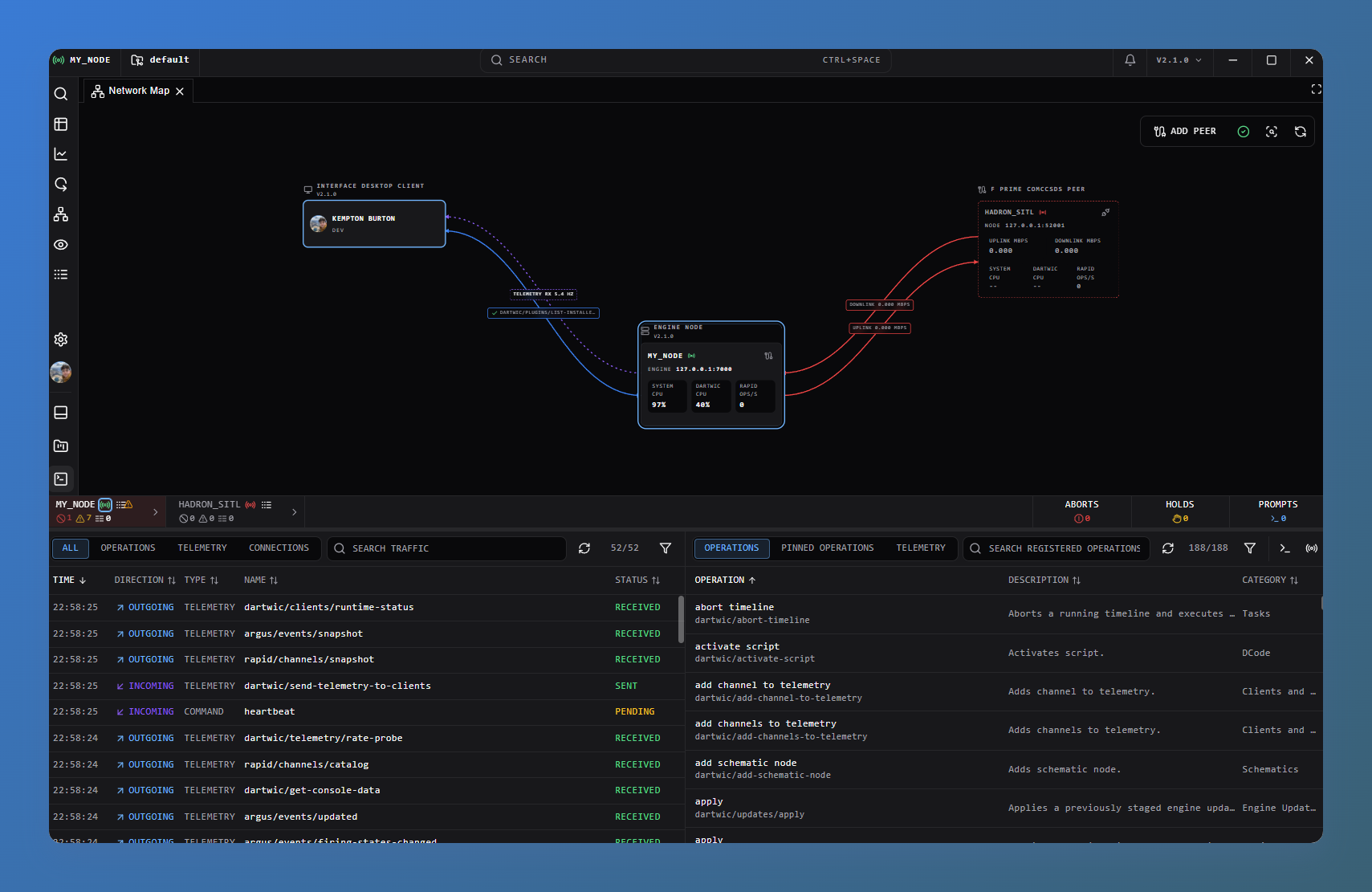
Reconnection and forgetting peers have also received fixes, including preventing queued telemetry from restoring data after a connection has been removed.
Channel APIs use upsert, query, and remove, with clearer command and telemetry handlers. Incremental updates report changes; complete snapshots keep connected nodes synchronized, including removals.
Plugin authors use registerPeerTransport for a new link between DARTWIC applications, or registerPeer for a device-protocol bridge. The Engine supplies the bridge's Peer and EngineProtocol so it can publish measurements and handle commands directly.
DCode and channel control
Timed conditions such as when(|sensor_ready| == 1, time=0.5): wait for a condition to stay true across evaluations before running a block, without blocking the surrounding work. A false evaluation resets the timer; once qualified, the block runs on each qualifying evaluation. Use if for an immediate check or wait_until when the procedure itself should wait.
Nest once: inside when for work that should run only once during that runtime section's execution.
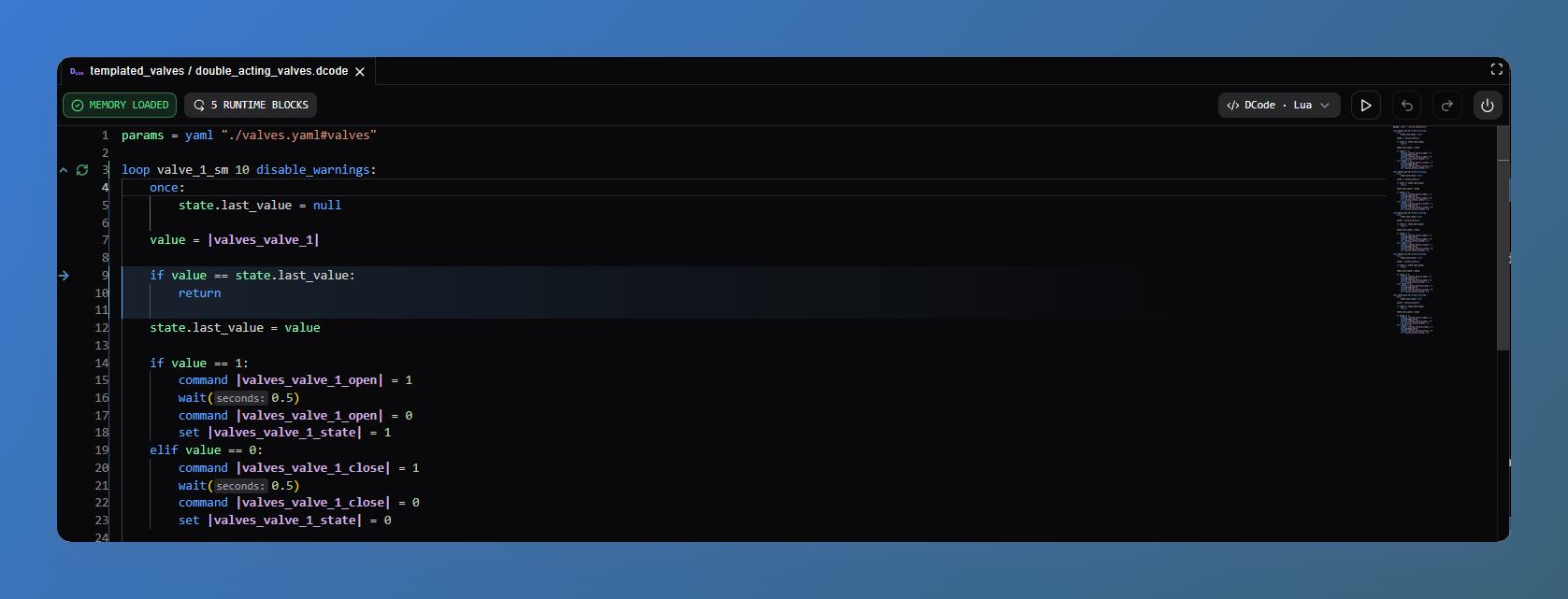
Channel-control statements are more consistent: command, set, override, and free work with or without a value. Operator manual overrides retain priority. Rejected operations leave the channel unchanged and warn without stopping the task body.
Runtime cleanup now waits for final handlers and in-flight callbacks before discarding old work. Reusing a task name does not inherit an old runtime's claims, and releasing a channel keeps its last value.
The editor has fixes for syntax, channel references, and variable navigation. These automation changes also apply to Native C++ DCode.
Events, recording, and telemetry
Event history now distinguishes repeated detections from separate firing periods, with compact count badges and exact values in details. Reports can stop firing after an inactivity timeout or explicitly through stop_event_firing; holds and prompts end through their workflow.
The C++ plugin SDK now follows DCode's event names and arguments, including typed prompts and holds. The old consoleError and stopEventFiring names have been removed; bundled native plugins use the updated SDK.
Peer synchronization retains complete 5 Hz snapshots, with fixes for duplicate event/log records and disconnected-node display. Recording, log delivery, and network diagnostics also received background-processing improvements. Locally saved history remains available when a peer disconnects.
The new every_value_exclude_autorecord mode saves every submitted measurement without mixing in periodic snapshots. The LabJack stream worker uses it so acquisition gaps stay visible in history. Graph tooltips and telemetry CSV exports can also show who wrote each sample.
Review and export a run
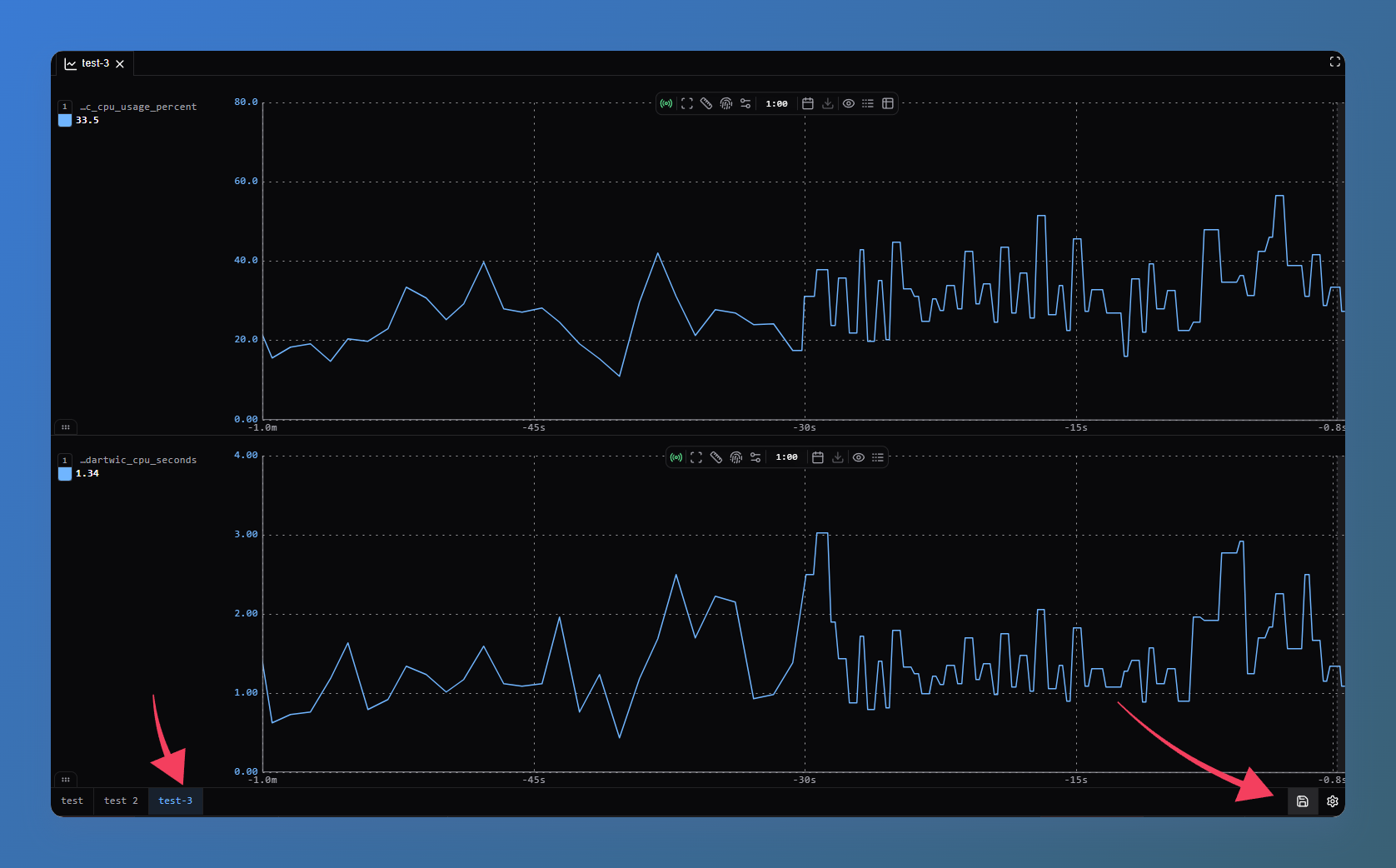
Save arrangements of multiple telemetry graphs and reopen them across the workspace, with each graph's channels, window, and settings ready to use.
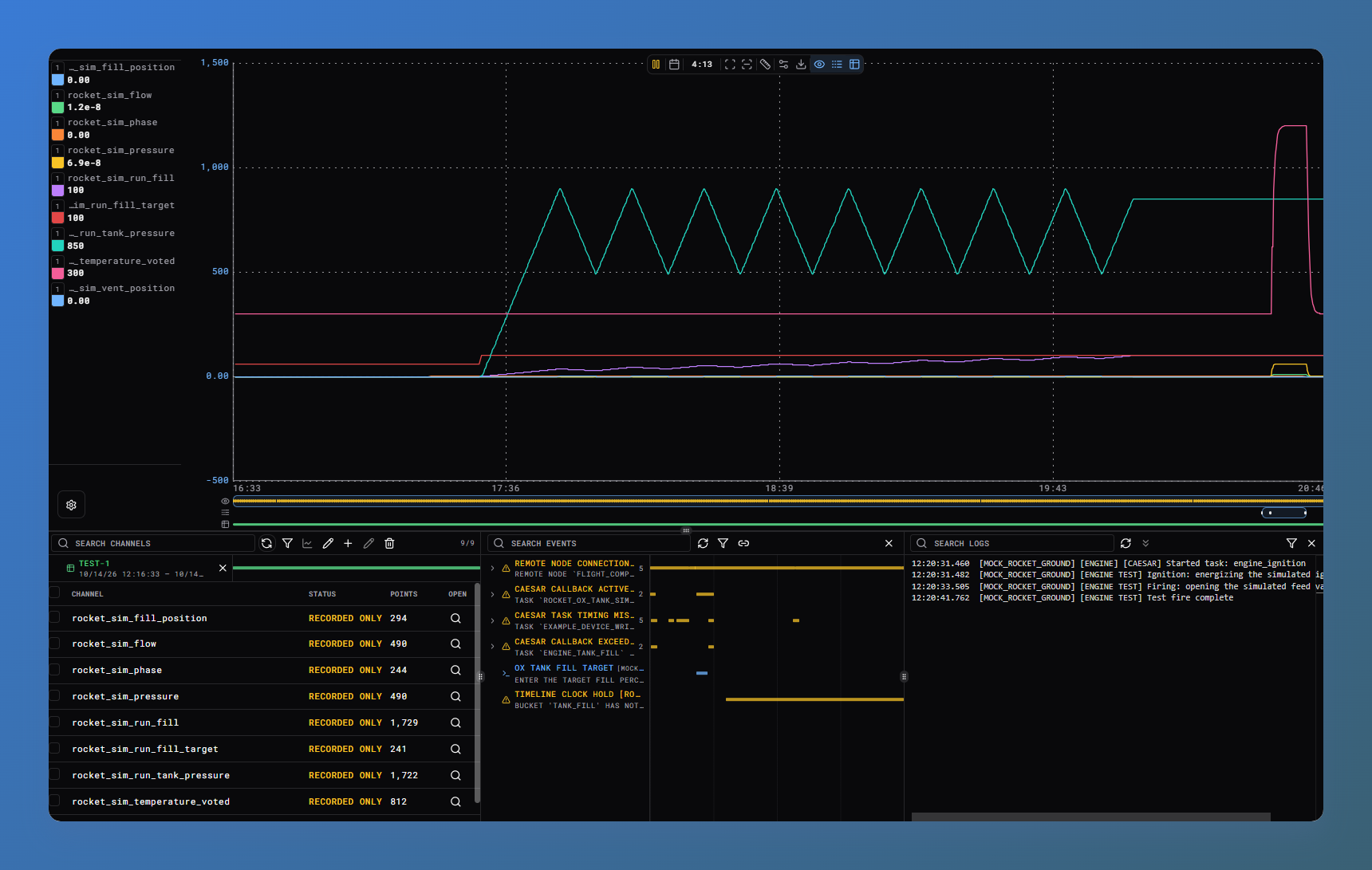
Click a dataframe to open its run in Telemetry. Channel traces, events, logs, and dataframe ranges share a time axis, with blue highlights showing loaded records. Export channels, events, and logs together for the period you are viewing, or a whole dataframe as a ZIP. Events, Logs, and databases also offer selected, loaded, and visible range exports.
Device feedback and the example workspace
The Example Plugin distinguishes the command you send from the state you observe, using matching _state channel names. Command and readback mappings appear together where supported. Module connection status is also independent of whether its acquisition task is running.
The example workspace follows these changes and includes the simplified C++ flight peer, with matching plugin sources and launch tools.
The F Prime bridge uses the same Engine-supplied Peer and protocol, retaining dictionary-driven measurements, events, and commands. It was exercised with Hadron SITL and native fixtures; command execution is confirmed throug...
example-workspace-v2.0.5
DARTWIC Example Workspace 2.0.5
The example device bindings now use one <command>_state readback for every command. The task mappings, saved channels, valve and ox-tank DCode, recording list, acceptance script, and Engine Test Fire schematic all use those names. Old _applied, _position, and separate valve state channels are removed from the authored snapshot.
Install Example Device Plugin 2.0.4 before opening this workspace. The project dependency requires that version. If updating an existing copy rather than starting from this tagged source, replace its read mappings and schematic/script references and remove obsolete saved channels. This release is tagged source; GitHub's source ZIP does not include plugin binaries or a built flight peer.
Verified: all workspace JSON parsed; nine command/state pairs matched read mappings and saved channels; the Engine Test Fire schematic referenced device states; the workspace verifier passed; the Windows flight peer built from a fresh CMake directory. A live Engine run of the full sequence was not performed for this release.
example-workspace-v2.0.4
Release artifacts
This is a bundled DARTWIC release. Each artifact is versioned and delivered separately.
| Artifact | Version | Minimum Engine | Minimum Interface | Release |
|---|---|---|---|---|
| DARTWIC Engine | 2.0.0 | — | — | New release |
| Desktop Interface | 2.0.0 | 2.0.0 | — | New release |
| Webserver Interface | 2.0.0 | 2.0.0 | — | New release |
| TEMPEST Peer | 2.0.0 | 2.0.0 | — | New release |
| Engine Plugin SDK | 2.0.0 | 2.0.0 | — | New release |
| Interface Plugin SDK | 2.0.0 | — | 2.0.0 | New release |
| DARTWIC Engine Protocol SDK | 2.0.0 | 2.0.0 | — | New release |
| DARTWIC Example Workspace | 2.0.4 | 2.0.0 | 2.0.0 | New release |
| DARTWIC Example Plugin | 2.0.3 | 2.0.0 | 2.0.0 | New release |
| LabJack T7 Plugin | 1.0.0 | 2.0.0 | 2.0.0 | New release |
| EtherCAT Plugin | 2.0.0 | 2.0.0 | 2.0.0 | New release |
| Documentation | 2.0.0 | — | — | New release |
| React Client | 2.0.0 | 2.0.0 | — | New release |
| Python Client | 2.0.0 | 2.0.0 | — | New release |
| DARTWIC Node.js Client | 2.0.0 | 2.0.0 | — | New release |
| DARTWIC C++ Client | 2.0.0 | 2.0.0 | — | New release |
| Modbus TCP Plugin | 1.0.1 | 2.0.0 | 2.0.0 | Existing release (link only) |
Overview
DARTWIC 2.0 expands the platform from a single-node acquisition and control workspace into a system for distributed operation, more capable automation, and recorded evidence of what happened.
DARTWIC stands for Data Acquisition for Rocket Testing With Integrated Controls. It started as a way to collect data from rocket tests and operate the equipment around them. The same tools can connect sensors, run control logic, command devices, build operator displays, and review a test afterward. Channels give measurements and commands a shared name across the engine, automation, interface, and external software.
I started work on 2.0 in April 2026. Roughly six months later, this release brings together two major subsystem additions—TEMPEST peer networking and ARGUS—and substantial reworks of RAPID, CAESAR, DCode, and the tools around them. Where 1.0 concentrated on making one node useful and reliable, 2.0 focuses on letting a project grow across devices, procedures, and connected nodes, while being the most optimized with the most carefully designed backend yet.
What shaped 2.0
A lot of this release went into the behavior underneath the interface and engine:
- Control comes first. Prepare repeated work ahead of execution and keep recording, telemetry, and other background services from holding up control for disk or network delivery. All control backends limit global locks and runtime allocation to allow for more deterministic timing and faster more reliable control. Every single action is also designed around when it is executed, synchronous or asynchronous. Need a immediate response? Use a channel calculation or a event DCode block.
- Authority belongs to the engine. Make it clear who controls a channel, how an override takes effect, and when control is released. Those rules are applied across DCode, plugins, operators, and remote requests.
- Operators need evidence. Show source timestamps, command origin, task timing, recording pressure, and failures. An accepted command and a confirmed equipment response are different things. It is easier than ever to find what created or controlled a channel.
- Extensions should reuse the platform. Give device drivers, custom interfaces, and external applications access to the same underlying services through documented SDKs and clients.
- Keep the workflow understandable. Make timing, ownership, and outcomes explicit so authors and operators can follow what their system is doing.
Major additions and reworks
TEMPEST: connected engines and custom nodes
TEMPEST grows beyond the client messaging layer in 1.0 into a peer system for connecting DARTWIC engines and custom applications. Nodes can share RAPID channels, ARGUS events, and supported log streams, and route commands to the engine that owns the resource.
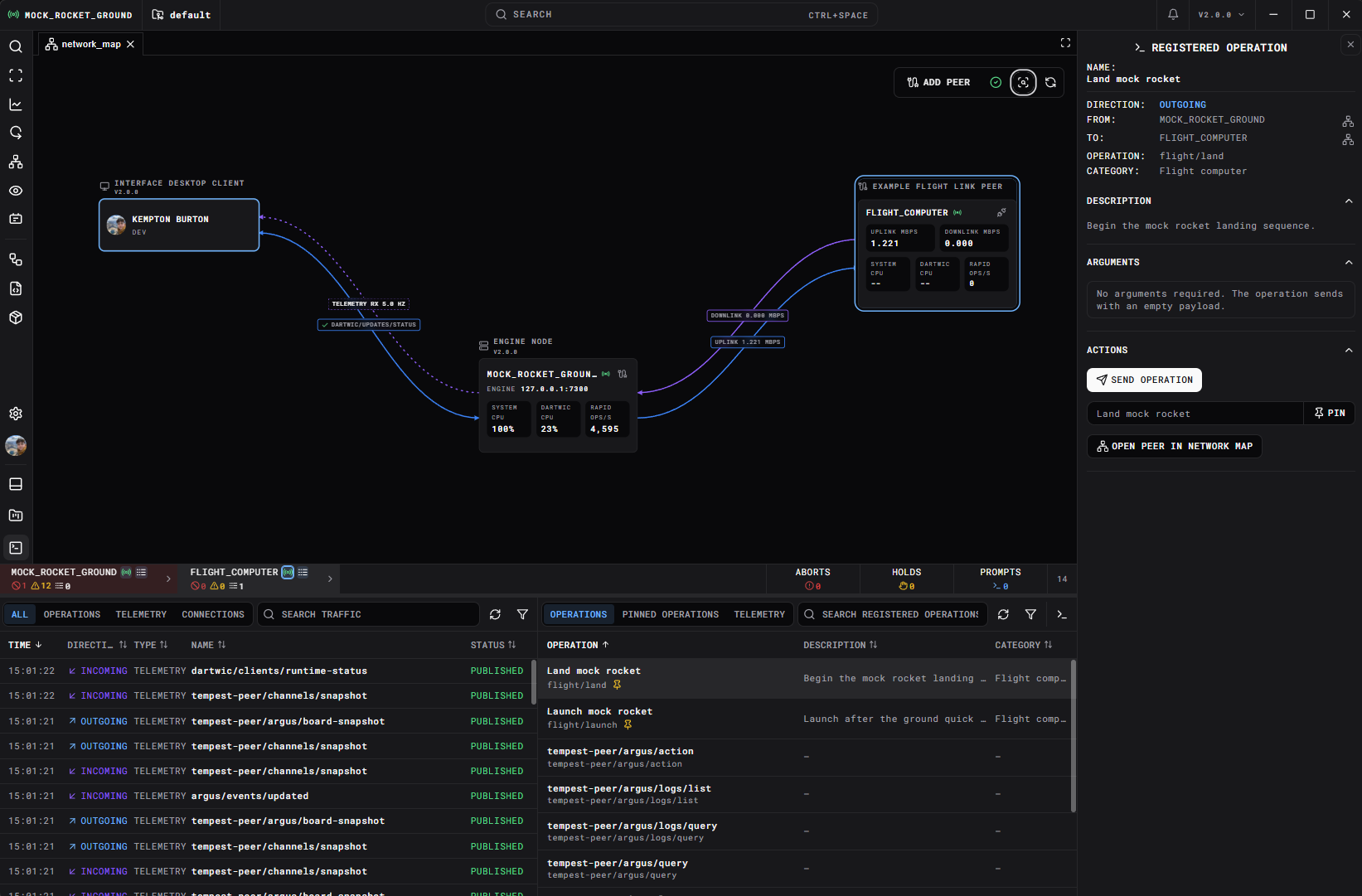
A remote channel keeps its node identity, such as TEST_STAND:tank_pressure, throughout searches, schematics, DCode, and client requests. Remote observations retain their source timestamps and availability; receiving a value does not transfer control authority to the receiving node. Custom peer types and transports let native applications or embedded-system integrations participate alongside engine-to-engine connections.
The Network Map provides a place to configure and inspect those connections. See TEMPEST Peers for setup and examples.
ARGUS: events, logs, and history
The old alarming system has grown into ARGUS, a dedicated subsystem for events, logs, and their recorded history. A condition now has a named identity, source context, related channels, firing intervals, and operator actions that can be followed over time.
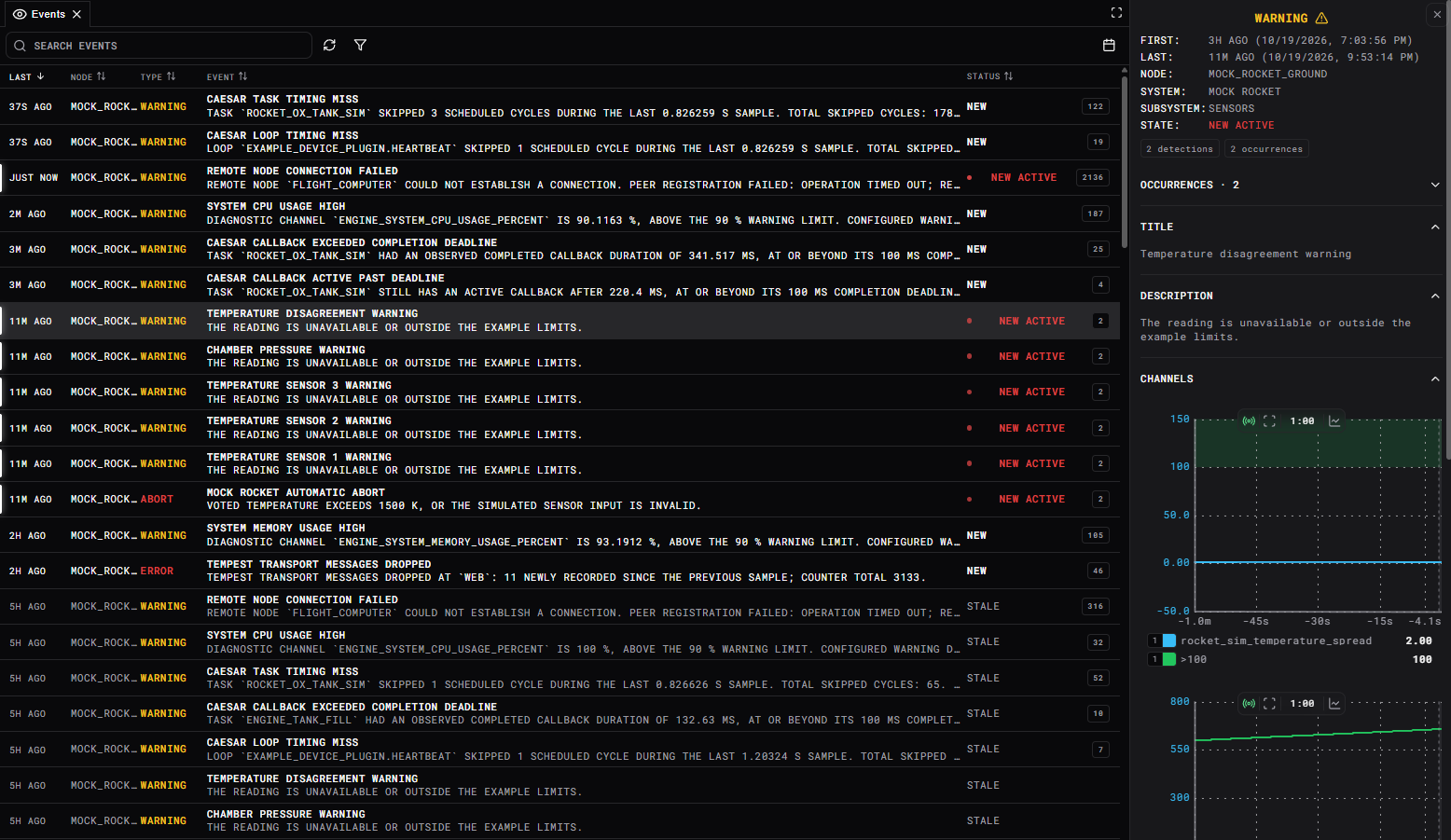
Repeated reports can belong to one continuing occurrence, while a later recurrence remains part of that event's history. Acknowledgement, resolution, silencing, prompts, and holds have distinct meanings. DCode can declare event conditions and reactions alongside its control logic, including explicit overrides when a condition fires and releases when it clears.
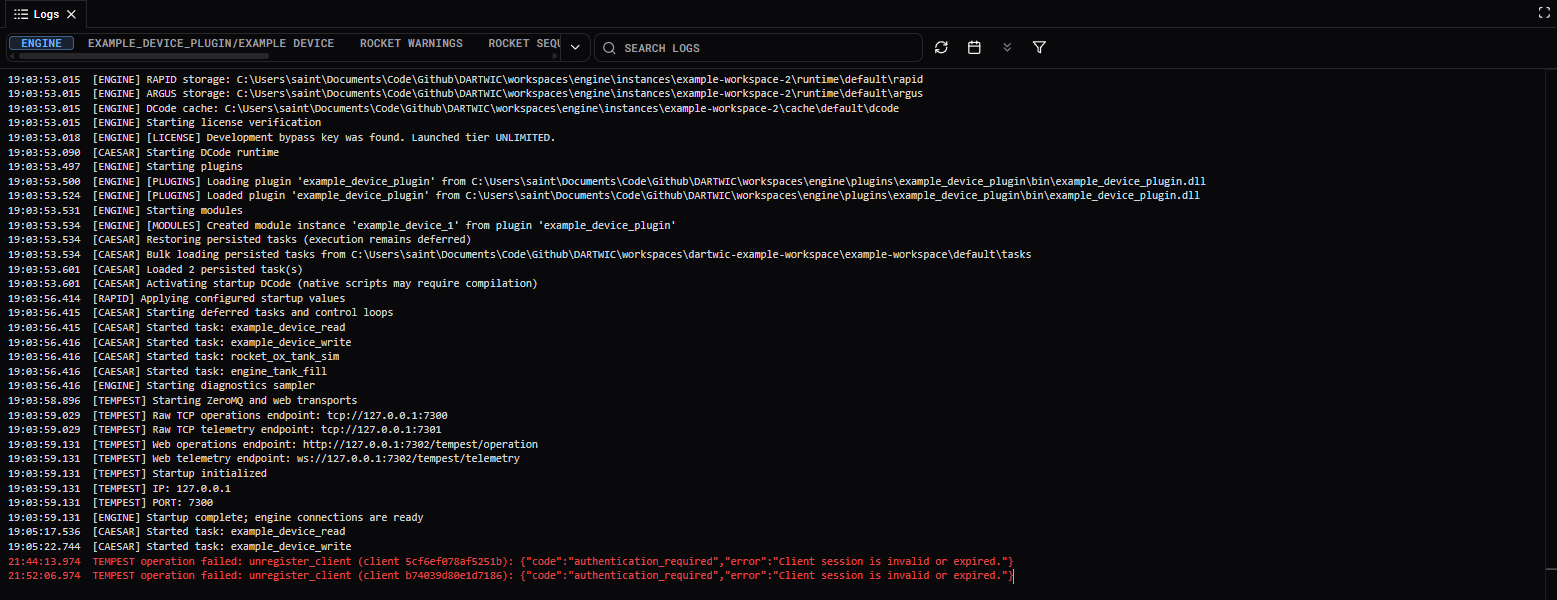
The event board, chronological logs, recorded channel graphs, and dataframe views bring that evidence together for investigation. Recording runs independently of client delivery, with diagnostics for backlog and loss. ARGUS Events explains the operator workflow.

CAESAR and DCode: a fuller automation system
Automation expands from periodic and worker tasks into state machines, sequences, timelines, and ordered task groups. A project can describe a procedure, wait for a condition, advance through states, or coordinate a read → control → write cycle without maintaining separate custom scheduling code.
The custom programming language, DCode, was created to allow writing easy automation sequences and scripts inside DARTWIC. It comes with a full code editor built into the interface, providing docstrings, syntax checking, autofill and code suggestions.
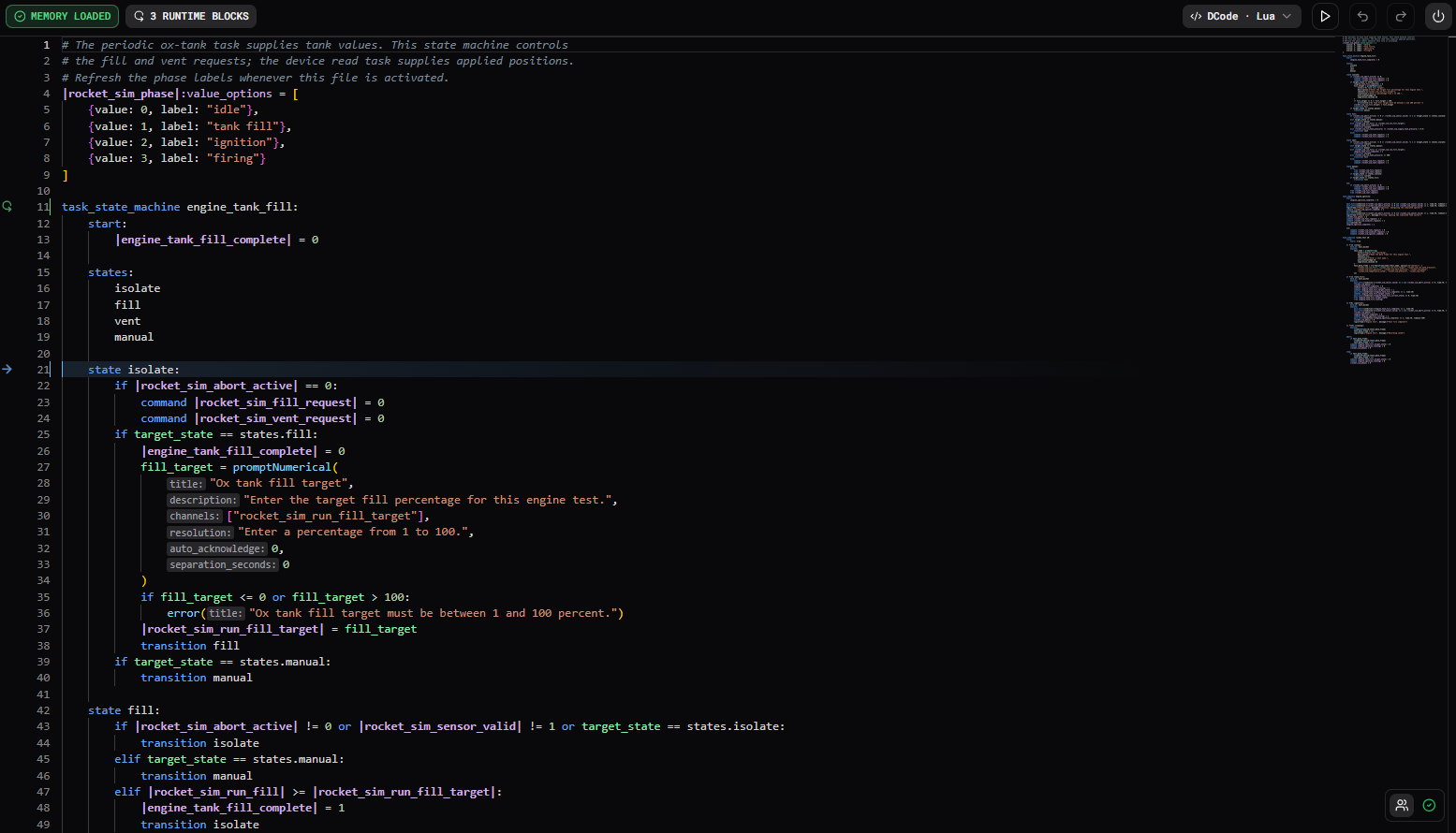
DCode also adds a native C++ execution backend for supported code, alongside Lua. Templates and configuration tables let one definition generate calculations, tasks, and events for many device instances. Plugin functions use a shared argument/result schema across both backends. The editor adds runtime visibility and navigation to help connect authored code with the tasks and channels it creates.
Task lifecycle and channel authority are more explicit: starting a task does not automatically take control, holding it retains its authority, and completed stop releases the channels it controls. Timing diagnostics distinguish observed rate, late releases, missed releases, failed cycles, and callbacks that are still active.
See Tasks, Templates and Configuration, and Native C++ Execution.
RAPID: reworked access, authority, and recording
RAPID now supports fixed ...