Repository navigation
Alpha Guide
What works today, how to install it on a host, and how to use it from the browser and the terminal. Alpha is functional and deliberately plain; the visual pass comes later. Everything below was exercised on an Ubuntu 26.04 VM with Podman 5.7.
-
Workspaces are system users (
ws-<name>) with their own subuid range, home under/srv/ws, rootless Podman andsystemd --userkept alive by linger. Deleting a workspace removes the user, its home, its containers, images and volumes, and the subuid entry. -
Services come from an image or from a Dockerfile in a git repository. Each service becomes a Quadlet
.containerunit; stateful services get a named volume; a workspace shares one network where services resolve each other by name. - Plans before changes. Creating or editing anything produces a plan that shows exactly what will happen on disk, including the unit diff. Nothing changes until the plan is applied. Destructive plans need an explicit confirmation.
-
Secrets are encrypted at rest with a per-panel master key and pushed to
podman secret; unit files only ever contain the secret's name. -
Ports are closed by default. A port is reachable only inside the workspace network until it is published, and then it binds to
127.0.0.1unless you say otherwise. Host port clashes across workspaces are refused at plan time. -
Deploy starts the unit and waits for the health check (
Notify=healthy). For Dockerfile services it first clones the repository and builds the image as the workspace user; the image is tagged with the commit. -
Observe: systemd state, live CPU/memory/network from
podman stats, the unit file on disk, journal logs with follow mode. -
Reboot-safe: deployed services carry
[Install]and come back on their own; services that were defined but never deployed do not start at boot.
Requirements: Ubuntu 26.04 LTS (Fedora and Debian 13 are secondary targets), root access, outbound network for images.
# build locally (Rust stable, pnpm) and copy the binary, or take a release binary later
cargo build --release -p maurice
sudo install -m 0755 target/release/maurice /usr/local/bin/maurice
sudo ln -sf maurice /usr/local/bin/marik
sudo ln -sf maurice /usr/local/bin/maurice-odysseus-stella

sudo maurice host prepare       # AppArmor fix for pasta, panel PostgreSQL, master key, journald limits, maurice.service
sudo systemctl enable --now maurice
host prepare is idempotent. It writes /etc/maurice/maurice.env (database URL, master key; mode 0600, keep a copy somewhere safe), installs the panel's own PostgreSQL as a system Quadlet unit on 127.0.0.1:5432, and the panel as maurice.service on 127.0.0.1:7700. The panel listens on loopback only; put it behind SSH or a proxy. There is no authentication yet (MVP).
Same binary, three names (ADR-007):
| Name | Use it for | Refuses |
|---|---|---|
marik |
everyday work: read, plan, deploy, restart, stop | applying destructive plans |
maurice |
everything; destructive plans need --confirm
|
— |
maurice-odysseus-stella |
scripted recovery; also needs --yes-i-mean-it
|
— |
Open http://127.0.0.1:7700/ (through an SSH tunnel: ssh -L 7700:127.0.0.1:7700 user@host).

- Existing workspaces with environment (
devorprod), system user, uid, subuid range and home. - Create a workspace: a name and an environment. Plan opens the plan dialog; nothing happens until you apply it.
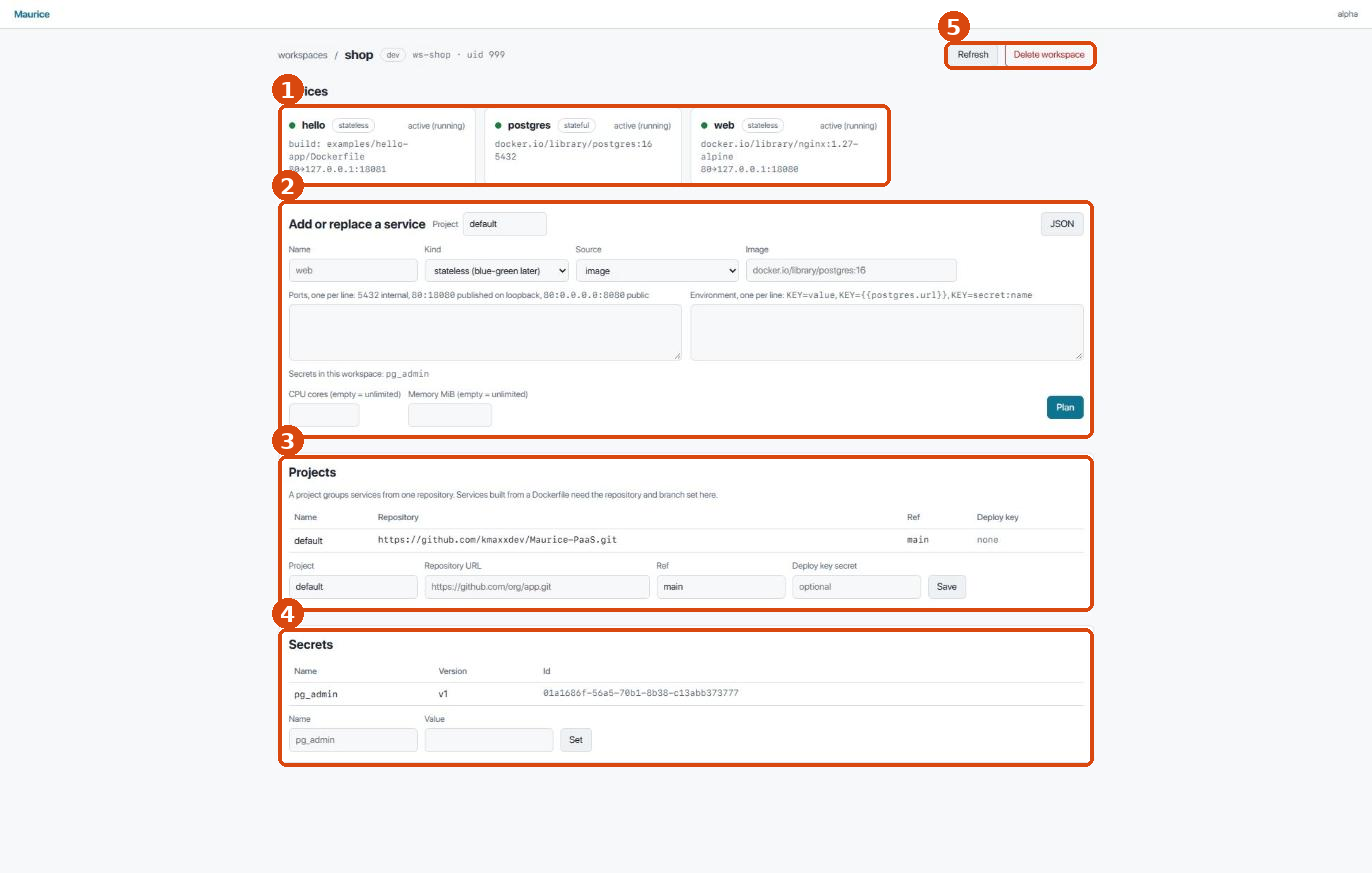
- Services with live state from systemd, image or Dockerfile, and ports (
80→127.0.0.1:18080means published on loopback; a bare number is internal only). Click a card for the service page. - Add or replace a service through the form: name, kind, source, ports one per line, environment one per line (
KEY=value,KEY={{postgres.url}},KEY=secret:name), CPU and memory limits. JSON switches to the raw API shape. - Projects: which repository and branch a Dockerfile service is built from, and the deploy-key secret for private repositories.
- Secrets: names and versions; set a new value here before referencing it from a service.
- Refresh re-reads state; Delete workspace plans a destructive removal.
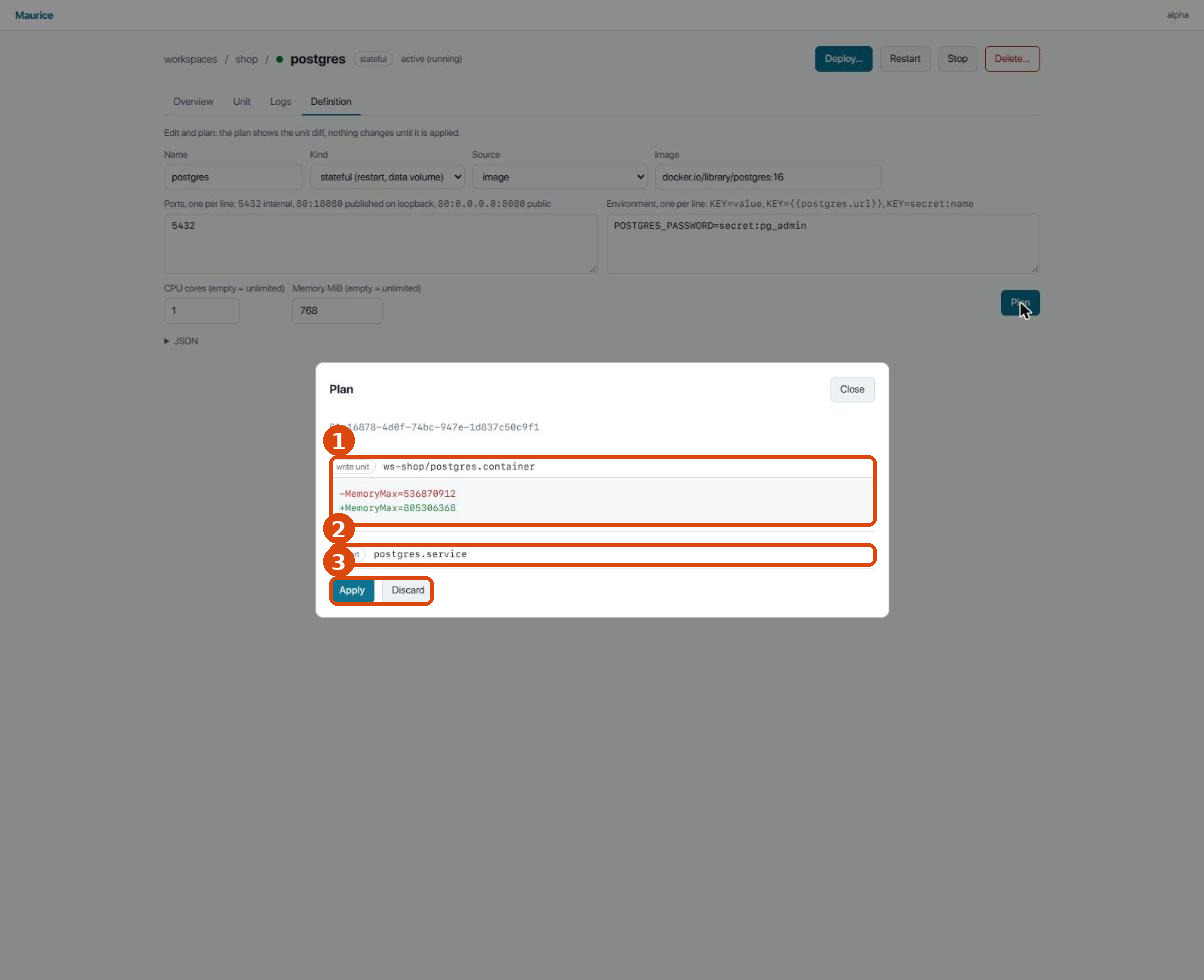
- Every change the plan will make. Unit changes show a line diff against what is on disk (here: a memory limit raised from 512 to 768 MiB).
- Follow-up actions the plan implies, such as restarting a running service after its unit changed.
- Apply executes through the agent and streams progress; Discard throws the plan away. Validator findings appear above the changes: errors keep Apply disabled, warnings do not.
Destructive plans look different:
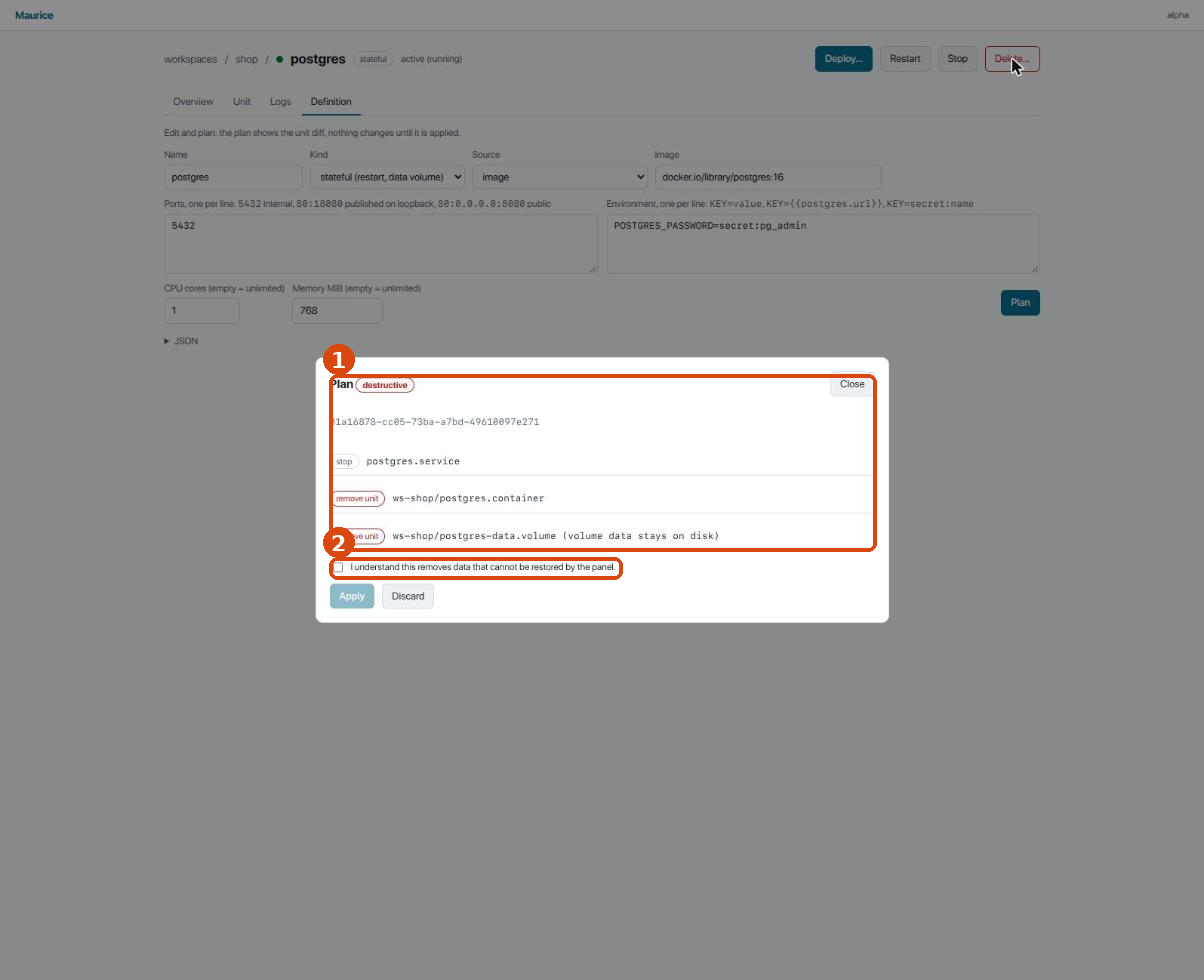
- The
destructivebadge and red change markers. - The confirmation checkbox: Apply stays disabled until it is ticked. From the CLI the same plan needs
maurice … --confirm;marikrefuses it.

- Actions: Deploy… plans a (re)start, or a clone and build for Dockerfile services; Restart and Stop act immediately (they are reversible); Delete… plans a destructive removal.
- Runtime: systemd state, the image that runs, the deployment id and since when.
- Usage: CPU, memory and network sampled every two seconds, with meters against the configured limits.
- Ports and environment as the unit sees them; secrets appear by name only.
- Tabs: Unit shows the file on disk, Logs the journal, Definition the editable form.

- Tail size and Refresh.
- follow keeps appending new lines as they arrive.
marik workspace create shop --env dev         # prints a plan
marik plan apply <plan-id>                    # creates ws-shop

WS=$(marik workspace list | awk '{print $1}')
printf 's3cret' | marik secret set $WS pg_admin
marik service upsert $WS -f examples/postgres-service.json
marik plan apply <plan-id>                    # writes the units
marik service list $WS
marik service deploy <service-id> && marik plan apply <plan-id>   # waits for healthy

marik service unit <service-id>               # the .container file on disk
marik service logs <service-id> --follow
marik service stats <service-id>

marik project set $WS default --repo https://github.com/you/app.git --ref main [--key-secret deploy_key]
marik service upsert $WS -f examples/hello-service.json   # dockerfilePath → built on deploy

maurice service delete <service-id>           # destructive plan
maurice plan apply <plan-id> --confirm
maurice workspace delete $WS --purge && maurice plan apply <plan-id> --confirm
Service definitions are the API's JSON (see examples/): imageRef or dockerfilePath, ports[] with containerPort, published, hostIp, hostPort, and env[] with literal, ref or secretName.
- No proxy, domains or TLS; publish to
127.0.0.1and front it yourself until MVP. - No authentication on the panel; keep it on loopback.
- One container per service: redeploy restarts in place (blue-green is MVP).
- Builds run without a registry; images live in the workspace user's local store.
- Env references resolve
{{service.host}},{{service.port}}and{{service.url}}(postgres, redis-compatible, http). - Logs follow mode polls the journal once a second.