Repository navigation
Releases
v2.3.3 — Headless command-line scan and export scope fixes

This release adds a command-line scan that runs without a window, and fixes export ignoring the selection and the chosen scope.
Command line
iptv-checker scan <playlist>checks a saved playlist (by name or id), an M3U file or folder, or a playlist URL with no window and no display, so it runs from cron or a systemd timer on a headless server. It uses the saved settings, and the run is written to scan history, so the app shows it later (#304, ref #262).- Every scan setting has an override flag, for example
--timeout 5or--skip-screenshots, and--preset <name>applies a saved preset.--export <dir>writes the CSV report, a playlist per status and the renamed playlist. - The exit code is
0when the scan completed,1when it failed,2for invalid arguments and130when it was interrupted. A playlist with no channels counts as a failure, and so does a network outage the scan notices. - A headless run checks every channel again and keeps no checkpoint. Every status playlist is rewritten on export, empty ones included.
- On Windows the app has no console, so the output has to be redirected to a file. That path is untested.
Export
- The export menu starts from the selection each time it opens: "Selected" when more than one row is selected, otherwise "All". It always started on "All" (#303, ref #302).
- "Export Scan Log (JSON)" follows the export scope. A scoped file holds only those channels and records how many were left out as
channels_omitted_by_scope;summarystill covers the whole run. - The File menu's "Export Filtered M3U/M3U8" exports the filtered list. It used the scope last picked in the export menu, "All" by default. The other File menu exports use the selection-driven default.
- A File menu export chosen with nothing loaded no longer stays queued and runs once a playlist opens.
- Previewing one row of a multi-row selection from the context menu keeps the selection. The table still showed the rows as selected, but the stored selection collapsed to that row, so "Selected" exported one channel.
Fixes
- Scan history ids are unique across launches. They came from a per-launch counter, so runs from different launches shared one id and one results file. Existing entries are unchanged (#304).
- The scan history index is rewritten under a file lock, because the app and a command-line run can write it at the same time.
Internal
- Scan orchestration moved from the Tauri command layer into the engine, behind a host interface that the app handle and the headless host both implement (#304).
- The TypeScript types that cross the IPC boundary are generated from the Rust definitions by ts-rs, and CI fails when the committed bindings are stale (#303).
- CI runs clippy and the Rust tests on Windows. Debug builds on Windows embed the application manifest through the linker so test executables can start; release builds are unchanged (#303).
Full changelog: v2.3.2...v2.3.3
v2.3.2 — Dispatcharr guide history and DMA-BUF rendering on Linux
This release shows past programmes in the Dispatcharr guide and keeps WebKit's DMA-BUF renderer on for most Wayland setups.
Dispatcharr
- The guide includes programmes that have already ended. Dispatcharr's
/output/epgleaves them out unlessprev_daysis set, so the guide started at the current programme. The guide URL now asks for as many days back as the deepest catch-up archive, at least one and at most the guide view's 14 days. - The guide URL pins
tvg_id_source=channel_number, which the channel-to-guide mapping depends on.
Linux
- WebKit's DMA-BUF renderer stays on under Wayland. It was disabled on every Wayland session, so WebKit painted every frame, video included, on the CPU. It is now disabled only with NVIDIA's proprietary driver older than 555, which lacks Wayland explicit sync. On an RTX 4090 with driver 615.78, 1080p playback in the lightbox dropped from about 125% to 23% of a CPU core. Setting
WEBKIT_DISABLE_DMABUF_RENDERERstill overrides this (#301).
Full changelog: v2.3.1...v2.3.2
v2.3.1 — Codec ranking, HTTPS probing fix, and Cast list scrolling
This release adds video codec ranking to Dispatcharr's Fix order and fixes ffmpeg probing of HTTPS streams on macOS and Linux.
Dispatcharr
- Fix order can rank working streams by video codec, newest first: AV2, AV1, VVC, HEVC, VP9, H.264, VP8, MPEG-4, MPEG-2, MPEG-1. Unlisted codecs follow, and streams without a detected codec come last. The signal joins the end of the default rank order, so existing rankings are unchanged until it is moved up (#300, ref #294).
- The table's Codec column sorts by the same order instead of alphabetically (#300).
Fixes
- ffmpeg and ffprobe now get the system CA bundle through
SSL_CERT_FILE, unless the user has set it. The static macOS sidecar looked for root certificates in its build machine's OpenSSL path, so every HTTPS input failed TLS verification. Those streams were reported alive but got no media info or screenshot. An environment variable is needed because the HLS demuxer does not pass-ca_fileon to variant playlists and segments. - Scan summary logs redact stream credentials from channel URLs.
- The Cast device list in the sidebar scrolls when it outgrows the panel.
Full changelog: v2.3.0...v2.3.1
v2.3.0 — Xtream account alerts, Dispatcharr server switching, and per-stream findings
This release warns when an Xtream subscription has expired or is about to, lets a failing Dispatcharr account switch to a working server, and shows each Dispatcharr stream's findings on its own row.
Xtream
- The account's expiry, status and
authflag are judged when the playlist opens: expiring soon (within 7 days), expired, banned or disabled, or rejected (auth: 0). Unknown status words never raise an alarm (#295). - A banner reports an unusable or soon-expiring account: red when the channels will not play, amber for an upcoming expiry. After a scan, if at least half of the checked channels were refused with HTTP 401/403, it names the account as the likely cause (#295).
- Opening an expired or rejected account fails with that cause instead of "Xtream server returned no live or VOD content". Saved playlists still fail over to their other mirrors and report the account error only if none opens. The server tester reports it too, and shows the account's status and expiry (#295).
- The report panel gains an Xtream Status row, and both account rows are colored by state (#295).
- A playlist download that never connects reports "Timeout", "DNS failure" or "Connection refused", read from the error chain. A saved playlist whose mirrors were all unreachable says so in one line, listing the causes (#295).
Dispatcharr
- The provider-down banner offers Test servers for Xtream Codes accounts. The test uses the account's own login from Dispatcharr, starting with its current server and the servers tried for it before (#296).
- Picking a working server re-reads the account, refuses if its server changed meanwhile, updates
server_url, verifies it and asks Dispatcharr to refresh the account. Streams that keep their provider stream ID are rewritten in place. Plain M3U accounts are not offered the switch. Changing an account needs a Dispatcharr admin connection (#296). - The server test probes no more servers at once than the smallest connection limit they report, so a one-connection account no longer makes every server after the first look dead (#296).
- The quality-label check reads the provider stream name (
x-dispatcharr-stream-name) instead of the row title, which is the Dispatcharr channel's name. A stream named 4K that probes 720p is now flagged as mislabeled, in scans and after in-app playback (#297). - Stream rows show their findings as chips after the stream name: mislabel ("720p, not 4K"), low frame rate, low bitrate, frozen video, missing media info and a dead stream's reason. Hovering a chip shows the full explanation. Results from earlier scans keep their old label results until rescanned (#297).
Fixes
- The stream proxy reports hosts that do not resolve as a DNS failure ("Upstream host not found", HTTP 502) instead of as a private network address with HTTP 403.
Dependencies
- All JS and Rust dependencies updated, including Tauri 2.12.5,
fancy-regex0.20 andcast-sender0.4 (#298).
Full changelog: v2.2.1...v2.3.0
v2.2.1 — 1080i playback on Windows, steadier remuxed streams, and probe retries
This release plays field-coded 1080i channels on Windows, keeps remuxed streams running through bursty provider pauses, and retries failed media probes during scans.
Playback
- Windows WebView2 cannot decode field-coded (PAFF) interlaced H.264 through MSE, so such channels failed with "Decode error" after the AAC audio route started. When an MPEG-TS route ends in a decode error, the player now falls back to a proxy route that deinterlaces with
bwdifand re-encodes with libx264. Frame-coded interlaced and progressive H.264 are unaffected (#291). - Converted 1080i keeps its full 50 fps motion: each field becomes a frame. Video is encoded at CRF 15, since the stream only travels over loopback. Only interlaced frames are deinterlaced, and only app-built proxy requests can start an encode (#292).
- Channels that needed conversion go straight to it on reconnect or reopen for the rest of the session (#291).
- Routing keeps the media element's decode error instead of mpegts.js's generic MSE append error, so the real failure reason is shown and acted on (#291).
- Remuxed streams use a 15-second inactivity timeout instead of the 6-second direct-stream one. Providers that deliver in bursts pause for 7-9 seconds; the proxy previously killed a healthy ffmpeg mid-stream, interrupting playback every couple of minutes (#291).
Scanning
- Failed media probes are retried in both the single-connection and mixed-provider paths, using the scan's retry count and backoff. Single-connection providers often had not yet released the liveness check's connection, leaving alive rows with blank Res, Codec, FPS and Audio (#290).
- When every probe attempt finds no track, the reason is kept on the result and in the scan log, and the Resolution cell shows an amber
?with the reason on hover (#290). - Mixed-provider probes run beside media capture and retry after it, avoiding capture races. Recovered probe warnings are cleared (#290).
Full changelog: v2.2.0...v2.2.1
v2.2.0 — Localization, stream quality flags, and Dispatcharr catch-up
This release localizes the app into 14 languages, including right-to-left Arabic and Persian, flags alive streams with frozen or low-bitrate video, and adds catch-up detection to Dispatcharr sources.
Localization
- Translates the UI, native menus, tray, dialogs and update notification into Simplified Chinese, Russian, Spanish, Ukrainian, Brazilian Portuguese, Turkish, French, German, Italian, Polish, Vietnamese, Indonesian, Arabic and Persian (#279, #280).
- The UI stays English until a language is chosen. On first start, when the OS language is supported, a dialog offers to switch. The language can be changed in Settings and applies after a restart.
- Arabic and Persian lay out right to left: panels, column and panel resizing, context menus, arrow keys and the guide timeline mirror. Media scrubbers and playback controls stay left to right, and digits stay Latin.
- Channel, group and programme names render with automatic text direction. URLs, regex, codecs and paths stay left to right.
- Dates and numbers follow the system region unless the chosen language differs. Failure reasons, CSV columns and scan logs stay English, since they are persisted, exported and compared.
- The AUR package lists
noto-fontsandnoto-fonts-cjkas optional dependencies.
Stream quality
- Bitrate profiling runs ffmpeg's
freezedetecton the sample it already decodes, downscaled to 320 px wide. A result is flagged Frozen Video when the picture is frozen at the end of the sample and the freeze lasted at least 7 s of the 10 s sample. Audio-only streams are never flagged (#255). - Adds a Minimum video bitrate setting (kbps, off by default). Alive streams with a measured video bitrate below it are flagged Low Bitrate. Streams without a measured bitrate are never flagged (#254).
- Both flags leave the status Alive. The bitrate cell shows them with a tooltip, the detail panel explains them, and the status filter gains Frozen Video and Low Bitrate while any channel has them.
- Split Playlists writes flagged streams to a
low_qualityfile and leaves them out ofworking. With no flagged channels, output is unchanged (#257). - Video bitrate is shown in each language's unit.
Dispatcharr
- Detects catch-up from each stream's Xtream archive flag and depth, using the panel timezone from the M3U account's Xtream login. The archive card, Guide playback and Verify now work on Dispatcharr sources. Archive URLs are built per stream, so Verify judges each provider separately (#283, ref #281).
- Catch-up filters and counts match a channel when any of its streams has catch-up. Channel rows and the Guide use the first catch-up stream in failover order.
- Adds an Audio bitrate rank signal for Fix order, compared to the nearest 32 kbps. Saved rank orders get it appended last, so existing ordering is unchanged (#283, ref #282).
- Adds a Treat low-quality streams as dead setting (off by default). Frozen and low-bitrate streams then follow the Unlink or Move to end policy, ahead of dead streams. A channel whose only working streams are low quality keeps them. The Fix all summary counts them separately (#287, ref #256).
- Streams added by the Could Not Dispatch plugin are no longer scanned or counted as dead. Fix and reordering keep them last, and Find streams no longer offers them (#284).
Playback
- Playing a channel whose URL returns an HTTP error reports the status, such as
HTTP 404, instead of "Format not supported". Errors on the channel's own URL end playback immediately, while alternate URLs and catch-up variants still fall back (#270, ref #176). - Genuine HLS segment and variant server errors are reported, and the channel's own HTTP error is kept through later fallbacks.
- Streams on LAN servers play in the app, and direct
.tsand.mp4URLs there get codec, resolution, bitrate and screenshots again. Proxy URLs built by the app carry a per-launch key that allows private targets; unkeyed requests are still checked as before, and a public URL still cannot redirect into a private one (#288).
EPG
- Programme titles keep text after entity references, so "Tom & Jerry" no longer becomes "Tom". Non-UTF-8 guides are decoded using the encoding in the XML declaration. A bare
&stays as text instead of failing the whole guide (#289).
Fixes
- Light theme uses readable shades for the detail-panel notes and bitrate markers (#288).
- Detail-panel action buttons wrap as whole buttons instead of breaking a label (#288).
Internal
- Updates to Tauri 2.12 (wry 0.57, tao 0.37), React 19.3, Vite 8.3 and current Rust and frontend dependencies. The Rust crates move to edition 2024 (#289).
tauri-plugin-mcp0.3.1 sits behind a dev-onlymcpCargo feature, so release builds and tests no longer compile it. On Linux,bun tauri devenables it only when the PipeWire development files are installed.
Full changelog: v2.1.0...v2.2.0
v2.1.0 — Dispatcharr, sample clips, and playback fixes
This release adds a native Dispatcharr source with channel-first stream management, opt-in sample clips for checking stream quality, and fixes for remuxed playback.
Dispatcharr
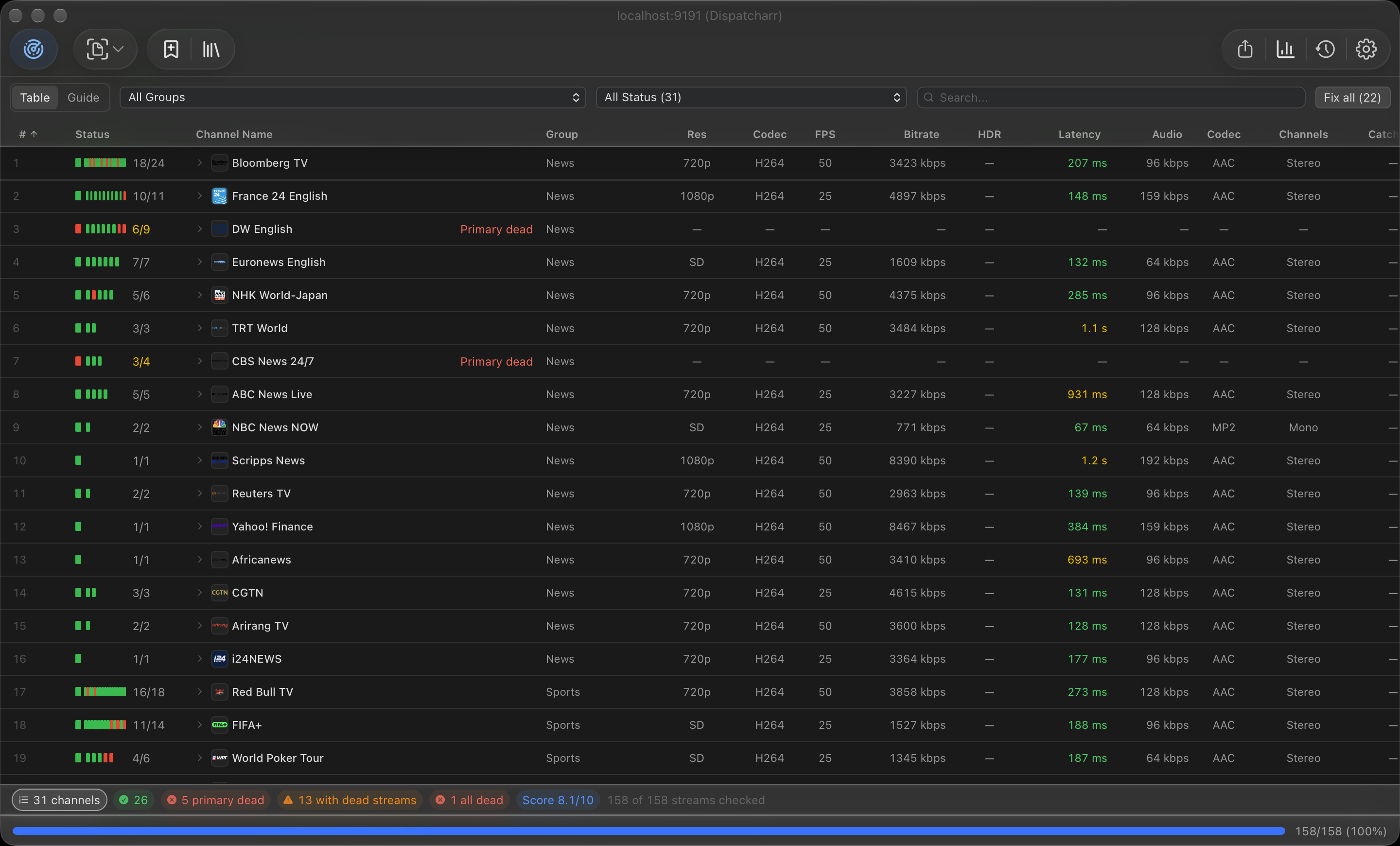
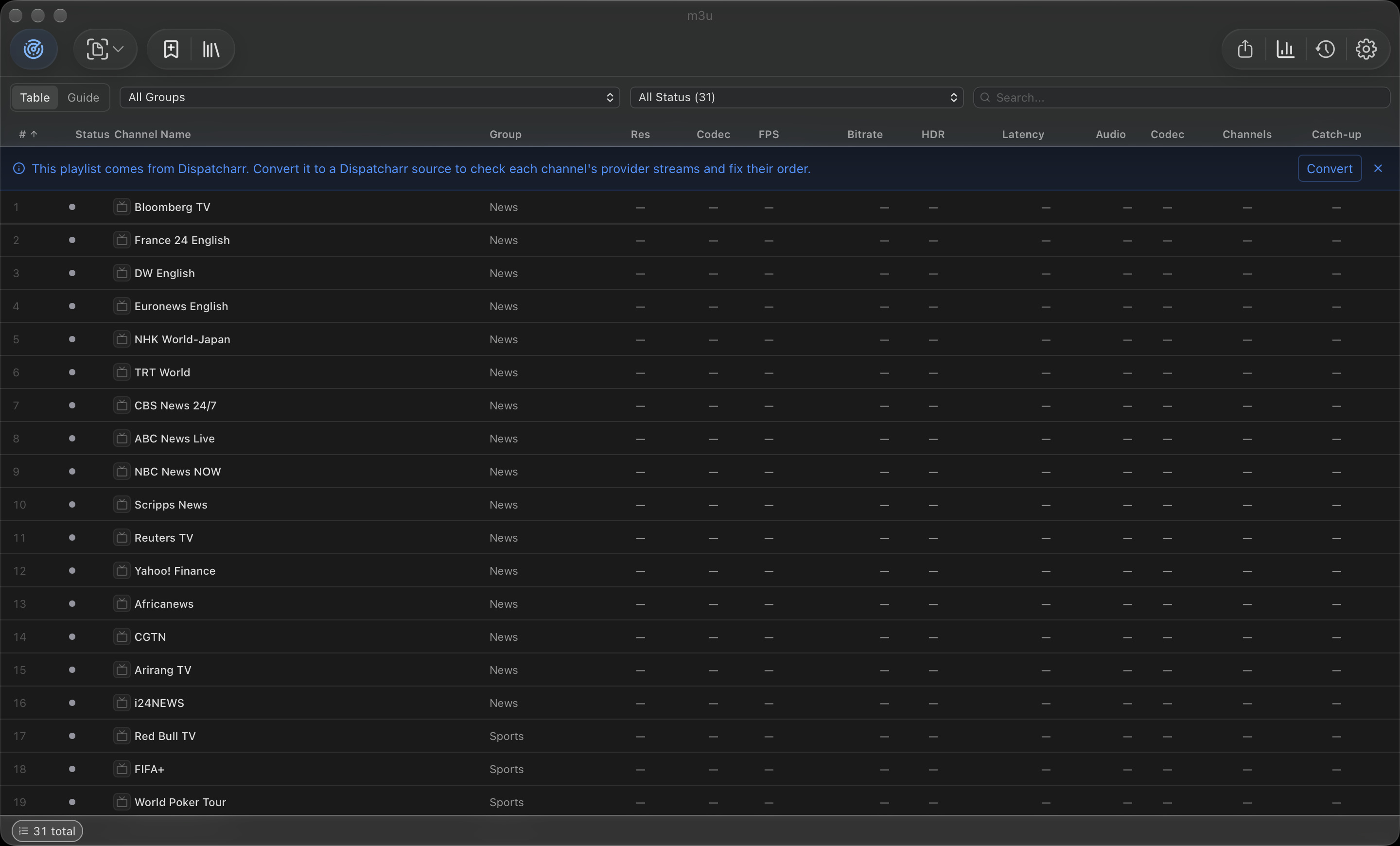
- Adds a Dispatcharr source to the Open dialog, saved playlists, and recent sources. It signs in with an API key or username and password and loads every channel's ordered streams through the REST API (#248, ref #200).
- Shows one row per channel with a per-stream health strip and an alive/total count. Channels expand to their streams in failover order (ref #204).
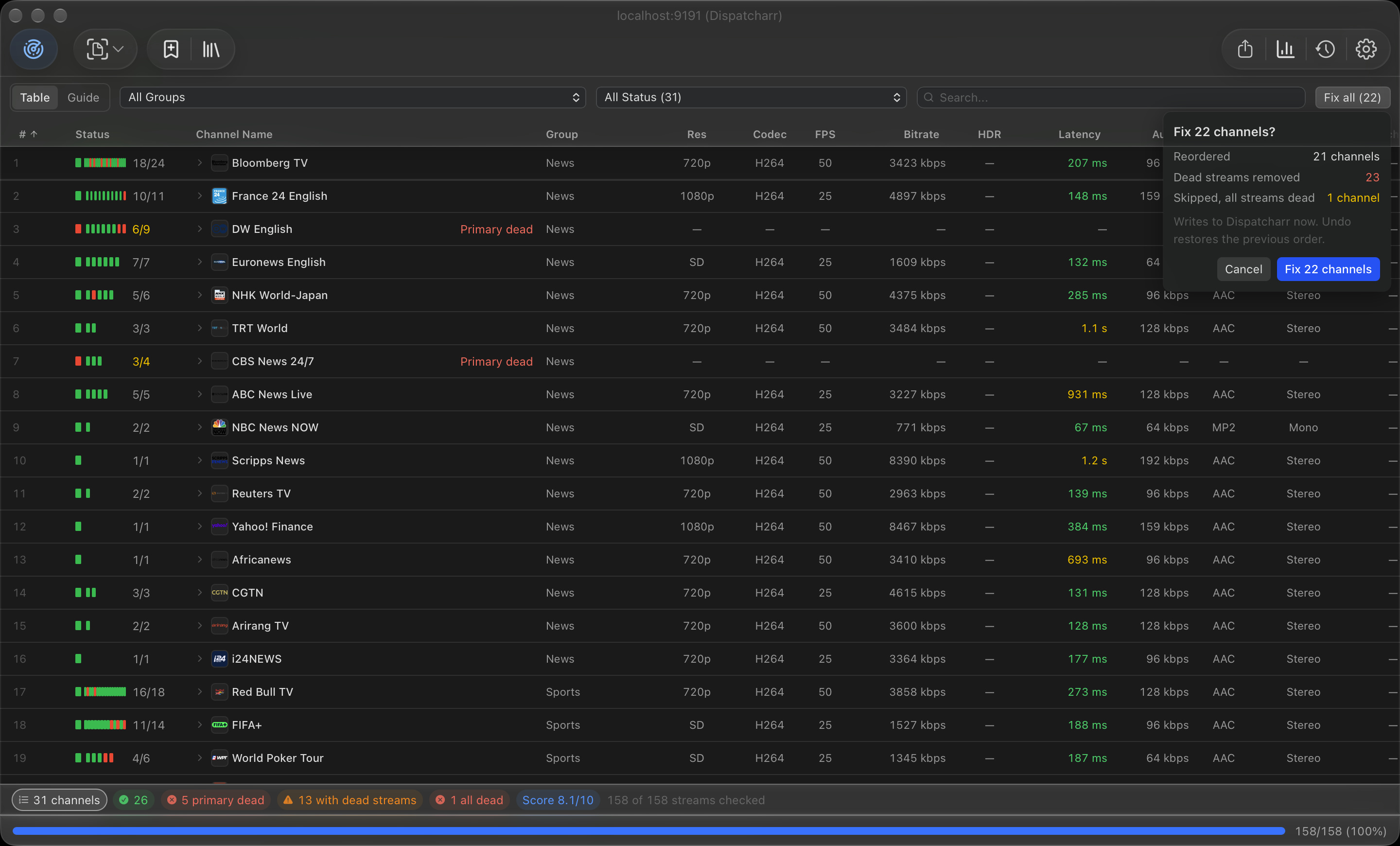
- Writes Fix order, Make primary, move, and remove straight to Dispatcharr. Each write re-fetches the channel and refuses if it changed since load. Each row has Undo, and Fix all applies to the current filter with Undo all (ref #201, ref #202).
- Finds, tests, and links replacement streams for channels whose streams are all dead, and lists channels that have no streams.
- Scans honour each M3U account's connection limit, including viewers already watching through Dispatcharr, and report busy accounts instead of marking streams dead.
- Adds channel filters for primary dead, any dead stream, and all dead. The stats bar counts channels.
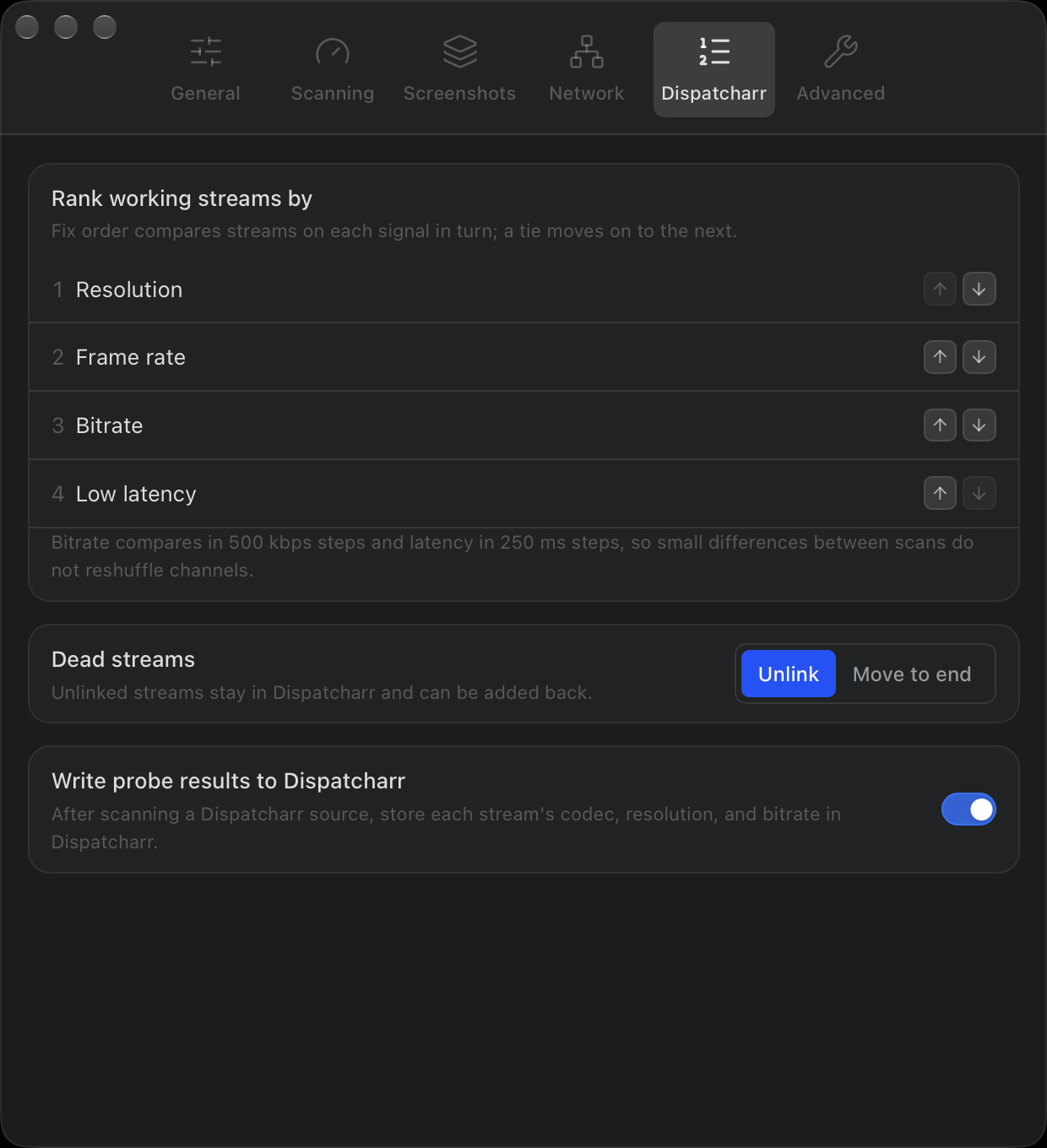
- Merges probe results into Dispatcharr's stream stats after each scan. This is on by default and can be turned off in Settings, alongside the ranking signals and dead-stream handling Fix order uses.
Sample clips
- Adds Capture Sample to the selected-channel sidebar, which records a 5 to 10 second clip, and an Auto-capture sample clips setting that records one for every alive channel during scans. Auto-capture is off by default, so default scans are unchanged (#253, ref #187).
- Clips are stream-copied, never transcoded: captured as MPEG-TS and remuxed locally to MP4, keeping the MPEG-TS when the codecs do not fit MP4.
- Single-provider scans add the clip as another output of the existing ffmpeg diagnostics run, so no extra connection is opened. On single-connection playlists, manual capture, playback, scans, and catch-up tests wait for each other.
- Plays clips inline from the localhost stream proxy with byte ranges. Open uses the configured external player, and Show in folder reveals the file.
- Clips share the screenshot folder, retention, and low-space pause, and free space is checked before every clip. The Screenshots settings tab is now Media.
Playback
- Missing video timestamps no longer become large negative PTS values when remuxing. Missing durations are recovered from adjacent source DTS within a 0.5-second bound (#247).
- When every playback route fails, the most informative decode error is kept instead of "Format not supported" (#247).
Fixes
- Scan completion flushes the last batched results first, so everything reacting to completion sees every result (#248).
- Fake ffmpeg scripts in the Rust tests are written through
install, removing an ETXTBSY race that made parallel test runs flaky.
Full changelog: v2.0.2...v2.1.0
v2.0.2 — Playback compatibility and archive fixes
- Play streams with audio codecs unsupported by the embedded player by converting audio to AAC when needed, including live and archive playback.
- Improve playback startup detection and fallback routing for HLS, MPEG-TS, and finite video-on-demand streams.
- Keep the seven-day archive programme list and thumbnail panel scrollable.
- Fix Homebrew cask generation in the release workflow.
Ref #229
Full changelog: v2.0.1...v2.0.2
v2.0.1 — Header, playback diagnostics, and log improvements
- Keep toolbar labels below their icons in narrow windows so the header stays on one row.
- Restore native Select All in text fields.
- Add log export, select-all copying, and Shift-click range selection in the log viewer.
- Improve playback diagnostics with stream formats, codec support, and detailed errors across fallback attempts, while redacting sensitive URLs.
- Improve release recovery and verify all platform builds before publication.
This release was rebuilt to include PR #244 and PR #245. If you installed the earlier v2.0.1 build, reinstall from the downloads below to receive these changes; the version number is unchanged.
Full changelog: v2.0.0...v2.0.1
v2.0.0 - Massive update! TV guide, catch-up, and playback diagnostics
IPTV Checker 2.0 is massive update that brings EPG, catch-up verification, and archive playback! Find something to watch, check whether your provider really keeps it, and play it from the beginning. When playback struggles, the new diagnostics help explain why.
A TV guide you can play from
- Browse your playlist on a continuous programme timeline. Switch between Table and Guide, scroll through channels and days, or jump back to now. Channel logos make the guide easier to scan, and channels without programme data remain visible.
- Replay past programmes or restart one already on air. On channels with catch-up, choose Play from beginning for a currently airing programme, seek through the archive, and use Go Live to return to the live stream.
- Download available archive programmes. Choose Download… from a programme's context menu to save it with ffmpeg, with progress and cancellation. You can also test that programme's catch-up directly from the guide.
- Load programme data from XMLTV and Xtream sources. EPG discovery, cached guide data, and provider timezone handling support the timeline, including programmes crossing midnight and daylight-saving changes.
Check what “catch-up” really means
A channel advertising three days of catch-up does not necessarily have three days of playable programmes. The new Verify controls check the archive itself.
- Quick verification tests a recent archive point to check whether catch-up works. Full verification also probes the advertised retention and estimates how much history is actually available.
- Real, Shallower, Fake, and Untested filters sit together under Catch-up. Failed checks include a reason, such as an empty archive, a request returning the live stream, an HTTP error, or a timeout.
- Verify all channels, the filtered list, or your selection, or combine scanning and catch-up verification. Requests run sequentially, with progress and cancellation, to accommodate providers with connection limits.
- See catch-up health in reports and clean up your exports. Export working catch-up channels or a playlist with failed catch-up flags removed.
- Verification results are fresh each session. Reopening a playlist or restarting the app clears verdicts, so yesterday's result does not silently become today's answer. A successful quick check does not establish the full advertised retention.
More reliable playback
- Better handling of difficult archives on macOS. Native HLS playback, transport detection, and an ffmpeg remux fallback cover more provider streams, including archives the internal player previously failed to open.
- Reach a working playback route sooner. Shorter archive fallback waits and remembered successful compatibility routes reduce repeated startup delays on troublesome channels.
- Start replays at the requested beginning, with improved handling of HLS playlists that would otherwise start near the live edge.
- Picture-in-picture reopens after being closed, from both the sidebar and expanded player on macOS.
- Opening an external player recovers cleanly from failed internal playback, fixing the null-player error during handoff.
- Improved HTTP playback on macOS, audio-only stream detection, and recovery when a stream produces audio but fails to decode video. Channel details also update from actual playback.
See what happens during playback
The new Playback panel puts useful evidence beside the player:
- Time to first frame, buffer depth, interruptions, and dropped video frames.
- A session chart and event timeline showing buffering, recovery attempts, reconnects, and errors, with transport details where available.
- Per-channel summaries and recent session history during the current app session.
- A JSON diagnostics export with sensitive URL and path values redacted, making playback problems easier to investigate.
Background playback and unavailable measurements are distinguished from foreground playback problems. Player controls stay accessible while you scroll through the details.
A better fit for everyday use
- Group, status, and search controls stay accessible in smaller windows. Filters now have their own row, and toolbar actions adapt to the available width. The filter row appears only after a playlist is opened.
- View menu labels describe the next action: Show or Hide, matching the focused window's current state for source filters, header button text, and other panels.
- Faster filtering and sorting of large playlists, cached guide calculations, and less rendering work while navigating the timeline.
- More reliable guide selection, scrolling, and loading cancellation, plus better handling of overlapping listings and right-to-left programme titles.
- Toolbar popovers remain visible above the macOS glass header; channel search no longer applies autocorrect.
- Saved playlists are preserved if loading or normalization fails. Linux AppImage builds also support newer toolchains.
Getting started
Open a playlist and switch to Guide. On a catch-up channel, try Play from beginning on a programme still airing. Use Verify → Quick to check recent availability, then Full when you want to check archive depth.
Builds are available for Apple Silicon and Intel Macs, Windows x64 and ARM64, and Linux x64 and ARM64. Choose a macOS DMG, Windows installer or portable ZIP, or Linux AppImage, DEB, or RPM from the assets below. Existing installations can use the built-in updater.