Repository navigation
Releases: loglux/blueedit
Release list
BlueEdit 0.4.6 (preview)

BlueEdit 0.4.6 (preview): a clock, as in Far.
Download
- Windows:
blueedit-0.4.6-win-x64-setup.exe(installer, no administrator rights) orblueedit-0.4.6-win-x64.zip(onebe.exe, nothing installed). - Debian, Ubuntu:
blueedit_0.4.6_amd64.deb:sudo apt install ./blueedit_0.4.6_amd64.deb - Fedora, RHEL:
blueedit-0.4.6-1.x86_64.rpm:sudo dnf install ./blueedit-0.4.6-1.x86_64.rpm - Any Linux x64:
blueedit-0.4.6-linux-x64.tar.gz. - Formula pictures module (typeset formulas and images, in Windows Terminal): the installer and the packages put it in; for the zip and the tar.gz,
blueedit-mathimages-0.4.6-*.
New in this release
- A clock at the right of the menu bar, as in Far's editor, on by default. View → Clock goes round the time, the date and the time, and off, and the choice is kept (setting
clock, also in Tools → Settings). - View → Show timing has left the menu: it measures how long a key takes to reach the screen, which is for whoever works on the editor. It is the setting
showTimingin settings.json now.
The files are not signed: Windows may warn on first start ("More info → Run anyway").
SHA-256 of the Windows installer: 49c755854dc81955c75b8e37c05d3f0c0a44a0dbfdd151de174a754e4045f336
SHA-256 of the Windows zip: e282a383420a78d3fa7a119b6058b9ebf4c3d6c9871a5786d2c1997ab9166146
SHA-256 of the .deb: a82db678c5691bed4232489a83fcb097f4b34149494aa9072ca1a51e422d05dc
SHA-256 of the .rpm: df276590460588967390ba6b7884f64ac3b6b2bbec2578825ed2e5382231a2a9
SHA-256 of the Linux tar.gz: 7f3149eb02a188223978fc8a8c52e5f7b7038f78b1dae3ee005b7997d70ea0a8
SHA-256 of the formula pictures module, Windows: a1b7c01df967233b086a7c94dd7c3d7d5b17080ec5f9499cfe0e147e085fcc4b
SHA-256 of the formula pictures module, Linux: d4753a43e33bb2f4da5ca83b4caeb9d586e2b6f1315b3b7549dae55e333b1179
BlueEdit 0.4.5 (preview)
BlueEdit 0.4.5 (preview): images in Markdown, shown as pictures.
Download
- Windows:
blueedit-0.4.5-win-x64-setup.exe(installer, no administrator rights) orblueedit-0.4.5-win-x64.zip(onebe.exe, nothing installed). - Debian, Ubuntu:
blueedit_0.4.5_amd64.deb:sudo apt install ./blueedit_0.4.5_amd64.deb - Fedora, RHEL:
blueedit-0.4.5-1.x86_64.rpm:sudo dnf install ./blueedit-0.4.5-1.x86_64.rpm - Any Linux x64:
blueedit-0.4.5-linux-x64.tar.gz. - Formula pictures module (typeset formulas and now images, in Windows Terminal): the installer and the packages put it in; for the zip and the tar.gz,
blueedit-mathimages-0.4.5-*.
New in this release
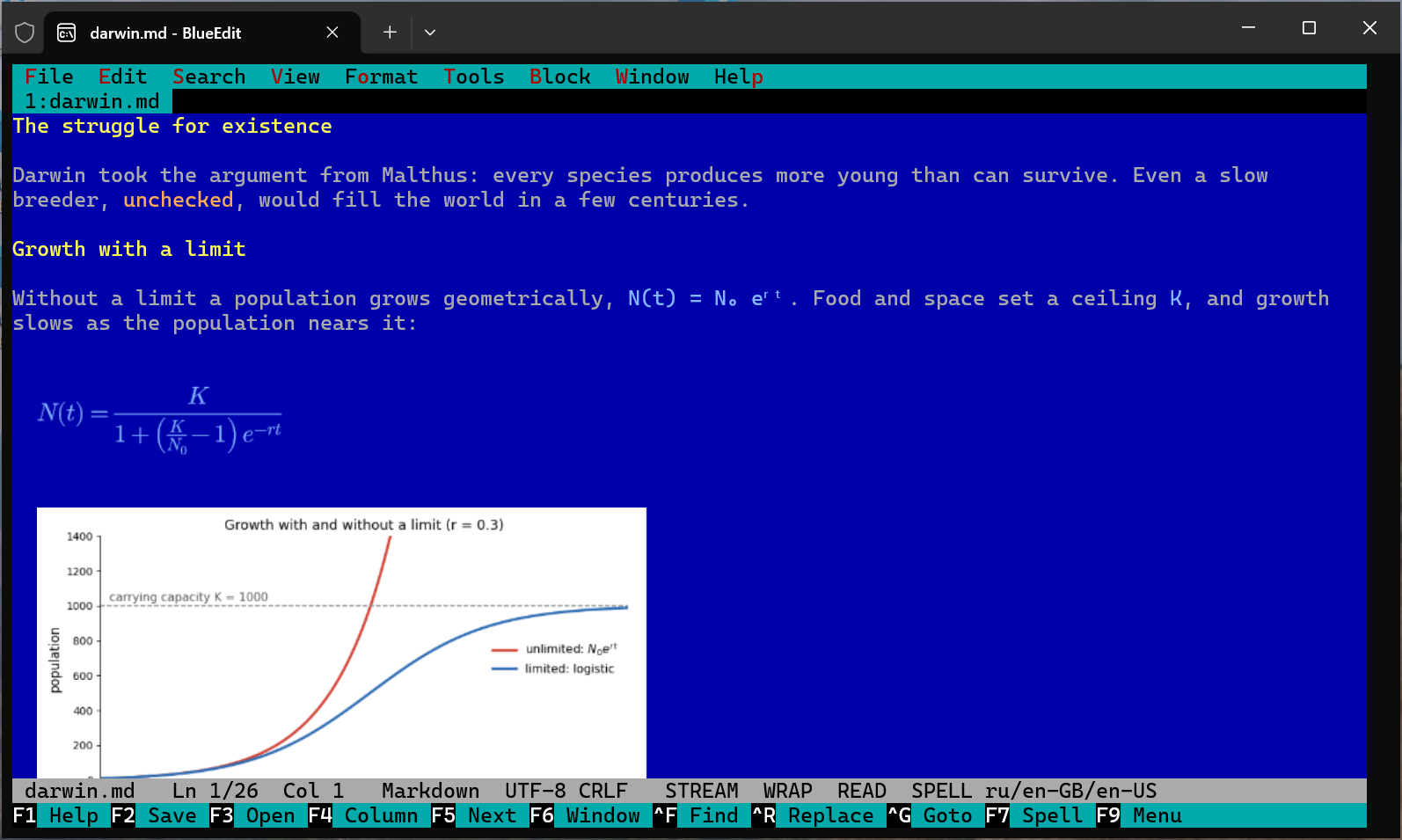
- Images in Markdown: a line that is only an image,
or Obsidian's![[name.png]](|300for its width), shows the picture in the reading view and Live preview, in terminals that show Sixel graphics (Windows Terminal 1.22+). PNG and JPEG, also BMP, GIF and WebP; a photo is turned the way its EXIF says. A chart or a diagram keeps its colours exactly; a photo gets 255 colours chosen for it. Obsidian's names are found where its settings put attachments. View → Images turns them on and off and says why none are shown. See docs/formula-pictures.md. - Images need this release's formula pictures module: an older one still draws formulas, and View → Images says it is too old.
- Names of files and notes in
[[links]]and in a link's(target)are no longer spell-checked.
The files are not signed: Windows may warn on first start ("More info → Run anyway").
SHA-256 of the Windows installer: 94ffd748fe1c78073152611e71166ced28daf79277b82c733c6b61c7306b460a
SHA-256 of the Windows zip: 7a367a2018c2b614c542311221f760dc2c3f0f75fb1c831b4c6594ddb0ee8fd8
SHA-256 of the .deb: c501bc0764b1f30691dd35264af51db797f8396e1f20e714b779563f057e536c
SHA-256 of the .rpm: 469ec91bb01c3d9b3382b21a53de803dc9cace818703b40f8eafd63bb7a38148
SHA-256 of the Linux tar.gz: c7154af983d1b912e8956661c2fe089dfcef2a3e487ca2402b2d355bd144a1eb
SHA-256 of the formula pictures module, Windows: defed4f4f1030a60a982bc2bf2e375a4e85ff2735583cb37171b4333d9e5a5ae
SHA-256 of the formula pictures module, Linux: 76d80c50aff9a27608e47b7bbcb490a5d69aa3f98111a0edc25b792fd67bd8a6
BlueEdit 0.4.4 (preview)
BlueEdit 0.4.4 (preview): the menus show what is on.
Download
- Windows:
blueedit-0.4.4-win-x64-setup.exe(installer, no administrator rights) orblueedit-0.4.4-win-x64.zip(onebe.exe, nothing installed). - Debian, Ubuntu:
blueedit_0.4.4_amd64.deb:sudo apt install ./blueedit_0.4.4_amd64.deb - Fedora, RHEL:
blueedit-0.4.4-1.x86_64.rpm:sudo dnf install ./blueedit-0.4.4-1.x86_64.rpm - Any Linux x64:
blueedit-0.4.4-linux-x64.tar.gz. - Formula pictures module (typeset display formulas in Windows Terminal): the installer and the packages put it in; for the zip and the tar.gz,
blueedit-mathimages-0.4.4-*.
New in this release
- The menus show what is on, as Far's do: √ before a setting that is on (soft wrap, line numbers, formula pictures, spelling, auto-wrap, column mode, timing), • before the chosen Markdown view and theme, and the line endings (CRLF or LF) at the right. "Spell check on/off" and "Line endings CRLF/LF" no longer name both states.
- F8 and Alt+Z keep their setting, as Alt+G did, so the menu and Tools → Settings always agree (Alt+Z for text or for code, by the file).
- Formula pictures says at the right why none are shown while it is on: no module, module failed, or not in this terminal.
- Format → Paragraph: align left / right / centre / justify: the names say these act once on the paragraph at the caret (or the selected ones); they are not modes.
- Ctrl+F12 (Format code) says how many lines it changed, or that nothing changed.
The files are not signed: Windows may warn on first start ("More info → Run anyway").
SHA-256 of the Windows installer: 71c5ecea4601ff4f96ce935fe2c7dcc68c23b596b063a5a42022f9cbe51fad0b
SHA-256 of the Windows zip: 2a9a24690995315d2d4935e2c816d081616c8c9d553557aab09c76263e5322c0
SHA-256 of the .deb: f03fb7fee3d246cd09f9beab1e782281f78f980aca0f8e9ffb05a0f363f2f2d3
SHA-256 of the .rpm: 01275dc4c2d4255163374f89cd9123cc81024a0db792c1110701e71bb127cc1a
SHA-256 of the Linux tar.gz: 36311de82ad0abc4f77f226d6b0e87e9638b0318eae1eb1c99c7a9b749ca0ca6
SHA-256 of the formula pictures module, Windows: 6c14158530537fc0d5615fe48ba48eb912eb67407773e74f378e48e4e78fd03d
SHA-256 of the formula pictures module, Linux: ef88d61544a06b66a161c1579cc75953a487ef0f922a74a90f34df57ef392af6
BlueEdit 0.4.3 (preview)
BlueEdit 0.4.3 (preview): cloud grammar checking set up from a list.
Download
- Windows:
blueedit-0.4.3-win-x64-setup.exe(installer, no administrator rights) orblueedit-0.4.3-win-x64.zip(onebe.exe, nothing installed). - Debian, Ubuntu:
blueedit_0.4.3_amd64.deb:sudo apt install ./blueedit_0.4.3_amd64.deb - Fedora, RHEL:
blueedit-0.4.3-1.x86_64.rpm:sudo dnf install ./blueedit-0.4.3-1.x86_64.rpm - Any Linux x64:
blueedit-0.4.3-linux-x64.tar.gz. - Formula pictures module (typeset display formulas in Windows Terminal): the installer and the packages put it in; for the zip and the tar.gz,
blueedit-mathimages-0.4.3-*.
New in this release
- Tools → Set up grammar checking → Cloud service: Anthropic Claude, OpenAI, Google Gemini or DeepSeek chosen from a list, then the key (typed,
env:NAMEorfile:PATH; the window says where the key is got, and a key the service refuses is said before anything is kept), then a model from the service's own list, the recommended one first (claude-haiku-5-5, gpt-5.4-mini, gemini-3.5-flash-lite, deepseek-flash). No address or model name to type, as in the installer. Before, the editor could use these services only through "Another model server", with the address typed by hand.
The files are not signed: Windows may warn on first start ("More info → Run anyway").
SHA-256 of the Windows installer: 1e445dcda83befa2c080e39bbacb749e181161f109c877f1fcf897c917df559b
SHA-256 of the Windows zip: 54876a50ba4dd83c62a3188316466b56b35643b03fd05ed46fe93a9b9845cefb
SHA-256 of the .deb: 6f29939d157c8175f9d99cb8ed13de017fcbd3778f00691df7050d764cba5bb2
SHA-256 of the .rpm: d228cfebc607f92e3daa7ec932573bc51046d73e3d945ff1f374885672641e66
SHA-256 of the Linux tar.gz: 95b85c7d9216b16202faca122caeb67fda4f88c5673606472a190347219eb74c
SHA-256 of the formula pictures module, Windows: 15532c8d537895db542be6df586808a8df9ef28aa32eb3e00aa7341739167fa2
SHA-256 of the formula pictures module, Linux: 40041d916d6bbc2b6d68f3fd118f6af05d4d9ac85cf133e2290be6e57141f6e1
BlueEdit 0.4.2 (preview)
BlueEdit 0.4.2 (preview): a new F1 help, and packages for Debian, Ubuntu and Fedora.
Download
- Windows:
blueedit-0.4.2-win-x64-setup.exe(installer, no administrator rights) orblueedit-0.4.2-win-x64.zip(onebe.exe, nothing installed). - Debian, Ubuntu:
blueedit_0.4.2_amd64.deb:sudo apt install ./blueedit_0.4.2_amd64.deb - Fedora, RHEL:
blueedit-0.4.2-1.x86_64.rpm:sudo dnf install ./blueedit-0.4.2-1.x86_64.rpm - Any Linux x64:
blueedit-0.4.2-linux-x64.tar.gz. - Formula pictures module (typeset display formulas in Windows Terminal): the installer and the packages put it in; for the zip and the tar.gz,
blueedit-mathimages-0.4.2-*.
New in this release
- F1 help in sections: the contents at the left, the chosen section at the right, keys in their own colour and column, text wrapped to the window. It opens on Markdown in a Markdown file and on Code in a language with a language server. The help is written as plain sections (
lang/help.en.md), so a translation no longer has to align columns by hand. - Linux packages: the .deb and .rpm put the editor in /usr/lib/blueedit with the formula pictures module, and
beon PATH;apt remove blueedit/dnf remove blueedittake it away. Certificates, OpenSSL and ICU are recommended, nothing is required. Checked in clean Debian 12, Ubuntu 24.04 and Fedora 41. There is no package repository yet, so a newer version is installed the same way, over the old one.
The files are not signed: Windows may warn on first start ("More info → Run anyway").
SHA-256 of the Windows installer: 847b8b165f433164ce08dc617811e652fe9e3225d77bce487170d2a39397a00e
SHA-256 of the Windows zip: 6763aa7d8d38e596450e9121248d012a0ea636af39ac80d7d554b27372e6575f
SHA-256 of the .deb: 561ca8821bc217516c2100c96401aafe290e7f6c714e087b6c6ac6828d82ac0f
SHA-256 of the .rpm: 8f647282ed4474d7b41dd79e77b4fdfe57db63ca65275769e6204a94c63830f6
SHA-256 of the Linux tar.gz: b943959607a9d2c27e949a93fb0bc6787f7a995c6f817ad577e0f12b312928d1
SHA-256 of the formula pictures module, Windows: b524e0b5b677ec763836493621f3531adf60865a01e7b8da873b9d3a49e85c08
SHA-256 of the formula pictures module, Linux: b21fac4dcf8ec522ce1eb9bb3d1cd6dd9691ab76e42a68634193c50d2a37e842
BlueEdit 0.4.1 (preview)
BlueEdit 0.4.1 (preview): clearer windows.
Download
- Windows:
blueedit-0.4.1-win-x64-setup.exe(installer, no administrator rights) orblueedit-0.4.1-win-x64.zip(onebe.exe, nothing installed). - Linux x64:
blueedit-0.4.1-linux-x64.tar.gz. - Formula pictures module (typeset display formulas in Windows Terminal): the installer puts it in; for the zip and Linux,
blueedit-mathimages-0.4.1-*.
New in this release
- F7 on a typo or a grammar finding opens a new window: the fixes are buttons, the checker's explanation is shown whole under them, and who found it (Windows spelling, LanguageTool and its rule, or the model) is at the bottom right in grey. Ignore and Never show this (for a typo, Add to dictionary) are buttons under it. A word typed partly in the other keyboard layout and a formula's rule of writing use the same window.
- Tools > Code tools: a table of the tools (found where, or what installing takes) with Install the missing, Remove and Close as buttons under it.
- Tools > Set up grammar checking: Remove is a button under the list, not one of the ways to check grammar.
- Tools > Grammar checking: round marks while one checker is on, boxes once several are allowed.
- Lists of one choice (encodings, spelling provider, grammar model, interface language) mark the one in use "(now)".
- Save as: the line of keys no longer runs past the frame.
The files are not signed: Windows may warn on first start ("More info → Run anyway").
SHA-256 of the Windows installer: 8b7f320cdeb730b267e829183b82fcb4590f30efae518171948c5113dfab96d6
SHA-256 of the Windows zip: d2ed01e458d8a1acf3590d195c447f790fe3912cc745f339c97993a715ea76b4
SHA-256 of the Linux tar.gz: 3a6ad3d23a8c4a4a154c7be34409e32ad659ed992223426c7ea162a8a97f2f61
SHA-256 of the formula pictures module, Windows: 51ae0a72be43780234d4585f21741d7f1aca98bea707209ea7f17c86f9764820
SHA-256 of the formula pictures module, Linux: 927e98144d311c6ee1e912ef606f4efc557c1a47b5763a1644c3e31a333e4b7e
BlueEdit 0.4.0 (preview)
BlueEdit 0.4.0 (preview) — the first public release.
A fast console text editor for writing, mathematics and code, on Windows and Linux: Markdown with a live preview, LaTeX formulas as readable text or typeset pictures, spelling, grammar and style checking, language servers for code.
Download
- Windows:
blueedit-0.4.0-win-x64-setup.exe(installer, no administrator rights) orblueedit-0.4.0-win-x64.zip(onebe.exe, nothing installed). - Linux x64:
blueedit-0.4.0-linux-x64.tar.gz. - Formula pictures module (typeset display formulas in Windows Terminal): the installer puts it in; for the zip and Linux,
blueedit-mathimages-0.4.0-*.
New in this release
- Windows installer:
bein PATH, Start menu, "Open with BlueEdit"; grammar checking chosen on its own page — rules, a language model sized to your video card, or a cloud service. - Grammar and style through cloud services: OpenAI, Anthropic (Claude), Google (Gemini), DeepSeek, or any OpenAI-compatible server (Ollama, LM Studio, llama-server). The API key is stored in a separate file, encrypted on Windows.
The files are not signed: Windows may warn on first start ("More info → Run anyway").
SHA-256 of the Windows installer: 7b27ac87e6a5cb255bae5000e798922cef45e1613038e8f9dc0362e7e8fb7aca
SHA-256 of the Windows zip: 94472587679f5359c07a1a041087ef7493a3e9e79ec776e8ad8e68dbb2090222
SHA-256 of the Linux tar.gz: 3b2f50df60dcf79ca5aa01a4206e99f38c6d313f12f5499bd5c7d4ec48b31e96
SHA-256 of the formula pictures module, Windows: 361df7a4330234cd91285449b81f1707402391387a9f409d6af00e98f81b4c00
SHA-256 of the formula pictures module, Linux: 8de936bac80e7cf34824b261f17c700dd5165c1837706e12cd3144cc666bbd62