


Quick start ·
New: reins tui ·
Benchmark ·
How it works ·
Usage ·
Docs ·
中文
You ask Codex, Claude Code, Pi or DeepSeek Harness to train a model, run a benchmark, or hand a review to a second agent. The work takes two hours. Now what?
- The agent polls with
sleep && tail, burning turns, tokens and context on nothing. - Or the job is owned by the agent's shell, so it dies when the turn ends, times out, or the app restarts.
- Or the second agent's answer lands somewhere else, and you carry it back to the conversation by hand.
Reins hands the work, a command or a fresh agent in any harness, to an independent OS-native process owner. When it finishes, Reins resumes the exact same conversation with a short result: what it observed, what a child agent reported, where the files are, and the command to acknowledge it.
$ reins run --task "train model" -- python train.py --config configs/exp.yaml
reins: submitted managed task <task-id>
reins: execution backend: systemd
...
The agent ends its turn — zero model calls while it waits. Two hours later, the same session receives a short envelope like this:
[reins] <task-id>-c1
Task: train model
Result: exited 0 · 2h 3m 32s
From: run on systemd-user
Files: ~/.reins/tasks/<task-id>/ (attempt-1.log)
Details: .../details/<task-id>-c1.md (as needed)
Session: <session-id> (only)
ACK after inspection: reins ack <task-id>-c1

Ten agents in three harnesses means ten windows, and no way to see which of them is waiting on a
task, a reply or you. reins tui puts them on one screen: every Claude Code, Codex and Pi session on
the machine, whether it runs in a terminal, the desktop app or the background, with the tasks, goals
and messages it started. Press Enter and the session opens in a pane beside the panel, in its own
interface.
- One conversation, never a copy. A closed Claude Code session resumes in the background and the pane attaches to it; a Codex thread opens through Codex's shared app-server, so the pane, Codex Desktop over SSH and every callback write the same thread. A session already open in another window is never opened a second time.
- Results land where you are looking. A callback for a closed Claude Code session brings it up under the same id, and one for an open Codex thread arrives as a new turn in it, not as a second headless run beside it.
- Grouped by project, named by you. Sessions sit under their folder, and the Reins name you gave each one stands beside the title its harness picked, so look-alike sessions stay apart. A session that cannot open says why in a window you will not miss.
- Everything from one menu. Right-click a session (or press
o) to open it below or to the right, fork it, open a shell in its directory, message it, pin it, copy its id, stop or archive it. Start a collaborator from the same menu: a new Claude Code, Codex or Pi session that already knows its partner and how to reach it. - Safe to leave.
Alt+d, closing the terminal or a dropped SSH connection leaves every session running,Alt+qasks first with Detach preselected, andreins tuibrings the same screen back. - Ready on install. The npm package for Linux and macOS includes Zellij and the panel. Ctrl keys go straight to Claude Code.
reins tui            # the panel
reins tui <id>       # open one session, by its id or a task it started
→ Terminal UI guide · Linux and macOS
8× cheaper, 10× fewer model calls, and the work survives the agent being killed. Same agent (Codex with Kimi K3), same task, with and without Reins. → The full benchmark
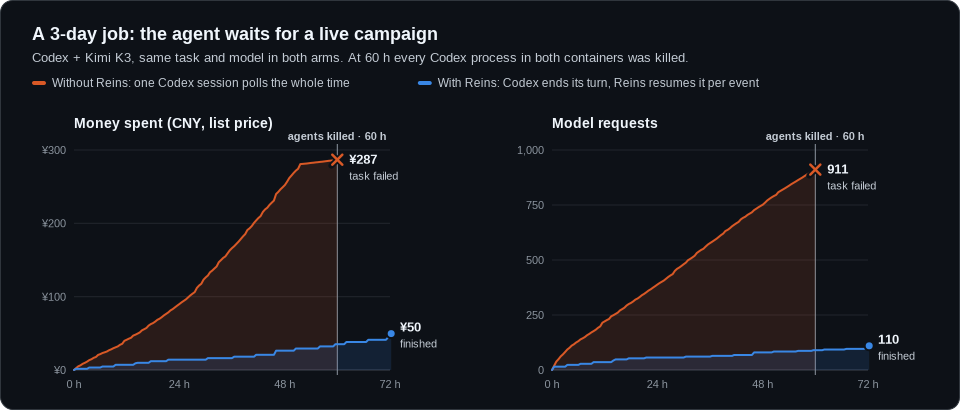
Without Reins the agent has to keep watch: one session polled for 60 hours, made 911 model requests and spent ¥287, and when its process was killed the task died with it. With Reins the agent ends its turn after each step and is called back when there is something to do: ¥35 over the same 60 hours, nothing to kill at hour 60, and the job ran to the end.
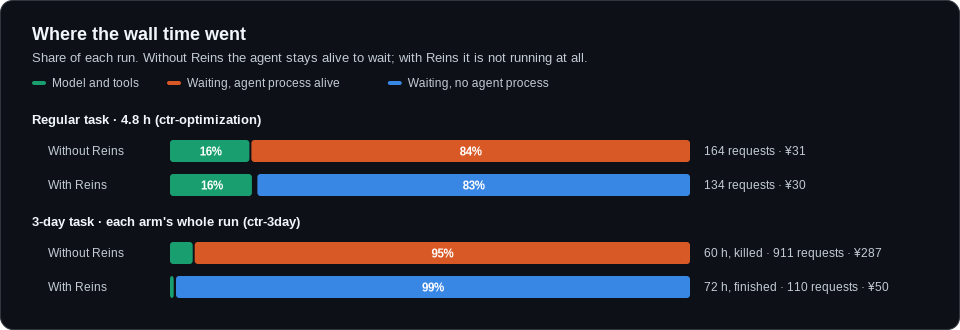
| Without Reins | With Reins | |
|---|---|---|
| 3-day task, cost of the first 60 h | ¥286.78 | ¥35.17 |
| Model requests in those 60 h | 911 | 90 |
| Every agent process killed at hour 60 | task failed | finished all 72 h |
| Result back in the same session (median) | – | 2 s |
| 4.8-hour task, cost | ¥30.59 | ¥30.11 |
Reins changes what waiting costs and whether the work survives, not how well the model solves the task. Money at list price (input ¥20, cache hit ¥2, output ¥100 per million tokens).
Subscriptions are the cheapest way to use frontier models, and they come tied to a harness. A Claude plan gives you Claude models inside Claude Code; a ChatGPT plan gives you OpenAI models inside Codex. That quota generally can't be pointed at another tool, and each of these harnesses is built around its own vendor's models.
Open harnesses such as Pi work the other way around. They run whatever model you give them: an API key from any provider, an open-weight model on your own GPU, or a cheap fast model for routine steps.
Real work rarely fits one model. Writing, coding, reviewing and long experiments each have a model that does them best or most cheaply, and models keep getting more specialized. Using the right one for each job means running several harnesses side by side, some closed and some open. None of them knows the others exist: a Codex session can't hand a task to Claude Code and get the answer back, and a Pi agent can't report to either.
This project fills that gap. From a Codex, Claude Code, Pi or DeepSeek Harness session,
reins agent codex|claude|pi|dsh starts a fresh agent in any of the four as a durable job, and the
result comes back to the session that asked for it. Codex, Claude Code, Pi and DeepSeek Harness are harnesses; Reins is what holds all of them, which is why
Long Task Callback became Agent Traffic Control and then Harness Reins.
| Feature | What you get |
|---|---|
| No polling | The worker and daemon wait for you. No model turns are spent while the task runs. |
| Same conversation | Callbacks are bound to the original Codex (CODEX_THREAD_ID), Claude Code (CLAUDE_CODE_SESSION_ID), Pi (PI_SESSION_FILE) or DeepSeek Harness (DSH_SESSION_ID) session — never a guess. |
| Survives the agent | Tasks run under systemd, launchd or Task Scheduler — not as a child of the agent turn or even the daemon. |
| Claude Code native | In Claude Code (CLI or desktop app), a background reins wait wakes the conversation you're looking at — no headless side session. → Claude Code guide |
| Pi native | Pi's extension steers the result into the running Pi session — even mid-run, before its next model call. → Pi guide |
| DeepSeek Harness native | A background reins wait runs as a DSH job; its completion notification wakes the same conversation. DSH has no headless fallback, so delivery is always the original live session. → DSH guide |
| Any agent, any harness | reins agent codex|claude|pi|dsh starts a fresh agent as a durable job from any of the four. It writes a structured report, shown to you as a claim, never as proof. |
| Sessions talk to each other | Name a Codex, Claude Code, Pi or DSH session, then reins send to it from any other. Messages survive a busy or closed session, never start a process unless you ask, and agents that talk in circles get stopped. → Guide |
| Every session in one terminal | reins tui lists the Claude Code, Codex and Pi sessions on the machine with the tasks, goals and messages they started, and opens any of them in a pane in its own interface, without a second copy of the conversation. → Guide |
| One installation | reins setup installs one canonical ~/.reins/bin/reins; copies of reins in other environments forward to it, so versions never mix. |
| Multi-stage goals | Track an objective across many callbacks with a YAML plan that the agent must verify before declaring victory. |
| Never reruns blindly | Ambiguous launches, reboots and failures are reported to the agent for inspection — Reins never silently replays work. |
| Self-repairing setup | When something is misconfigured, the agent gets a machine-readable repair plan and fixes it itself. |
| At-least-once delivery | Durable queue, stable callback IDs, retries with backoff, and explicit ACKs. |
# 1. Install (prebuilt for Linux x64, macOS and Windows x64; see below for other platforms)
npm install -g harness-reins

# 2. Make it the installed Reins, add the skills for Codex + Claude Code, start the coordinator
reins setup --force --enable --now
#    Using Pi too? Add --with-pi-extension (Pi skill + live-callback extension)
#    Using DeepSeek Harness too? Add --with-dsh (skill + launcher discovery)

# 3. Check that everything is healthy
reins --version
reins doctor --agent codex --session <session-id>
Without Node, or on Linux arm64, install from source and run the same reins setup:
python3 -m pip install "git+https://github.com/lz59970062/harness-reins.git"That's it. setup installs the bundled skill, so your agent already knows when and how to use reins.
From inside a Codex, Claude Code or DeepSeek Harness session, just ask it to run something long.
Platform requirements
| Platform | Task owner | Coordinator | Notes |
|---|---|---|---|
| Linux | Independent systemd user service (v240+) | systemd user service | Falls back to GNU screen when no user systemd is available (e.g. Docker, AutoDL). See containers. |
| macOS | One-shot launchd job in the GUI session | LaunchAgent | No screen needed. See macOS guide. |
| Windows 10+ | Per-user Task Scheduler task + Job Object | Login scheduled task | Requires a logged-in session and an ACL-capable filesystem (NTFS). See Windows guide. |
The backend is recorded when a task is submitted and is never silently changed during recovery.
To use the screen compatibility backend: sudo apt install screen (or dnf install screen), then
reins run --backend screen ....
Codex Desktop callbacks
Start Desktop normally: auto delivers callbacks through the native codex queue command, with no
launcher and no restart. Callback modes are explicit (cli, codex-queue, app-server, manual, auto).
Read Codex Desktop and callback modes for
the details and current limits.
Reins does not read the records of either. Move over in one explicit step:
reins migrate            # shows what would change; changes nothing
reins migrate --apply    # archives ~/.atc and ~/.ltc, removes the old services, skills and hooks
reins setup --force --enable --now
Each generation moves on its own: one that still has callbacks to deliver or tasks running is left
alone and reported, so a busy LTC does not hold back an idle ATC. Add --wait to let the old daemons
finish first, or --only atc|ltc to move one. State directories are renamed, never deleted. ATC's
systemd drop-ins and its experts.yaml carry over to Reins.
systemd user service (Linux) / LaunchAgent (macOS) / login scheduled task (Windows)
  └─ reins daemon                 control, recovery and callback delivery

Independent per-task service (screen for legacy tasks)
  └─ Reins worker
      └─ training / benchmark / build / child agent
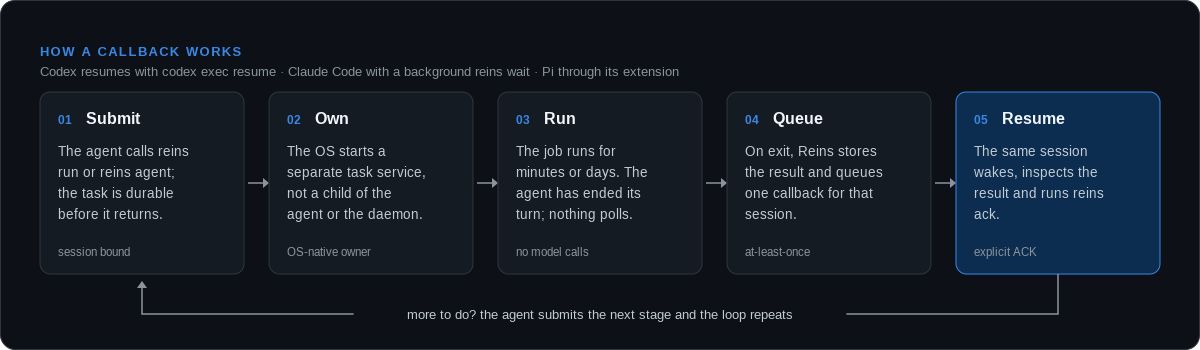
- Submit — the agent calls
reins runorreins agent. Reins durably records the command, environment, original session binding, backend and log path, then returns immediately. - Own — the daemon asks the OS for a separate task service. The task is not a child of the agent or the daemon.
- Run — the job runs for minutes or hours. Nobody polls.
- Queue — on exit, Reins stores the result and queues a callback for the original conversation.
- Resume — the same session wakes up, inspects the result, and runs
reins ack.
Rule of thumb: anything reliably done in under 60 seconds can run in the foreground. Anything longer — or of uncertain duration — goes through
reins run.
Reins has three entry points:
| Command | Use it when… |
|---|---|
reins run -- <command> |
You want Reins to launch and own a new long task. |
reins agent codex|claude|pi -- <prompt> |
You want a fresh child agent to work in the background and report back. |
reins done ... |
The task is already owned by screen, tmux, Slurm or another scheduler — just report completion. |
reins run \
  --cwd "$PWD" \
  --task "train model" \
  -- python train.py --config configs/exp.yaml
Returns as soon as the task is durable, printing the task ID, backend and log file:
tail -f ~/.reins/tasks/<task-id>/attempt-1.logDSH keeps background jobs alive across turns and notifies the conversation when one exits. After
reins run, it prints the exact command to start with run_in_background: true:
reins wait --queue-dir ~/.reins/queue --task <task-id>Read the finished job's output with job_output; that output is the callback. DSH's one-shot
runner refuses desktop-preset sessions, and a second writer would race the live writer lock, so Reins
never resumes a DSH conversation headlessly: with no waiter the callback stays queued until this
session runs reins wait again. → DSH guide
Claude Code wakes a session when a background shell command exits. After reins run, it prints the
exact command to run with run_in_background:
reins wait --queue-dir ~/.reins/queue --task <task-id>reins wait exits — and the session wakes up — as soon as the callback is queued. While a waiter is
alive the daemon stays out of the way; if the session is gone, the daemon falls back to a headless
claude -p --resume from the session's original directory. The installed Claude skill teaches
Claude to do this on its own. → Claude Code guide
reins agent claude --cwd "$PWD" --task "review parser edge cases" \
  -- "Inspect parser.py and its tests. Report concrete defects and suggested fixes."

reins agent codex --template test --task "write parser tests" \
  -- "Use docs/parser-contract.md to test parser.py, including invalid input and boundaries."
The child gets its own private prompt/result files; the callback still goes to your conversation.
Use --template / --template-file for reusable prompts, --model / --reasoning-effort to pin
the child's model, and --dry-run to preview. → Agent mode & templates
set +e
python train.py --config configs/exp.yaml
status=$?
reins done --cwd "$PWD" --task "train model" \
  --command "python train.py --config configs/exp.yaml" --exit-code "$status"
exit "$status"
Drop this into a screen/tmux session, Slurm epilogue, shell trap or Python finally. done only
queues the callback — it doesn't make the preceding process durable.
reins wait --task <task-id>         # (Claude Code / DSH) block until the callback is ready, then print it
reins ack <callback-id>        # confirm a callback was received and inspected
reins status                        # list callbacks that still need handling
reins cancel --id <callback-id>     # cancel a queued callback
reins retry --id <callback-id>      # re-deliver a result without rerunning the task
reins owner [<task-id>]             # which session started a task, by its Reins name
reins stop <task-id> -m "why"       # stop a task for good; its session is told not to rerun it
reins doctor --agent codex --session <id> # JSON readiness report + repair planCallback ACK says "I saw this result." Goal ACK says "the whole objective is done (or blocked)."
reins goal start --id report-goal --session <session-id> --cwd "$PWD" \
  --task "finish the report" --plan-file .reins/goals/report-goal.yaml
reins goal check --id report-goal
reins goal ack --id report-goal --state completed --plan-sha256 <checked-sha256>
The plan is an editable YAML path of steps. Completion is rejected unless every step is completed
and the digest matches a fresh goal check. Idle goals get a status nudge every three hours.
→ Goals guide
reins session register reviewer          # inside the session that should receive
reins send reviewer --subject "Check the queue change" -m "Branch feature/queue is ready."
reins inbox                              # what is waiting for this session
Works across Codex, Claude Code, Pi and DeepSeek Harness on one machine. Messages between machines are planned. → Messages between sessions
reins tui                # the panel, with each session's tasks and messages
reins tui <id>           # open one session, by its id or a task it started
Double-click a session to open it beside the panel; n starts a new one, a right click opens its
menu. Claude Code and Codex sessions keep running when you close the pane or the screen. Not on
Windows. The npm package for Linux and macOS includes Zellij; with pip, install harness-reins[tui] and Zellij.
→ Terminal UI guide
Inside an agent conversation, Reins binds automatically via CODEX_THREAD_ID (Codex) or
CLAUDE_CODE_SESSION_ID (Claude Code). You can also bind explicitly:
reins done --agent claude --session <session-id> --cwd "$PWD" --task "external job" --exit-code 0If no target can be determined, Reins fails instead of guessing; there is no "most recent session" fallback.
- At-least-once delivery. Unacknowledged callbacks retry with backoff. After a host failure a callback may arrive twice, so resumed agents inspect existing processes and artifacts before acting.
- No blind reruns. After a reboot, Reins wakes the original session with the task, log path and
interruption reason — the agent decides whether to resume from a checkpoint. There is no
--resume-command. - No cross-host recovery. Reins does not move workspaces, data, checkpoints or credentials between machines.
- Private state. Everything lives under
${REINS_HOME:-~/.reins}/; full callback details are saved privately indetails/<callback-id>.md. An older~/.codex/harness-reins/is moved there on first run and left as a symlink.
More in recovery & self-repair and architecture.
Upgrading from 0.6
Drain existing work and upgrade the coordinator before submitting native tasks, or use a separate 0.7
queue and Agent profile — the 0.6 daemon does not understand native task records. Pass the same
--queue-dir /absolute/path/to/reins-queue to reins daemon, reins run and reins ack. Standalone
coordinators also need separate CODEX_HOME profiles. The submitting shell must carry the original
Agent session ID (or pass --session). Old scripts may still pass --via-daemon; it is a hidden no-op.
Service management
# Linux
systemctl --user status harness-reins.service
journalctl --user -u harness-reins.service -f
# macOS
launchctl print "gui/$(id -u)/harness-reins"
reins setup --service auto picks systemd (Linux), launchd (macOS) or windows-task (Windows).
Use --service standalone --now where user systemd is unavailable (e.g. AutoDL), or
--service supervisor explicitly. Standalone setup does not register startup on its own — see
containers for boot hooks, Supervisor and Docker restart policies.
| Topic | |
|---|---|
| Claude Code: live callbacks, binary discovery, session directories | docs/claude-code.md |
| Pi: steered live callbacks, managed sessions, Pi child agents | docs/pi.md |
| DeepSeek Harness: live jobs, no headless resume, DSH child agents | docs/dsh.md |
| Terminal UI: sessions, tasks and messages in one place | docs/guides/tui.en.md |
| Agent mode, templates, Claude Code config | docs/agent-mode.md |
| Registering templates as discoverable skills | docs/template-registration.md |
| Goals and acknowledgement layers | docs/goals.md |
| Callback format, reminder cadence, user hook | docs/callback-reminders.md |
| Callback modes (CLI / Desktop / manual) | docs/callback-modes.md |
| Restart, recovery and self-repair | docs/recovery.md |
| Protocol v1 and package architecture (design) | protocol · architecture |
| Platform ownership and extension points | docs/architecture.md |
| macOS · Windows · Containers | macOS · Windows · Containers |
| Benchmark: what waiting costs, with and without Reins | Benchmark |
| Validation records | 0.8.0.dev0 Linux in Docker |
| Validation records (Long Task Callback era) | 0.7.0 · 0.7.1 preview · Linux preview · macOS · Windows |
| Release history | CHANGELOG.md |
- Native task owners on Linux, macOS and Windows
- Fresh child agents in Codex, Claude Code and Pi; live callbacks into Claude Code and Pi
- Protocol v1: root-plus-suffix IDs, record schemas, delivery capabilities, results that keep child reports apart from observed facts (0.8)
- One canonical installation and npm distribution for Linux x64 (0.8)
- Prebuilt npm packages for macOS and Windows (0.14.5)
- Messages between Codex, Claude Code and Pi sessions on one machine (0.11), and DeepSeek Harness (0.12)
- A terminal UI for every Claude Code, Codex and Pi session on the machine (0.14)
- Messages between machines, over SSH and an authenticated port (design)
- Expert agents, and forking an expert's context from a checkpoint
- Fan-in: one callback when a group of tasks finishes
- More harnesses: Gemini CLI, OpenCode, and agents that speak ACP
- A first benchmark against working without Reins: Codex and Pi, Terminal-Bench 4 and a 3-day task (results)
- Benchmark with several runs per cell, more models, and injected faults on regular tasks
MIT · Reins was previously Agent Traffic Control (atc) and, before that, Long Task Callback (ltc); see Coming from ATC or Long Task Callback.