Repository navigation
Tutorial
The examples in this tutorial will be using RSpec for the testing framework. However, any testing framework will do and should have similar configuration setup. You may need to take additional steps based on your framework of choice (e.g. cucumber scenarios & step definitions).
In your editor of choice, setup a new project with the following directory structure:
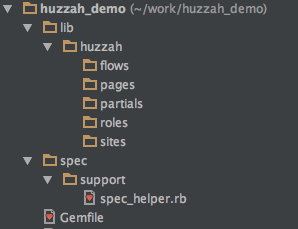
Update your Gemfile:
gem 'huzzah'
gem 'watir-webdriver'
NOTE: Although Huzzah is designed to be use with watir-webdriver, the two gems a decoupled. This allow you to choose the version of watir-webdriver that best suits your needs.
Perform a bundle install to get the gems.
Next, you will need create your Huzzah configuration. This should be done in the RSpec spec_helper.rb file.
require 'huzzah'
require 'watir-webdriver'

Huzzah.configure do |config|
  config.path = "#{your_project_path}/lib/huzzah"
  config.default_driver = ENV['BROWSER'] ||= 'firefox'
  config.environment = ENV['AUTO_ENV'] ||= 'qa'
end
See Configuration
and Defining Custom Drivers for more information.
Setup a Testing Framework (RSpec)
Setup Huzzah Directory Structure
Add Huzzah Configuration to Testing Framework
Create a Basic Test Scenario
Create a Page
Add Locators
Refactor Test Scenario
Add a Method to the Page
Refactor Test Scenario
Add a Site Config
Refactor Test Scenario
Add a Flow
Refactor Test Scenario