Repository navigation
Tutorial
The examples in this tutorial will be using RSpec for the testing framework. However, any testing framework will do and should have similar configuration setup. You may need to take additional steps based on your framework of choice (e.g. cucumber scenarios & step definitions).
In your editor of choice, setup a new project with the following directory structure:
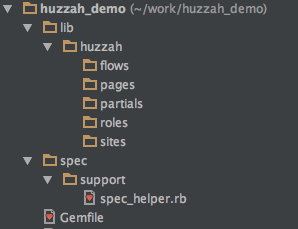
Update your Gemfile:
source 'https://rubygems.org' do
  gem 'rspec'
  gem 'huzzah'
  gem 'watir-webdriver'
end
NOTE: Although Huzzah is designed to be use with watir-webdriver, the two gems a decoupled. This allow you to choose the version of watir-webdriver that best suits your needs.
Perform a bundle install to get the gems.
Next, you will need create your Huzzah configuration. This should be done in the RSpec spec_helper.rb file.
require 'huzzah'
require 'watir-webdriver'

Huzzah.configure do |config|
  config.path = "#{your_project_path}/lib/huzzah"
  config.default_driver = ENV['BROWSER'] ||= 'firefox'
  config.environment = ENV['AUTO_ENV'] ||= 'qa'
end
See Configuration for details about the path, default_driver & environment attributes.
See Defining Custom Drivers for more information about using a browser other than Firefox.
Add a file name bing_spec.rb under the spec directory and add the following code:
require_relative 'support/spec_helper'

describe 'Bing' do

  before(:each) do
    @role = Huzzah::Role.new
    @role.browser.goto('http://bing.com')
  end

  after(:each) do
    @role.browser.close
  end

  it 'performs keyword searches' do
    @role.browser.text_field(id: 'sb_form_q').when_present.set('Huzzah')
    @role.browser.button(id: 'sb_form_go').click
    expect(@role.browser.link(href: 'https://en.wikipedia.org/wiki/Huzzah')).to be_present
  end

end
The above example is a very simple, yet poorly implemented, test scenario. The first thing that needs to be addressed is the hard-coded watir locators. Let's take a look at Huzzah's implementation of the page-object model. Create a new file under your lib/huzzzah/pages driectory named bing_home_page.rb and add the following code: