Repository navigation
Tine roadmap: what comes next, and where we'd like your input #646

Replies: 10 comments 23 replies

|
Section 1: Beta becomes 0.7.0. Reply here with anything that stops you trusting Beta with your graph, and the size and platform of your graph. |
|
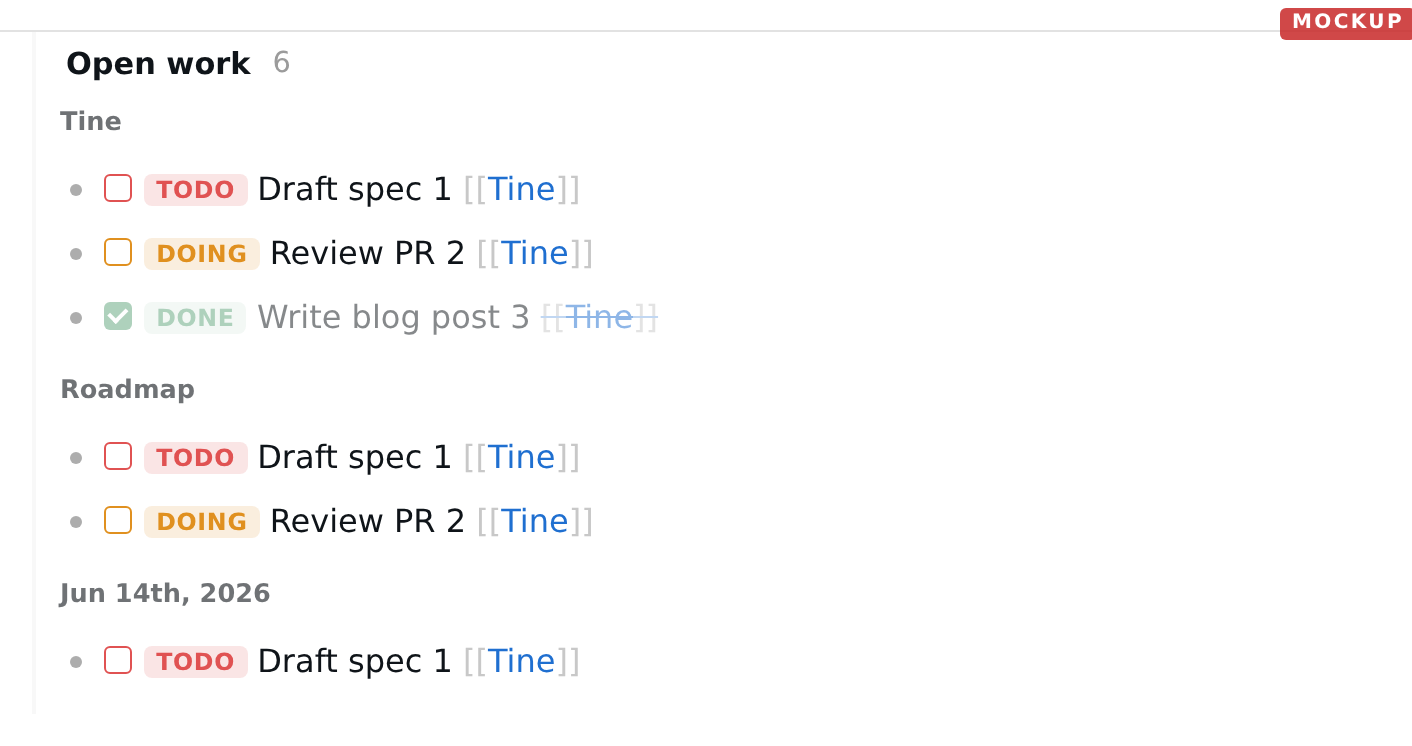
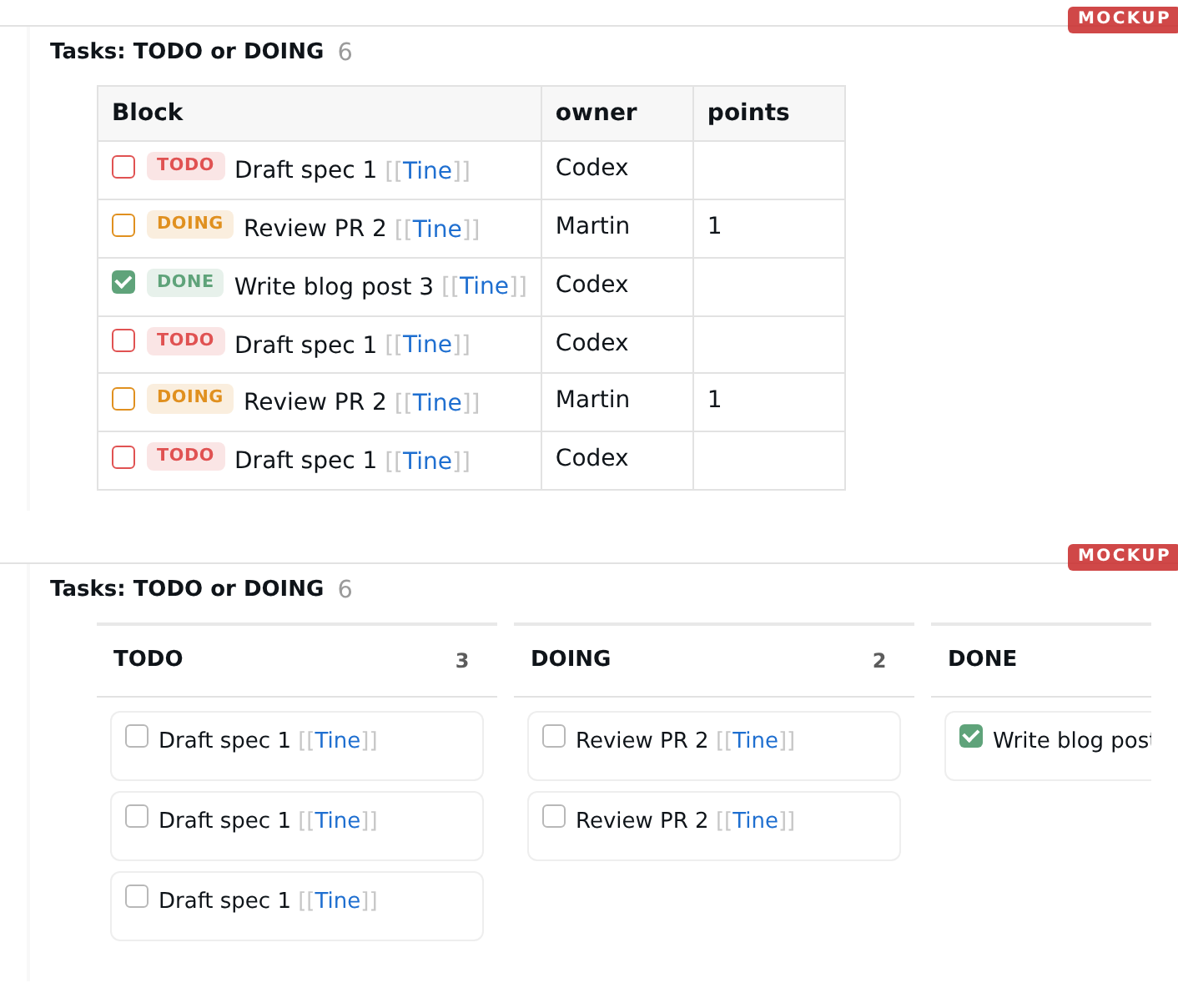
Section 2: calm UI. Reply here about the query mockups and the carry buttons: what do you use every day that must stay visible, and what could go?
|
|
Section 2: keyboard. Reply here with what you miss, and what a keybinding engine (section 5) would have to handle for you. |
|
Section 2: Logseq behaviours and small additions. Reply here if something you rely on in Logseq is missing. |
|
Section 2: mobile. Reply here with the actions you reach for most on the toolbar. |
|
Section 3: agents. Reply here if you already point an agent at your notes: what should it see? |
|
Section 4: exports and sharing. Reply here with what you'd publish or mount. |
|
Section 5 and "not planned". Reply here to argue for or against anything on these lists. |

This comment was marked as off-topic.
This comment was marked as off-topic.

From a different perspective, when we measure by the number of issues solved - thats very high for this repo. Martin tackles issues really fast without a big delay compared to other repositories. The feedback loop is just great I think Martin is killing it. :) And since he's solving issues rapidly, I'm much more inclined to post since I know that they will be solved. Personally, the number of issues that I post is more of a reflection of how much do I believe in the process and care about it, not that Tine has "a lot of issues". |

|
Written by Claude (Opus 5.5), read and approved by Martin. @EllisMorrow, the roadmap you asked for is now at docs/ROADMAP.md: a short section per version (0.9 in Beta, 0.10 in development, 0.11 plugins, and Later), with each version's issues as a GitHub milestone so the lists stay current. It is updated at every Beta release and whenever Martin changes what a version contains. |

|
@Brikas every single word you wrote is spot on! @martinkoutecky FWIW, one concern i have is that there are multiple sources of truth. That's a bit of an anti-pattern. e.g. if i want to know what's the latest on tine's roadmap, do i check this discussion, or the doc you just linked? they will probably diverge at some point. Also, sometimes discussions get a bit overloaded, with the same topic being discussed across multiple places. But none of these is a huge concern and the free flowing conversations is probably good thing, even if it's a but unorganized. |
This comment was marked as off-topic.
This comment was marked as off-topic.

|
A few thoughts/questions about the roadmap:
|
|
It may be worth making Tine localization-ready during Section 2. As the UI and settings grow, adding localization later could become increasingly costly, while an English-only interface may limit adoption. Tine could provide the localization framework and stable translation keys, with separate language files that the community can contribute and maintain through PRs. |
|
asking an agent (or static analysis tool) to find all user exposed strings and replace them with i18n placeholders, is quite trivial, so i18n can easily be added at any arbitrary point in time. |
|
@Dieterbe As a side note, I previously worked on localization in a project where implementing it required rewriting almost the entire codebase. I imagine the difficulty can vary greatly depending on the tech stack. |
yes. you need to pull in the libraries and replace every user-facing string, everywhere. it's a lot of changes, but it's a very specific change that can easily be done by agents and/or static analysis tools. |
|
@EllisMorrow I'd like to give you a proper answer about this, but not here.
If you want it, please write to me at the standard tine email, support at tine dot page.
|
|
@martinkoutecky When others are allowed to raise certain topics but I am not allowed to respond to them publicly, that is a clear form of unfair and unequal treatment. This is not a matter of whether the discussion takes place by email. |
|
@EllisMorrow I sat down with Claude and had a proper conversation about this whole situation, because I wanted to understand it rather than just manage it. One thing it pointed out helped me a lot, so I’ll share it. You are Chinese and I am Czech, and I think we are using two different norms for reading a discussion. Both are real and well described. Anthropologists call them high-context and low-context communication. In a high-context norm, a lot of the meaning is in what is implied: what someone is really getting at, why they phrase things the way they do. Reading that is a normal and even necessary skill. In a low-context norm, what is said is what is meant. You answer the words, and you read them in their most reasonable light (the principle of charity). It’s a rough generalization and people vary, but I think it explains a lot of what happened here. When you see “rhetorical tactics” and “indirect implications”, you are reading in the first way. When I see an attack on a person, I am reading in the second. I don’t think either norm is stupid. But a forum needs one, and Tine uses the low-context one. Concretely: you can answer anyone’s argument as sharply as you like. “This doesn’t follow, because…” is always fine, about anyone’s post, including mine. What’s not fine is claims about what someone is secretly doing or why: bad faith, sophistry, ingratiation, finding it amusing. In a low-context forum nobody can check those or answer them, and the thread becomes about people. The rule is the same for everyone. When it was crossed against you in #422, I should have said so at the time, and I am sorry. That’s my full answer. I won’t discuss it further here, and posts about other participants’ motives will be hidden. Your testing and feedback are a big part of why Tine moves as fast as it does, and I’d like that to continue. |
|
We come from different cultural backgrounds and have different knowledge, experiences, and many other factors that shape how we understand things. I can understand and respect the things you may not see. After all, there are also many things you can see that I probably cannot. I'm also very glad that you approached this matter with an open mind and took the time to examine it seriously. I believe you genuinely put thought into it. I'd now like to share my perspective. You don't have to reply, but I want you to know that I'm also taking your words seriously. Assuming that we both have good intentions, I believe this situation could at least help the two of us establish a better way of communicating, or perhaps even develop some shared principles for making judgments. Although I'm not the author of Tine, I've invested a great deal of time and thought into this software. My motivation has largely been to protect it from being harmed by people who might have ulterior motives and use one argument or another to push it in an undesirable direction. Of course, I also fully believe that even if I had never participated, you and the existing community would still be perfectly capable of doing a good job. I don't want to keep trying to prove anything about this matter, and you've already handled it very well. That said, some of the things I expressed could actually be examined and verified through explicit, point-by-point analysis under a low-context communication framework. They are not necessarily unfalsifiable claims. However, I don't want us to keep spending our limited daily energy and AI computing resources on these matters. Even if we could conclusively establish certain points, doing so would probably have little practical value. And of course, as a human being, I recognize that I have sometimes used emotionally charged language that was inappropriate. In the future, if I face personal attacks, I will follow your low-context discussion rules when responding, as I believe I did in #891. Even when my high-context analysis suggests that a particular interpretation is very likely correct, I will deliberately choose not to pursue it publicly. If we had known each other in real life for several years, you would probably discover that my judgment in high-context analysis is no worse than my judgment on software-related issues. Much of the time, it is relatively accurate and insightful, because I have accumulated substantial experience and continuously refined my understanding over many years. But here, you are entirely free not to believe that. That's perfectly fine. I wouldn't readily place that much trust in someone I only know online either. However, when someone makes a logical rebuttal that addresses an argument rather than a person, I don't think it should automatically be categorized as "two people focusing on each other." Doing so risks bypassing the actual issue being examined, especially in discussions involving core features. For example, suppose someone argues that "Microsoft engineers work for a company with enormous financial resources, so their design decisions must always be correct." If I respond, "Microsoft engineers are not designing for the specific problems Tine faces, so their solutions cannot automatically be assumed to be suitable for Tine," that is clearly a logical rebuttal directed at the argument, not the person. This kind of analysis is directly relevant to how Tine's features should be designed and developed, and it is something that also deserves your participation in the discussion. Such discussions may not always sound particularly friendly, but they are a necessary and healthy part of critical thinking. That is the purpose of discussion: to help us arrive at solutions that are likely to be sound and have lasting value. Sometimes, when I am personally attacked, I also need to explain or defend myself. For example, saying "Whether I am courageous or timid has nothing to do with Microsoft as a company" is not shifting the discussion toward the other person. It is an attempt to identify and explain a logical fallacy. In situations like this, I think it is important to recognize that the other person has already shifted the discussion away from the actual issue and toward whether I, as a person, am qualified to make a judgment at all. That is why I sometimes describe this kind of conversation as "cunning, full of sophistry, and malicious." I understand that you dislike such characterizations, and I can avoid using them in the future. But my decision to stop using those descriptions does not mean that the underlying style of argument will disappear. If you want to eliminate that kind of argumentative behavior and the unnecessarily complicated discussions it creates, I believe you need to identify where it originates and address the underlying cause. To be frank, I also dislike having to respond repeatedly to arguments that mix together large amounts of irrelevant information. It is troublesome and wastes both my time and yours. But when those arguments concern actual features, I cannot simply ignore them if I care about Tine's development. In the future, if you see personal attacks that directly target individuals rather than addressing the substantive issue, I hope you will apply the same standards to everyone, especially those who initiate such attacks, and deal appropriately with the source of the problem. Personally, I do not usually go out of my way to repeatedly challenge or analyze other people's arguments. I generally only do so when recurring logical fallacies have become particularly obvious and appear deliberate. I also don't enjoy commenting on what other people are like. After all, what kind of person someone else is usually has little to do with me. - I really appreciate your consistently well-intentioned and rational approach to dealing with people and problems. I'd like to share a little of my experience from my own cultural background. If you're interested, you can read it; if not, feel free to skip it. Perhaps it will help you better understand the Eastern communication context.
|


Uh oh!
There was an error while loading. Please reload this page.
Uh oh!
There was an error while loading. Please reload this page.
Written by Claude (Opus 5.5) from Martin's decisions; read and approved by Martin.
Current roadmap (2026-11-11 on): docs/ROADMAP.md. It is kept up to date per version, with GitHub milestones for the issue lists. This post is the October 2026 plan, kept for its discussion threads.
Updated 2026-10-08: section 1 shipped as 0.7.0; #110 added to Later. Later the same day: a new storage core joins section 2; the command line now follows it.
This is the companion to Where Tine is going. That post says why; this one says what, in which order. To write it I went through every open issue and every discussion here (with help from other agents), proposed a place for each, and Martin decided. Each one now has a place: on this roadmap, deliberately not in Tine (usually with a better home, such as a plugin), or closed because it is already done.
How the work flows. Beta is now the line: stable gets only severe fixes, and it retires when Beta has caught up and earned your trust. Work happens in cycles: agents build until Martin's quota runs low, he cuts a Beta release, and you test it while the quota renews. So there are no dates here, only an order, and Martin may still pick something up on a whim.
How items were placed. By Martin's priorities, in this order: data safety, performance and maintainability first; then a UI that stays simple and polished; things you can configure rather than things imposed on you; small tools that compose (the unix way). When Tine and Logseq differ, Logseq's behaviour is the default unless there is a reason. Requests for parity with other tools come after the map in the Direction post.
Where your input helps most. Each section below is also a comment in this thread; please reply under the one you care about. Above all, the UI. Making Tine calmer means deciding what you see all the time and what appears only when you reach for it, and we're not sure where that line is. Martin himself isn't sure for some of his own daily tools (see the carry buttons in section 2). Section 2 has mockups; tell us what you'd miss. We also want to hear "you're about to build the wrong thing".
1. Beta becomes Tine 0.7.0 — done
Shipped 2026-10-08. Tine 0.7.0 was built from the Beta line. Items below that are still open continue in the 0.8.0 Betas.
The goal of this phase is trust, not features. It ends when Beta is at least as reliable as stable on your graph, and then Beta becomes 0.7.0.
Large graphs. Typing lag and the index rebuild on a 13,000-page Windows graph (#623); slow renames (#406); pages that hang while loading (#550). Beta is already faster than stable on our Linux benchmarks, but Ellis's graph shows the benchmarks missed something, so Windows gets measured too.
Your data. The unexplained loss of several days of notes on close (#540) stays open until we know the cause, and the save path gets the diagnostics to find it. A broken
config.ednmust never open as an empty graph (#332).Logseq queries. Your existing advanced queries and
:default-queriesshould just work (#628, #629). We'll collect the query shapes people actually use and translate those automatically; anything left over gets a clear message with the equivalent Tine query. Journal settings from Logseq that Tine ignores today (:default-queries, turning off the scheduled/deadline section, how many days ahead it looks) will be honoured.Android. Inserting images from the phone (#622) gets a redesign rather than a fourth patch. Nextcloud graphs get a clear message instead of a silent failure (#630).
The Beta bug list reported since beta.1 (#632, #638 to #642, input methods #575), plus a security pass over Dieter's audit (CSP, dependency updates).
2. Calm and quick
Tine has grown a lot of buttons. This phase is about taking them away again, and about the keyboard.
Quick, underneath: a new storage core. Saving has caused too many small bugs, because its logic is split between the editor and the backend. The next Betas move it into one place: the backend owns each page while you edit it, saves it with the same guarded write Tine uses today, and keeps a recovery copy of anything not yet saved. Its rules were written down first as a formal model and checked by proof, so the code can be tested against them. Nothing that saves today on an ordinary setup will be refused. It is also what makes the command line in section 3 simple.
Queries that look like content. Today a query block shows about 25 controls before you touch it (title, count, Export, four view buttons, a sentence, a gear…). The proposal: at rest a query is just its title, its count and its results, with a thin line marking them as live. The view menu and a "⋯" menu (edit, edit as text, copy results, export) appear when you hover. Clicking the title opens the editor inline, and the real results below update as you type, so there's no second preview list. Tasks look the same in lists, tables and boards. (#502, #585, #619, #387)
The same treatment elsewhere: the built-in Scheduled & Deadline section loses its Export button, and link types are told apart visually (#430, #432). Then the rest of the app: we'll count every command, menu entry and setting, and each one has to earn its place. Rare commands stay in the command palette and stay bindable, niche settings move to
config.edn, and duplicates go.An open question: the journal's "Carry…" buttons. Martin uses them every day, and they are also clutter. Hidden behind hover, though, a new user would never find carry-over at all. The options we see: leave them as they are; show them on hover, as in the mockup below; or show them only on today's journal (the past-day button would move to the day's right-click menu, where it already is). Today you can already turn them off in Settings → Journals. Which would you pick?
Keyboard. Small things first: paste without formatting, copy block ref, duplicate block, search for the selected text, insert a child block, Ctrl+1…9 for tabs, Escape back to editing (#513, #576, #379, #633, #634, #587, #428).
What Logseq does and Tine doesn't yet: ticking a task from a block reference (#518), editing properties inside Linked References (#486), TODO pages listing their tasks (#487), dragging a block out of query results (#494), Logseq's coloured text and highlights (#243), page icons in the sidebar (#346), a full All Pages view (#335), close/collapse others in the right sidebar (#462).
Small, contained additions: find and replace within a page (#208), sticky parent bullets while scrolling (#643), relative links to files so a graph stays portable (#457), one-level collapse commands (#525), favouriting blocks (#570), a notice with Undo when a deleted block was referenced elsewhere (#635), tab and sidebar fixes (#527, #528, #529, #521).
Mobile: share into Tine from other apps on Android (#608); one pass over the toolbar layout, so selected text is never covered and the main actions are within reach (#375, #598, #160).
Desktop: minimise to tray (#625), after multi-window. A Microsoft Store build, so Windows Defender stops flagging Tine (#302, #307).
Localization (#107), as the last step of this phase, once the UI has fewer words in it: menus, settings, buttons, dialogs and errors become translatable, falling back to English, with Simplified Chinese as the first language, reviewed by native speakers. The Guide stays English for now. Searching Chinese text by pinyin (#151) comes after.
3. Your agent, next to you
This is section 1 of the Direction post, made concrete. Each step is usable on its own. The command line comes after the storage core in section 2, because it talks to the same backend as the app.
A command line first (#108). Your agent reads and edits the graph through
tinecommands instead of editing Markdown by hand: add a block under this one, link to that page, reference or embed that block. The command line deals with block ids, links and Tine's syntax, so even a small model gets them right. It asks Tine's own query engine instead of grepping files. Edits go through the same guarded save path the app uses. With the app open, the command line talks to it; with the app closed, it starts the same backend without a window. Either way, an edit to a block that changed underneath is refused rather than written over. The same command line exports queries and diagnostic reports for scripts and cron jobs (#588, #636). Every block it writes is labelled with who wrote it (author:: claude, say), so you can tell agent text from yours. Martin will be its first daily user.MCP next (#109), built from the same commands, for agent apps that have no shell. It can also tell your agent which page you're looking at.
Whose text is whose: agent-written blocks carry
author::and look different.Comments: select text, press a key, answer; threads live as ordinary child blocks. Whether they show in the margin or in the sidebar is an open question in the Direction post.
Undo a whole agent run, for graphs kept in git: each command-line run is a commit, and Tine reverts it block by block without losing what you edited since.
"Changed since you last looked" per page.
4. Exports that are the app
Section 2 of the Direction post, made concrete.
Export writes a "pack" (the read-only app with search), and a selection is a query: "these pages, plus everything within k links", picked in a graph view. That graph view is the local, slice-picking kind, not a whole-graph hairball (#183, #203). We haven't designed it yet; the Direction post has a rough sketch, and ideas are welcome.
Mark queries as exported, and re-export all of them with one button or
tine export queriesfrom cron. Multi-page "copy / export as" falls out of this (#505), as does navigation inside a live export (#548).Then quick share: a secret gist on your GitHub, and a link that carries the key.
5. Later, on purpose
Git sync (#33), in two phases as described in the Direction post.
Agent-written plugins: the experimental, typed plugin tier.
A live-preview editor (#95). It was the most-voted item in the #422 poll, so it gets a fair, time-boxed experiment after 0.7.0. The bar is set before any code exists: input methods, undo and caret behaviour must match today's editor, and typing must not get slower on Linux or Android. If the experiment doesn't clear it, we stop.
A keybinding engine in the spirit of VS Code, as Brikas proposed in discussion #383: commands bindable anywhere,
whenconditions instead of hardwired modes, chords, and a which-key style hint for sequences (Dieter's idea). Martin likes it, but it is a contract for every key in the app, so it gets designed once the small keyboard work above has shown exactly what it must handle.Supertags / page schemas (#131). The property editor and Sheets already cover part of it. A proper schema layer would compete for the same attention as sections 3 and 4, so it waits until they're done. Martin wants it, but after everything else currently planned.
Plain Markdown folders and single files (#110): opening an ordinary Markdown folder, or one file, without a Logseq graph around it.
Not planned, and what to do instead
These are reasonable requests that Martin doesn't want in Tine's core. Most would make good plugins, and an agent can write one for you. If the plugin API is missing something, tell us the smallest addition that would make it possible.
As plugins: mind maps and spatial views (#404), focus levels (#497), image galleries (#584), a planner (#242), random block (#419), ghost-text autocomplete (#165), paste transforms (#120).
Not at all, for now: animations (#402), per-block soft-wrap (#453, we chose one global setting in #474), a formatting toolbar on desktop (#219), an outline-navigator panel (#613, sticky parents first), sorting references by edit time (#517; file times aren't reliable under sync), 32-bit ARM (#604).
Keeping Logseq's behaviour: Move Up inside an embed moves the embedded block, as in Logseq, but Tine will say where it moved (#641); breadcrumbs in references navigate (#526); Android Back at the start exits the app (#386); pasting a block reference over selected text replaces the text, with a separate "paste as link" command for wrapping it (#448).
What we'd like to hear
Queries: does the calm version hide something you use every day?
The "not planned" list: which of these would you write as a plugin, and which do you think we're wrong about?
Beta: what still stops you from using it daily?
All reactions