Repository navigation
Releases: mfathy234/nadfny
Release list
Nadfny 0.4.1

Nadfny 0.4.1 makes updating reliable on slow connections.
Download
| File | What it is |
|---|---|
| Nadfny-0.4.1-setup.exe | Installer (recommended). Per-user, no administrator rights, adds a Start menu entry, updates itself. |
| Nadfny-0.4.1-win-x64.msi | The same installer as a plain MSI, for scripted or managed installs. |
| Nadfny-0.4.1-portable-win-x64.zip | Portable. Unzip anywhere and run Nadfny.exe. |
All are self-contained (the .NET runtime is included). Requires Windows 10 or 11 x64 with the WebView2 Runtime, which Windows 11 already has.
Fixes
- Updates resume. If the connection drops, or you close Nadfny while an update downloads, the download continues where it stopped instead of starting over.
- Updates show their progress. The sidebar shows the percentage, the size and about how long is left, so a slow download no longer looks stuck.
- No more silent hangs. If no data arrives for a minute, Nadfny retries on its own, and tells you if it still cannot finish.
- An update that is already downloaded and checked is used again rather than downloaded twice, and leftover downloads from older versions are cleaned up.
These improvements apply from the next update on. If you are updating from an older version, the update to 0.4.1 still uses the old downloader: leave Nadfny open until the sidebar says Restart to update.
Good to know
- The app is not code-signed yet, so SmartScreen may warn on first run: choose More info, then Run anyway.
Checksums (SHA-256)
9086413bffedc92778de2e728bcca34f6704ac62997b4fcbefce7eb750771189  Nadfny-0.4.1-portable-win-x64.zip
b98d938b4f57b9c7c6c193a767d859ef05378a6cccb6df5e9e7f68c26de0947f  Nadfny-0.4.1-setup.exe
cfae28b0860c52046565394156c6930555bbf3c1c4faede5150fd8274acf0d73  Nadfny-0.4.1-win-x64.msi
Nadfny 0.4.0
Nadfny 0.4.0 finds four more places a developer's disk fills up: local AI models, WSL disks, git repositories and crash dumps.
Download
| File | What it is |
|---|---|
| Nadfny-0.4.0-setup.exe | Installer (recommended). Per-user, no administrator rights, adds a Start menu entry, updates itself. |
| Nadfny-0.4.0-win-x64.msi | The same installer as a plain MSI, for scripted or managed installs. |
| Nadfny-0.4.0-portable-win-x64.zip | Portable. Unzip anywhere and run Nadfny.exe. |
All are self-contained (the .NET runtime is included). Requires Windows 10 or 11 x64 with the WebView2 Runtime, which Windows 11 already has. Installed copies of 0.2.0 and later update themselves.
What's new
- AI models (Caches): models from Ollama, Hugging Face and LM Studio, each with its size. Ollama models are removed through Ollama itself (models share files, so Nadfny never deletes them directly); Hugging Face models are downloaded again on next use; LM Studio models go to the Recycle Bin. With Ollama closed, its models show as one folder; start Ollama to remove single models.
- WSL distros (Docker): the disk of every WSL distro, which grows but never shrinks on its own. Compact a distro's disk to give the empty space back to Windows, or turn on automatic shrinking on WSL 2.0 and later.
- Repository health (Worktrees): for each git repository, what
git gcwould reclaim, the Git LFS cache, local branches whose remote branch is gone, and stashes. Repositories worth tidying come first; the rest fold away. Branches are deleted withgit branch -d, so git keeps any branch with work not merged yet. - Crash dumps and error reports (Caches): your own app crash dumps and error reports (anything written in the last 24 hours is kept), and Windows' memory dumps, minidumps and error reports through Windows' own Disk Cleanup.
Fixes
- Docker and WSL disk compaction never run at the same time.
Good to know
- The app is not code-signed yet, so SmartScreen may warn on first run: choose More info, then Run anyway.
- Compacting a WSL disk and cleaning Windows' system dumps ask for administrator permission. Compacting shuts down every WSL distro and Docker Desktop while it runs.
Checksums (SHA-256)
cf7336cc67791233cb9f9bfe4b72f23c9ae14d8c350578a889a6a530b09596d3  Nadfny-0.4.0-portable-win-x64.zip
62df4ef1aa1649aa23197e920e0faf86ee6183c17410659b2efec36ef8a4a9f6  Nadfny-0.4.0-setup.exe
81ed17fd414b0e2b1159e0d2b975fffcc361968fdc07e45952caad47e028b661  Nadfny-0.4.0-win-x64.msi
Nadfny 0.3.0
Nadfny 0.3.0 finds more of what fills a developer's disk, shows what is growing, and cleans up after apps that would not leave.
Download
| File | What it is |
|---|---|
| Nadfny-0.3.0-setup.exe | Installer (recommended). Per-user, no administrator rights, adds a Start menu entry, updates itself. |
| Nadfny-0.3.0-win-x64.msi | The same installer as a plain MSI, for scripted or managed installs. |
| Nadfny-0.3.0-portable-win-x64.zip | Portable. Unzip anywhere and run Nadfny.exe. |
All are self-contained (the .NET runtime is included). Requires Windows 10 or 11 x64 with the WebView2 Runtime, which Windows 11 already has. Installed copies of 0.2.0 update themselves.
What's new
- Storage history: Nadfny now remembers each scan (90 days). Overview shows what grew since last time, which categories grew most, and used space per drive over time; lists show "+1.2 GB since..." next to things that grew.
- Large files: a new page for files over 100 MB, 500 MB or 1 GB, old Downloads grouped by type and age, and duplicate files (matched by content, hard links excluded). Nadfny never lets you remove every copy of a file, and everything goes to the Recycle Bin.
- Windows space: the hibernation file (often 6 to 16 GB) with confirmed Turn off and Reduce, pagefile and swapfile sizes per drive, and restore points.
- More developer caches: Go, uv, Poetry, Conda, Bun, Deno, Composer, Cargo git checkouts, VS Code extension downloads, JetBrains caches and logs, Visual Studio component caches.
- Old SDKs and tools: old .NET SDK patches (your
global.jsonpins are respected; Nadfny shows the uninstall command rather than deleting from Program Files), Android emulator and system images, folders of older JetBrains IDE versions. - Build output: "Last used" now comes from your project's own files, with filters up to "1+ year" and an oldest-first sort. New project types: Unity, Godot, Flutter, Elixir, CocoaPods, CMake, Gradle, Expo, Ruff, tox. Generic names such as
buildandTemponly count next to their project files. - Broken apps and bulk uninstall: remove apps whose uninstaller is gone (their Windows entry is backed up to a
.regfile first), and uninstall several apps in one go, one after another, quietly when the app supports it, with one review of everything they left behind.
Fixes
- Cache clearing checks that the folder is the one you were shown.
- Hibernation is detected correctly on PCs where Windows only sets its default value.
Good to know
- The app is not code-signed yet, so SmartScreen may warn on first run: choose More info, then Run anyway.
- Turning off hibernation, removing a broken app's machine-wide entry, and uninstalling apps installed for all users ask for administrator permission.
Checksums (SHA-256)
0d1f02e47bfa4aacca11c293d19eec8e81b9d8cd6e38a07a304c949f7dae7749  Nadfny-0.3.0-portable-win-x64.zip
646165573eb9af071d22c729ca5f292c8c3def68d3f3493c9baa6111b481a6fe  Nadfny-0.3.0-setup.exe
e13811e158600d76c34dd082063eb1ae01eea79f407af284a6a1e9e463238fe8  Nadfny-0.3.0-win-x64.msi
Nadfny 0.2.0
Nadfny 0.2.0 adds an Apps & games page, the Recycle Bin, and a proper installer with the Nadfny icon.
Download
| File | What it is |
|---|---|
| Nadfny-0.2.0-setup.exe | Installer (recommended). Per-user, no administrator rights, adds a Start menu entry, updates itself. Upgrades a 0.1.0 install in place. |
| Nadfny-0.2.0-win-x64.msi | The same installer as a plain MSI, for scripted or managed installs. |
| Nadfny-0.2.0-portable-win-x64.zip | Portable. Unzip anywhere and run Nadfny.exe. |
All are self-contained (the .NET runtime is included). Requires Windows 10 or 11 x64 with the WebView2 Runtime, which Windows 11 already has.
What's new
- Apps & games: every installed app and game with what it really takes: the program, its data in AppData and ProgramData, and its caches. Filter by apps, games or "has cache", and search.
- Clear cache for one app (browsers and Electron apps often hold gigabytes). Settings, sign-ins and saved files are kept.
- Uninstall through the app's own uninstaller (Store apps through Windows, Steam games through Steam), then review the folders it left behind. Leftovers go to the Recycle Bin, and folders another installed app also uses are never offered.
- Games from Steam, Epic, Xbox, GOG, Ubisoft, EA and Battle.net, and also games you downloaded into your own folders (
D:\Games\Racing\…), recognized by their engine files (Unity, Unreal, Godot, GameMaker, RPG Maker, Ren'Py).
- Recycle Bin: how much it holds on each drive, and emptying it, in Caches.
- More honest sizes: sparse and compressed files count the space they really use (an Android emulator disk no longer shows as 512 GB), and OneDrive cloud-only files count as zero.
- Safer deletes: the deletion engine now also checks the real path Windows resolves, so a short name (
C:\PROGRA~2) or a junction cannot slip past its protected-folder rules. - Installer: a
setup.exewith the Nadfny icon. In-app updates now use it.
Good to know
- The app is not code-signed yet, so SmartScreen may warn on first run: choose More info, then Run anyway.
- Uninstallers of apps installed for all users ask for administrator permission, as they do from Windows Settings.
Checksums (SHA-256)
c0d249332878ab1b6437a36dc8051a5082996cb18f300beb4f9e3b5b004afc55  Nadfny-0.2.0-portable-win-x64.zip
bff6f366783ca1eb9dbddcfbc3e003713fec2329b496291bce93888da465b6f8  Nadfny-0.2.0-setup.exe
fff20d53b605917b168992e3674cb82c9574c112bb3ab456212494247b31f252  Nadfny-0.2.0-win-x64.msi
Nadfny 0.1.0
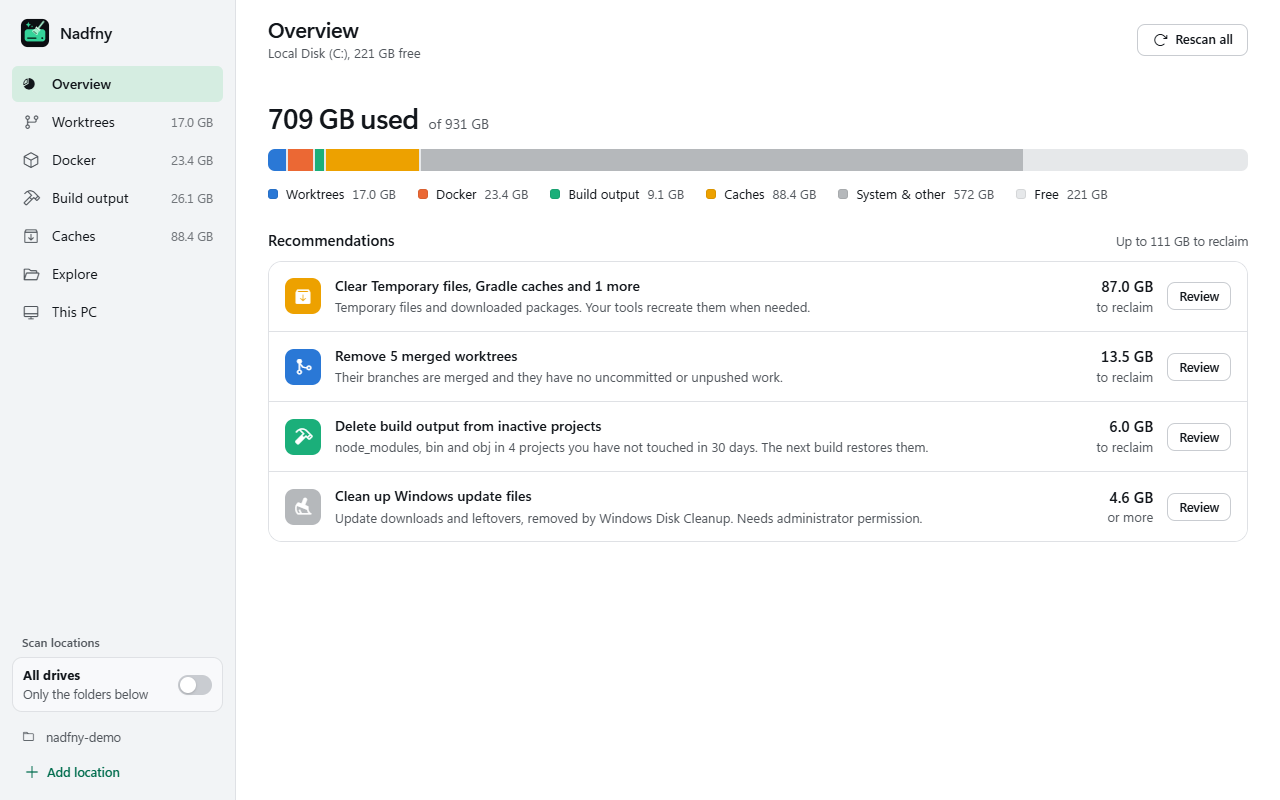
The first release of Nadfny (نضّفني, "clean me"): find what is eating your disk and clean it up safely.
Download
| File | What it is |
|---|---|
| Nadfny-0.1.0-win-x64.msi | Installer. Per-user, no administrator rights, adds a Start menu entry, updates itself. |
| Nadfny-0.1.0-portable-win-x64.zip | Portable. Unzip anywhere and run Nadfny.exe. |
Both are self-contained (the .NET runtime is included). Requires Windows 10 or 11 x64 with the WebView2 Runtime, which Windows 11 already has.
What's in 0.1.0
- Worktrees: every linked git worktree with size, branch and Merged / uncommitted / unpushed badges; remove several at once, optionally with their branches.
- Docker: build cache, images, containers and volumes, prunes, and WSL disk compaction.
- Build output:
node_modules,bin/obj,dist,target,.next,.venvand more, filterable by age. - Caches: npm, pnpm, Yarn, NuGet, pip, Gradle, Maven, Playwright, Temp, and Windows update leftovers through Disk Cleanup.
- Explore any drive by size, and a This PC page with your full hardware specs and copy buttons.
- All drives mode to scan every local disk, with live progress.
Updates
Nadfny checks for new releases on its own (10 seconds after launch, then every 6 hours) and from Check for updates in the sidebar. The installer version downloads the update, verifies its SHA-256 checksum and upgrades in place on Restart to update. The portable version shows the update and links here.
Safety
- Every delete is confirmed by name and size. Worktrees with unsaved work need an extra acknowledgement, and are re-checked with git right before removal.
- Build output is only deleted when it contains no git-tracked files and no hand-written source code.
- System folders, your profile and AppData are refused by the deletion engine itself.
- Deletes run in the background with live progress, and resume if the app is closed mid-way.
Good to know
- The app is not code-signed yet, so SmartScreen may warn on first run: choose More info, then Run anyway.
- Docker disk compaction and Windows update cleanup ask for administrator permission. Compaction closes Docker Desktop and shuts down WSL while it runs.
Checksums (SHA-256)
ee5d1c6615b8c184215c8fcf0e63e1ff066ee76bbc2e3c9a79dacc4450e0ada9  Nadfny-0.1.0-win-x64.msi
fa10e888ca5593ca83ea1e9ca4e0b93ff73e54fcdaeef1bbe693b30dfc00ef32  Nadfny-0.1.0-portable-win-x64.zip