Repository navigation
Releases: nefariousjosiah/WWE-SVR2007-RECOMP
Release list
v2.2.1

WWE SmackDown vs. Raw 2007 running natively on Windows, and on Linux and the Steam Deck through Proton: the game's code recompiled for PC, with a native renderer. 60 fps, from 480p up to 8K; 720p at 60 fps on the Steam Deck.
v2.2.1
- Screen shapes now cover the whole game (still experimental). At 16:10, 21:9 and 32:9 the title screen, menus and loading screens fill the screen too, not just matches: backgrounds and side panels reach the edges, while text, pictures and panels keep their shape. No more switching back to 16:9 between menus and matches. (#4)
Updating: open the settings menu, go down to Update and press A twice; your saves are kept and backed up first.
You need your own copy of the game: a disc image (.iso, about 7.8 GB) of your own SvR 2007 disc, USA / Europe release. None of the disc's files are in this download, and this project does not condone piracy.
Download
SVR2007-NATIVE.zip under Assets below (not Source code, which is the developer source).
Windows
- Extract the zip into a folder of its own (for example
C:\Games\SVR2007-NATIVE). - Copy your
.isointo that folder, next tosvr2007.exe. - Run
svr2007.exe(if Windows warns, More info > Run anyway). The game finds the disc image by itself and starts.
A controller is recommended: keyboard controls are included but not tested yet.
Linux / Steam Deck (Proton)
Extract the zip, copy your .iso into that folder next to svr2007.exe, add svr2007.exe to Steam as a non-Steam game with Proton Experimental, and start it (from Game Mode on the Deck). Step by step: README.
v2.2
WWE SmackDown vs. Raw 2007 running natively on Windows, and on Linux and the Steam Deck through Proton: the game's code recompiled for PC, with a native renderer. 60 fps, from 480p up to 8K; 720p at 60 fps on the Steam Deck.
v2.2
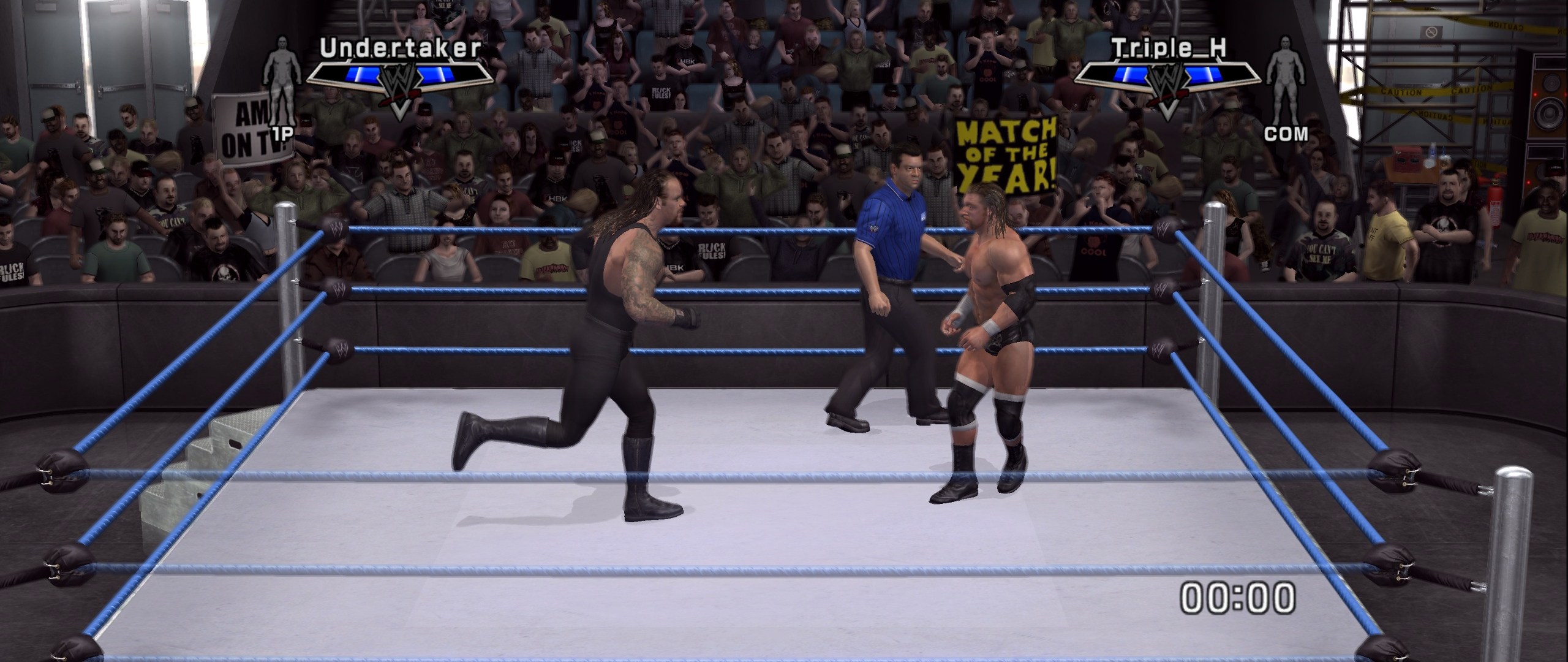
- New screen shapes (experimental): 16:10, 21:9 and 32:9. Pick one in the settings menu under Screen shape. Matches, entrances and cutscenes fill the screen and show more of the arena, with nothing stretched and the HUD in its usual place. Menus stay 16:9 for now. 16:10 suits the Steam Deck and many laptops; 21:9 and 32:9 are for ultrawide monitors.
Updating: open the settings menu, go down to Update and press A twice; your saves are kept and backed up first.
You need your own copy of the game: a disc image (.iso, about 7.8 GB) of your own SvR 2007 disc, USA / Europe release. None of the disc's files are in this download, and this project does not condone piracy.
Download
SVR2007-NATIVE.zip under Assets below (not Source code, which is the developer source).
Windows
- Extract the zip into a folder of its own (for example
C:\Games\SVR2007-NATIVE). - Copy your
.isointo that folder, next tosvr2007.exe. - Run
svr2007.exe(if Windows warns, More info > Run anyway). The game finds the disc image by itself and starts.
A controller is recommended: keyboard controls are included but not tested yet.
Linux / Steam Deck (Proton)
Extract the zip, copy your .iso into that folder next to svr2007.exe, add svr2007.exe to Steam as a non-Steam game with Proton Experimental, and start it (from Game Mode on the Deck). Step by step: README.
v2.1
WWE SmackDown vs. Raw 2007 running natively on Windows, and on Linux and the Steam Deck through Proton: the game's code recompiled for PC, with a native renderer. 60 fps, from 480p up to 8K; 720p at 60 fps on the Steam Deck.
v2.1
- Unlock everything. A new setting in the settings menu (F1, or Back + Start on a controller): every superstar, arena, attire, move and other Shop item is available, as if bought in the Shop. It shows from the next menu screen. Best treated as permanent: switching it off brings back your own progress, but rewards you earn while it's on are not saved, so you'd lose them.
Updating: open the settings menu, go down to Update and press A twice; your saves are kept and backed up first.
You need your own copy of the game: a disc image (.iso, about 7.8 GB) of your own SvR 2007 disc, USA / Europe release. None of the disc's files are in this download, and this project does not condone piracy.
Download
SVR2007-NATIVE.zip under Assets below (not Source code, which is the developer source).
Windows
- Extract the zip into a folder of its own (for example
C:\Games\SVR2007-NATIVE). - Copy your
.isointo that folder, next tosvr2007.exe. - Run
svr2007.exe(if Windows warns, More info > Run anyway). The game finds the disc image by itself and starts.
A controller is recommended: keyboard controls are included but not tested yet.
Linux / Steam Deck (Proton)
Extract the zip, copy your .iso into that folder next to svr2007.exe, add svr2007.exe to Steam as a non-Steam game with Proton Experimental, and start it (from Game Mode on the Deck). Step by step: README.
v2.0.1
WWE SmackDown vs. Raw 2007 running natively on Windows, and on Linux and the Steam Deck through Proton: the game's code recompiled for PC, with a native renderer. 60 fps, from 480p up to 8K; 720p at 60 fps on the Steam Deck.
v2.0.1
- Shift, Ctrl and Alt work as keyboard buttons. Bound on their own (for example Shift to run), they now work in game, and holding one no longer stops every other key, so you can hold Shift to run while moving with the arrow keys. Combos like Shift + arrow keys (the D-pad by default) still work; if you bind Shift as a button, give the D-pad other keys (SvR 2008 #13). Thanks to RiasatSalminSami for the report.
Updating: later versions can be installed from the settings menu: go down to Update and press A twice; your saves are kept and backed up first.
You need your own copy of the game: a disc image (.iso, about 7.8 GB) of your own SvR 2007 disc, USA / Europe release. None of the disc's files are in this download, and this project does not condone piracy.
Download
SVR2007-NATIVE.zip under Assets below (not Source code, which is the developer source).
Windows
- Extract the zip into a folder of its own (for example
C:\Games\SVR2007-NATIVE). - Copy your
.isointo that folder, next tosvr2007.exe. - Run
svr2007.exe(if Windows warns, More info > Run anyway). The game finds the disc image by itself and starts.
A controller is recommended: keyboard controls are included but not tested yet.
Linux / Steam Deck (Proton)
Extract the zip, copy your .iso into that folder next to svr2007.exe, add svr2007.exe to Steam as a non-Steam game with Proton Experimental, and start it (from Game Mode on the Deck). Step by step: README.
v2.0
WWE SmackDown vs. Raw 2007 running natively on Windows, and on Linux and the Steam Deck through Proton: the game's code recompiled for PC, with a native renderer. 60 fps, from 480p up to 8K; 720p at 60 fps on the Steam Deck.
v2.0
- Background blur, now a setting in the settings menu (F1): the depth of field that softens the crowd and the arena behind the wrestlers is Off by default, for a sharp picture. Turn it On for the console's original look; it changes instantly. (SvR 2007 never had the edge blur of the later games, so there's no setting for it.)
- More resolutions: 480p for weaker graphics cards, 1080p, and 8K for top-end ones, next to Auto, 720p, 1440p and 4K (F1 > Resolution, from the next start).
Updating: later versions can be installed from the settings menu: go down to Update and press A twice; your saves are kept and backed up first.
You need your own copy of the game: a disc image (.iso, about 7.8 GB) of your own SvR 2007 disc, USA / Europe release. None of the disc's files are in this download, and this project does not condone piracy.
Download
SVR2007-NATIVE.zip under Assets below (not Source code, which is the developer source).
Windows
- Extract the zip into a folder of its own (for example
C:\Games\SVR2007-NATIVE). - Copy your
.isointo that folder, next tosvr2007.exe. - Run
svr2007.exe(if Windows warns, More info > Run anyway). The game finds the disc image by itself and starts.
A controller is recommended: keyboard controls are included but not tested yet.
Linux / Steam Deck (Proton)
Extract the zip, copy your .iso into that folder next to svr2007.exe, add svr2007.exe to Steam as a non-Steam game with Proton Experimental, and start it (from Game Mode on the Deck). Step by step: README.
v1.0.1: Videos fixed
WWE SmackDown vs. Raw 2007 running natively on Windows, and on Linux and the Steam Deck through Proton: the game's code recompiled for PC, with a native renderer. 60 fps, up to 4K; 720p at 60 fps on the Steam Deck.
v1.0.1: Videos fixed
- No more ghosting in videos. The intro, the titantrons and the menu background videos no longer show a double image when things move (#1). Thanks to RiasatSalminSami for the report and Quantum1997 for tracking down the setting behind it.
Updating: later versions can be installed from the settings menu: go down to Update and press A twice; your saves are kept and backed up first.
You need your own copy of the game: a disc image (.iso, about 7.8 GB) of your own SvR 2007 disc, USA / Europe release. None of the disc's files are in this download, and this project does not condone piracy.
Download
SVR2007-NATIVE.zip under Assets below (not Source code, which is the developer source).
Windows
- Extract the zip into a folder of its own (for example
C:\Games\SVR2007-NATIVE). - Copy your
.isointo that folder, next tosvr2007.exe. - Run
svr2007.exe(if Windows warns, More info > Run anyway). The game finds the disc image by itself and starts.
A controller is recommended: keyboard controls are included but not tested yet.
Linux / Steam Deck (Proton)
Extract the zip, copy your .iso into that folder next to svr2007.exe, add svr2007.exe to Steam as a non-Steam game with Proton Experimental, and start it (from Game Mode on the Deck). Step by step: README.
v1.0.0: SmackDown vs. Raw 2007 on PC and Steam Deck
WWE SmackDown vs. Raw 2007 running natively on Windows, and on Linux and the Steam Deck through Proton: the game's code recompiled for PC, with a native renderer. 60 fps, up to 4K; 720p at 60 fps on the Steam Deck.
v1.0.0: SmackDown vs. Raw 2007 on PC and Steam Deck
- 60 fps everywhere. Menus, entrances, matches and cutscenes run at 60 fps (the console version dropped to 30 in matches), with the game's timing kept right.
- Up to 4K, any window size or fullscreen, with Direct3D 12 on Windows and Vulkan for the Steam Deck.
- Faster loading. Menus and matches load quicker, and matches keep a steady frame rate while the game streams in the background.
- Entrance videos play smoothly and in the right colours, on PC and on the Deck.
- Subtitles show at the right time in 60 fps cutscenes.
- Create-a-Superstar works: an on-screen keyboard for names (controller or keyboard), and the superstar's photo comes out right.
- Saves just work, in the
userdatafolder next to the game. - English or Italiano, picked in the settings menu.
- Settings menu (F1, Back + Start, or Share + Options on PlayStation): resolution, Direct3D 12 or Vulkan, fullscreen or window, 60 or 30 fps, FPS counter, sound, language, keyboard controls, controllers and updates.
- Updates from inside the game: later versions install from the settings menu, and your saves are backed up first.
Updating: later versions can be installed from the settings menu: go down to Update and press A twice; your saves are kept and backed up first.
You need your own copy of the game: a disc image (.iso, about 7.8 GB) of your own SvR 2007 disc, USA / Europe release. None of the disc's files are in this download, and this project does not condone piracy.
Download
SVR2007-NATIVE.zip under Assets below (not Source code, which is the developer source).
Windows
- Extract the zip into a folder of its own (for example
C:\Games\SVR2007-NATIVE). - Copy your
.isointo that folder, next tosvr2007.exe. - Run
svr2007.exe(if Windows warns, More info > Run anyway). The game finds the disc image by itself and starts.
A controller is recommended: keyboard controls are included but not tested yet.
Linux / Steam Deck (Proton)
Extract the zip, copy your .iso into that folder next to svr2007.exe, add svr2007.exe to Steam as a non-Steam game with Proton Experimental, and start it (from Game Mode on the Deck). Step by step: README.