Repository navigation
Releases: nuk3s/soc-ai
Release list
soc-ai 1.6.0

Summary
soc-ai 1.6.0 records each grid gap and shows it on the Dashboard, Alerts, Hunts and host pages.
The sweeps do not score the hours of a gap, and the baselines do not learn an outage as zero. The
operator can act on waiting actions from the Investigations list and on many leads with one press.
One rule decides whether a write to Security Onion can run, and each refusal states its reason.
The full list is in CHANGELOG.md under
1.6.0.
Grid gaps
The sensor of the attack range was down from 2026-10-15 to 2026-10-19. A dogfood on the range and
on a fresh install found 141 defects, and many came from that outage. Before this release, a
baseline learned an outage as a count of zero. The Alerts page said "The grid is quiet" over the
outage.
A grid gap is a span of time when grid data is missing. soc-ai opens a gap when the grid refuses
the connection or does not answer for 3 minutes. The first good answer closes the gap. The ledger
is in the store. An open gap therefore survives a restart. Migration 0064 adds the grid_gaps
table.
The sweep also records a gap when most hosts of a plane send no documents in the same hours. One
quiet host among busy hosts still gets its departure. The sweep does not score the hours of a gap
or the settle margin after it. grid_gap_settle_minutes sets the margin, and the default is 60. A
profile stores a gap hour as missing. A hit inside a gap does not count toward the daily hit limit
of its analytic.
The Dashboard, Alerts, Hunts and the host page show a strip for each gap in the page window. A
closed gap stays in the bell for 24 hours. The general chat and a hunt get one fact line for each
gap in their window. GET /api/v1/grid/gaps returns the ledger.
The operator can record a gap that soc-ai did not see. Use soc-ai grid-gaps add:
soc-ai grid-gaps add --start 2026-10-15T13:36:00Z --end 2026-10-19T09:00:00Z \
  --detail "The sensor VM was down"
An admin can also use POST /api/v1/grid/gaps. soc-ai grid-gaps list prints the ledger.
The strip of a closed gap that wrote hits offers "Review N hits in this gap". soc-ai selects a hit
when its event window lies inside the gap and the hit is not a spike. The drawer states the reason
under each hit that soc-ai does not select. The operator can change each selection. One confirm
marks the selected hits benign with the reason grid_gap. The lead page then leaves the benign
observations out of its weight.
The hold card of an analytic counts the hits inside a gap among the hits that broke its limit. When
the gap hits alone broke the limit, the card offers Return to live.
Verdicts and writes
The action card, the Investigations row, the needs-you count and the execute route read one action
rule. Each refusal states its own reason. A write is off in these cases:
- a backtest replay, and a superseded investigation
- the investigation of a promoted finding or lead
- an anchor document that is not a Security Onion alert
- an investigation with no alert, and a comment with no case
- a write that disagrees with the analyst verdict on the alert
- the demo
A promoted finding or lead uses one document as its anchor. A write on that document is now off
only when the document is not a Security Onion alert. The operator can therefore escalate a
Security Onion alert that a lead cites, from the investigation of the alert. soc-ai checks the
anchor documents against the alert feed with one grid search for each page. When the grid does not
answer, soc-ai refuses the write and states the reason.
The execute route refuses a write against the analyst verdict with 409 analyst_verdict.
Auto-acknowledge never acts on an alert that carries an analyst verdict other than false positive.
The guard covers a re-run and the cluster fan-out. Re-run, Deep re-run and Request more info ask
first when an analyst verdict stands on any investigation of the alert. Bulk Re-investigate skips
such an alert.
The Acknowledge button and the escalate confirm state what one press writes. A second press names
what is already done. The escalate card names and links each case that the alert is already on. A press
then opens no second case and records the action as done.
Operator workflow
The Investigations list at ?actions=pending shows each waiting action on its row. The row button
names the write, and Dismiss is next to it. Select rows and press Dismiss actions to dismiss their
waiting actions with one confirm. The result line names each row and offers Undo.
The needs-you count holds only the actions that a person can execute. The count, the badges and
the bell leave out the rest. The investigation page keeps each such action with its reason. On the
attack range, 8 of the 9 counted actions were on promoted findings.
An Alerts group names the other groups on its network flow. A sibling group has an alert with the
same community id within 1 hour, or an alert between the same two hosts within 5 minutes. The chip
warns when the verdicts are opposite. Show in Alerts opens the row of each sibling. The sibling
read costs at most two searches. The new route is GET /api/v1/alerts/siblings.
An escalation claim with no case id blocks each later escalation of its alert. "Check Security Onion
now" on the Status page compares one claim with Security Onion. A case link settles the claim, and
the result links the case. The check writes nothing to Security Onion. The route is
POST /api/v1/escalations/check.
A running backtest has a Cancel control. The run stops after the alert in flight and keeps the
results that it finished. POST /api/v1/backtest also takes alert_ids, a list of 1 to 200 alert
ids.
Hunts and leads
The operator can select leads on the Hunts page. One press dismisses, reopens or hunts the
selection. The confirm states the count and the skips. A bulk hunt starts at most 3 hunts. Undo
stays for 2 minutes.
The Analytics tab and the Status page show a failed or blind sweep. Before, they showed a green
"live" over failed sweeps. A hunt opens no investigation for an observation finding. The hunt
outcome counts the threat findings over all findings. A lead that soc-ai closed on the verdicts of
its hunt says so.
Hosts
The entity page reads every key of a machine. An address and a name of one machine show the same
counts. The host page lists the investigations of the machine. The Users card reads Windows logons.
The Connections rate divides by the window hours that hold records, and it leaves out the hours of
a grid gap. Before, the 7d rate divided by 192 hours on a 168-hour window. Each relative age follows
one rule. Before, the host header read "30h ago" where the lists read "1d ago".
Settings and Status
An admin cannot reset their own password in Settings. soc-ai users reset-password <name> recovers
a locked-out admin. soc-ai users list prints the accounts. Every page shows a banner while the
account uses the generated password. The sign-in page states the transport in use.
Each setting shows its source: DEFAULT, ENV or DB. "Use the default" removes a database override.
The "Danger Zone" section is now "Connections". It shows the current values and tests an edited
value. An API token has a name, and Revoke asks first.
The Status page shows the dependencies and each scheduled job. A model check that meets only
transport errors reads "could not measure" and raises no alarm. soc-ai doctor adds the rows
admin password and backups. An empty alerts feed is WARN.
Console
The Dashboard, Hunts, Investigations and host pages keep their window and filters in the URL. A
custom window means the same hours on every page. A chat turn that times out after its tools
returned writes a partial answer. Chat answers link addresses, leads and investigations.
Text
The console, the operator strings of the backend, the docs and the in-app guide follow ASD-STE100
Simplified Technical English. The timeline shows no prompt text and no internal labels.
Investigator strategy
The code of the swarm triage experiment ships in 1.6.0. It changes nothing by default.
investigator_strategy defaults to single, and the investigation loop runs as in 1.5.3. The
Settings page does not show the setting. It is an experiment setting. In the experiment, no other
strategy improved on single within the cost limit. The cost limit is two times the tokens of
single.
Two fixes apply to the self-consistency vote when verdict_consistency_samples is above 1. The
default is 1, and the vote is then off. Each extra sample now emits a usage event. A run that
reaches its tool budget now votes with a partial verdict.
Security
The lock moves aiohttp to 3.14.5 and certifi to 2026.10.19. The new versions close four CVEs in
aiohttp 3.14.3 and one advisory in certifi 2026.4.22.
Upgrade
- Back up the store with
soc-ai backup. Migrations run at start. soc-ai has no schema downgrade. - Docker: run
SOC_AI_IMAGE_TAG=1.6.0 docker compose pull soc-ai && docker compose up -d. - Source install: run
uv syncand restart soc-ai. Add--extra mlif you use the estate model.
The systemd unit does not change. - Migration 0064 runs at the first start. It adds the
grid_gapstable. - Keep the backup from step 1. An older image refuses a store at a newer migration head. A
rollback to 1.5.3 therefore restores that backup. See Rollback. - Run
soc-ai doctor. Theadmin passwordrow reads WARN while the admin uses the generated
password. Thebackupsrow reads WARN when<data dir>/backupsholds no
soc-ai-backup-*.tar.gzarchive from the last 48 hours. - No setting needs a change.
investigator_strategystayssingle.
Known limits
- The probe opens a gap only when the grid refuses the connection or does not answer. A slow answer
or a partial read opens no gap. Record such a spa...
soc-ai 1.5.3
soc-ai 1.5.3 is the detection ladder release. Cheaper detection steps now run before the model
investigation. Each run records its cost. The Hosts list shows one row per machine. A hunt
investigates its own findings. Each count in the console states its scope. The full list is in
CHANGELOG.md under 1.5.3.
Detection ladder
Every triage run, hunt and lead hunt stores its model requests, tokens, tool calls, searches and
wall time. soc-ai usage --days N prints the cost per entry point. On one grid, 2,051 scheduled
triage runs in 30 days used 163.4 million tokens for one true positive.
Each run has a budget class. A cheap run is one synthesis request with no loop and no Oracle. The
scheduler uses it only when a dispositive template cleared the alert. A standard run is the
investigation loop with the prompt sections and tools that the alert needs. A deep run has every
tool. An Investigate click, a re-run and a bulk selection always run the loop.
The rule prior gives a scheduled alert the verdict of the latest model run on its rule. Six
safeguards must hold. rule_prior_mode takes off, shadow or live, and the default is
shadow. In shadow mode, the model runs as before, and soc-ai records what the prior would decide.
A rule-prior run never acknowledges an alert in Security Onion.
The prior sweep tests a rate departure hour by hour against the same hour of the week. A burst of
one to four hours now moves the test. A new member that fewer than 3 hosts in the estate know forms
an observation at weight 0.6. A new member that more than 20 % of the profiled hosts know forms
none. Each observation stores its statistic, the baseline, up to 10 document ids and an OQL query.
The estate model learns peer groups and scores each host against the estate. It is off by default,
and it writes shadow observations only. An estate_outlier observation names the top three
features, with the value of the host and the median of its peers. The run refuses a model file whose
sha256 the store does not record. At 20,000 hosts, the fit takes 8.8 s.
Analytics
A spec file can declare ships_as: shadow, a daily hit limit and a minimum precision. Such an
analytic starts in shadow, and the analyst approves it to live. After each sweep, soc-ai checks each
live analytic against its limits. A breach moves the analytic back to shadow with the numbers as
evidence. soc-ai never approves an analytic to live and never retires one. The setting
analytic_self_heal_enabled controls the check.
A third evaluator, model, runs learned detectors in the hourly profile sweep. Two detectors ship
in shadow. model-cross-plane-silence fires when one telemetry plane of a machine stops sending
documents and another plane keeps its expected count. model-logon-chain fires on a first logon to
a host outside the learned edge set within 15 minutes of an inbound session.
Three match analytics replace three role priors. Each prior tested a different fact from the one its
title stated. On a test network, the Defender prior missed all 10 Defender detections. The new
analytics read Defender events 1116 and 1117, event 4719 and the group events 4728, 4732 and 4756.
docs/HUNTING.md maps each old id to its new id.
Oracle
oracle_rule_mode selects the rule that sends a verdict to the Oracle: classic, shadow or
uncertainty. The default shadow keeps the classic rule and records what the uncertainty rule
would send. The uncertainty rule sends a verdict with a confidence from 0.4 to below 0.7. It also
sends a verdict where the decision template and the model disagree. A deep run that ends with needs
more info goes to the Oracle too.
An Oracle verdict changes the local verdict only when the Oracle cites evidence. On one grid, 6
answers changed needs more info to false positive with no evidence. After a usage limit, the Oracle
route pauses until the reset time. notify_on_oracle_failure reports each pause.
Hosts
The Hosts list shows one row per machine. The old list showed one row per address. On one grid, one
proxy had 14 rows. The dossier sweep groups the addresses into machines by five rules: agent, bridge
and container, DHCP lease, unique short name and single address. Search reads every name, address,
MAC, OS, role and agent name. The sweep reads the DHCP leases of Security Onion 3.x. An address
unseen for dossier_stale_address_days leaves the census. The host page lists every open lead on
the host first, then the alert verdicts of the last 7 days. The entity page states the type of a
user, a domain or an address. It counts the open leads that name the value.
Scale and the store
A synthetic estate of 20,000 hosts ran through the sweeps. The profile build reads every host in
batches of 500, and profile_build_workers caps the batches in flight. The census reads past 10,000
addresses. The machine clustering took 102 seconds at 20,000 hosts. It now takes about 1 s.
soc-ai can keep the store in PostgreSQL. Set SOC_AI_DATABASE_URL to a postgresql+asyncpg:// URL.
SQLite stays the default. soc-ai store migrate --to <url> copies a store into an empty store. Back
up a PostgreSQL store with pg_dump. The SQLite store files now have mode 0600.
Hunts and leads
A hunt opens one investigation for each finding that names an entity. Two investigations run at a
time, the highest severity first. The hunt then states its result, for example "2 of 3 findings are
threats". When every finding of a lead hunt has a verdict, the lead closes as promoted.
hunt_findings_investigate_max caps the investigations of one hunt.
A hunt closes a lead only after it reads its evidence. A hunt with a visibility gap or a failed tool
call keeps the lead open under "Needs decision". The lead offers one verb, "Hunt this lead". The
analyst can mark a hit benign.
A backtest replay writes no observation, forms no lead and writes nothing to Security Onion. Before
this change, an inherited false positive from a replay could acknowledge a live alert. The
Investigations list hides replays by default.
Console
One Ask soc-ai panel replaces the chat bubbles and the Dashboard chat panel. The key c opens it. A
flow strip under the page header names each step of the flow and its state. The peer diagram, the
hunt map and the investigation graph use React Flow 12.12.0. No label overlaps another. The chips of
a row sit in one Tags column. The console shows each title in full, with no ellipsis.
The Dashboard panels move and resize. soc-ai keeps one layout for each user account. The Needs-you
tile counts five parts: leads, unread shadow hits, alert groups with no verdict, verdicts that need
more info and pending actions. The tile that it replaces said "queue clear" while 11 leads waited.
On the investigation page, the acknowledge card states its scope before the click.
Alert verdicts and the bell
The runs inside the page window decide the verdict of an alert group. The worst verdict of those
runs counts. One rule held one true positive and five later false positives, and the Dashboard
breakdown read "True positive 0". The old counts also reached back seven days past a 24-hour
window. A group with no run in the window keeps its older verdict. The Alerts row marks that
verdict "inherited" with its age. The Dashboard breakdown states how many groups that applies to.
The Alerts verdict filter and the verdict sort read the same verdict. GET /api/v1/alerts adds
windowVerdict, windowConf, windowInvId and verdictAt. verdictCounts, worstVerdict,
worstConf and worstInvId now read the runs of the window only.
The bell panel accounts for every unit of its badge. A badge read 309 while the panel listed 12
rows. A "Needs you" block now states each part of the count with its scope, and the parts add up
to the badge. Show more loads 20 more rows. Dismiss all replaces Clear all. It hides the events
and marks the unread shadow hits as read, with an audit record. The server marks no hit when new
hits arrived after the count. Leads, alert groups with no verdict, verdicts that need more info and
recommended actions stay. They are decisions.
The time filter of a page filters everything on it. A count that the filter does not change states
its scope in words, for example "all open" or "last 7 days".
Security
The lock moves pydantic-ai-slim and pydantic-graph to 1.107.7. The new version closes
PYSEC-2026-4283 to PYSEC-2026-4291.
Upgrade
- Back up the store with
soc-ai backup. Migrations run at start. soc-ai has no schema downgrade. - Docker: run
SOC_AI_IMAGE_TAG=1.5.3 docker compose pull soc-ai && docker compose up -d. The
image includes themlextra for the estate model. - Source install: run
uv sync, with--extra mlfor the estate model. Copy
scripts/systemd/soc-ai.serviceover the unit. Runsystemctl daemon-reloadand restart soc-ai. - Migrations 0053 to 0063 run at the first start. 0053 backfills the lead decision list and
clears stale dismissals. 0055 clears the rebound stamps on addresses with no declaration. The
other migrations add tables and columns. - Let the first dossier sweep run. It groups the addresses into machines and rebuilds the
profiles. A rate baseline from an older build is blind until then. - Read the defaults.
rule_prior_modeandoracle_rule_modeareshadow. Read a week of
shadow records before you switch either one.estate_model_enabledis off.
soc-ai 1.5.2
soc-ai 1.5.2 is the TLS release. TLS has two paths. The proxy path is the production path: Caddy
terminates TLS in front of soc-ai and renews the certificate. The direct path is the default
after setup.sh: uvicorn terminates TLS with a certificate file and a key file, and soc-ai now
validates those files, reports them, and warns before they expire. The full list is in
CHANGELOG.md under 1.5.2.
The proxy path
One command puts Caddy in front of soc-ai:
scripts/tls-proxy.sh enable soc-ai.example.com [auto|internal|<cert.pem> <key.pem>]The caddy service lives in docker-compose.yml under the proxy profile. The script writes
the proxy settings to .env, starts the stack and waits for the certificate. It writes
COMPOSE_PROFILES=proxy, so every later docker compose up -d keeps Caddy. Caddy gets its
certificate in one of three ways:
auto, the default: automatic HTTPS from Let's Encrypt. The name must resolve to the host on
the public internet. Ports 80 and 443 must be reachable from the internet.internal: a certificate from Caddy's own CA. The script exports the root ascaddy-root.crt
and prints the steps to trust it on each client.<cert.pem> <key.pem>: a certificate from your own CA. The script copies the two files into
./certs/.
soc-ai serves plain HTTP inside the compose network. SOC_AI_TLS_CERT and SOC_AI_TLS_KEY stay
blank. SOC_AI_BIND=127.0.0.1 keeps port 8443 on the host loopback. PROXY_TRUSTED_IPS holds
the compose network subnet, so soc-ai trusts the forwarded headers from Caddy. The Caddy container
receives two variables, SOC_AI_DOMAIN and SOC_AI_CADDY_TLS, and no soc-ai secret. Caddy
reloads a renewed certificate without downtime. scripts/tls-proxy.sh disable restores the
direct path. scripts/tls-proxy.sh status prints the mode and one health check. setup.sh
asks for the HTTPS domain, so a new install can start on the proxy path.
DOCKER.md, TLS paths, holds the details. DEPLOYMENT.md
holds the host Caddy recipe for a source install.
The direct path
soc-ai reads the certificate and the key at start. It states the subject, the issuer, the names,
the validity window, the chain order, the key match and the SHA-256 fingerprint.
- The start log states the result. soc-ai starts with a bad certificate. The doctor, the bell
and the webhook carry the warning. soc-ai doctorhas atlscheck. PASS for a valid chain. INFO for a self-signed certificate.
WARN 30 days before expiry, for a broken chain, and for plain HTTP on a non-loopback bind with
no trusted proxy. FAIL for an expired or not yet valid certificate, a key that does not match,
or a file that cannot be read.- The Config screen has a TLS panel. It shows the same record and a "Check again" button that
reads the files on disk. After a swap it says "Restart soc-ai to load them" and names the
restart command. GET /api/v1/config/tlsreturns the record for an admin.- A daily check compares the days left on the certificate soc-ai serves against 30, 14 and 7.
When the band changes it fires thetls_expirynotification and puts a row on the bell. A
restart does not repeat the webhook. A swap on disk without a restart keeps the alarm.
Proxy trust
PROXY_TRUSTED_IPS accepts addresses and CIDR blocks. The HSTS header and the CSRF guard follow
the same trusted proxy rule as the Secure cookie flag, so a cookie write from the console works
behind Caddy. uvicorn's own proxy-header rewrite is off, so soc-ai holds
one rule. The doctor warns when a trusted block covers every address.
Upgrade
- Docker:
docker compose up -d --build. The container healthcheck now tries HTTPS and then
HTTP. Source install:uv sync, copyscripts/systemd/soc-ai.serviceover the unit, run
systemctl daemon-reload, then restart soc-ai. The unit now passes--no-proxy-headersand
the cipher list. - A self-signed certificate reads as INFO in the doctor and on the setup health card. Nothing
turns amber on a stock install. - To move to the proxy path, run
scripts/tls-proxy.sh enable <domain>. The move needs one
restart of soc-ai. The script does it. - Set
NOTIFY_ON_TLS_EXPIRY=falseto keep the webhook quiet. The bell row stays.
Known limits
- soc-ai loads the certificate once at start. A swap on disk needs a restart. The TLS panel and
the doctor say so. - The doctor reads the files on disk. It cannot see the certificate a running soc-ai serves. The
TLS panel andGET /api/v1/config/tlscan, and they flag the difference. - soc-ai does not run ACME itself. The proxy path covers it.
soc-ai 1.5.1
soc-ai 1.5.1 is a review release. It contains 61 fixes. Each fix has a test that failed before the
fix. The review covered the evidence gates, the Oracle redaction, the egress guard, the tools, the
store, the installer, the CI and the console. The release ran on a live attack range and on a
production grid before it shipped. CHANGELOG.md
lists each change under 1.5.1.
Evidence gates
- A
resolutionmarker written by the model no longer stores a real verdict as a pipeline failure.
Each synthesis path removes the field. - A short wire string on the alert's own flow no longer grounds a verdict. Examples: an SMB file
namedalert, a four-letter RPC name. A whole word needs 5 characters. A substring needs 8
characters. - A hunt finding cannot cite a tool error, a duplicate-call stop or a prefetch hint as evidence.
- An alert with an attack class that matches a housekeeping template no longer settles as a false
positive with zero tool calls. The investigator examines it. - The origin-chain tool refuses a lookback of zero, a negative lookback, or a lookback over 30
days. It refuses before it can return the "self-originated" result.
Oracle redaction and the egress guard
- The web search and the crawler refuse an internal name that has a port. Examples:
dc01.corp.local:443,finance-pc:445. The targeted dispatch uses the same set of discovered
hosts as the interactive tools. A model argument cannot disable the guard. - The Oracle sanitizer tokenises Windows computer names, NTLM server names and Kerberos principals.
- The sanitizer re-fangs
10[.]0[.]0[.]5andhxxp://before it matches. A learned internal host
that recurs defanged in a runbook is tokenised. The residue gate does not refuse it. - An
ORACLE_INTERNAL_SUFFIXESentry without a leading dot, or in upper case, now matches. - The Oracle client rejects a confidence that is NaN or out of range. The old code clamped it to
1.0. - Each MCP tool call writes an audit row.
Store and migrations
- The startup migration chain runs in one transaction. A revision that fails leaves the store
unchanged. - The orphan check runs only when a revision runs. A store that already holds an orphan starts,
with a warning. - Migration 0052 adds three indexes. The bell read and the unread shadow-hit count use them. On a
383 MB production store the bell answers in about 40 ms.
Tools
- The pcap tool reports a tcpdump failure as an error. The old code reported "no packets matched".
The capture window is at most 60 minutes. The ring-file scan is at most 100 files. - The blocklist loader does not load a corrupt or empty feed file. The refresh validates a feed
body before it replaces the live file. An empty feed does not read as clean. - The backup archive has mode 0600. It does not contain the bootstrap credential.
- The webhook sender retries only after a connect failure. It does not retry after a read timeout.
The receiver can have accepted the first request.
Hunting
- Role priors on the process and logon dimensions find the host role. These dimensions key on
host.name. The dossier keyed roles on the IP address, so five of the nine shipped role priors
were blind. - A host that sends no documents in the window is a collapsed-rate departure. The observation
states that the host was not seen in the window. - A dimension that no plane on the grid carries reads as blind. It does not read as quiet.
- One lead starts one hunt. A click and a loop wake that arrive together start one agent.
- The auto-hunt loop reads past a page of leads that cite nothing.
- A hunt delete releases the lead and the fired condition that point at the hunt.
- A reopened lead can be promoted again.
- A hunt chat recovers after an unclean restart.
- An alert re-triaged as a false positive closes the lead that the alert formed. If other
observations remain, the lead keeps them.
Console
- Clear on a stored API key or on the webhook URL asks for a confirmation click.
- A failed acknowledge, escalate or assign shows a red toast. The toast stays until you dismiss it.
- A failed group read shows a retry card. It does not show "No events in window".
?view=mineand the palette entry "My queue" open the Alerts screen on the Mine chip.- The Alerts screen stops the background poll when you leave it.
- The fitness chip and the full check do not grade a staged model. Apply the model first.
- Bell rows, investigation rows and sort headers work from the keyboard. A click on any part of a
bell row opens the row. - The lead page shows finished hunts, failed reads and stale hunt rows. The Hunt-again confirmation
links the existing hunt. - The Egress policy page lists MISP and the release check.
- The Data sources page reads "not configured" when a key is blank. The MaxMind row does not ask
for a key. No command uses that key.
Installer and build
setup.shdoes not copy conf comments into.env. It quotes each value. It reads the port from
the conf. It leaves the TLS key readable by the container.pydantic-ai-slim[openai]replaces the full provider set. The image has 80 fewer packages.mcpis capped below version 2. Pins with advisories are bumped. A dependency audit job runs in
CI.- A blank
SOC_AI_TLS_CERT,SOC_AI_TLS_KEYor API key reads as unset.LOG_LEVELis validated
at load.
Upgrade
- Start soc-ai. Migration 0052 runs at the first start. It adds three indexes. It changes no rows.
- Docker: the image rebuilds from the new lock file. Source install: run
uv syncbefore the
restart.pip install -e . --no-depsdoes not update the pins. - Set
LOG_LEVELto a Python logging level name:DEBUG,INFO,WARNING,ERRORor
CRITICAL. Any other value stops the start. - With
API_AUTH_REQUIRED=false, creating a user or changing a role needs an admin session. A
password reset already needed one.
The full test suite runs in about 3 minutes with pytest -n 4 --dist loadfile.
Known limits
- Only
soc-ai priorsprints the reason a dimension is blind. The API and the console show the
count. - The collapsed-rate analytic keeps firing for a host that left the estate. It stops when the
baseline ages out, after 30 days at most. - A role prior on a
host.namedimension measures only after the next profile rebuild.
soc-ai 1.5.0

1.5.0 is the hunting release, and it is the largest change since 1.0. Every release before it
waited for a person. An alert arrived, or you typed an objective. soc-ai now runs its own
detection logic over the grid, collects what each run observed, and decides by itself which
entities are worth a look. An analytic finds a hit. Hits on one entity form a lead. The lead
starts its own hunt. You read the hunt and promote it, and the investigation that follows ends in
a verdict with the evidence attached. The release also makes a verdict more accurate, and it
restores every write to a Security Onion 3.3 grid.
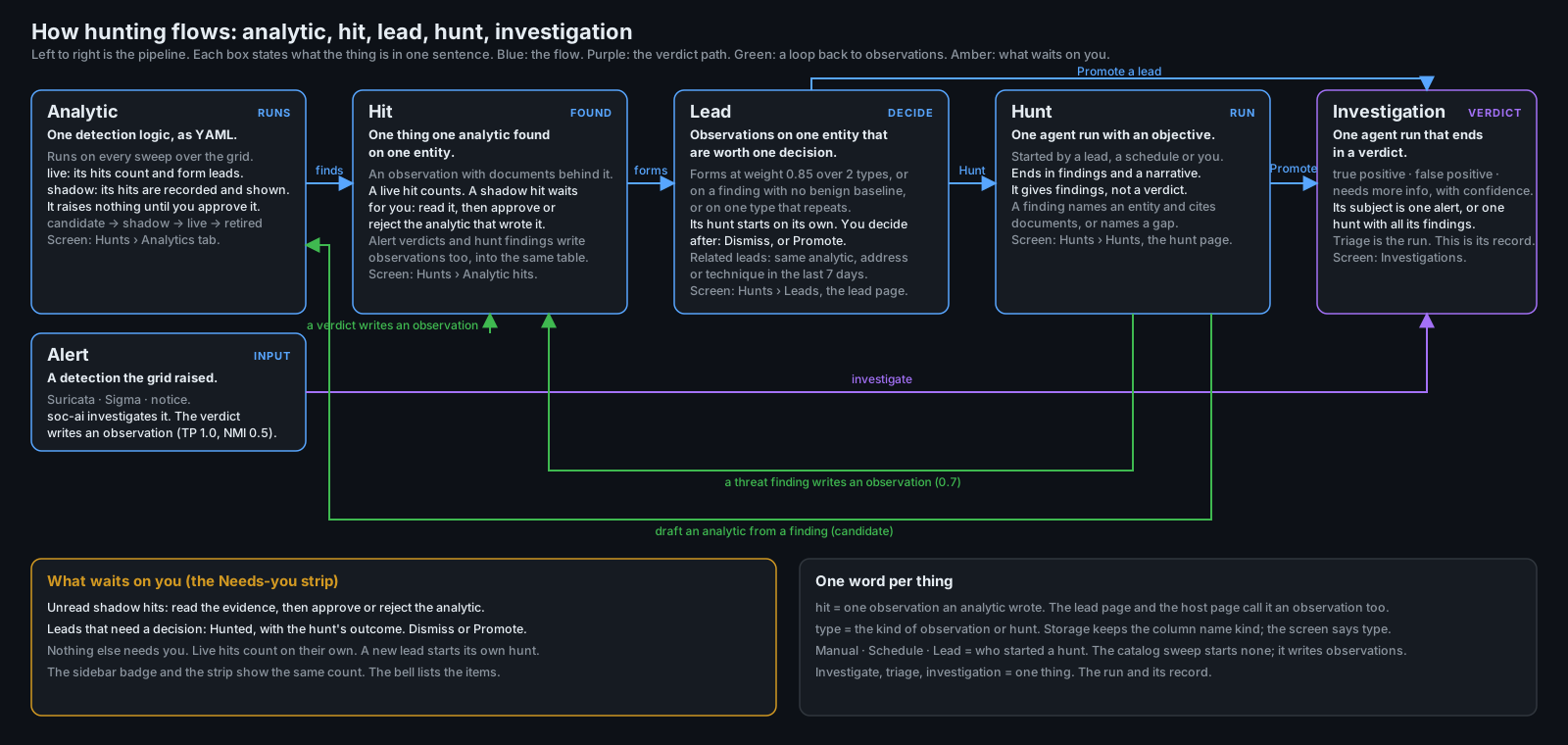
What it does now
Analytic
An analytic is one detection logic. The catalog holds two tiers. A shipped analytic is a YAML
file in the repository. A local analytic is one that you create in the app. Four shipped query
analytics cover DCSync, Kerberoasting, AS-REP roasting and decoy interaction. A query analytic
compiles to one Elasticsearch query and calls no model. Its findings come from the text of the
spec, so nothing generative writes them.
An analytic has four states: candidate, shadow, live and retired. You move a candidate to shadow.
You approve a shadow analytic to live. You retire an analytic with a reason. Each transition records
the spec text before and after, who acted and why. A shipped analytic can only be retired.
The Analytics tab lists the catalog with a status column and an outcome ledger for each analytic:
the observations it wrote, the leads it contributed to, how many of those leads were hunted,
promoted or dismissed under each reason, the documents it scanned and the entities it could not
score. Every analytic declares the telemetry it needs. An absent data source becomes a coverage
gap in your findings. It never becomes an all-clear.
Hit
A hit is one observation that one analytic wrote about one entity, with the documents behind it.
One table holds the observations from every source: a profile departure, a catalog hit, a triaged
alert and a promoted hunt finding. An alert verdict writes 1.0 for a true positive and 0.5 for
needs more info. A false positive writes nothing. A promoted hunt finding writes 0.7. Each weight
decays with a 48 h half-life.
GET /api/v1/hunts/hits lists every hit from the last 7 days. Live hits come first, newest first.
Shadow hits follow, unread first. A live hit carries the visual weight of a real signal. A shadow
hit is provisional, and it brings receipts: the matched documents and fields, the baseline for a
profile analytic, a 30-day dry run, and the overlap with any live analytic that saw the same
documents. A hit with incomplete receipts reads "could not run" and names the missing part.
A shadow hit stays unread until you open its evidence or act on it. The card offers Approve
analytic, Reject analytic and Mark read. An approval leaves the hit in place. You keep the hit and
its read state, and the next sweep records the entity again as a live hit. The catalog sweep records
the observation only. It adds no entry to the Hunts list.
Lead
A lead is the observations on one entity that are worth one decision. A lead forms at a live weight
of 0.85 across two or more observation types, or on a finding that has no benign baseline, or on one
type that repeats to an uncapped weight of 1.5. A lead spans the entities that one hit names. It
never merges through a hub. A domain controller sits on many leads, and a merge through it would
join the estate into one.
A lead has a status: open, hunting, dismissed with a reason, or promoted. The lead page carries
the timeline of its observations. Each entry names the analytic, the summary, the baseline used
and the evidence ids, and each id opens the raw document.
The lead page also carries a Related leads panel. A lead is related when it is open, when it
formed in the last 7 days, and when it shares one of four things: the same analytic within 24 h,
the same alert rule within 24 h, the same external address or /24 network, or the same ATT&CK
technique. Each row states the share in one phrase, names the state of the related lead, and links
to it. The lead row carries a "+N related" chip. soc-ai computes the list on read and stores
nothing. A stored relation goes stale as soon as you answer either lead.
Hunt
A hunt is one agent run with an objective. An analyst, a schedule or a lead starts it. A lead hunt
reads the documents that formed the lead before it queries the grid, and its objective names the
lead's observations and the related leads. The objective asks the hunt to state whether the
related leads are one campaign, with the evidence.
With lead_auto_hunt on, a loop wakes every 60 s and starts the hunt for each open lead that has
no hunt, oldest lead first, up to lead_auto_hunt_concurrency at a time. The loop leaves four
leads alone: a dismissed lead, a reopened lead, a shadow lead, and a lead whose observations cite
no documents. Each of those keeps its Hunt button, so you can start the hunt by hand.
A hunt ends in findings and a narrative. It states no verdict. A finding names an entity and cites
documents, or it names a gap.
Investigation
An investigation is one agent run that ends in a verdict. Its subject is one alert, or one hunt
with all of its findings. Promotion used to start the alert triage on one cited document, so the
scope collapsed from the hunt to one event.
A hunt-subject investigation now reads the hunt: the objective, the narrative, every finding and
every document those findings cite, up to 40. The promoted finding's documents come first and the
rest follow newest first. A lead hunt also carries the lead's observations and its related leads.
soc-ai loads the cited documents as evidence before the investigation starts.
The verdict schema does not change. The prompt states what each verdict means for a hunt. A true
positive means the hypothesis holds as an attack or a compromise. A false positive means the
findings have a benign explanation that the evidence supports. Needs more info names the gap that
a tool call can close. The summary answers the objective in one paragraph.
Every gate runs on a hunt subject: the evidence gate, the citation validation and cap, the egress
guard, the Oracle escalation and the session gate. Decision templates do not run. Every template
matches an alert rule class, and a hunt has none. The unattended acknowledge does not run either.
Security Onion holds no hunt to acknowledge.
GET /api/v1/investigations/{id} carries a subject block with the hunt id, the objective, the
finding ordinals and titles, the lead id, the document ids and the observation ids. A list row
carries subjectType, which reads alert or hunt. Promote on a lead with no finished hunt
answers HTTP 409 lead_not_hunted and names the way forward.
Accuracy and speed
Two measurements drive this release. Both are on record, and both read stored events. Neither
comes from a rerun.
A turn audit of 41 investigations, 2026-09-19. It read 35 runs on a production deployment
(the 30 newest complete alert investigations and 5 investigations of hunt findings) and 6 runs on
an attack range, with the range's ground truth supplied. All 30 production alert verdicts were
correct. The median wall time to done was 73 s. The correct verdict was reachable from the
prefetched context at 2 s, in 29 of the 30 cases. The model first wrote the final verdict at a
median of 17 s. Measured run by run, the median time from that first statement to done was 58 s.
That span held 79% of the wall time and 84% of the tokens, and no turn in it changed a verdict.
An accuracy mission on eleven range alerts with known truth, 2026-09-19. Eight are true
positives and three are false positives. Each alert ran three times, or twice on the two hardest,
for 31 runs per arm. The arm where the investigation loop writes the report went from 29 of 31
correct to 31 of 31. The arm where a second model call writes the report went from 26 of 31 to 30
of 31. A third round over the seven alerts that had missed or could regress landed 28 of 28, 14 of
14 in each arm.
The accuracy cost time and tokens. These are the medians over the nine-alert set.
| Arm | Time before | Time after | Tokens before | Tokens after |
|---|---|---|---|---|
| The investigation loop writes the report | 55 s | 70 s | 65K | 76K |
| A second model call writes the report | 103 s | 112 s | 87K | 91K |
The extra time buys a tool call that names who drove a host, and a turn that tests its hypothesis
against the grid.
Three changes came out of the two measurements.
- The investigation loop writes the report.
investigator_emits_reportis on by default. The
second model call added no new evidence in 40 of 41 sampled runs, cited nothing in 78% of recent
production runs, and reversed two correct range verdicts. On the eleven range alerts this path
landed 31 of 31 against 30 of 31, 42 s faster. Every gate still runs on the report on both
paths, and the stored report names the call that wrote it. - The first-pass synthesis runs only when it can close the alert. On the production deployment
it ran 2,009 times and its answer was discarded 1,661 times. It now runs only when a dispositive
decision template has already cleared the alert. That removes about 18 s and 8,000 tokens from
each affected run. The verdict does not change. The loop never read the first-pass report. - A run that stops early reads the evidence it gathered. A tool-call budget cut, and a
concluding synthesis that fails, now write the verdict from the tool results that did land. A
run that gathered nothing lands the honest failure report and stays retryable.
Security Onion 3.3
Security Onion 3.3 stopped accepting a Kratos API-flow session token in an X-Session-Token header.
The login...
soc-ai 1.4.0
The trust release. Four arcs, one subject: whether soc-ai's judgement can be checked rather than
taken on faith. After the 1.3.2 security audit closed the ways soc-ai could be abused, this makes its
judgement measurable, and closes the deterministic half of that audit's most serious finding.
The hunt journey became measurable
- soc-ai can now measure whether it actually finds the attacks it should. The evaluation harness
has always been able to plant synthetic attacks and check the verdict on a single alert. It could
never check the thing soc-ai is really for: taking a plain-English hunt across the network,
surfacing a finding, promoting it to a full investigation, and reaching a verdict. That whole
journey can now be scored, and when it falls short it says which step broke — the hunt found
nothing, the finding cited no usable evidence, or the investigation reached the wrong verdict —
rather than just failing. - Synthetic runs are unmistakable. Anything produced from planted evaluation data is marked as
such in the database and carries a "Synthetic — evaluation data" badge everywhere it appears: hunt
and investigation lists and detail pages, notifications, the command palette, the dashboard. A
planted attack can never be read as something that really happened on your network. Evaluation runs
are also kept out of a host's real history entirely, so they cannot alter what soc-ai says a machine
has been up to. - The evaluation refuses to run if a planted document ever reached a real index, rather than
quietly measuring against contaminated data — and it now refuses just as firmly when it cannot read
the grid completely enough to be sure, instead of reporting a clean result it did not earn. - The actions soc-ai recommends are now scored. Every scenario has always declared which action a
correct triage should suggest; that expectation had never actually been checked.
Verdicts must rest on evidence the run retrieved
-
A verdict must now rest on evidence soc-ai actually retrieved. Previously the checks confirmed
that evidence had been gathered, never that it supported the conclusion — so a single successful
lookup was enough to let a confidently-wrong true positive stand, including one steered by text
planted in the network traffic being analysed. A true positive whose decisive indicator appears in
nothing the run actually retrieved is now held back for review instead of escalated, and its
recommended actions are withdrawn. Where the evidence is partly there, confidence is reduced rather
than the verdict discarded — a sound judgement is never thrown away over formatting.This closes the fabricated-indicator case. It does not settle every case: an attacker who plants a
real value in their own traffic still passes it, and the broader question of whether a conclusion
genuinely follows from its evidence remains open work.
The detection quality pass
Work on the backlog the trust release produced, before the version was cut. Most of what follows is
repair to soc-ai's ability to judge itself: the pass found seven separate places where a scenario
rendered perfectly and measured nothing, and four of those were introduced by earlier fixes to the
evaluation itself.
-
An attack can no longer be dismissed as benign without looking. Two scenarios — a thousand-file
share sweep followed by a 3.2 GB archive, and a remote WMI execution followed two seconds later by
a PowerShell download — were both closed as routine internal traffic with zero tool calls. The
guards covered attack signatures and malware rule names, but not the deliberately-informational
analytics rules that behavioural detections actually use. soc-ai already refused to escalate
without looking; it now refuses to dismiss without looking, which matters more, because a missed
intrusion is quieter than a false alarm. -
The cloud second opinion was reasoning with no evidence in front of it. Its transcript was
assembled from text message parts only — and every tool returns structured data, so every tool
result was silently dropped. It once overrode a fully-cited local verdict while complaining that
"no file hash, signature, or service name is actually present in the evidence." That was literally
true of the payload it had been handed. Its scepticism was rational; it was being starved. This
affected every escalation in production. -
soc-ai can tell "nothing happened" from "nothing was watching." On a host outside an endpoint
rollout it would probe for process telemetry, get nothing back, retry across field shapes and wider
windows, and burn its entire budget — then report a hedged verdict that read as uncertainty about
the attack rather than a gap in coverage. It now states the gap plainly and spends the budget
elsewhere. Runs that exhausted their budget fell from six in twenty-six to one. -
Correct verdicts were being recorded as misses. Citations naming genuinely retrieved evidence
could not be resolved when the evidence sat under an IP address key, because the resolver split
paths on dots and an address contains dots. Coverage collapsed, a confidence penalty fired, and
sound detections were scored as false negatives. -
The physical index name is no longer queryable. It served no purpose in any query soc-ai makes,
and it let a search select documents by storage location rather than content. Operators pasting an
index filter copied from Security Onion will now get a clear error pointing atevent.dataset.Alongside these, the scenario catalogue nearly doubled (13 → 25), so no single case swings the
measurement by more than six percent.
The Oracle checks its own claims, behind a boundary that is complete by construction
Until now the cloud second opinion adjudicated from a sanitized case payload and nothing else — a
review formed entirely from what the local run had happened to write down. It can now run the same
read-only tools the investigator has, with its arguments desanitized before execution and its results
re-sanitized on the way back. Off by default (oracle_tools_enabled).
- A class-changing Oracle verdict now requires the Oracle to have looked. At least one successful
tool call in its own loop, or the disagreement is recorded on the adjudication event and the local
verdict stands. A zero-tool agreement still lands, because it adds confidence rather than flipping
anything. - Egress flipped from block-known-bad to allow-known-safe, and this is the load-bearing change.
Building the tool loop proved the wire gate was a blocklist. A bare internal name likefilesrvor
PDC01has no regex shape, so the residue sweep could only catch it through values the sanitizer's
harvest recognised, and the harvest is keyed on field paths — an open set. Five commits each closed
one missed category (generic-key envelopes, single-label names on domain fields, non-ECS Windows
event leaves), which is the argument that a sixth was always possible. Now any scalar from a field
the harvest does not classify is masked before the model can see it, on the initial payload and on
every tool result. The cost is utility, not privacy: an unclassified value arrives opaque rather
than as a stable token, so the Oracle cannot correlate it across fields.
A measurement that knows its own noise floor
- Each scenario can run N times (
--repeats), reporting per-scenario stability, macro-averaged
recall, and a scenario-bootstrap confidence interval. This exists because a test-retest on code that
provably could not affect the outcome moved strict recall by 0.235 and flipped 6 of 25 scenarios
between pass and fail. A single batch cannot distinguish a fix from a coin flip, and it no longer
claims to. - Adjudication and the eval judge moved to
claude-opus-5.
Fixed in this release
- A network sensor's hostname is no longer attributed to the hosts it watches. Found on a live
attack range: two agentless targets were each reported as the router that observed them, because a
Zeek or Suricata document's top-levelhost.namenames the box that shipped it. Any host with no
agent of its own was liable to inherit its sensor's identity — including in the stored host dossier,
where the wrong name would persist. Host identity from a document is now accepted only when the
document is about that host.
soc-ai 1.3.2
An adversarial security audit of the whole product, and the fixes it earned. Four attacker positions
were tested — someone who controls the telemetry soc-ai ingests, a logged-in analyst gone rogue, a
stranger on the network, and anything that could carry your data out of the building. Every finding
below came with a working reproduction before it was fixed.
Fixed
- A hunt that runs out of budget no longer sends your objective to the model unredacted. When a
hunt exhausted its request budget, tool budget, or timeout, the partial-report step wrote its summary
from the raw objective — internal IPs and hostnames included — even with redaction on. Every other
step on that path was redacting correctly, which is what made it hard to see. - A detection drafted from an attacker's own traffic can no longer quietly exclude them. Field
values from telemetry were spliced into the drafting prompt as trusted ground truth, so text planted
in a payload could steer the rule into skipping the attacker's address — and the checks still passed
it, because the "would have fired" count measured a different query than the rule you exported. The
telemetry is now fenced off and treated as data, the two are cross-checked, and the console shows you
the query the count came from. - A citation now has to name evidence that was actually retrieved. Citations were confirmed by
looking for the reference anywhere in the gathered text, so a string planted in a DNS lookup could
pass as a document that was never fetched. Verdicts and hunt findings now resolve citations against
the evidence itself — document IDs, sensor-computed hashes and fingerprints, and detector-assigned
labels — while anything an attacker composes freely cannot stand in as a source. - Redaction now covers every place that talks to a model. Three paths sanitized without running the
fail-closed check, which mattered because that check catches bare Windows hostnames and
credential-style usernames that sanitizing alone does not. The optional runbook-embeddings tier sent
queries and runbook text to the gateway with no redaction at all. - A bad password from one person no longer locks out everyone else. Failed logins accumulated
against the whole site and were never cleared by a successful one, so on a shared network connection
a handful of typos could refuse valid credentials for fifteen minutes.PROXY_TRUSTED_IPS, which
tells soc-ai how to identify individual clients behind a proxy, is now documented. - Group acknowledge and escalate now refuse what they cannot honour. An unrecognized severity was
silently dropped rather than rejected, which quietly widened an acknowledgement to every severity in
the group. Unrecognized filter values are now refused outright. - A promoted hunt finding cannot be acknowledged or escalated in Security Onion by a side door, and
re-investigating one no longer produces a record that could. - Metrics are no longer readable by anonymous visitors on the public demo, and resetting a user's
password now requires being signed in.
soc-ai 1.3.1
A critical dogfood of the 1.3 journey before it went public — a live walk of hunt → promote →
investigate → draft, plus correctness and performance passes. The fixes below all land before the
first public 1.3 release.
Fixed
- The Draft-detection button no longer times out before the rule arrives. The request carried the
20-second budget meant for database reads, but drafting a rule takes 16–44 seconds on the analyst
model — so the button reliably failed while the server finished a good draft and threw it away. The
client now waits long enough, and the server has its own 150-second budget that returns an honest
"took too long" before the client gives up. - A detection can only be drafted from a confirmed true positive. The two draft buttons had drifted
apart: the hunt-console button would draft a rule from any finding — including one whose investigation
concluded false positive — while the investigation screen required a confirmed true positive. Both
surfaces and both API routes now enforce the same rule: investigate and confirm the finding first. - Drafted rules are grounded in the events that were actually seen. The drafter used to receive only
the finding's prose and a list of document IDs, never the events themselves, so it could invent field
values the UI then called "grounded." It now reads the cited events and keys the rule on their observed
values, and refuses to draft when nothing resolves on the grid. - "Rule structure valid" and the would-have-fired count now match what you export. Editing the rule
in the review box no longer leaves a green validity badge and a firing count describing the original
draft — once you edit, the pane says the checks reflect the pre-edit rule until re-checked. The badge
was also renamed so it no longer implies the rule is guaranteed to load in Security Onion, and Sigma
field names are now checked against the same allow-list the query engine uses. - The would-have-fired dry run is anchored to when the activity happened, not the last 30 days from
now, so a rule drafted from older evidence no longer reports a misleading zero. Over-broad rules that
match everything now surface as "not specific enough to dry-run" instead of a reassuring huge count. - Exported rules carry their origin. The copied/downloaded
.ymlnow names the hunt and finding it
came from and marks soc-ai as the author, so a rule pasted into Security Onion can be traced back. - A drafting failure returns an honest error, not a raw 500 — a slow or unavailable analyst model
now maps to a clear "model unavailable / timed out, retry" instead of an opaque server error. first_seenno longer floods a hunt with false "novel" destinations when the baseline window has
no data (a young grid, short retention, or a coverage gap): it says novelty could not be determined
instead of calling every established destination brand-new.- Beaconing analysis stops ranking a burst of identical timestamps as the strongest beacon (a
zero-interval burst is not a cadence), and internal destinations are now excluded in the query rather
than after hauling them back and discarding them — so the external candidates the tool exists for are
no longer crowded out. - Plainer, more discoverable copy across the journey: the "citation gate stripped this finding"
tooltip is gone; the investigation toolbar's "Export" is now "Export decision record" so it doesn't
compete with the Sigma "Download .yml"; a completed hunt points the way to promote → investigate →
draft; and when detection authoring is off, a confirmed finding shows a quiet "enable it in Config"
link instead of nothing.
Performance
- The polled hunt-detail endpoint and the triage prior-outcomes memory no longer deserialize whole
investigation report blobs to read a handful of scalar fields; the detection dry run makes one grid
round trip instead of two.
soc-ai 1.2.9
The front-door release: the path from git clone to a first verdict on your
own alert is now engineered with the same care as the verdicts themselves. The
installer asks how you'll reach a model and redacts the cloud route by
default, the doctor names each silent trap with its fix attached, Config opens
on eight decisions instead of 109, and an Operate hub gives the trust
instruments one page that says what each proves.
Added
- The installer asks how you'll reach a model — and the cloud route
redacts by default.setup.shforks local (primary) vs. cloud API key;
route 2 setsANALYST_CLOUD_REDACTION=trueand prints exactly what
egresses before the first hunt runs; a junk route answer fails loudly
instead of silently defaulting. - The quickstart leads with a working demo, not a wall of config.
docs/quickstart.mdopens with a five-minute, no-SO, no-LLM local replay
(docker compose -f docker-compose.demo.yml up, plus a hosted twin) before
asking for a single Security Onion or LLM credential. - Day one turns the lights on instead of leaving them for an admin to
find.setup.shnow prompts for auto-triage (a 5-minute schedule, ≤25
targets/sweep, high-severity+) and the 10-runbook starter pack — both
default to yes — plus an optional MaxMind GeoLite2 key for GeoIP/ASN
enrichment. - Setup doesn't stop at "the container is up." A doctor preflight
(python -m soc_ai doctor) runs automatically once the stack reports
healthy, and the runbook starter pack installs itself through the admin API
(POST /api/v1/runbooks/starter-pack) — a fresh box is triage-ready, not
just running. - Doctor gained three checks, each with a fix attached to its failure.
The SO audit write grant (_has_privileges, no canary writes, graded per
privilege), index-pattern coverage (catches the.ds-*narrowing trap and
reports a partial match honestly rather than pass/fail), and layered
DNS/TCP/TLS upstream reachability, with a hint scoped to whichever layer
actually failed. - A local LLM stack is one file away. Optional
docker-compose.llm.yml
runs a pinned Ollama + LiteLLM profile on the app network for the local
route;docs/LESSER_MODELS.mdgained a "Standing one up" walkthrough. - CI now catches doc drift that used to ship silently. The README's
version badge and the quickstart's internal links are checked against
pyproject.tomland the doc tree on every run — a stale badge or a dead
link fails the build instead of waiting for a reader to find it. - The 30-minute clone-to-verdict bar is now a release gate, not a claim.
scripts/first-verdict-timer.shtimessetup.sh --autoplus the wait for
a real completed verdict and reports pass/fail against the 1800-second bar;
setup.sh --env-onlyplus a pytest harness cover the installer's config
generation (both LLM routes, the day-1 prompts, junk-input handling), so
the installer itself is under test. - The sidebar now reads like an analyst tool. Navigation splits into
Investigate (the analyst loop) and a collapsed-by-default Operate group;
nothing moved routes, only shelves. Detection tuning stays one click from
alert-group context, where noise nominations originate: a Tune rule link
on each group row jumps straight to Config → Detection tuning. - Config opens on eight decisions, not 109. Day-1 settings render up
front; the rest folds behind per-section Advanced reveals. Settings search
still finds everything and expands whatever it lands on. The day-1 set is
snapshot-tested at ten or fewer. - An Operate hub presents the trust instruments. One page names what
each proves: model fitness, verdict quality, the audit chain, backtest
replay, diagnostics, runbooks. No more scattered peer screens. - The Dashboard carries a persistent setup-health card. Wave 1's doctor
checks (minus the expensive fitness probe) feed a cached preflight API:
green when clean, named failures with fixes for admins, honest counts for
analysts. A Re-check button forces a fresh read past the cache; if the
attempt itself fails, the card says so plainly instead of going quiet. - The audit chain is now verifiable from the console. Config →
Diagnostics (what the Operate hub's audit-chain card points to) runs a
real chain walk on demand and reports one of four honest outcomes: intact,
partially verified (capped short of the full chain), tampered at a named
sequence number, or couldn't verify. A capped scan never gets the green
check; only a full, clean one does.
soc-ai 1.2.8
The degraded-grid release: what soc-ai says when Security Onion is down,
saturated, stalled, or answering with half its shards is now as engineered as
what it says when everything works. The rule the whole release enforces: a
false all-clear outranks any loud error — a blind sensor must never be
reported as a calm network. No breaking changes; seven migrations (0024–0030),
applied automatically on upgrade.
Degraded-grid honesty
- A partial read is no longer a complete read, anywhere. Elasticsearch
answers 200 having read only some shards; the client used to discard
_shards/timed_out, so every surface reasoned from a partial view as if it
were whole. Partial reads now raise, every route answers 503 with the shard
story, and the diagnostics probe and topbar health pill detect the state
instead of reporting green. Opt-out for exploratory reads:
es_fail_on_partial_results. - An outage can no longer dismiss identifier suggestions. The discovery
scan's public-suffix retirement — the one irreversible write in the product —
now requires that the sub-queries feeding that signal succeeded AND observed
events; and it is gated per signal, so one persistently failing unrelated
sub-query no longer suppresses retirement forever. - A sweep that could not read the backlog is not an empty backlog.
Auto-triage cycles that land zero because the grid refused are marked
degraded, durably; a refused (429) sweep no longer records as
"Last batch · 0 investigated"; a malformed query is answered as a bad query
(400) instead of accusing the grid of an outage. - A backtest cannot mistake an outage for a bad model. An unreadable
window is reported as unreadable rather than "no dispositioned alerts";
a run that loses the grid mid-flight no longer scores unread rows as model
disagreement; and the failure note now survives onto consoles that have run
a backtest before. - A hunt with no successful grid read cannot land as a clean sweep.
Includes closing the retry hole where a deduplicated retry of a failed query
counted as a success, and the all-rejected case, which is labelled a query
problem — not grid health. - The buttons an analyst clicks while the grid is sick answer instead of
crashing. Investigate, group ack/escalate, find-alert and bulk re-hunt
return honest 503/400s (nothing acknowledged before a failure is reported),
and bulk re-hunt stops burning one grid timeout per row against a dead grid. - The server produces the outage verdict, not the browser. The routes that
used to hang until the SPA gave up at 20 s (Test ES, auto-triage, backtest,
model-fitness) answer within the console grid budget with a definitive
diagnosis; an ES 429 reads as "overloaded — retryable", never as "check your
query". - The audit chain cannot report intact from a half-read index. Verification
of a partial read is answered as unverifiable — never a pass, and never a
tamper claim — and chain-head recovery at write time is guarded against the
same state, so a stalled grid can no longer manufacture a future false
tamper verdict. - The screens stop asserting numbers they never obtained. Alerts renders
em-dashes, not zeros, when its query failed; the Dashboard no longer prints
"queue clear" under an unknown count; failed actions say so on screen; a
scan that is running, or that came back blind, says which — for every role.
Added
GET /api/v1/dossiers/sweep-health— a non-privileged projection of
sweep health (running,degraded,last_run,error_count; never the
raw failure strings), so non-admin analysts see "the sweep came back blind"
instead of "the sweep hasn't run yet" over a sweep that ran and died.- A degraded-grid dogfood harness. The demo mock grid gains five
runtime-switchable states (healthy, down, half-read, saturated, stalled) —
strictly opt-in, off in the packaged demo — and a capture script walks every
screen and action in each state.
Fixed
- The hosted demo's Config screen renders its read lock as policy, not as an
outage. The demo refuses admin-gated reads (a security fix: the public
demo used to answer the user table and which secrets were set); that refusal
now reads "Read-only demo" instead of an alarm-red failure card. - A Send button that did nothing. The chat draft was restored twice on
mount, so text typed before the second restore was silently replaced and the
send dropped. Type, press Send, nothing — no request, no error. Fixed at the
source. - Opening an investigation whose Oracle run redacted something answered
500. The redaction record is per-category counts; the detail page expected
a sentence. Every investigation the egress guard had actually protected was
unopenable; the counts are now phrased ("1 IP address and 2 hostnames
redacted before the second opinion").
Added
- A Dashboard assistant that answers you instead of handing you off. The
"Ask soc-ai" box on the landing screen used to prefill the Hunt Console and
navigate away, so "what datasets do I have?" became a multi-minute background
job. It is now a chat: it answers in one turn using the investigation chat's
read tools, at roughly the same latency. Each analyst gets one rolling thread
that survives navigation and restarts; Clear discards it. When a question
needs a sweep, the agent does not start one. It writes the hunt objective from
what it just looked at, says what the sweep would settle, and puts a Start
hunt control in front of you. It has no write tools and cannot change a
verdict. New settinggeneral_chat_enabled(Config → Models & Reasoning →
Agent, hot, on by default) switches it off without a restart. That matters if
a shared analyst model is already busy with the triage backlog: this is the
one agent that sits on the screen everyone lands on. New endpoints
GET/POST/DELETE /api/v1/chat, migration 0025,
and the flag rides onGET /api/v1/aboutso a disabled deployment hides the
box rather than failing the first question someone asks. - soc-ai knows what a host is. Every internal address was only an address:
"10.0.0.5 is probing SSH" read as unremarkable internal noise, where "the
hypervisor running your SIEM and your backups is probing SSH" would have been
escalated on sight. Same events, opposite urgency, and the whole difference is
asset knowledge the product did not hold. A sweep now builds a durable record
for each internal host out of telemetry already in Elasticsearch — hostname,
OS, the services it answers on, a behavioral baseline, and an inferred role
(hypervisor / domain controller / security appliance / server / workstation /
network device / IoT) — and the agent reads it throught_host_dossierand a
prompt block on every investigation, chat and hunt. Classification is
rule-based and deterministic, never model-written: an ordered port-set table
with peer-count and hour-spread preconditions, so one inbound SSH connection
can no longer promote a laptop to "server". A dossier is context and never
evidence — it is marked system-inferred in the prompt and cannot satisfy the
evidence gate, because "this is probably a hypervisor" is a conclusion, and a
conclusion must not unlock a confident verdict the way an observation does.
What you declare and what the system infers are stored in separate columns
and resolved at read time, so an override survives every later sweep
structurally rather than by convention; the builder keeps observing an
overridden host anyway, so three consecutive builds that disagree with your
value earn one prompt, then at most one per 14 days, with "keep mine"
snoozing on a backoff capped at 90 days. Thirteen hot settings under
Config → Host dossier. The schedule (dossier_schedule_enabled) is off by
default — a sweep is hundreds of hosts times several Elasticsearch round
trips, so you choose when it runs;POST /api/v1/dossiers/refresh(admin,
single-flight) runs one now, anddossier_context_enabledtakes the dossier
back out of prompts while leaving the data building. Reads are
GET /api/v1/dossiers,/dossiers/{ip},/dossiers/conflictsand
/dossiers/summary; overrides are admin-gated and audited. Migration 0024.
The record reaches you through the agent, the API, and the Hosts screen
below. - The agent asks who was driving an internal host before it blames the
host. On 2026-08-05 soc-ai attributed SSH username-probing to an internal
host and stopped there, while the events it had already pulled included a
zeek.sshrecord showing a different machine opening an SSH session to that
host seconds earlier. The real actor was one pivot away and never got named.
t_host_summarycannot answer this by construction: its peer list is
a volume-ranked aggregation over 24 hours, so a two-second session is
invisible beside thousands of routine events, and an aggregation carries no
ordering — "immediately before" is not expressible in it. The new
t_origin_chainlists remote-access sessions inbound to a host in the window
before the activity, time-ordered, and names the closest preceding one as the
likely driver. It matches SSH, RDP, WinRM and SMB by dataset or by well-known
port, because a short session often lands as a barezeek.connwith no
protocol log at all. Both answers are load-bearing: a session found means the
host is a waypoint and attribution belongs upstream, and no session found
means it acted on its own, which is usually the more serious finding — so an
empty result is reported as a result rather than a shrug. The tool alone would
not have changed the outcome above (t_host_summarywas available, and was
called twice), so investigator doctrine now makes the pivot a precondition for
attributing hostile behavior to an internal host. - **A Hosts screen that says what...