Repository navigation
Exports and Verification

02 · INVESTIGATE AND EXPORT · All guides · Get help
On this page
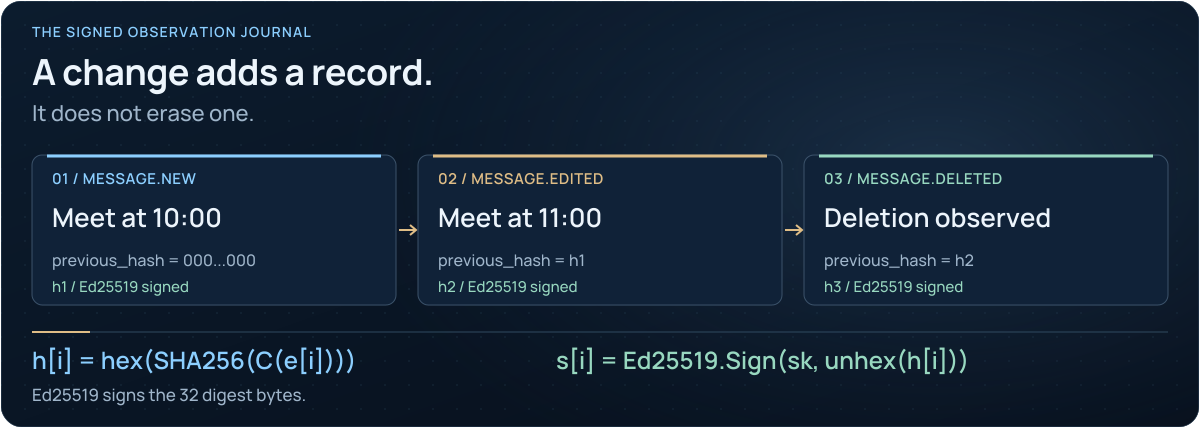
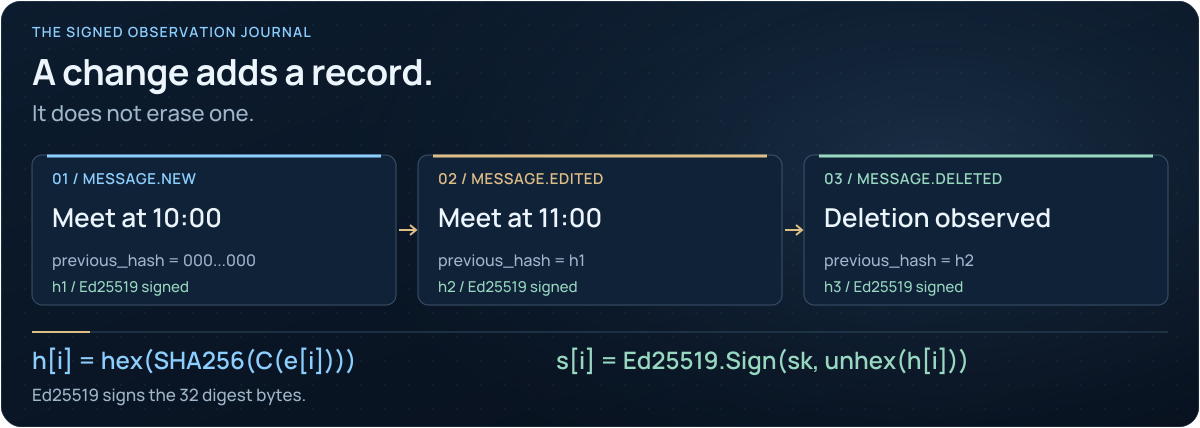
- Encode the event. Nine fields, including the previous hash, become one canonical UTF-8 JSON value.
- Hash and sign. SHA-256 describes those bytes; Ed25519 signs the 32 raw digest bytes.
- Verify the handoff. Recompute every hash, check every signature and compare the key fingerprint and retained checkpoint.
Open the full-size animation · Static diagram · Formulas and change scenarios
| Output | Use |
|---|---|
| Signed evidence ZIP | Captured journal, signatures, manifest, retained media and an offline report |
| JSONL / CSV / HTML | Analysis or reading; retain the signed ZIP for verification |
| Full chat export | The chat history visible at acquisition time |
| People profile export | Derived observations with record references |
| Checkpoint | A signed journal boundary to retain separately |
| Run receipt | The collector's program/version information for that run |
A full chat export is a snapshot of current visible history. It cannot recreate every earlier edit or deletion. An evidence ZIP excludes login secrets and is not a full application backup.
| File | Purpose |
|---|---|
events.jsonl / chat.json
|
Authoritative records |
report.html / chat.html
|
Readable report in the chosen language, sealed |
custody.json |
Acquisition, export, case details and the standards followed |
SHA256SUMS |
Every file's SHA-256 for sha256sum -c, without Python |
manifest.json + manifest.sig
|
Signed list of every file and its SHA-256 |
README.txt |
Verification steps in the report language and in English |
Set the report language, case title and ID, examiner, organization and notes under
Exports → Report settings. They are signed into the manifest and the report seal.
Every report ends with a seal: an Ed25519 signature over the SHA-256 of each byte before
it. A recipient checks it in the browser by dropping the file onto the report, or with
python -m tgwitness.verify report.html --fingerprint TRUSTED_SHA256 --evidence evidence.zip.
The report also prints well to PDF, with a blank custody-transfer table.

- Select the intended workspace and note its public-key fingerprint.
- Open Exports and verify the journal.
- Save the signed ZIP, a checkpoint and any relevant history/profile exports.
- If you need password protection, choose the encrypted export option and transfer the password separately.
- Give the recipient the expected fingerprint through a trusted channel separate from the archive.
For a password-protected wrapper, decrypt it first to obtain the inner signed archive. Encryption protects access to the file; signatures verify its signed content.
Use a trusted copy of the project and its installed Python environment:
python -m tgwitness.verify evidence.zip --fingerprint TRUSTED_SHA256With a previously retained checkpoint:
python -m tgwitness.verify evidence.zip --fingerprint TRUSTED_SHA256 --checkpoint checkpoint.jsonReplace the placeholders with the actual files and trusted fingerprint. A successful check detects changes covered by the signatures, hash chain and manifest. Read the reported coverage and gaps too.
At a terminal the verifier answers with a coloured summary (--lang en|ru|uk); piped output
stays plain text. --json prints only a JSON answer for scripts.
Activate the project environment and use a new output filename:
python -m tgwitness.download --token-file data/live/panel-token.txt --out evidence.zipFor another workspace add --profile ID; obtain its ID from Exports. For a remote installation add --url https://your-server. The transfer checksum does not replace signature verification.
The browser fallback is limited to 128 MiB; supported browsers can stream to a chosen file. The download CLI defaults to a 5 GiB transfer limit. Larger verification limits and per-workspace settings are described in the quick start.
Next: Trust and limitations · Evidence reference · External timestamps

01 · Connect and capture
02 · Investigate and export
03 · Independent checks
04 · Run and protect
05 · Find an answer
Project and author