Repository navigation

Replies: 1 comment

|
Hey @tris203, +1 on this. I often run out of disk space myself and end up starting a new thread in T3 to work out which worktrees can go and which I want to keep. I wanted something similar, so I put this together in my fork: 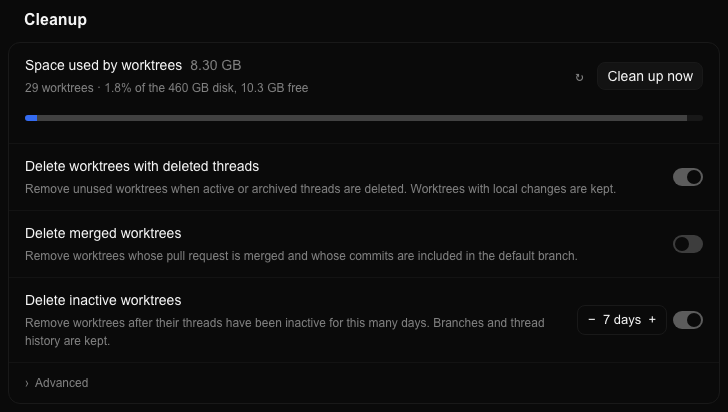
Mine is a bit simpler and not fully fleshed like yours. It lives in the Worktrees tab of the nightly release and just shows worktree storage in the Cleanup section, with a small Clean up now button. The idea is that the button starts a thread that audits your worktrees, picks out good candidates for deletion, and asks you to confirm before removing anything. I think this would be a super useful quality of life feature, hope this gets picked up |
0 replies
Sign up for free
to join this conversation on GitHub.
Already have an account?
Sign in to comment


Uh oh!
There was an error while loading. Please reload this page.
Proposal
Add a read-only view of worktree storage by cleanup category to the existing web and desktop Settings → Storage page. Users should be able to understand where their disk space goes, what their current rules can reclaim, and why other worktrees remain.
This follows the maintainer's request for an Ideas discussion on #14761. That issue remains the record of the visibility gap; this discussion asks for approval of the direction and smallest useful scope before implementation.
Why this is useful
Today the panel configures cleanup rules without showing the storage those rules affect. A user can enable cleanup and still have substantial disk usage, with no indication whether the rule has little to reclaim or whether worktrees are protected for reasons they cannot see.
While working with the category visualization in #12604, it helped me identify unexpected classifications and investigate shortcomings of the rules. Those investigations are now tracked separately in #13836 (ignored setup files), #14742 (squash merges), and #14758 (release and stack targets). The same visibility would help users understand their own storage and decide how to adjust rules to improve disk reclamation.
For example, the earlier all-project view showed 90.3 GB in worktrees, with 63.7 GB in “Other.” A total alone would not explain that remainder. Categories and retention reasons let users distinguish space a policy change could reclaim from space that must remain protected.
Proposed first scope
The intended starting surface is the existing web/desktop Storage settings with its project and environment selection. Mobile has no equivalent panel today.
Earlier UI examples
These screenshots are from the closed, unmerged #12604 prototype. They illustrate the category visualization and scope selection. Its labels and totals reflect that branch's proposed cleanup behavior, rather than the currently shipped rules. The visible Save/Discard controls are outside the approval requested here.
Across projects:
One project:
Decision requested
Would maintainers approve this read-only storage-category visibility and rule-comparison direction? Is the scope above the smallest useful version, or should the first increment show current categories and retention reasons before adding comparisons of proposed rules?
Approval here would leave the existing cleanup protections and eligibility policy intact. The scanner implementation and the broader #14653 staged Save/Discard workflow would need their own design agreement. Measurements should be bounded and demand-driven so this visibility does not add continuous disk activity or unnecessary remote traffic.
Related work
All reactions