Repository navigation
Call to all contributors: show your features in a short video #1727

Replies: 6 comments 5 replies

|
Umm, how about screen shots or wiki entry All new features are in the wiki I don't do videos How about we write a wiki entry at the same time as a PR? |

|
Hi, I already have two videos: Chained folio reports across three or more folios, format_copie_021126.mp4Folienverweis_021126.mp4 |


|
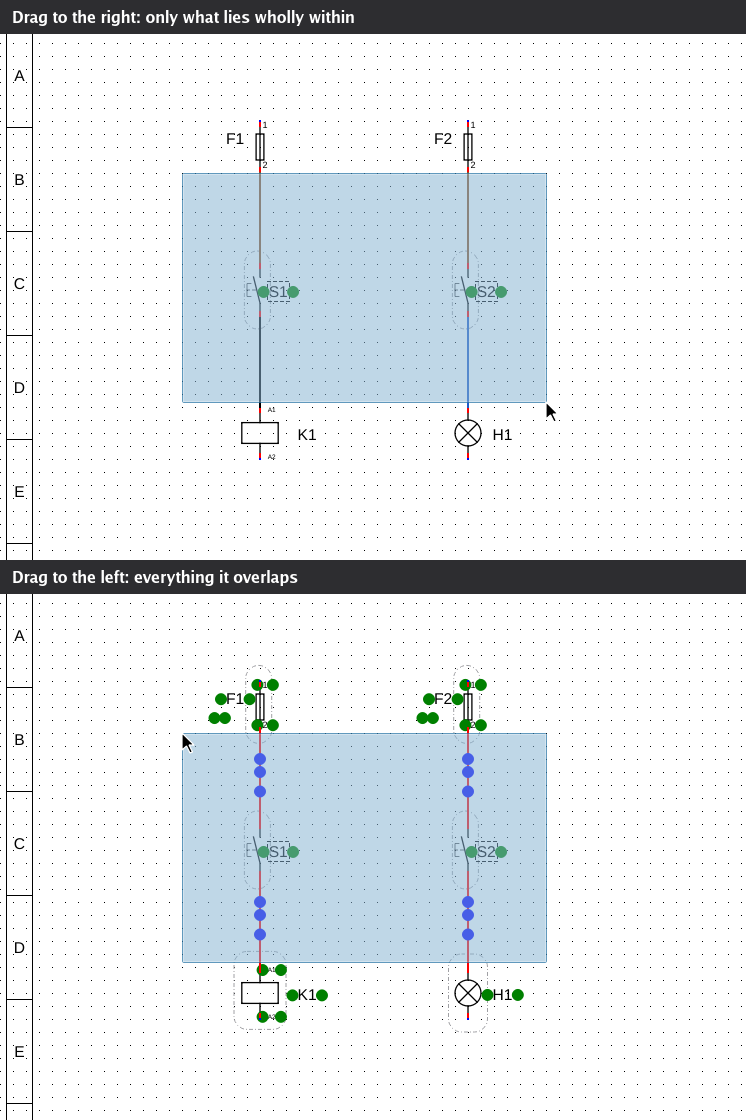
Hi Laurent, I understand the idea, but I would rather not make videos. Building the features, testing them and getting them through review is already quite some work, and most of mine are a setting or a menu entry that explains itself. I think a screenshot or two, with a line on where to find it, is enough, so that is what I'll add to each PR from now on. The earlier ones already have screenshots in their descriptions. If you or someone else wants to turn them into videos, feel free. For the two that were merged this week: Selection rectangle (#1729): Settings > General > Appearance > Selection rectangle selects: everything it overlaps (as before), only what lies wholly within it, or by direction: dragged to the right, only what lies wholly within; dragged to the left, everything it overlaps.
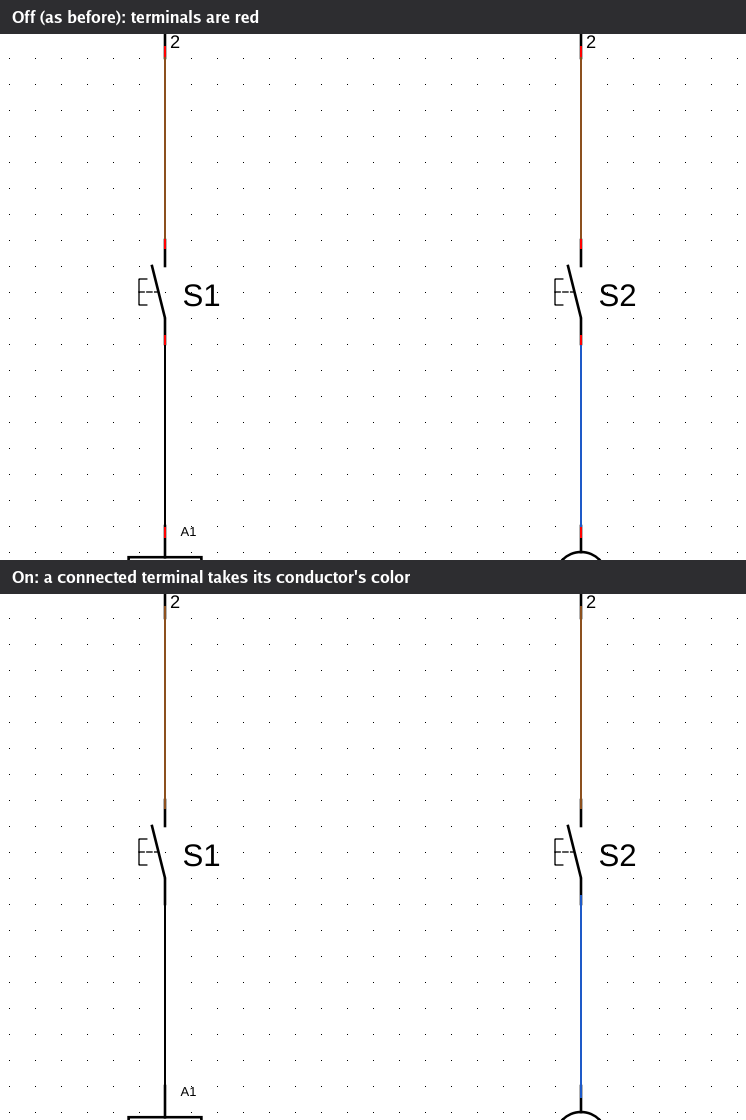
Terminals in the conductor's color (#1719): Settings > General > Appearance > Draw a connected terminal in the color of its conductor. Off by default.
Project > Update elements from the collections (#1718, still open) has its screenshots in the PR. |

|
perfect :) |
|
I'm working on AI auto make video, lets see the results |
|
@scorpio810 the video tool is ready and anyone can use it: https://github.com/ispyisail/qet-how-to-video You write a short story (open this menu, click here, type 40). It plays the story on a real QElectroTech build, checks the saved project, and only then makes the video: captions, music, YouTube description and thumbnail, plus a copy under 10 MB for GitHub. If a menu is later renamed, qet-verify says which videos to record again. Linux only for now. How to use it: Making a how-to video. It works well with an AI assistant; the repo has the instructions for one. Both tools, with the wiki one: #1744 |

|
If I'm understanding this correctly, this is only used on Linux—it doesn't work on Windows, right? |

What use will Windows be to you in 2026? I know that many companies make it compulsory; when I returned to work after a long period of sick leave, I had no choice but to use Windows, even though for 25 years I had been using and administering a stable Debian machine for five electricians working in shifts… without any problems and without internet access… By the way, you could use WSL (Windows Subsystem for Linux) on Windows. |
If there is demand i can proably make a windows version |
|
Thank you both so much for your insights! @scorpio810 I completely share your frustration. The forced cloud integrations, telemetry, and account requirements in modern Windows are extremely annoying. In my day-to-day work as an electrician and automation technician, I use a dual-boot system with Linux and Windows. Unfortunately, heavy-duty industrial tools like the Siemens TIA Portal leave me no choice—whether in a VM or on bare-metal systems, there’s no getting around Windows for this kind of work. @ispyisail Thank you very much for your offer! My question was mainly asked for the sake of completeness, since some people don’t work with pure Linux systems. Please don’t go to the trouble of creating a dedicated Windows version just for my sake—I can easily manage running it on Linux if needed. I really appreciate the insights and the quick responses! |


Uh oh!
There was an error while loading. Please reload this page.
Uh oh!
There was an error while loading. Please reload this page.
Hi everyone,
A lot of new features have landed in QElectroTech recently, and that’s great. But many of them have never been explained to users. Users find new menus and options without knowing what they do or how to use them. Then the questions come to the forum, and a long text answer is rarely the best help.
A short video is the best way to show a feature. So from now on, I’m asking for this:
For each user-facing feature you add, please record a short how-to video: 1 to 3 minutes, a screen recording, with captions or a few spoken comments. It doesn’t need to be polished.
Post the link in your PR (or in this discussion for features already merged).
I’ll publish the videos on the QElectroTech YouTube channel, in a playlist for the coming 2.0.0 release, and link them in the release notes.
To be clear: I don’t intend to monetize the YouTube channel. Your videos will never be used to earn money. QElectroTech is funded only by PayPal donations, and that’s enough, even if the pot is close to zero today.
Honestly, even I can no longer remember how some features work — “Add a fillet”, for example. QET has grown a lot over the years, many features were added by different contributors, and not all of them are documented. That’s exactly why up-to-date documentation (and small usage examples or short videos) would help everyone, maintainers included.
For features that are already in master, please reply here with the ones you wrote and the video when it’s ready.
Tools: OBS Studio works on Linux, Windows and macOS. A GIF is also fine for very small changes.
Thanks to all of you, the code is only half of the job, showing it is the other half!
Laurent
All reactions