Repository navigation
CRM API
Use the CRM API to get, search, create & update clients, cases, & contacts in Unity
The CRM API provides integrators with the following Client and Case features:
- Search for & GET Clients &/or Cases that already exist in Unity
- Create a new Client (with associated client contacts e.g. Mr & Mrs Smith)
- Create a new Case for an existing Client (or combine with create Client request above)
- Record time
- Archive a Case
- List clients created since a given date/time
- List cases created since a given date/time
This API was designed prior to REST becoming popular, so although the data payloads are JSON, this API is not strictly RESTful. However, examples are provided to help you get started.
The /Clients endpoint allows integrators to mimic the same functionality as the create new client screens in Unity. It supports creation of Individuals, Groups (e.g. Mr & Mrs), & Companies, with associated contacts, addresses & phone numbers.
This screenshot shows some of the fields expected by the API (see the “Parameters” section below to see how the data in these fields needs to be provided).

TIP: it is also possible to create a Case (or Cases) whilst creating a new Client, within the same request.
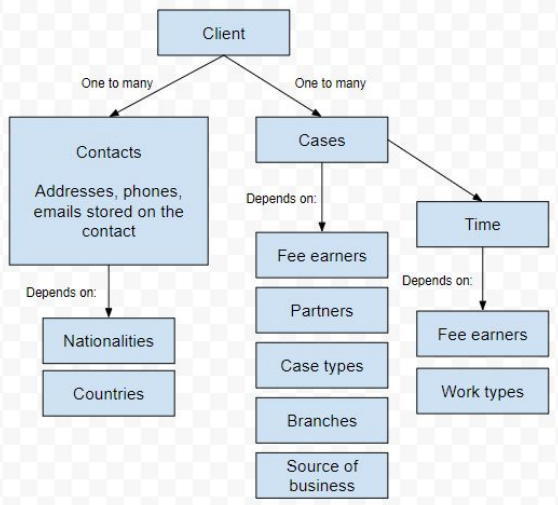
- Countries
- Nationalities
| Name | Type | Description |
|---|---|---|
| Code | str(6) | Auto generated by Unity on POST and returned in the response object. You must associate this value with your own Client object for mapping purposes. You will need it to add further Contacts or Cases to this Client at a later date |
| Description | str(77) | Required. Either the organisation name (if it's a company) like "Acme PLC", or "Smith John Mr and Jane Mrs" if it's a group, or simply "Bloggs Joe Mr" for individuals. IMPORTANT: Please place surname at the start of Description because the Code above is auto generated based on this value |
| _contacts | Object Array | An array of 1 or many contacts - see below |
| Cases | Object Array | Optional: An array of 0, 1 or many cases. Only populate this if you want to create a case or cases within your create Client request |
| Notes | str(250) | |
| IsCompany | Boolean | Set to True if client is a company |
| IncorporationDate | DateTime | Only relevant if IsCompany=True |
| IncorporationCountry | Lookup | Only relevant if IsCompany=True |
| VatRegistered | str (20) | Only relevant if IsCompany=True |
| CertificateRegistration Number | str (20) | Only relevant if IsCompany=True |
| Name | Type | Description |
|---|---|---|
| LastName | str(30) | Required. |
| FirstName | str(30) | |
| Title | str(15) | |
| Nationality | Lookup | Defaults to British if omitted |
| NI | str(20) | National Insurance Number |
| BirthDate | Date | Format "YYYY-MM-DD" |
| IsDeceased | Boolean | |
| Gender | Int | 0 = Male, 1 = Female, 2 = Other |
| JobTitle | str(30) | |
| EMail1 | str(50) | |
| EMail2 | str(50) | |
| _workAddress | Address obj | |
| _homeAddress | Address obj | |
| _billingAddress | Address obj | |
| _workPhoneNumber | Phone obj | |
| _mobilePhoneNumber | Phone obj | |
| _homePhoneNumber | Phone obj |
| Name | Type | Description |
|---|---|---|
| Line1 | str (35) | Required. |
| Line2 | str (35) | |
| Town | str (35) | |
| County | str (35) | |
| Postcode | str (35) | Required. |
| Country | Lookup | Defaults to UK if omitted |
| Salutation | str (100) | |
| AddressName | str (100) | |
| DxNumber | str (10) | |
| DxDistrict | str (20) |
| Name | Type | Description |
|---|---|---|
| AreaCode | str (6) | |
| Phone | str (15) | Required. |
Taken from: https://github.com/quillpinpoint/interactive-api/blob/main/curl-examples/crm-api/create-client.sh
curl --location --request POST 'https://api.ourdomain.co.uk/quillapi5/clients' \
 --header 'clientId: {your-tenant-id-here}' \
 --header 'Accept: application/Json' \
 --header 'Authorization: Bearer {your-token}' \
 --header 'Content-Type: application/json' \
 --data-raw '{
    "Description": "Bloggs Joe Mr",  #recommended format: "{lastname} {firstname} {title}"
    "_contacts": [
        {
            "LastName": "Bloggs",
            "FirstName": "Joe",
            "Title": "Mr",
            "EMail1": "joe.bloggs@mydomain.co.uk",
            "JobTitle": "Software Developer",
            "Organisation": "ACME Legal Ltd",
            "NI": "NH123456A",
            "BirthDate": "1995-04-30",
            "_homeAddress": {
                "AddressName": "Mr J Bloggs",
                "Salutation": "Mr Bloggs",
                "Line1": "25 Park Drive",
                "Line2": "Bury",
                "Town": "Manchester",
                "Postcode": "AB1 2CD"
            },
            "_homePhoneNumber": {
                "AreaCode": "01234",
                "Phone": "567890"
            }
        }
    ]
}'Taken from: https://github.com/quillpinpoint/interactive-api/blob/main/curl-examples/crm-api/create-client-and-case.sh
curl --location --request POST 'https://api.ourdomain.com/quillapi5/clients' \
 --header 'clientId: {your-tenant-id-here}' \
 --header 'Accept: application/Json' \
 --header 'Authorization: Bearer {your-token}' \
 --header 'Content-Type: application/json' \
 --data-raw '{
    "Description": "Bloggs Joe Mr", #recommended format: "{lastname} {firstname} {title}"
    "_contacts": [
        {
            "LastName": "Bloggs",
            "FirstName": "Joe",
            "Title": "Mr",
            "EMail1": "joe.bloggs@mydomain.co.uk",
            "JobTitle": "Software Developer",
            "Organisation": "ACME Legal Ltd",
            "NI": "NH123456A",
            "BirthDate": "1995-04-30",
            "_homeAddress": {
                "AddressName": "Mr J Bloggs",
                "Salutation": "Mr Bloggs",
                "Line1": "25 Park Drive",
                "Line2": "Bury",
                "Town": "Manchester",
                "Postcode": "AB1 2CD"
            },
            "_homePhoneNumber": {
                "AreaCode": "01234",
                "Phone": "567890"
            }
        }
    ],
    "Cases": [
        {
            "VendorCode": "YOUR-CASE-REF",
            "Description": "Description of this case",
            "DateOpened": "2020-05-04T00:00:00+01:00",
            "CaseType": {
                "Code": "01"
            },
            "Branch": {
                "Code": "1"
            },
            "FeeEarner": {
                "Code": "3"
            },
            "Partner": {
                "Code": "3"
            },
            "Source": {
                "Code": "4"
            }
        }
    ]
}'- Status: 200 = Success
- Status: 500 = Fail
A successful response contains a full JSON object graph which includes Unity’s auto generated Id’s. For example:
- Client.Code
- Contact.Code
- Case.Code (if you created a case whilst creating a client, this is the unique case code as seen by the user)
- Case.OrqaId (if you created a case whilst creating a client, this is a “new style” internal case Id that other Unity endpoints may require)
You should store these Id’s against the equivalent entity in your own CMS for mapping purposes.
The /Cases endpoint allows integrators to mimic the same functionality as the create new case screens in Interactive. It supports creation of non-legal aid cases only & financial data is NOT supported in this API (see Money API for that).

- Branches
- CaseTypes
- FeeEarners
- Partners
- Sources
| Name | Type | Description |
|---|---|---|
| Client.Code | str (6) | Required. The Id of the Client entity you want to associate this case with |
| VendorCode | str (25) | Integrator's reference for this case file |
| Code | str (12) | Case code, auto generated by Unity on POST |
| OrqaId | str (25) | Internal Unity Id for the case (auto generated) |
| Description | str (50) | Required. Description of case |
| DateOpened | Date | Format "YYYY-MM-DD" |
| Branch | Lookup | |
| CaseType | Lookup | |
| FeeEarner | Lookup | |
| Partner | Lookup | |
| Source | Lookup | |
| Notes | str (250) |
https://github.com/quillpinpoint/interactive-api/blob/main/curl-examples/crm-api/create-case.sh
- Status: 200 = Success
- Status: 500 = Fail
The /Archive endpoint allows integrators to mimic the same functionality as the Case Archive screen in Interactive.
This screenshot shows some of the fields expected by the API (see the “Parameters” section below to see how the data in these fields needs to be provided).

| Name | Type | Description |
|---|---|---|
| Code | str (12) | Required. Case code |
| ArchiveNumber | str (10) | |
| Location | str (20) | |
| BoxNumber | str (10) |
https://github.com/quillpinpoint/interactive-api/blob/main/curl-examples/crm-api/archive-case.sh
- Status: 200 = Success
- Status: 500 = Fail
The /TimeRecording endpoint allows an integrator to mimic the same functionality as the record time screens in Interactive.
This screenshot shows which fields are expected by the API (see the “Parameters” section below to see how the data in these fields needs to be provided).

Lookup dependencies
- FeeEarners
- WorkTypes & RateSchemes
| Name | Type | Description |
|---|---|---|
| OrqaCaseId | str (25) | Unlike other requests, the case is not identified by the "Case.Code" here. Instead you need the "OrqaCaseId" |
| Description | str (160) | |
| Created | DateTime | |
| IgnoreTimeLimit | bool | |
| FeeEarnerCode | int | |
| WorkTypeCode | str(6) | |
| RateSchemeCode | int | |
| Units | int | |
| Notes | str(999) |
Assuming OrqaCaseId is known:
https://github.com/quillpinpoint/interactive-api/blob/main/curl-examples/crm-api/create-time.sh
- GET /WorkTypeCacheItems/{FE}?isLegalAid={true/false}&rateschemeCode={rateschemecode}
- GET /WorkTypes?feeearnercode={FE}
- GET /ValidWorkTypes?feeearnercode={FE}
- GET /FeeEarnerValidWorkTypes?orqaId={ID of the case}&feeEarnerCodes={FE}
- Status: 200 = Success
- Status: 500 = Fail
These two endpoints allows integrators to get a list of Clients or Cases created since a given datetime & are typically used by integrators who need to synchronise clients/cases created within Unity with another system.
GET /clients-changed/?since={datetime}
GET /cases-changed/?since={datetime}
Where {datetime} is ISO 8601 format e.g. yyyy-MM-ddThh:mm:ssZ or yyyy-MM-ddThh:mm:ss+1:00
QUIRK ALERT: these created datetimes are not UTC, they follow the UK's daylight saving (BST) zone changes. So if you need to sync down to the hour/minute level, you will need to ensure you send the correct offset. AND the offset must be urlencoded for example
+becomes%2Blike this:yyyy-MM-ddThh:mm:ss%2B1:00
https://github.com/quillpinpoint/interactive-api/blob/main/curl-examples/crm-api/cases-changed.sh
Results for /cases/changed and /clients/changed are paged and so include a _links object providing links to next/prev pages, for example:
{
  "Results": [
    {
     "Id": "2021-03-24_GRW2-E22Q-8S21",
     "Action": "created",
     "Code": "ABC0012",
     "Description": "Case description",
     "ClientCode": "ABC001",
     "CaseType": { "Code": "12", "Description": "Residential Purchase" },
     "FeeEarner": { "Code": "34", "Description": "Smith John Mr" },
     "Partner": { "Code": "56", "Description": "Jones Jane Mrs" },
     "Created": "2021-03-24T00:00:00",
     "Opened": "2021-03-23T00:00:00"
    }
  ],
    "_links": {
        "next": { "href": "https://api.{quill-domain}/quillapi5/cases-changed/?since={timestamp}&page=2", "templated": false }
    }
  }
}QUIRK ALERT: You must specify the "fetchChildCollections" parameter in the GET /Client request, even if its false
Examples:
https://api.{quill-domain}/quillapi5/clients/SMI001?fetchChildCollections=falsehttps://api.{quill-domain}/quillapi5/clients/SMI001?fetchChildCollections=true- Alt syntax:
https://api.{quill-domain}/quillapi5/clients?code=SMI001&fetchChildCollections=false|true
Examples:
https://api.{quill-domain}/quillapi5/Cases/SMI0011https://api.{quill-domain}/quillapi5/Cases/VendorCode/{vendorCode}- Alt syntax:
https://api.{quill-domain}/quillapi5/Cases?code=SMI0011
"vendorCode" is your own unique case code that you provided when creating the Case Also, when carrying out a data transfer from a previous system to Unity, we populate "vendorCode" with the unique case id from previous system
Search examples:
- Search for cases where the clientName containing searchStr
https://api.{quill.domain}/quillapi5/cases?clientdescription={searchStr} - Search for cases where the matter description starts with searchStr
https://api.{quill-domain}/quillapi5/cases/startingWith/{searchStr}
| Name | Type | Description |
|---|---|---|
| OrqaId | str (25) | A newer internal case Id that we use at Unity |
| Code | str(12) | The traditional Unity case code as seen and used by the end user |
| VendorCode | str(25) | The equivalent case code from your system, that you sent when creating the case |
| Description | str (50) | |
| Client | obj | An object containing client information |
| DateOpened | Date | |
| Branch | Lookup | |
| FeeEarner | Lookup | |
| Partner | Lookup | |
| CaseType | Lookup | |
| IsLegalAid | bool | |
| IsArchived | bool | |
| DateClosed | Date | |
| etc. |
Status: 201 (Created) if successful Status: 400 (Bad Request) if any of the following occur:
- The displayCode provided is not found within the system
- The total amount provided is 0 Status: 500 Fail
- GET /Branches
- GET /Countries
- GET /CaseTypes
- /Case-Attributes/Case-Types ( newer alternative endpoint returning status)
- GET /FeeEarners
- /Case-Attributes/Fee-Earners (newer slimmed down endpoint containing just code, name, status)
- GET /Nationalities
- GET /Partners
- /Case-Attributes/Partners (newer slimmed down endpoint containing just code, name, status)
- GET /Sources
curl --location --request GET 'https://api.ourdomain.co.uk/quillapi5/feeearners' \
--header 'clientId: {tenandId}' \
--header 'Accept: application/Json' \
--header 'Authorization: Bearer {token}'The CRM API also allows updating of existing Client & Cases to some extent, by issuing PUT requests with valid Id’s.
This would allow, for example, changing a client name or changing a case description.
Attempting to synchronise updates/puts between disparate systems can be a big challenge and, in our experience, its better to be pragmatic and limit the scope to inserts only if possible. So, rather than attempt to document all these various PUT scenarios here, please let us know what you’re looking for and we can provide specific examples for you.
Some functions, like TimeRecording and Archiving, are simply POST only.
END