Repository navigation
Releases: rinshidvp/blinkbreak
Release list
BlinkBreak v0.7.0

Gentle sounds that help you notice a reminder and know when a break is over.
Added
- Sound settings with Soft bell, Wooden tap, and Airy tone, a volume slider, and
separate Start and End preview buttons. All sounds are synthesized offline. - An optional End-of-break cue when the countdown naturally finishes, so you can
look away without watching the timer. Manual completion, dismissal, and snoozing
stay silent. - A brief, clear single-note cue when a blink reminder appears, plus a Blink preview
button. It follows the existing sound setting and volume and has no end cue. - A simple download page explaining the
app, with clearly labeled Windows, Mac, and Linux downloads and installation help.
Changed
- The optional break chime now lives in Settings → Sound. Existing sound and reminder
preferences are preserved; sound remains off by default. - Blink cues have a stronger output and a short held note so they are easier to
notice on laptop speakers. The volume slider still controls them; other break
sounds keep their original level.
Install
Windows
BlinkBreak-Windows-Setup.exe
Run the installer. No admin rights needed. If Windows says "Windows protected your PC", click More info → Run anyway
(the installer isn't paid-code-signed yet).
macOS
BlinkBreak-Mac-AppleSilicon.dmg: Macs with an M1 chip or newerBlinkBreak-Mac-Intel.dmg: Macs with an Intel processor
Open the disk image and drag BlinkBreak to Applications. The app isn't notarized by Apple yet, so the first time
you open it macOS says it can't verify BlinkBreak: click Done, open System Settings → Privacy & Security,
and click Open Anyway next to BlinkBreak. You only need to do this once.
Linux
BlinkBreak-Linux.deb: Debian/Ubuntu. Install withsudo apt install ./BlinkBreak-Linux.deb(remove later withsudo apt remove blink-break).BlinkBreak-Linux.AppImage: any distribution. Runchmod +x BlinkBreak-Linux.AppImage, then open it (your distribution may need FUSE for AppImages).
Idle sensing uses GNOME/Mutter or freedesktop ScreenSaver D-Bus when available; otherwise timers count while BlinkBreak is open and Settings explains the limitation. Fullscreen detection is not available on Linux yet.
BlinkBreak lives in your system tray / menu bar. Click the icon for options.
New to this? Follow the step-by-step install guide.
Verify the download (optional)
The SHA-256 value for every installer is listed below. Compute the hash of the downloaded file
and compare it to the matching filename:
c5c3cb3f20fe3c3e158e4fa12d7eb3831449fb0989a7df611c263d797c1c92ff  BlinkBreak-Linux.AppImage
0d01ee32518e61a1d2152edba9c3ccfc7c5610c925ebe3d096e1359285a57dfe  BlinkBreak-Linux.deb
07f0728dd28baff2614d68f0c8fa34275856dfc35f163db09432b12c8fadf020  BlinkBreak-Mac-AppleSilicon.dmg
e1962b24bec0484c6b5f2bedf7af5b8e6f51ff5d54f039044c922f7469d24bc0  BlinkBreak-Mac-Intel.dmg
71353d9303a1891823cab236e41683a58b360eff74b34104fad12fdc1bd0f451  BlinkBreak-Windows-Setup.exe
Windows PowerShell: Get-FileHash .\<downloaded-file> -Algorithm SHA256
macOS/Linux: shasum -a 256 <downloaded-file>
BlinkBreak v0.6.0
Strict mode: breaks that don't wait for fullscreen apps.
Added
- Strict mode (Settings → Fullscreen, off by default): breaks show even over fullscreen
videos, games, and presentations instead of waiting, and you can still close them. Works on
Windows, macOS, and Linux X11 desktops such as GNOME on Xorg. Wayland desktops don't let apps
cover fullscreen windows, and Settings says so. blinkbreak --break-nowstarts a break in the running app, so you can bind it to a keyboard
shortcut.- CI now opens a real fullscreen window on Windows, macOS, and Linux and checks that the break
appears above it.
Changed
- A break you start yourself (Take a break, the tray menu, or
--break-now) shows right
away, even over a fullscreen app.
Fixed
- On macOS, breaks now gently dim what's behind them, as on Windows and Linux. Before, the
backdrop was solid, and the blink reminder showed as a white box instead of a small pill.
Security
- Updated a build-time dependency (
source-map-js) with a denial-of-service advisory. It is not
part of the installed app.
Install
Windows
BlinkBreak-Windows-Setup.exe
Run the installer. No admin rights needed. If Windows says "Windows protected your PC", click More info → Run anyway
(the installer isn't paid-code-signed yet).
macOS
BlinkBreak-Mac-AppleSilicon.dmg: Macs with an M1 chip or newerBlinkBreak-Mac-Intel.dmg: Macs with an Intel processor
Open the disk image and drag BlinkBreak to Applications. The app isn't notarized by Apple yet, so the first time
you open it macOS says it can't verify BlinkBreak: click Done, open System Settings → Privacy & Security,
and click Open Anyway next to BlinkBreak. You only need to do this once.
Linux
BlinkBreak-Linux.deb: Debian/Ubuntu. Install withsudo apt install ./BlinkBreak-Linux.deb(remove later withsudo apt remove blink-break).BlinkBreak-Linux.AppImage: any distribution. Runchmod +x BlinkBreak-Linux.AppImage, then open it (your distribution may need FUSE for AppImages).
Idle sensing uses GNOME/Mutter or freedesktop ScreenSaver D-Bus when available; otherwise timers count while BlinkBreak is open and Settings explains the limitation. Fullscreen detection is not available on Linux yet.
BlinkBreak lives in your system tray / menu bar. Click the icon for options.
New to this? Follow the step-by-step install guide.
Verify the download (optional)
The SHA-256 value for every installer is listed below. Compute the hash of the downloaded file
and compare it to the matching filename:
06fb7a352926be69d92461253d36a96ea00b7cfd5b838f0945bcf5d25d4ab1e7  BlinkBreak-Linux.AppImage
4bb813415060d3124412b0dc191d68e911acb359c56bb552860f72fb592a9287  BlinkBreak-Linux.deb
79eff4a306f031e9f7aa99898a523520099286f7a485270d62f97044c2c1f7f7  BlinkBreak-Mac-AppleSilicon.dmg
3edd7915906455e6c3c6e1dff2fd067ff77aa36d65c426d22aa74933ec693d27  BlinkBreak-Mac-Intel.dmg
a5a57bba0a5e0cc77c36c8d0460fa3d4f877c10bfd938781d19158509441d517  BlinkBreak-Windows-Setup.exe
Windows PowerShell: Get-FileHash .\<downloaded-file> -Algorithm SHA256
macOS/Linux: shasum -a 256 <downloaded-file>
BlinkBreak v0.5.0
BlinkBreak now runs on macOS and Linux as well as Windows.
Added
- macOS downloads for Apple Silicon (
BlinkBreak-Mac-AppleSilicon.dmg) and Intel
(BlinkBreak-Mac-Intel.dmg) Macs. - Linux downloads as a Debian/Ubuntu package (
BlinkBreak-Linux.deb) and a portable
BlinkBreak-Linux.AppImage. - The README and install guide link straight to the newest download for each computer.
- Active-use timing on macOS, and on Linux desktops that report idle time over D-Bus
(GNOME/Mutter or freedesktop ScreenSaver). - Settings and the Story tab say plainly what the current computer supports, such as
fullscreen deferral being Windows-only for now. - Every build is now installed and launched on Windows, macOS, and Linux in CI before it
is published.
Changed
- Downloads have plain names that say which computer they are for, such as
BlinkBreak-Windows-Setup.exe, instead of version and CPU codes. - Start with Windows is now Start at login, available on every platform.
Fixed
- A new install now really starts at login, as the setting always said. Before, it stayed off
until you switched it on yourself. Existing installs keep whatever you chose. - On macOS, clicking BlinkBreak in the Dock brings the dashboard back after you close it.
Known limitations
- The Mac app isn't notarized by Apple yet. The first time you open it, approve it once in
System Settings → Privacy & Security → Open Anyway. - Fullscreen deferral is Windows-only. On Linux desktops without a supported idle service,
timers count while the app is open.
Install
Windows
BlinkBreak-Windows-Setup.exe
Run the installer. No admin rights needed. If Windows says "Windows protected your PC", click More info → Run anyway
(the installer isn't paid-code-signed yet).
macOS
BlinkBreak-Mac-AppleSilicon.dmg: Macs with an M1 chip or newerBlinkBreak-Mac-Intel.dmg: Macs with an Intel processor
Open the disk image and drag BlinkBreak to Applications. The app isn't notarized by Apple yet, so the first time
you open it macOS says it can't verify BlinkBreak: click Done, open System Settings → Privacy & Security,
and click Open Anyway next to BlinkBreak. You only need to do this once.
Linux
BlinkBreak-Linux.deb: Debian/Ubuntu. Install withsudo apt install ./BlinkBreak-Linux.deb(remove later withsudo apt remove blink-break).BlinkBreak-Linux.AppImage: any distribution. Runchmod +x BlinkBreak-Linux.AppImage, then open it (your distribution may need FUSE for AppImages).
Idle sensing uses GNOME/Mutter or freedesktop ScreenSaver D-Bus when available; otherwise timers count while BlinkBreak is open and Settings explains the limitation. Fullscreen detection is not available on Linux yet.
BlinkBreak lives in your system tray / menu bar. Click the icon for options.
New to this? Follow the step-by-step install guide.
Verify the download (optional)
The SHA-256 value for every installer is listed below. Compute the hash of the downloaded file
and compare it to the matching filename:
4946585f2df71ce81cf334e466b529e2c028e4b296b4e8a9d69b5fde50850d50  BlinkBreak-Linux.AppImage
da8c6f684472c2290c6d8f0c4c2b835260e1eaaf6ea0b8369a2a579a26a84cd1  BlinkBreak-Linux.deb
11982bab2270cd11ee21a3a8869328fb1e6a7ec2bab581361fb9d4cd037e669c  BlinkBreak-Mac-AppleSilicon.dmg
2db3c55bb4ca28af886cc93844f66f2b4f4a570fa6a3526969ee4f3cd5bc3176  BlinkBreak-Mac-Intel.dmg
d1c88c5f5efa152f96649fdd32dc47cfac1c0cbaa09dd3f3d3f9ab4b4bd20bf9  BlinkBreak-Windows-Setup.exe
Windows PowerShell: Get-FileHash .\<downloaded-file> -Algorithm SHA256
macOS/Linux: shasum -a 256 <downloaded-file>
BlinkBreak v0.4.0 - calmer reminders + health story
A calmer study rhythm: related reminders no longer pile up, and the app now explains
how its screen-health routine works.
Added
- A Story tab that follows a focused session from blinking and distance breaks through
posture, movement, and a longer rest. - Clear in-app explanations of active-use timing, interruption protections, local-only
privacy, and the limits of the app's health guidance.
Changed
- When several reminders become due together, BlinkBreak shows the highest-priority break
and treats the other due reminders as covered instead of building a backlog. - Automatic reminders now have at least five minutes of active computer use between them.
- The dashboard's next-reminder estimate includes that quiet spacing and resolves ties using
the same health priority as the scheduler.
Fixed
- A reminder deferred by fullscreen mode no longer freezes the other reminder timers; a more
important break can replace it while it waits. - Deferred reminders now continue to respect a newly started pause or quiet hours.
Install
- Download
BlinkBreak_0.4.0_x64-setup.exebelow and run it. No admin rights needed. - If Windows says "Windows protected your PC", click More info → Run anyway
(the installer isn't paid-code-signed yet). - BlinkBreak lives in your system tray. Right-click the icon for options.
Verify the download (optional)
c6565bf930994154deb0e10fe17033ae5fc7baabf33491bbd3642d2ec59bcaa6 BlinkBreak_0.4.0_x64-setup.exe
PowerShell: Get-FileHash .\BlinkBreak_0.4.0_x64-setup.exe
BlinkBreak v0.3.0 — premium polish + soft chime
A polish release: easier to read, easier to use with a keyboard, and calmer motion.
Added
- Soft chime for big breaks (off by default). Settings → Reminders.
- The dashboard leads with your next reminder and says clearly when reminders are paused,
in quiet hours, or all turned off. - Preview plays the real reminder without counting toward your stats or moving the schedule.
Changed
- Easier-to-read text: secondary text now meets 4.5:1 contrast in light and dark.
- Choice controls slide to your pick, and the theme picker works with the arrow keys.
- One motion setting: BlinkBreak calms its motion when either its own setting or Windows
"reduce animations" is on. Reminders fade out instead of vanishing. - Gallery symbols stay still until you hover them.
- The interval box lets you finish typing, then keeps the value between 1 and 480 minutes.
- "Start with Windows" waits for Windows to confirm and tells you if it fails. Reset keeps it.
Fixed
- The blink reminder no longer shows a dark rectangle around the pill.
- The countdown ring and the reminder's closing time now always match.
- Reminder buttons work with the keyboard, and focus returns where it was afterward.
Install
- Download
BlinkBreak_0.3.0_x64-setup.exebelow and run it. No admin rights needed. - If Windows says "Windows protected your PC", click More info → Run anyway
(the installer isn't paid-code-signed yet). - BlinkBreak lives in your system tray. Right-click the icon for options.
Verify the download (optional)
cfca1ec286134d235464aae5b4c4005cd5e590e504211c138a61488941b5a79a BlinkBreak_0.3.0_x64-setup.exe
PowerShell: Get-FileHash .\BlinkBreak_0.3.0_x64-setup.exe
BlinkBreak v0.2.0 — calm redesign + dark mode
A new calm design: light, warm, minimal, with a dark mode.
Added
- Dark mode. Settings → Appearance → System, Light, or Dark. Reminders follow it too.
- A new symbol and motion for every reminder, each showing the exercise and timed to fit the
reminder exactly: slow blinks, a dot drifting to the horizon, a spine easing upright,
arms lifting, and a breathing circle (4 s in, 6 s out) for the long rest. - Long rest has its own symbol and a "Breathe in / Breathe out" guide.
- Settings are grouped (Appearance, Reminders, Schedule, System) with switches.
Changed
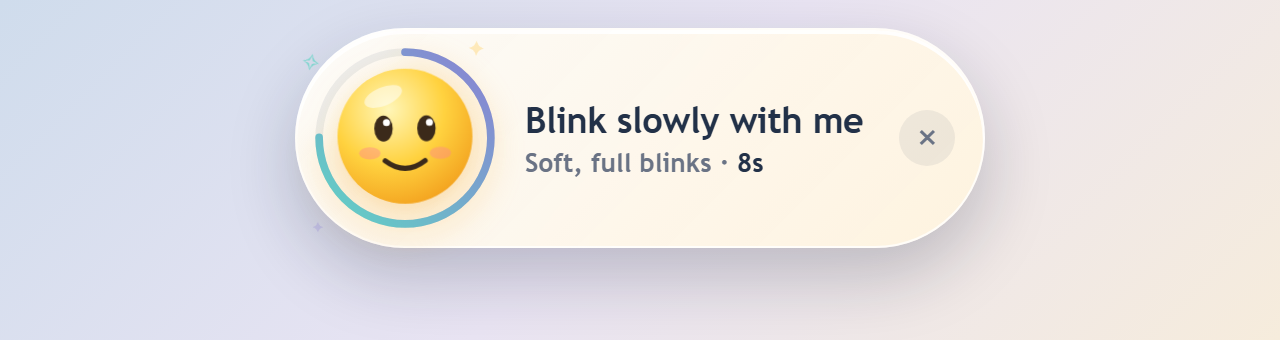
- The blink reminder is a small pill at the top center: an eye inside a thin ring, and two words.
- Overlay reminders are a smaller card on a light frost, with just Done and Later
(the snooze length is shown). Click outside to skip. - Shorter, calmer reminder text throughout.
- Smaller blink window, so its invisible edges no longer catch clicks meant for the app behind it.
Fixed
- With Windows "reduce animations" on, the countdown ring emptied instantly. It now drains
normally while other motion stops. - The development server no longer stalls on startup (it was scanning the Rust build folder).
- Updated development tools to fix security advisories (the installed app was not affected).
Install
- Download
BlinkBreak_0.2.0_x64-setup.exebelow and run it. No admin rights needed. - If Windows says "Windows protected your PC", click More info → Run anyway
(the installer isn't paid-code-signed yet). - BlinkBreak lives in your system tray. Right-click the icon for options.
Verify the download (optional)
df86dcfb8fd0e3776744e96d10333eadd56ef15a584eac1a6538d68b7e7c375c BlinkBreak_0.2.0_x64-setup.exe
PowerShell: Get-FileHash .\BlinkBreak_0.2.0_x64-setup.exe
BlinkBreak v0.1.0 — first public release 👁️
The first public release of BlinkBreak: a tiny Windows tray app that gently reminds you to blink, look away, fix your posture, and move during long screen sessions.
Install
- Download
BlinkBreak_0.1.0_x64-setup.exebelow (2 MB). - Run it. No admin rights needed, it installs just for you.
- "Windows protected your PC"? The installer isn't paid-code-signed yet, so SmartScreen doesn't recognise it. Click More info → Run anyway.
- BlinkBreak lives in your system tray. Right-click the icon for Open dashboard, Take a break now, Pause 15 min, and Quit.
Works on Windows 10 and 11.
What's in it
- 👁️ Blink: a little emoji at the top of your screen blinks with you, then floats away (every 5 min, 10 s)
- 🏔️ Look away: the 20-20-20 rule (every 20 min, 20 s)
- 🪑 Posture reset (every 30 min) · 🤸 Move & stretch (every hour) · ☕ Long rest (every 2 h)
- Every reminder closes by itself and never steals your typing
- Waits politely while you're in a fullscreen game, video, or presentation
- Timers count active use only, so they pause when you're away
- Starts with Windows, quietly in the tray (you can turn this off in Settings)
- 100% private: no internet, no account, no tracking
Verify the download (optional)
SHA-256 of BlinkBreak_0.1.0_x64-setup.exe:
227e98401ca6995ee2c9d3a90c86f1cf1d9b1b8e726f304a8e854b3dd0ec4021
PowerShell: Get-FileHash .\BlinkBreak_0.1.0_x64-setup.exe
Found a bug or have an idea? Open an issue or say hi in Discussions.