
ComfyUI nodes for long MiniMax H3 videos without the quality slowly falling apart: chains of clips, or one long render in overlapping windows.
Formerly the Clown Context Suite (renamed to avoid mix-ups with ClownsharkBatwing's RES4LYF nodes). Old workflows still load.
The Geiru Context Suite stands on other people's work. I'm building off it, so all credit to them:
- seitanism: ComfyUI-H3-Motion-Context-MultiRef. Holding the previous shot's real latents at the start of the next one, masked, is his method; Geiru Context is built on it.
- NikoDemon80: ComfyUI-H3-Motion-Context, the Chain node (copied in unchanged apart from its name as Geiru Chain, GPL-3.0 like this pack), and months of drift measurements that shaped how this was tested.
- ethanfel (Lumifel): the context noise idea behind Geiru Context Noise (see ComfyUI-MiniMaxH3-Context-Loop), and ComfyUI-H3-Prompt-IDE.
- drozbay (GitHub): native H3 latent-mask support and the masked-extension method everything here relies on, from MaskVidExperiments.
- kijai (GitHub): ComfyUI's MiniMax H3 support and the H3 context windows (PR #17425) that Geiru Hybrid Windows is built on, plus ComfyUI-KJNodes.
- JalenBrunson: ComfyUI-HybridWindows, which Geiru Hybrid Windows works like. I just added the keystone and capstone to it.
- ckinpdx: Carry Attention in ComfyUI-MMH3Tools, the idea of biasing H3's attention by part of the sequence, which led to Geiru Keystone Attention.
- TrentHunter82: TrentNodes. Its degrade node made the bad frame 0 tests possible, which showed how much a clean frame 0 matters (the idea behind Geiru Keystone).
- Imagineer13: the H3 Anti-Burn LoRA, used in the experimental Geiru Protection LoRA. Not part of this pack.
- Everyone on the Banodoco Discord and r/StableDiffusion who tested, argued and shared results.
When you chain H3 clips, each new clip starts from the tail of the last one. Detail and colour are lost a little in every clip, and the loss stacks up down the chain.
Clip 1's first frame is the only frame from before any drift. Geiru Keystone pulls every shot back toward it, so the loss can't stack up, and nothing from clip 1 ends up in the saved clips. No language model and no extra renders. Start with the Mad Clown Inventor or Easily Distracted Clown example.
Everything shows up under the Geiru Context Suite category.
| Node | What it does |
|---|---|
| Geiru Context | Holds the previous shot's last frames (and audio) at the start of this shot. Has the degradation_protection switch. |
| Geiru Anchoring | Holds a source's frames (and audio) at the end of this shot. |
| Geiru Shot Counter | The shot number. Can follow the H3 Motion Context Chain node's count. |
| Geiru Chain | nikodemon's Motion Context Chain node, renamed: Approve, Run/Re-roll, Chain, Reset and Clear buttons. |
| Geiru Keystone | Puts clip 1's first frame (keystone) into every shot and/or tacks its capstone onto the back. |
| Geiru Late Lock | Picks the step Keystone's latents come in, so the shot picks its own pose first. |
| Geiru Keystone Attention | Makes the keystone pull harder than the carried frames on the lighting blocks. Holds clip 1's brightness. |
| Geiru Context Noise | ethanfel's context noise on the held frames, so H3 doesn't copy them so exactly. |
| Geiru Hybrid Windows | One long render (a minute or more) in overlapping windows, with clip 1's keystone in every window. |
| Geiru Window Director | Optional, after Hybrid Windows: build the render one window at a time (Approve, Re-roll, Rewind, Blend all). |
Geiru Keystone, Late Lock, Keystone Attention and Context Noise each keep their own settings. Geiru Context's degradation_protection switch turns them all on or off together:
- On (default): each runs with its own settings. One you've turned off on its own node stays off.
- Off: they all pass through.
Use it on for long stretches of one scene and off around cuts: a hard cut or a new environment resets the drift on its own. When the scene changes, point Keystone's source_clip at the first clip that fully shows the new scene.
Wiring: Geiru Context → Geiru Context Noise → (Geiru Anchoring) → Geiru Keystone → (Geiru Late Lock) → sampler, with the model plugged through each of them, then through Geiru Keystone Attention to the guider.
When Anchoring is holding frames at the end of the shot, Keystone and Late Lock skip the capstone on their own.
Your speed (turbo) LoRA matters. Each turbo was trained on its own noise levels, so it handles the partly-noised held frames differently. All my testing used minimax_h3_ref2v_turbo_8step_v1.0_768p_comfyui_resized_avg_rank_64_bf16. Etupa still got degradation with minimax_h3_ref2v_turbo_silver_dareties_comfy_pruned_v2 and none with the 8-step turbo. If you see degradation with another turbo, try that one.
On a 50-clip chain (about 5 minutes 20 seconds, four scenes, same seed): by clip 20 the plain chain had fallen apart; with protection it stayed clean, though somewhat darker than clip 1.
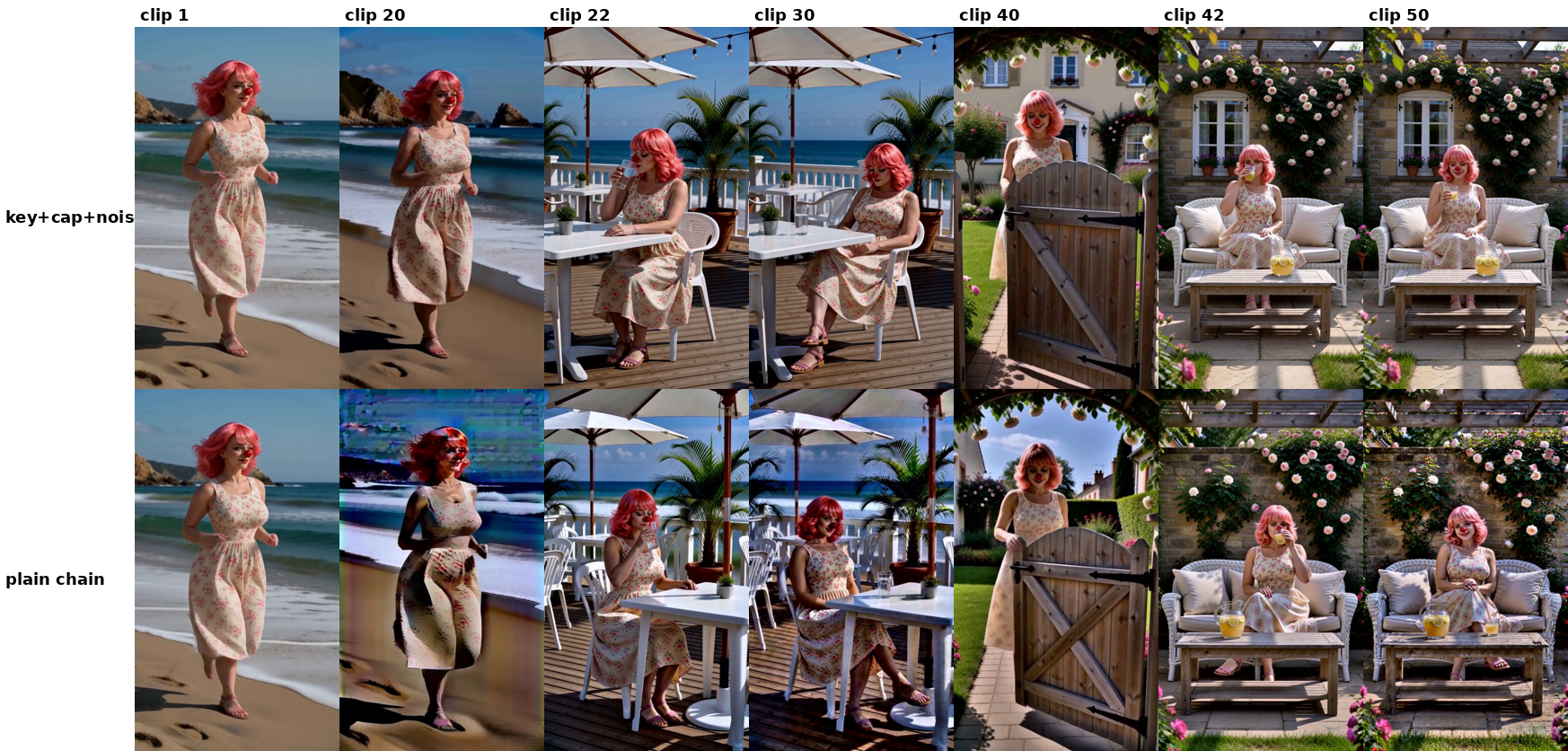
Keystone Attention takes out most of that darkening. By clip 10 of a beach chain, brightness had dropped 28% with no protection, 22% with keystone only, and 8% with keystone + Keystone Attention (balance 20, lighting blocks). Over 30 clips it held about −9%, against −17% for keystone + capstone (NerdNotes, tests 19 and 20).
Both copy real latents into the shot and mask them so the sampler keeps them. Frame counts go 5, 22, 39, 56, 73… (17n + 5); the drop settings go in steps of 17.
head_frames(Context) is the overlap with the previous shot.drop_last/drop_firstfree held frames at either end so the model remakes them.hold_audioholds the previous shot's audio for the whole overlap.audio_drop_last(Anchoring:audio_drop_first) trims held audio so the new sound comes in sooner.audio_feather_ticksfades it out at the join.shot_number(optional, from the Shot Counter): on the first shot they pass the latent through.
Recommended: Context head_frames 39, drop_last 17. Anchoring tail_frames 56, drop_first 17 (Anchoring's frames must outnumber Context's).
Use lengths that are multiples of 3: 141 (5.9 s), 192 (8 s), 243 (10.1 s), 294 (12.25 s) or 345 (14.4 s). H3's audio runs at 40 steps a second against 24 frames, so only every third frame lands on an audio step. With other lengths the held sound builds up and gets louder down the chain.
Each clip is saved whole, overlap included. With Context at 39 / drop_last 17, the new shot's frames 0-21 are exact copies of the previous shot's frames 153-174, and its frames 22-38 are a new take of the previous shot's 175-191. Cut so the join lands in the identical part:
- Cut the last 39 frames off every clip except the last (the default), or
- Cut the last 17 off each clip and the first 22 off the next.
Don't cut the first 39 off the next clip: that joins two takes of the same moment. Seamless Video Combiner does the join for you, sound included; example_workflows/sane_clown_combiner.json is set up for way 1 (End Overlap 39, End Join 0).
| Setting | Meaning |
|---|---|
use_classic_counter on |
The shot_number box is the shot. increment / decrement change it every run, fixed never. follow motion context copies the clip_index from Motion Context's Save Latent each run, so it lines up with a Chain node. |
use_classic_counter off |
The shot is the highest saved latent in latent_prefix + 1. Each new chain needs its own empty folder. |
A renamed copy of the Chain node from nikodemon's ComfyUI-H3-Motion-Context. Motion Context and seitanism's MultiRef use the same node names, so you can only install one, and MultiRef has no Chain node. With Geiru Chain you can use either. Keep Load Latent, Save Latent and Geiru Chain in the same group, and leave Load / Save's clip_index as widgets.
| Button | What it does |
|---|---|
| Approve | Moves Load and Save up one and runs the next shot. |
| Run/Re-roll | Runs the current shot again. Use this instead of ComfyUI's Run. |
| Chain | Approve on a loop. segments = how many shots (0 = until Stop). |
| Reset | Sets Load 0 / Save 1. Doesn't delete anything. |
| Clear latents | Deletes the numbered saved shots in the Load folder. |
- keystone = clip 1's first frame. capstone = a frame from the end of clip 1.
- Front: the keystone is locked into the shot's latent 0. With Geiru Context in front and the model plugged through Keystone (or Late Lock), the real frame is put back after sampling. Without Geiru Context, trim each clip's first frame when you join.
- Back: the capstone is tacked on after the shot's end for each model call and cut off again, so it's never in the output.
| Setting | Meaning |
|---|---|
placement |
keystone front (default), keystone front + back, capstone front + back, keystone front + capstone back. |
source_clip |
The clip they come from (1 by default). Change it when the scene changes. Shots up to and including it pass through. |
latent_folder |
Your chain's Save Latent folder (e.g. h3_ref2va). Keystone loads source_clip from it itself. Empty = use the source clip input (a Load Latent kept outside the Chain group). |
Geiru Late Lock goes between Keystone and the sampler (latent and model through it). For the first swap_step steps the slot is empty, so the shot picks its own pose; then Keystone's latent comes in. slots: capstone slot (back) (default), keystone slot (front), or both. Default swap_step is 4; around the last 25% of your steps is a good start. Raise it if it affects motion, lower it if colour or detail starts to go.
sidebysidelabeled_3.mp4
Clip 10 of a 10-clip chain: no Keystone, keystone front, keystone front + Late Lock capstone. Colour drift from clip 1: 6.4, 3.9, 2.9.
Every frame's attention is a pie shared by the prompt, the references, the sound, the new frames, the carried frames and the keystone. Keystone Attention only re-splits the slice shared by the keystone and the carried frames: balance 20 = the keystone pulls 20 times harder than the carried frames, and the carried frames give up exactly what the keystone gains. Everything else keeps its normal share.
It's applied on the 13 lighting blocks (31-33, 36-44, 47), found in a block sweep to carry brightness. That's what holds clip 1's brightness down a long chain. It costs a little motion (hair moved a bit less in testing).
It runs on whatever attention your model uses (Sage, Kijai's Sage patch, PyTorch, Comfy Kitchen, ...). With take_from = context slice it costs roughly 5-10% speed; whole pie costs close to nothing. The console shows how much attention the keystone actually gets on your shot.
Put it on the model line after your other model patches, right before the guider, and plug Geiru Keystone's av_latent into latent (only read, to find the keystone). It follows the degradation_protection switch and passes through on shots with no keystone.
| Setting | Meaning |
|---|---|
balance |
A weight on the keystone: 20 (default) = each keystone token counts 20 times as much when attention is shared out. 1 = off. With context slice, 20 comes to about 4x the keystone's normal attention (tops out around 6x); with whole pie, about 8x. |
take_from |
Who gives up attention for it. context slice (default, recommended): only the carried frames; everything else keeps its exact share. Holds the keystone's look best, with a slight slowdown (about 5-10%). whole pie: everything gives up a little; close to no speed cost, but holds the look less well. |
block_mode |
lighting blocks (greys out the box) or custom blocks. |
blocks |
Your own blocks for custom blocks, e.g. 31-33, 36-44, 47. |
Built on kijai's MiniMax H3 context windows (PR #17425) and works the way JalenBrunson's ComfyUI-HybridWindows does (based on the Rolling Diffusion paper). Not my idea; all credit to them. I added the keystone, capstone and keystone attention.
It renders the whole video in one go, in overlapping windows:
- Window 1 renders the first
switch_stepsteps, then carries on to the end once just to get its finished first frame (keystone) and last latent (capstone), and goes back. - Windows 2, 3 and on render the first
switch_stepsteps in order, each locked to the window before at the overlap, with the keystone and capstone. - The last steps run blended over the whole video, which smooths the joins.
GPU memory stays the size of one window however long the video is: the full-length copies wait in system RAM, and each window's own steps run on just that window. With keystone and capstone off, it works like plain hybrid windows.
The live preview loops the whole video: the windows already made, the window being made (updating as it goes), and grey for the part not made yet.
It's meant for scenes with fast motion that need to be seamless, not to beat the chain nodes at preventing degradation. Use at least two blend steps with finished_handoff on (for example switch_step 6 of 8). Plug the model through it to the guider. Update ComfyUI if the node is missing.
| Setting | Meaning |
|---|---|
context_length / context_overlap |
Window size and overlap in frames (17n + 5). |
switch_step |
Steps each window renders on its own before the blended finish. |
fuse_method |
How the blended steps average the windows (pyramid). |
freenoise |
Reuses window 1's noise for every window: more consistent, but motion can repeat. |
split_conds_to_windows |
One prompt per window (see below). |
crash_protection |
Saves progress after every window (output/geiru_hybrid_progress/). After a crash, press Run again with the same settings to pick up from there. |
detail_latent |
Optional input: use this latent's first frame as the keystone instead of window 1's. |
| Advanced (Show advanced inputs) | |
keystone_swap / keystone_step |
Window 1's finished first frame locked into every later window, from keystone_step. |
keystone_attention |
Needs keystone_swap. Keystone Attention during each window's own steps (only on the window being made), with balance, take_from, block_mode and blocks as on the node. |
back_capstone / capstone_step |
Window 1's last latent tacked onto the back of every later window, from capstone_step (keep it below switch_step). |
context_noise / _strength / _fade |
ethanfel's context noise on each window's locked overlap during its own steps. Fade linear (default, best in the fade sweep), ease or ethanfel. |
sound_first |
Renders the sound first on its own, then locks it in and renders the picture. |
finished_handoff |
Every window renders to the last step, and the next window's overlap is locked to those finished frames. |
Settings that do nothing grey out. 🎈 marks the settings that have to stay the same for a whole Window Director take. Workflows saved with an older layout load with every value on the right setting.
One prompt per window: one prompt node per window, joined in order with Conditioning Combine, into the guider, with split_conds_to_windows on. One prompt for a whole minute makes every window try to do the whole thing.

A 2 min 6 s roller coaster ride (3031 frames) in 16 windows of 226 frames, overlap 39, one prompt per window, with every window running all 8 steps on its own (switch_step 8), keystone, capstone (capstone_step 6) and context noise. No visible degradation from start to end.
clownawards_1.mp4
A 2 min 6 s talking clown with the same settings, 544 × 960, my recorded voice in the latent. No visible degradation; measured, the background darkens slowly (4-18% by window 15). Full settings and results in NerdNotes, test 15.
These were tests of extremes, not how the node is meant to be used.
Optional, for Geiru Hybrid Windows: build the render one window at a time instead of redoing the whole video when one window comes out wrong.
model → Geiru Hybrid Windows → Geiru Window Director → guider / sampler → VAE decode → video
| Button | What it does |
|---|---|
| Approve | Keeps this window and makes the next one. |
| Run/Re-roll | Makes the current window again (fresh noise when new_seed_on_reroll is on). |
| Rewind to selected | Goes back to the window you clicked in the strip and makes it again. Later windows are dropped. |
| Direct | Approves on a loop until every window is made, or until Stop. |
| Blend all | Once every window is made, runs the blended last steps over the whole video. With bypass_blend on it's Join all (no blend). |
| Reset | Clears this run's saved windows. |
The strip has one square per window: green = approved, yellow = ready to look at, pulsing blue = rendering, dark = not made yet.
Each made window's square shows its first frame. Hover over it to play the window (with its overlap with the one before). Every square takes the video's shape.

- These are rough previews, made straight from the latents the same way ComfyUI's quick sampler preview makes one: no VAE, nothing to wire, and they show up whatever your preview settings are. They're blurry with approximate colours; the real video is what your VAE decode makes.
- About a second per window, on the CPU, and a few hundred KB on disk. Saved next to the windows as
window_NNN_thumb.pngand.webp. - Reset deletes them with the run, Rewind deletes them from the chosen window on, and a re-roll replaces that window's. Takes made before 1.1.11 get theirs the next time those windows load.
| Setting | |
|---|---|
run_name |
Each name keeps its own windows in output/geiru_window_director/<run_name>/, so you can start a new take without losing the old one, or pick one back up after a restart. |
new_seed_on_reroll |
Off: a re-roll uses the same noise, so it only changes if you change the prompt or seed. On: fresh noise. |
🎈 keep_late_steps |
With finished_handoff on, also saves each window's steps after switch_step, so you can raise switch_step later and Blend all starts from there without making the windows again. Uses more disk space. |
bypass_blend |
The last button becomes Join all: the windows joined as approved. Use it with finished_handoff on. |
preview |
What the live preview loops while a window renders. this window: just the window being made (with its overlap with the one before). all windows so far: from the start of the video to the end of the window being made. Neither shows the part not made yet. |
- Keep
finished_handoffon, so each window builds on the finished window you approved. - You can change a window's prompt, and the protection settings (keystone, keystone attention, capstone, context noise, fuse method, freenoise), between windows. Changing a 🎈 setting stops the run with a message: set it back or press Reset. The one exception: raising
switch_steponce every window is made, withkeep_late_stepson.
I'm a clown and I'm ridiculous. My workflow names are equally so, so there's a folder of exact copies with more intuitive names: Workflows with Boring Names.
| Workflow | Boring name | What it is |
|---|---|---|
| Mad Clown Inventor | long_chain_keystone_and_late_lock |
Chain: Keystone (keystone front + capstone back) + Late Lock. |
| Noisy Clown | long_chain_plus_context_noise |
Mad Clown Inventor + Context Noise (at 1). |
| Easily Distracted Clown | long_chain_keystone_attention_and_context_noise |
Chain: Context Noise + Keystone (keystone front) + Keystone Attention. |
| Clown Coaster | hybrid_windows_60_second_simple |
60 s Hybrid Windows render, 8 windows, one prompt each. |
| Clowns for Picard | hybrid_windows_60_second_widescreen |
Clown Coaster in widescreen with sound_first. |
| Clown Control Freak | hybrid_windows_window_director_3_windows |
Window Director, 3 windows. |
| Clown Biker Babe | hybrid_windows_window_director_8_windows |
Window Director, 60 s in 8 windows. |
| everyone_wants_a_piece_of_the_clown | motion_context_chain_cntxt_and_anchors |
Motion Context chain with Context + Anchoring. |
| withers_has_big_nattys | static_vlog_odd_even_shots_cntxt_and_anchors |
Static vlog: odd shots fresh, even shots continue. |
| sane_clown_combiner | join_clips_into_one_video |
Joins 10 chain clips into one video. |
- Load your reference pictures and write the prompt in the H3 Prompt IDE node.
- Press Chain (or Run/Re-roll for one shot) on Geiru Chain, not ComfyUI's Run.
- Keep Load Latent, Save Latent and Geiru Chain inside their group.
- Keystone loads its source clip from
latent_folder(h3_ref2va). When the scene changes, changesource_clip, and flipdegradation_protectionoff around cuts.
Join the clips the normal way (see Joining the clips).
The base chain: Geiru Context (39, drop_last 17, holding the sound), Keystone on keystone front + capstone back, Late Lock on the capstone at step 4.
Geiru Context → Context Noise → Keystone (keystone front) → sampler, with the model through Context Noise, Keystone and Keystone Attention (balance 20, lighting blocks) to the guider.
Load your subject picture into Picture 1. Clown Coaster and Clowns for Picard run with ComfyUI's Run; the length and size are on PROMPT 1. Their SAVE LATENT node saves the finished latent to output/latents/geiru_hybrid/, so if the decode runs out of memory you can load it and decode it again (tiled) without sampling. Clown Control Freak and Clown Biker Babe use the Director's buttons (start with Run/Re-roll); the READ ME note in each walks through it.
Top: normal hybrid windows. Bottom: Geiru Hybrid Windows (keystone, capstone and finished_handoff on). Same seed and prompts.
rollercoaster_hyperdrive_comparereduced.mp4
- ComfyUI-H3-Motion-Context or ComfyUI-H3-Motion-Context-MultiRef (save / load latent). Install one, not both.
- ComfyUI-H3-Prompt-IDE
- ComfyUI-KJNodes
- ComfyUI-VideoHelperSuite
- rgthree-comfy
- ComfyUI-Custom-Scripts
- ComfyUI-Easy-Use
- ComfyMath
- Geiru Protection LoRA: Geiru-Protection-LoRa-Experimental. No colour gain on top of degradation protection so far (NerdNotes, test 16).
- Geiru Prophecy, Clown Carryover and the Prophecy and Anchoring workflows: Geiru-Prophecy-Experimental-.
Install Geiru Context Suite from ComfyUI-Manager, or clone into ComfyUI/custom_nodes/ and restart ComfyUI:
cd ComfyUI/custom_nodes
git clone https://github.com/roycho87/geiru_context_suite
No extra Python packages needed.