Repository navigation
The Popup
The desktop alert is one instrument, meant to be read from across the room: a large monospaced-digit countdown, and a colour that carries urgency rather than decoration.
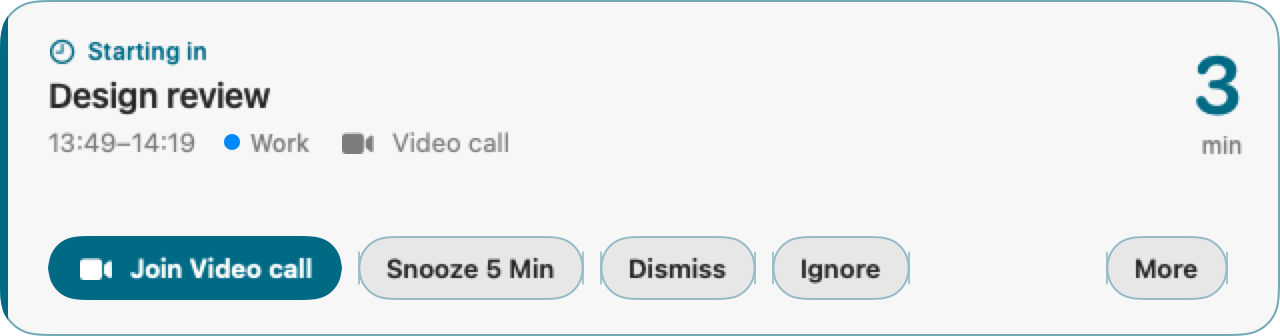
| State | When | Colour | Countdown | Rim |
|---|---|---|---|---|
| Starting in | more than 60 s before the start | cyan | minutes — 3 / min
|
4 pt |
| Starting in | 60 s or less | amber | seconds — 35 / sec
|
4 pt |
| Started | at or after the start | coral |
now, then +2 / min late
|
6 pt |
| Not acknowledged — phone alerted | escalation has pushed to your phone | keeps the state colour | unchanged | 6 pt, pulsing |
Urgency is never carried by colour alone: the state word, the SF Symbol beside it, the rim width and the countdown's unit all change together. The escalating state also replays a sound, so an alert that has already reached your phone is obvious on the desktop too.
- Countdown — right-aligned, monospaced digits so it doesn't jitter as it ticks, updating every second.
- Title — up to two lines.
-
Meta row — the meeting's time range, its calendar (colour dot + name, see
calendarColors), and either the detected video provider (Zoom,Google Meet,Teams, …) orIn personfor a meeting with a physical address. -
Actions —
Join <provider>is the single filled button; thenSnooze 5m,Dismiss,Ignore/Ignore series, and aMoremenu withSnooze 1 minandSnooze until start. With no meeting link,Dismissbecomes the filled button — there is always exactly one.
Hovering changes nothing about the layout; only the buttons themselves light up.
Shortcuts become live once you click the card. That click makes the panel the key window without activating MeetAlert or stealing focus from whatever you were typing in — before it, every keystroke still goes to the app you were using, which is the correct behaviour for an alert that must not hijack input.
| Key | Action |
|---|---|
↩ |
Join (or Dismiss, when there's no link) |
J |
Join |
5 |
Snooze 5 min |
1 |
Snooze 1 min |
T |
Snooze until start |
esc |
Snooze 5 min — "go away, come back", never a silent final dismissal |
⌘D |
Dismiss |
⌘⇧I |
Ignore / Ignore series |
Dismiss and Ignore deliberately require modifiers: both are final (Dismiss acks the whole occurrence, Ignore is permanent), and a clicked card is the key window — a bare letter would let ordinary typing kill an alert.
Multiple due alerts stack downward from the top centre of whichever screen your mouse is on, newest last, with the survivors sliding up when one is closed. If more alerts arrive than fit on the screen, extra panels overlap the last slot rather than drawing off-screen.
- Increase Contrast — the translucent material is replaced by an opaque background and the border doubles in weight.
- Reduce Motion — the slide-in, slide-out, reflow and the escalation pulse all drop to plain fades or nothing; the countdown stops animating its digit transitions.
- Every action keeps a text label (no icon-only buttons), and all text/background pairs are at least 4.9:1 in both light and dark appearance.
