Repository navigation
Releases: ssp-data/obsidian-fast-find-10k
Release list
0.2.6


What has changed?
A small release with one new setting: you can now make the search text larger or smaller than your theme's size. Results, preview, similar notes and the search bar all follow it, so a dense list on a big screen or a cramped one on a phone is a slider away.

Highlights
- Text size setting. Settings → Behaviour →
Text sizescales the result rows, the preview, the similar-notes panel and the search bar (input, pills, count) from 80 % to 130 % of the theme's size. The footer hints and the help overlay keep the theme size, so the modal's frame never grows with the text. - Live sample and instant apply. A sample under the slider, built from the same search line, tier label, result rows and preview lines the modal uses, follows the slider as you drag. If a search is open while you move it, the open search resizes too.
- Phones cap at 120 %. On mobile the slider still goes to 130 but the applied size stops at 120 %, so a single-column layout stays usable.
Fixes
- No user-facing bugs were fixed in this release. Search, ranking and keys are unchanged from 0.2.5.
Install from the release assets or build with make build as described in the README.
Install from Obsidian's community plugins (Fast Find 10K), with BRAT (ssp-data/obsidian-fast-find-10k), or copy main.js, manifest.json and styles.css into /.obsidian/plugins/fast-find/. Assets carry GitHub artifact attestations: gh attestation verify main.js --repo ssp-data/obsidian-fast-find-10k.
0.2.5
What has changed?
A maintenance release with no user-visible change: search, ranking, keys and settings are the same as in 0.2.4, and the modal looks the same on every theme. The plugin's stylesheet and colour code were reworked to pass the Obsidian community review, which is what stands between the plugin and a listing in Community plugins.
- Ready for the Obsidian plugin review. The reviewer's automated findings are cleared: colours are written through Obsidian's style helpers instead of inline styles, preview lines with a match are marked with a class rather than a
:has()selector, and the mobile pill row no longer sets a scrollbar property. None of this changes what you see; it only changes how the stylesheet and colour code are expressed.
Fixes
- No user-facing bugs were fixed in this release. The theme-colour contrast pass from 0.2.4 is unchanged.
Install from the release assets or build with make build as described in the README.
Install from Obsidian's community plugins (Fast Find 10K), with BRAT (ssp-data/obsidian-fast-find-10k), or copy main.js, manifest.json and styles.css into /.obsidian/plugins/fast-find/. Assets carry GitHub artifact attestations: gh attestation verify main.js --repo ssp-data/obsidian-fast-find-10k.
0.2.4
What has changed?
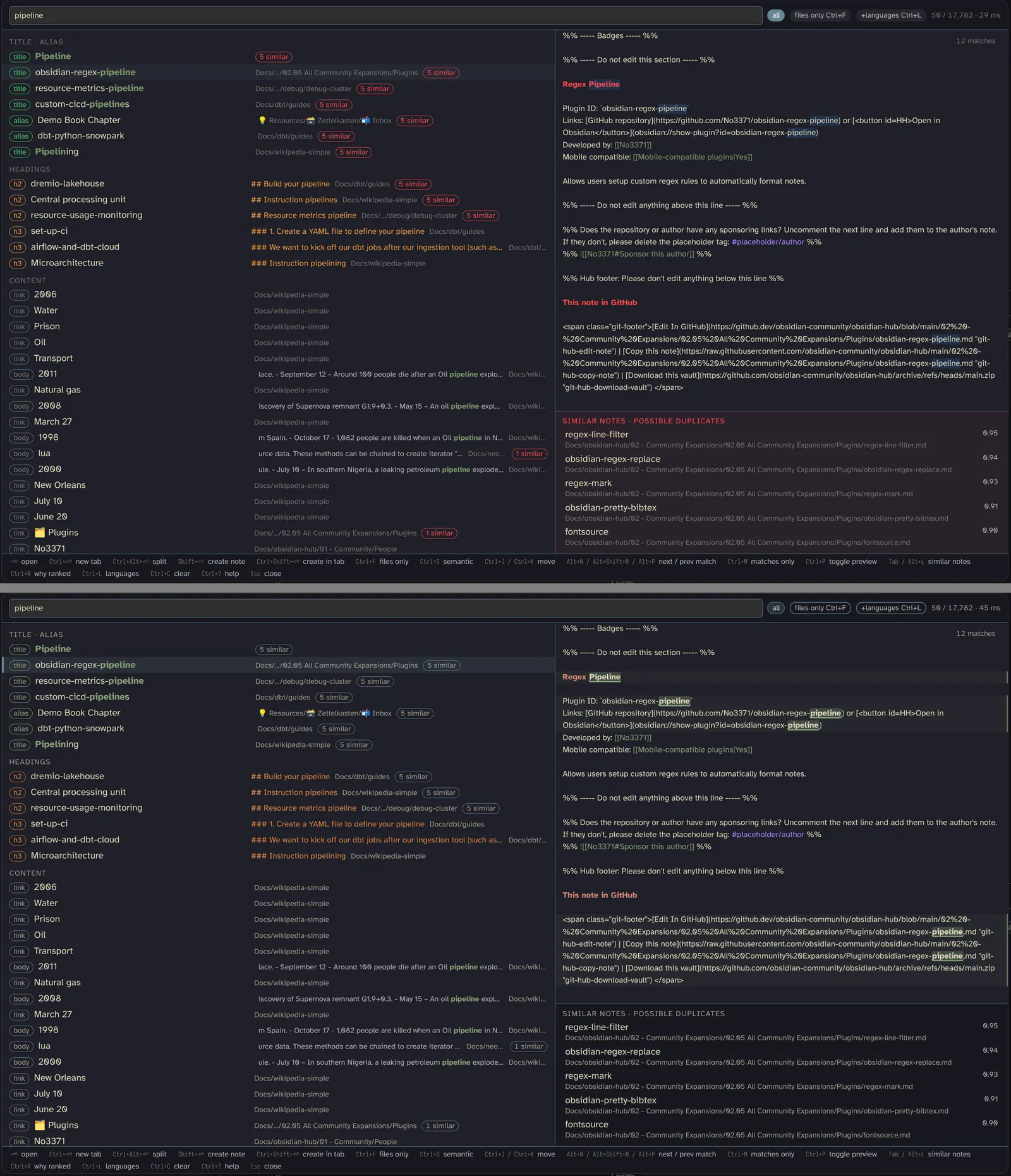
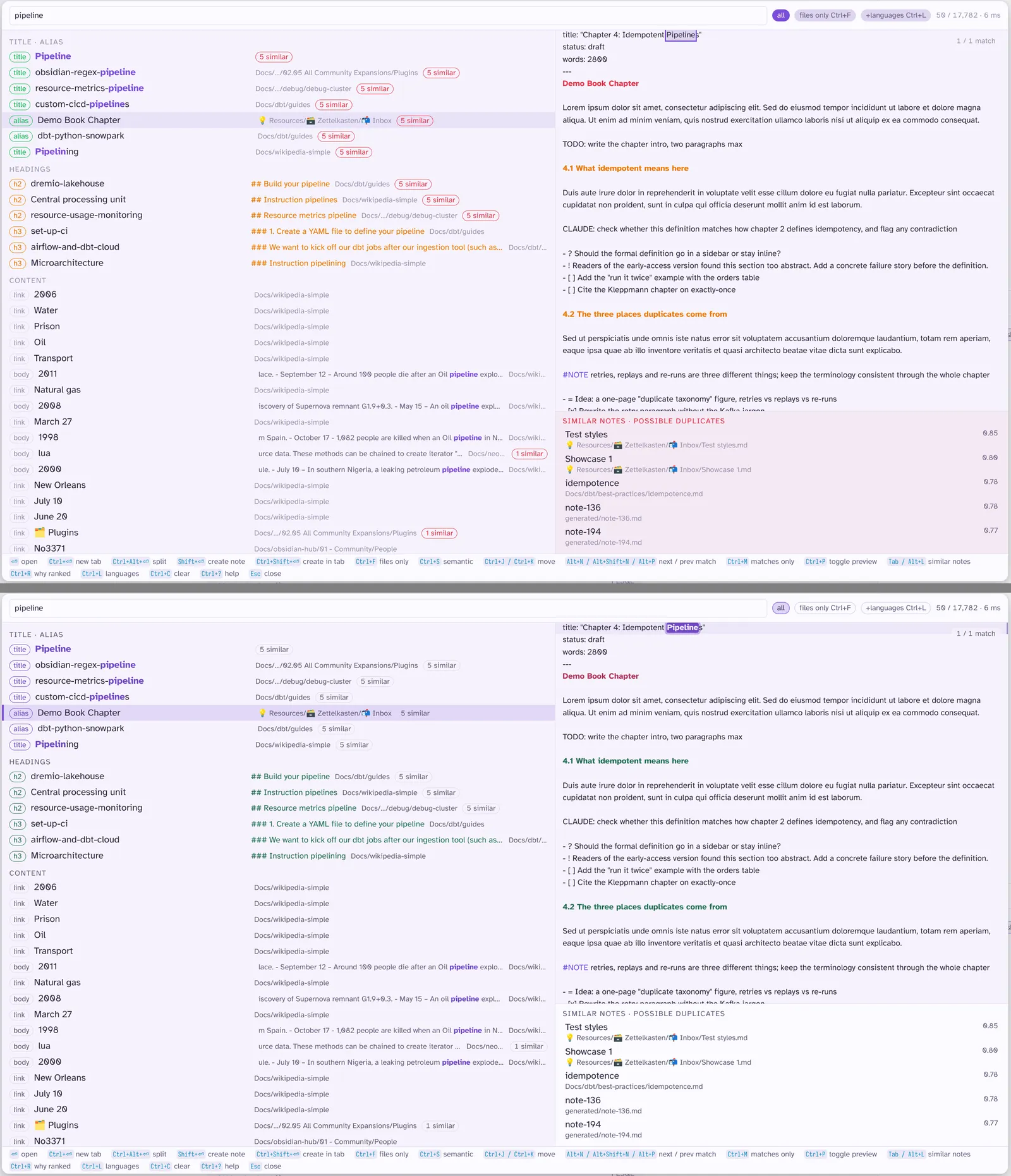
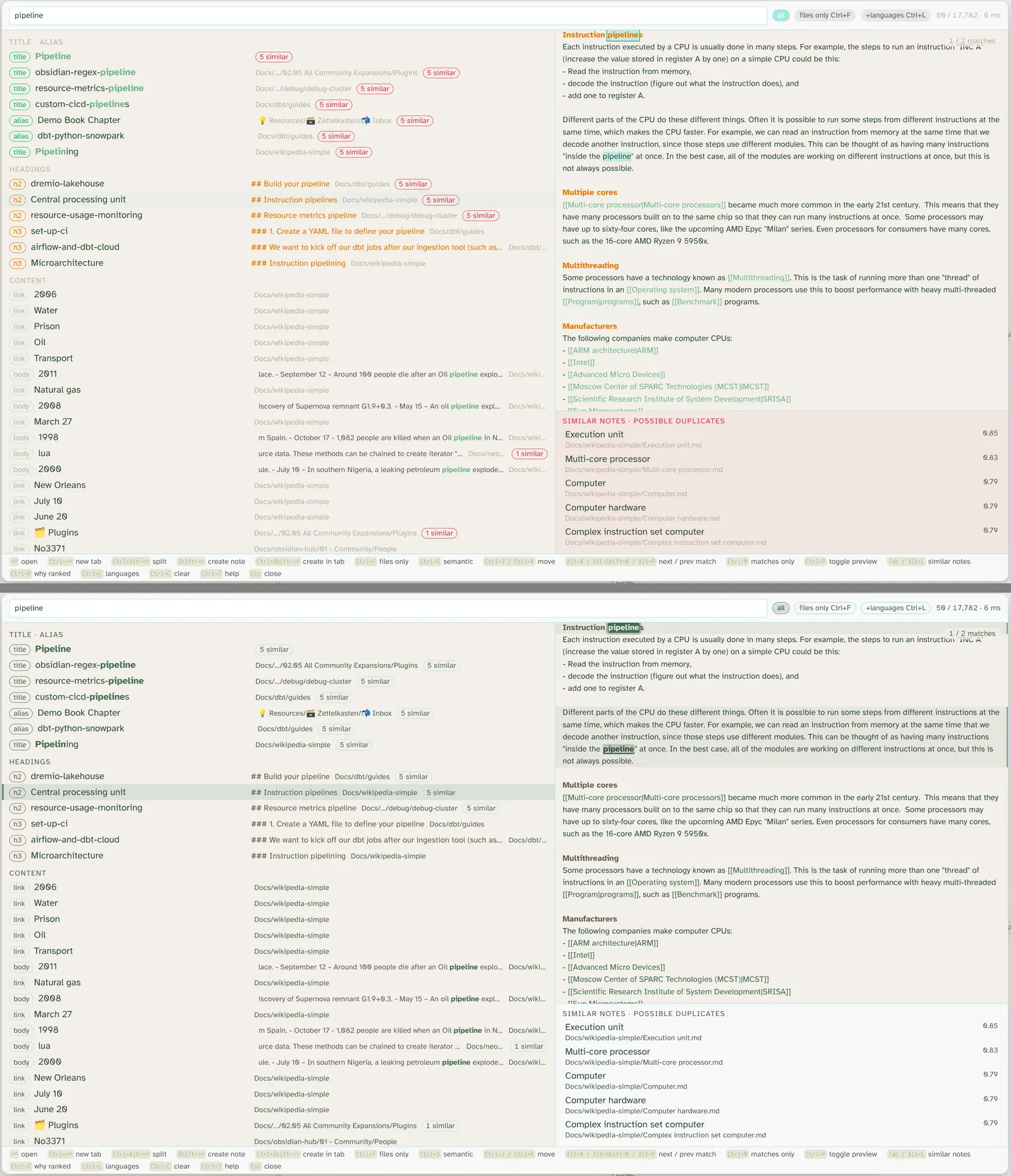
A visual release: search and ranking are unchanged from 0.2.3. The modal now takes its colours from your theme and adjusts them until every hit, badge and heading reads clearly, in light and dark mode alike, and the selected row is easy to spot.
Highlights
- Readable on every theme. When the search opens (and whenever the theme changes), each theme colour the modal uses is measured against the modal's backgrounds and blended toward the text colour only as far as needed to reach 4.5:1 contrast. Checked on Kanagawa, Asia Neon, Fireplace, Osaka Jade, Omarchy and the default theme, both modes.
- A selection you can see. The selected result, and the selected row in the similar-notes panel, now carry a bar on the left plus a light tint of the theme's selection colour instead of the theme's hover shade.
- Badges and heading context in theme colours. The
titlebadge uses the accent, theheadingbadge and the heading shown under a row use the theme's H2 colour, thesemanticbadge is outlined in the H3 colour. Other badges stay quiet. - Stronger preview highlights. Matches in the preview are bold and underlined, every line with a match gets a faint band across the full width with a rule on the right edge, and the current match (Alt+N / Alt+P) is a solid accent block.
- Quieter pills. The active pill (all / files only / +languages / preview) is tinted and ringed with the selection colour and keeps normal text; inactive pills are outlined. The
N similarpill and the panel's "similar notes" label drop the red for faint text and a plain border.
Fixes
- Pale light themes such as Osaka Jade light showed title hits and badges in colours that barely stood out from the background; they are now darkened enough to read.
- In some dark themes (Kanagawa among them) the selected row was almost indistinguishable from its neighbours, and the active pill's text could vanish against its background; both are visible now.
Before and after (0.2.3 above, 0.2.4 below; more themes in docs/showcase.md)
0.2.3
What has changed?
A small settings release: search and ranking are unchanged from 0.2.2. A new setting lets you hide the similar-notes panel, either everywhere or only on mobile, which leaves more room for results and the preview on small screens.
Highlights
- Similar notes panel setting. Under Behaviour,
Similar notes panelcan be set to always (the default), desktop only, or never. When hidden, both the panel and theN similarpill on each result go away; the create guard (Shift+Enter) still shows the closest existing notes before creating a new one. - Comparison with other searches. A new write-up compares native search, Omnisearch, Fast Find 10K and QMD on a 17,780-file vault, one query at a time with screenshots and timings, and says which tool fits which vault size. See the comparison and the summary table in the README.
Fixes
- No bug fixes in this release.
Install from Obsidian's community plugins (Fast Find 10K), with BRAT (ssp-data/obsidian-fast-find-10k), or copy main.js, manifest.json and styles.css into /.obsidian/plugins/fast-find/. Assets carry GitHub artifact attestations: gh attestation verify main.js --repo ssp-data/obsidian-fast-find-10k.
0.2.2
What has changed?
A small layout release: search and ranking are unchanged from 0.2.1. The preview's match counter now floats over the text instead of taking a line of its own, so the first lines of a note stay visible. The difference is most noticeable on mobile.
Highlights
- Match counter as a floating chip. The
3 / 12 matchescount and the matches-only label (Ctrl+M) now sit in a translucent chip in the preview's top-right corner. They no longer push the note text down, and clicking the chip still switches between matches only and the whole note.
Fixes
- On mobile, the preview header with the match count hid the first lines of the selected note. The label now takes no space, so the note starts at its first line.
Install from Obsidian's community plugins (Fast Find 10K), with BRAT (ssp-data/obsidian-fast-find-10k), or copy main.js, manifest.json and styles.css into /.obsidian/plugins/fast-find/. Assets carry GitHub artifact attestations: gh attestation verify main.js --repo ssp-data/obsidian-fast-find-10k.
0.2.1
What has changed?
Search now reaches everything in the vault that carries text: frontmatter properties, Bases, canvases and Excalidraw drawings, each with a filter to narrow to it. The preview counts and jumps between matches, renders mermaid diagrams and drawing exports, and starts open on mobile; navigation keys moved to Alt so capital letters can be typed again.
This release combines 0.2.0 and 0.2.1.
Highlights
- Properties are searchable. Every frontmatter key and value except Obsidian's own (
aliases,tags,title,cssclasses,created) matches in the content tier, shown with apropbadge andKey: valueas context. Filter with Obsidian's syntax:[Herkunftsland:India]keeps notes with that value,[price]notes that have the key; theProperty (frontmatter)weight slider tunes it, and 0 turns it off. (#4)

- Bases, canvases and drawings.
.base,.canvas,.excalidrawand.excalidraw.mdfiles are indexed with the file name as title: a canvas becomes a small markdown note (group labels as headings, text cards as paragraphs, file cards as links), a drawing contributes its text elements. Results carry acanvas,baseordrawingmarker, andtype:note,type:base,type:canvasortype:drawingkeeps one kind. (#1)

- Matches in the preview. The preview header counts the highlighted matches (
3 / 12 matches);Alt+N/Alt+P(orAlt+Shift+N) jump to the next and previous one, andCtrl+M(or a click on the header, thematchespill on mobile) shows only the lines around the matches, with line numbers. (#3)

- Diagrams and drawing exports in the preview. Fenced
mermaidblocks render as diagrams a quarter second after the selection settles; an Excalidraw drawing shows its PNG/SVG export when the Excalidraw plugin wrote one next to it. Everything else stays plain text. (#2)

- Alt for navigation. Preview scrolling is
Alt+J/Alt+Kand the similar-notes panelAlt+L/Alt+H(was Shift), so every capital letter stays typable, for example in a note name created withShift+Enter. Saved bindings on the old keys move over automatically, and a binding can list alternatives (Alt+Shift+N | Alt+P). - Ribbon icon. A search icon in the left ribbon (the drawer on mobile) opens the search with one click; turn it off with
Ribbon iconunder Settings → Behaviour. (#7)

- Preview on by default on mobile.
Preview open by default on mobileunder Settings → Behaviour now defaults to on, so the full-screen search shows the selected note's text right away; thepreviewpill still hides it. Settings saved by an earlier version keep their value, so turn the toggle on if you want the new default. - Partial matches and OR, documented. The README's query syntax and ranking sections now explain that plain words are AND-ed, that notes matching only some of them appear further down under partial (Settings → Ranking →
Partial-match tier), and that there is no OR.
Fixes
- On mobile the full-screen search could only be left by opening a note; a ✕ at the end of the search line and a swipe to the left now close it. (#8)

- On mobile the preview stayed empty until a result was tapped; it now shows the first result as on desktop (the same bug hid the preview on desktop with key hints set to never).
- "Search (resume last)" always opened the preview, ignoring the
Preview open by defaultsettings (desktop and mobile); it now follows them like a plain search. - Opening a result in a new tab or split (
Mod+Enter,Mod+Alt+Enter) now keeps focus on the opened note instead of returning it to the note you came from.
Fast Find 10K is available in Obsidian's Community plugins list; see the README's install section for BRAT pre-releases or building from source.
Install from Obsidian's community plugins (Fast Find 10K), with BRAT (ssp-data/obsidian-fast-find-10k), or copy main.js, manifest.json and styles.css into /.obsidian/plugins/fast-find/. Assets carry GitHub artifact attestations: gh attestation verify main.js --repo ssp-data/obsidian-fast-find-10k.
0.1.6
Fast Find 10K 0.1.6. Install with BRAT (ssp-data/obsidian-fast-find-10k) or copy main.js, manifest.json and styles.css into /.obsidian/plugins/fast-find/. Assets carry GitHub artifact attestations: gh attestation verify main.js --repo ssp-data/obsidian-fast-find-10k.
0.1.5
Fast Find 10K 0.1.5. Install with BRAT (ssp-data/obsidian-fast-find-10k) or copy main.js, manifest.json and styles.css into /.obsidian/plugins/fast-find/. Assets carry GitHub artifact attestations: gh attestation verify main.js --repo ssp-data/obsidian-fast-find-10k.
0.1.4
Fast Find 10K 0.1.4. Install with BRAT (ssp-data/obsidian-fast-find-10k) or copy main.js, manifest.json and styles.css into /.obsidian/plugins/fast-find/. Assets carry GitHub artifact attestations: gh attestation verify main.js --repo ssp-data/obsidian-fast-find-10k.
0.1.3
Fast Find 10K 0.1.3. Install with BRAT (ssp-data/obsidian-fast-find-10k) or copy main.js, manifest.json and styles.css into /.obsidian/plugins/fast-find/. Assets carry GitHub artifact attestations: gh attestation verify main.js --repo ssp-data/obsidian-fast-find-10k.