
README badges shaped like CD jewel case spines.
把技术栈、AI 工具和项目做成 CD 盒侧脊的 README 徽章。
English · 中文文档
Join our Discord group! ⬇️ 加入我们的 Discord 群组

One image URL puts a spine, or a whole shelf, in a README or GitHub profile.

This repository holds everything behind it:
apps/web |
The badge site: a Cloudflare Worker that draws SVG on request, and its home page. |
packages/spine |
The renderer. Pure TypeScript, no dependencies, text set as outlines. |
art |
Prints: one finished spine image per tool or project. Contributions welcome. |
skills/cd-spine-art |
The agent skill that draws prints with an image model. |
Live at spine.stv.pm.
cd-spine-art guides an agent from verified brand marks through art direction
to a cropped, upright spine. It needs an image tool that accepts reference
images, plus Python 3 and Pillow for cropping.
npx skills add stvlynn/spinesThen ask for what you want:
Use
$cd-spine-artto make a CD spine for React and add it toart/stack/.

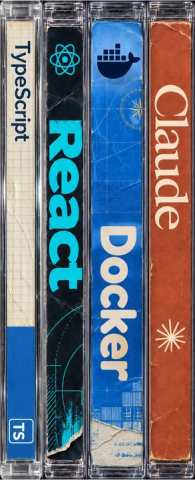One name lies down like a badge. Several stand side by side on a shelf.
Add ?layout=stack to lay several down, or ?layout=row to stand one up.
| URL | Draws |
|---|---|
/badge/<name>,<name>.svg |
Catalog entries for common AI tools and tech stacks (the list). Short names work: ts, py, k8s, next. |
/spine/<title>.svg |
Any title, typeset. |
/gh/<owner>/<repo>.svg |
A repository, with its stars and the mark of its main language. |
/gh/<owner>.svg |
An account's most-starred repositories on a shelf. count 1–12, default 8. |
/art/<name>,<name>.svg |
Prints from art. |
/shelf.svg?s=<item>&s=<item> |
Up to 24 of any kind. An item is a title, badge:name, gh:owner/repo or art:name, each with optional ;key=value settings. |
| Option | Values | |
|---|---|---|
theme |
paper clay steel noir grid signal midnight candy |
Picked from the title when omitted. |
sub |
text | The catalog line at the foot of the spine. |
icon |
a Simple Icons slug, or none |
The mark at the head. |
paper ink accent |
hex without # |
Recolor a theme. Ink adapts to the paper unless given. |
width |
slim regular wide |
Thickness of the case. |
layout |
stack row |
Lying down, or standing. |
size |
120–2400 | Length of a spine in pixels. |
gap |
0–24 | Space between spines in pixels. |
A catalog badge shows its print from art/ once someone has drawn it, and is
typeset until then. Passing any styling option asks for the typeset version.
A request that fails still answers with a spine that says why.
Each catalog entry wants one image of its own, and any project can have one.
art/WANTED.md lists what is missing and
art/README.md explains how to add it.
Needs Node 22 and pnpm.
pnpm installpnpm dev| Command | |
|---|---|
pnpm test |
Renderer and Worker tests. |
pnpm typecheck |
TypeScript, both packages. |
pnpm lint |
Biome. pnpm format fixes. |
pnpm presets |
Validate the catalog and regenerate its static registry. pnpm presets --check checks for stale output. |
pnpm art |
Rebuild the web copies of art/ and art/WANTED.md. |
pnpm fonts |
Rebuild the glyph atlases the renderer sets text from. |
Edit apps/web/catalog/presets.json to add or
update a badge. Each entry declares its slug, group (ai or stack) and
theme; optional fields are paint, title, icon and aliases. icon is a
Simple Icons slug and defaults to the badge slug; title defaults to the icon's
title. paint: "paper" applies the brand color to the paper, while "accent"
uses it for the artwork. Array order is the catalog's display order.
{
  "slug": "typescript",
  "group": "stack",
  "theme": "grid",
  "paint": "accent",
  "aliases": ["ts"]
}
Run pnpm presets and commit both the JSON and
apps/web/src/presets.generated.ts. Do not edit the generated registry. The
JSON Schema provides editor validation;
the generator also verifies themes, installed icon slugs, and uniqueness across
all badge slugs and aliases. Invalid configuration fails before output is written.
Tests, typechecking, pnpm art, and Wrangler dev/deploy regenerate the registry.
During development Wrangler watches the catalog as well as the source files.
CI runs pnpm presets --check first to catch uncommitted generated changes.
Only static icon imports enter the Worker bundle; catalog validation runs at
build time. Prints outside the badge catalog continue to use the art manifest.
pnpm run deployThis runs wrangler deploy for apps/web. Log in
first with pnpm --filter @repo/web exec wrangler login. The spines Worker
serves spine.stv.pm and uses Workers Builds to deploy pushes to main.
The build root is apps/web, the build command is pnpm -w test, and the
deploy command is pnpm exec wrangler deploy. Builds use Node.js 22.
The home page template is apps/web/index.html; Wrangler generates the static
public/index.html before dev or deployment. Set the optional GTM_ID build
environment variable to enable Google Tag Manager; leave it unset to omit tracking.
The container must have a published Google Analytics tag to collect GA data.
Configure the GitHub repository variable with:
gh variable set GTM_ID --repo stvlynn/spines --body YOUR_GTM_CONTAINER_IDCI reads ${{ vars.GTM_ID }}. Workers Builds runs separately from GitHub Actions,
so set the same GTM_ID under the Worker's Settings → Builds → Variables and
secrets too (and update both when changing the container). For a local deploy:
GTM_ID="$(gh variable get GTM_ID --repo stvlynn/spines)" pnpm run deploy.
GitHub routes read the GitHub API without a token, which allows 60 requests an hour. To raise that to 5,000, store a token with no scopes:
pnpm --filter @repo/web exec wrangler secret put GITHUB_TOKENBrand marks come from Simple Icons and belong to their owners. The home page follows the Sunbeam design system (MIT). Spine type is set in Inter, Fraunces, JetBrains Mono, Anton and Fredoka (OFL).