Repository navigation
Create links to markdown headers #1758

Replies: 2 comments 1 reply

|
You are not imagining it! 😅 Heading links did exist in Poznote, from March to October this year, when every heading had a small link icon that copied a direct link to that section. I removed it in October because it caused more trouble than it was worth. The icon sat inside the note itself, so it kept getting in the way while editing. Headings sometimes got duplicated when you changed their level, or left an empty one behind when you deleted them. I preferred to take it out rather than keep patching it. What is left today is the same idea on shared pages. On a publicly shared note, every heading has a link icon that copies a link straight to that section, and opening such a link scrolls right to it. Inside the app, the Outline panel is what you use to move between the sections of a note. Linking to a section when you insert a link is not possible yet either, for now you can only point at the note itself. I am working on it again right now, and both should be available in the next release. Thanks for raising it. |

|
Thank you so much for your response and your work Best regards |

and: 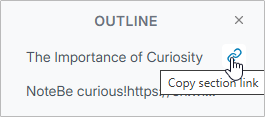
|


Uh oh!
There was an error while loading. Please reload this page.
Hi!
First of all, apologies if this is something that's already available in Poznote.
I could swear there used to be an icon to the right of Markdown headings that allowed you to copy a direct link to that specific section (although I might just be imagining things!).
When inserting links, would it be possible to select specific sections within a note, so we could link directly to a particular section rather than just to the note itself?
Regards!
All reactions