Repository navigation

Replies: 2 comments

|
In lightweight-charts v4, there is no built-in "X" shape for markers, but you can achieve this using a Custom Series Plugin. Since you are already working with Next.js and Tailwind CSS, this approach will integrate smoothly into your stack. The Simple Solution: Custom Primitive Define a Canvas Drawing Logic: You write a small class that uses the standard Canvas API ctx.lineTo() to draw two crossing lines. Use the Plugin: You attach this "Cross" primitive to your series. Alternative: The "Icon" Workaround Set the shape to square or circle. Set the color to transparent. Use the text property and pass an emoji or symbol: "✖" or "X". Pros: Very easy to implement. Cons: Harder to align perfectly centered on the candle compared to a custom plugin. |

|
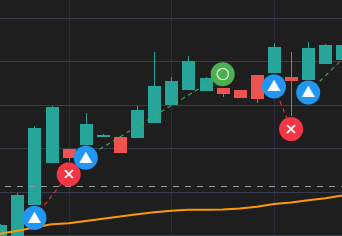
Thank you for the response! We've already solved it by drawing on a canvas overlay using ctx.fillText('×') for loss markers and ctx.fillText('○') for profit markers, connected with dashed lines. Here's what it looks like in our live trading monitor: |


Uh oh!
There was an error while loading. Please reload this page.
Uh oh!
There was an error while loading. Please reload this page.
Hi, I'm using lightweight-charts v4 and I'd like to customize the marker shape for losing trades.
Currently only 4 shapes are available:
circle,square,arrowUp,arrowDown.I'd like to display an ✕ (cross/X) shape for loss markers instead of a square.
Is there any way to:
Thank you!
All reactions