Repository navigation
v2.0.0-RC #912

Replies: 3 comments 4 replies

|
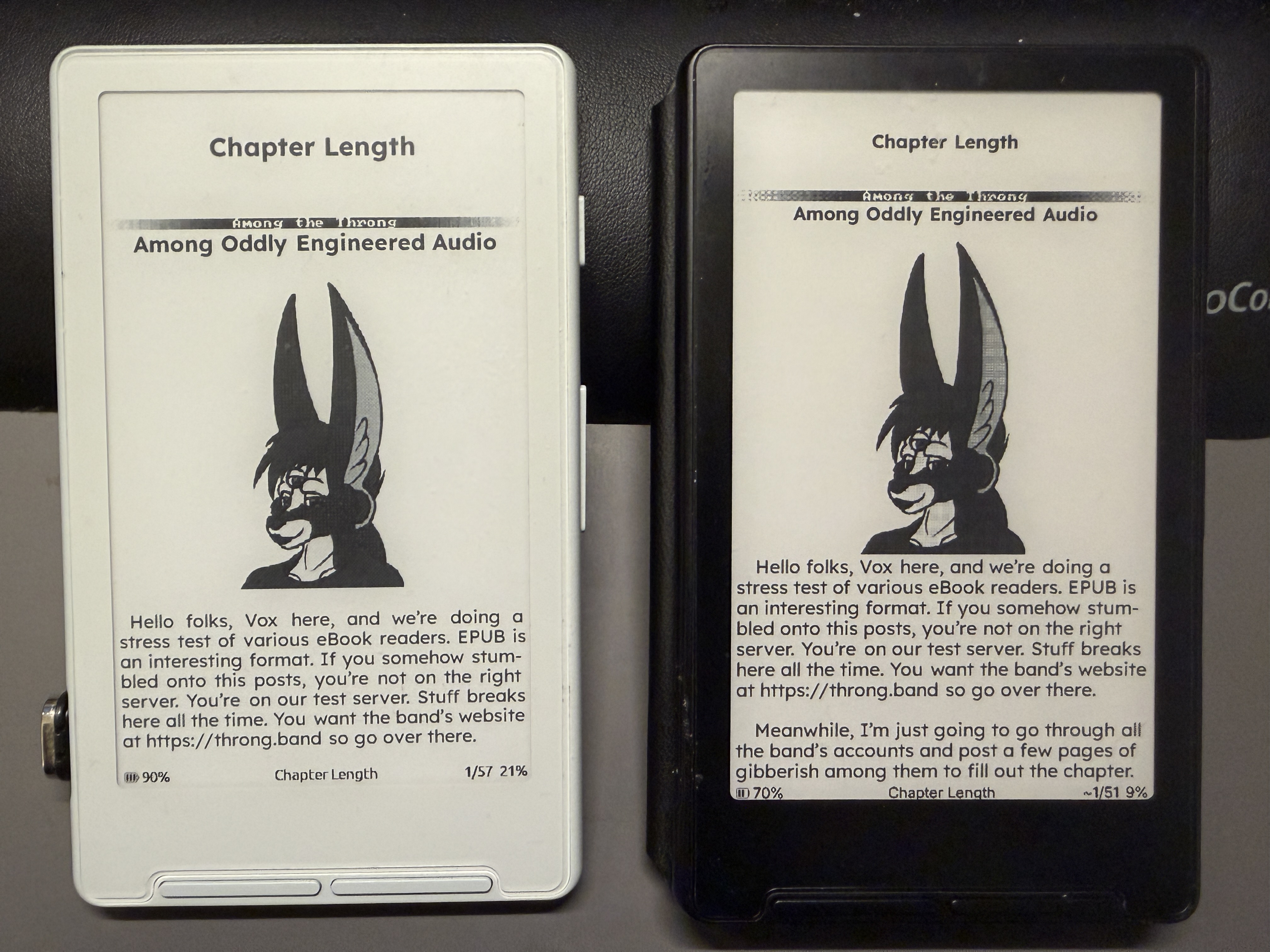
CrossInk 2.0RC LET'S GO!!! Using my ePub test document... everything is looking... Um, we have a layout problem. Crosspoint 2.0 on left, CrossInk 2.0RC on right. The titles aren't being scaled. Attaching the ePub for diagnosis. |

|
@uxjulia this has the same metalio support that crosspoint 2.0 does? |

|
no; only the xteink devices, seeed sticky, and boox picco |

|
Is support coming for metalio? since crosspoint has it and all |

Hey there, I'm only planning on supporting devices I own, otherwise I wouldn't be able to debug and troubleshoot for those devices. I currently have no plans on getting a Metalio. |

|
When trying to install Plugin Hub, I get a Memory Error. X4 and X3 both do the same. |

|
Everything seems to run slower than before on my og x4. Books take too long to open, even when they have already been indexed, and books that the latest version read in embedded style, in crossink default mode, now reads only on safe mode, After taking too long to open. |


Uh oh!
There was an error while loading. Please reload this page.
Uh oh!
There was an error while loading. Please reload this page.
Tip
You can flash stable and pre-release builds using Crossink's web companion app, Inky
Important
English is now the only built-in interface language. If you use another language, grab the separate crossink-languages download file from this release, add the
.yamlfile to your SD card under.crossink/languagesand activate it fromSettings > Language. EPUB hyphenation (other than English) also moved to SD packs, so install the packs for the languages you read in into.crossink/hyphenation.Release Notes
Boox Picco support, SD card plugins, Syncing of reading stats and clippings via Crosspoint Sync, an overhaul of languages and so much more.
New
Settings > System > Device > Download Languagesor manually add a language's.yamlfile (see thecrossink-languages.zipfile in this release) to your SD card into a.crossink/languagesfolder.Settings > Reader > Page Layout > Hyphenation Packsor manually install thecphyphfile to a.crossink/hyphenationfolder. Book layouts refresh automatically when a pack changes.Settings > System > KOReader Syncis nowSync Server. If you use CrossPoint Sync, your reading stats and clippings can now sync along with your progress. Stats and clippings sync are off by default, so turn them on underWhat to Syncif you want them.Sync BooksinFile Transfer > Sync Serversyncs progress, reading stats, and clippings for every book on your SD card in one pass. After the first catch-up it only sends books that changed since the last sync. There's alsoSync Reading StatsandSync Clippingsif you only want to upload one of those without touching your reading positions. These are only available if your sync server supports it (the default Crosspoint Sync server does.)Daily Reading Timestat that you can view underThis Deviceon the reading stats page. It also shows your 7-day average daily reading time.Off,Ignore Body Font, orAll TextinReader > Font Options(globally) or from a book'sFontmenu.Settings > Display > Screen Calibrationto keep text and status bars clear of your bezel. Calibration is saved to the device, so it stays put when you swap SD cards.Character Spacingsetting (-5 to +5) with a live preview, available in Reader settings and the in-bookReader Fontmenu.Word Spacingis now a -4 to +4 slider, so you can tighten it too.UI Fallback Fontsetting to display characters in book titles and filenames that the built-in UI font doesn't support like CJK characters.Imagesoption toDisplay (B&W).Display > Hide Battery %has moved into each status bar's settings and your old choice carries over.Select Chaptercan now be assigned to shortcuts, Quick Actions, and touch gestures.Look Up/Cliptoolbar. Clipping works even if you don't have a dictionary installed.Legacymenu navigation inControlsif you prefer the old button navigation behavior in Settings and the reader menu where both the front and side buttons acted as up/down.Author - Title. Turn it on per OPDS server inSettings > System > OPDS Servers > Use Server Filename.Settings > System > Aboutnow shows device, firmware, storage, and memory info. You can also export a privacy-safe support file to attach to bug reports (no network/device identifiers, credentials, or reading history).fieldsetHTML elements now render as outlined boxes.Settings > System > Release NotesCenter Status Baroption in theStatus Barsettings.Changed
OPDS Browserhas moved intoFile Transfer, which frees up room for aPluginsoption on the home screen of themes that show it (and when Plugins is enabled).Sync Behavior > Ask every timeis nowAsk on conflicts. It only asks when your device and the server disagree.Incremental.Fixed
Chapter Progress Percentageis available in both reader status bar slot pickers and web settings (fixes Chapter Progress Percentage Disappears from Status Bar Options #859)<section>), KOReader jumps to start #853)Notable updates from upstream Crosspoint
Settings > System > Plugins..otffonts can be used from the SD card or uploaded through the Fonts web page. Variable fonts and font collections are still not supported.Caution
If you have LOCKED device, make sure to download and flash the correct
.binotherwise you risk permanently damaging your reader. Do NOT attempt to flash anything other than the.binlabeled for your device's model.Unsure what device you have?
All reactions