Repository navigation
Releases: xilla420/dlss5-wow-sidecar
Release list
v0.6.0 - No more ghosting, and DLSS 5 310.9.16 on RTX 50

The ghosting behind characters and on camera turns is fixed, and RTX 50 cards now
run NVIDIA's newer DLSS 5 310.9.16, which costs about 40% less GPU time per frame.
RTX 40 cards keep the 310.8 build that runs on them.
Added
- A choice of neural runtime. The release now carries two builds of
nvngx_dlssnr.dll, underruntimes\latestandruntimes\compatible, and
Tuning → Neural runtime picks between them. Latest is NVIDIA's signed
310.9.16: on an RTX 50 card it cut the neural pass's GPU time from 2.85 to
1.7 ms per frame at 1280x720, and the overlay's own video memory by about
60 MB. It runs only on RTX 50. Compatible is the Ada-patched 310.8.0 the
previous releases shipped, which runs on RTX 40 and RTX 50. Automatic, the
default, takes Latest on RTX 50 and Compatible on RTX 40. The overlay copies
the chosen build next to itself at each launch;neural_runtimein
sidecar.tomlholds the choice. Installs without aruntimesfolder keep
using their loosenvngx_dlssnr.dllas before.
Fixed
- Moving things left translucent trails, and turning the camera smeared the
picture. The motion vectors handed to the neural pass pointed the wrong
way, so every frame blended in history from twice the real motion away. This
had been there since the first release and was misread as the cost of
estimated motion. They now point the right way, which a camera-pan test
confirms on hardware: DLAA's error against the true frame drops to a third of
what 0.5.0 produced. - More neural passes made the ghosting worse. Every extra pass was told the
scene had moved by a whole frame, so passes compounded the smear. Passes after
the first now see the scene as still, which it is. - History is dropped after a gap in the capture (alt-tab, loading screens, the
game minimised), instead of being blended into the first frames back.
Added
- Disocclusion handling. Each motion vector is now checked against the
previous frame. Where a turning camera uncovers new ground, or a character
uncovers what was behind them, or a spell effect moves in a way optical flow
can't follow, the pixel is shown from the present frame instead of the
neural pass's stale history. DLSS is told the same thing through its
bias-current-colour mask.disocclusion_fallbackinsidecar.tomlsets how
far to fall back (0 to 1, default 1). invert_motion = trueinsidecar.tomlflips the motion vectors back. It is
a diagnostic for comparing the old and new behaviour, not a setting to play
with.
v0.5.0 - WoW 3.3.5a support and a compact manager
World of Warcraft 3.3.5a (Wrath of the Lich King, build 12340) is now supported,
and the manager is redesigned to be more compact.
Added
- A game client switch: Retail & Classic, or 3.3.5a Wrath. It sits in the
header and decides which folder is scanned, which window check applies, and
what Setup tells you to do. Each client keeps its own folder, so switching back
and forth loses neither. - 3.3.5a setup and checks. Setup shows the two ways to get a capturable window
(Windowed Mode and Maximized in Video options, orgxWindowandgxMaximizein
Config.wtf). Checks add a WoW folder row that looks forWow.exeand, for
3.3.5a,Data/common.MPQ. Ad3d9.dllbeside a 3.3.5a client is reported as a
warning, because it is usually DXVK; the other injector names still block. If the
game and the selected client disagree, the window row says so. - A "Ready to play" checklist on Status that ticks itself off: files, checks,
game window, start.
Changed
- A more compact manager. One header row, icons in the side rail, the theme and
language at the foot of the rail, a one-line save bar, and status pills on the
checks board. The welcome panel shows a frozen fortress while 3.3.5a is selected. - The first-run notice has its own language picker, so it can be read before it
is accepted.
Fixed
- WoW 3.3.5a (Wrath, build 12340) was never detected. Its window class
carries the graphics API in its name (GxWindowClassD3d,GxWindowClassD3d9Ex,
GxWindowClassOpenGl), and the sidecar only knew the bareGxWindowClass, so
it reported WoW as not running. 3.3.5a has no "borderless" option: use
Windowed Mode with Maximized ticked in Video options, which gives the
same borderless window. - In Arabic, text set beside the welcome picture wrapped one letter per line.
- 3.3.5a players were told to cap the frame rate in a way that halves it. The
game's ownmaxFPSlimiter is coarse on Windows 11: with the overlay running and
the game in the foreground,maxFPS 60delivered about 35 fps, while uncapped,
vsync andmaxFPS 120all held 60. Setup and the Status advisory now point
3.3.5a players to the driver's Max Frame Rate forWow.exeinstead.
Validation and download
- Windows x64 Release build with both NVIDIA SDKs enabled.
- 253 native tests passed (221 unit, 31 device, 1 device-loss); translation and binary import checks passed.
- Tested live on a WoW 3.3.5a client (build 12340) on its login screen at 2560x1440: all checks green, DLSS armed, 58-60 fps presented of 60 captured. Not yet tested in the world, with DXVK, or with the OpenGL renderer.
- 3.3.5a players: cap the frame rate with the driver's Max Frame Rate for
Wow.exe, not the game'smaxFPS, which is coarse on Windows 11 (60 lands near 35 fps). - ZIP includes the manager, overlay, and the same third-party runtime components as v0.4.0. Their terms are in THIRD-PARTY-NOTICES.md.
- SHA256SUMS-v0.5.0.txt verifies the ZIP. BUILD-MANIFEST.json inside records the source commit and component hashes.
- Extract into a new folder outside your WoW installation. Existing sidecar.toml settings remain compatible; the client defaults to Retail & Classic.
Details of what was and was not verified: docs/verification-0.5.0.md in the source and ZIP.
v0.4.0 - Easy and Advanced modes
The manager now separates everyday use from detailed tuning, with an illustrated
welcome page and settings controls that stay within reach.
Added
- Easy / Advanced modes. Easy is the default; Advanced reveals individual
rendering settings, editable hotkeys, timing diagnostics and logs. Existing
setup, checks, presets, strength choices, themes and languages remain available.
Switching modes preserves every rendering value. - Original generated citadel artwork, embedded in the executable, with
theme-aware shading. The header separates preferences from the main action. - Persistent Save / Discard controls on every page, visible save errors, and
an unsaved-change dialog on close. Interface preferences save independently
from unfinished rendering edits. - Keyboard navigation for primary actions, presets and strength buttons.
- Regression tests for mode persistence, rendering resets and preset detection.
Fixed
- Resetting rendering now preserves language, theme, mode, scale, WoW path,
hotkeys and mask calibration. - Custom hook, HDR and optional strength values no longer appear as Recommended.
- Start is cancelled when pending settings cannot be saved; add-on settings
write failures are reported rather than silently ignored. - Fixed the first-run dialog position on scaled displays.
Includes the previously unreleased 0.3.0 changes below: three themes, ten
languages, 1x/2x/3x neural strength, configurable hotkeys and the project website.
Validation and download
- Windows x64 Release build with both NVIDIA SDKs enabled.
- 243 native tests and 32 Python tests passed; translation and binary import checks passed.
- ZIP includes the manager, overlay, and the same third-party runtime components used by the existing bundle. Their terms are in THIRD-PARTY-NOTICES.md.
- SHA256SUMS-v0.4.0.txt verifies the ZIP. BUILD-MANIFEST.json inside records source commit and component hashes.
- Extract into a new folder outside your WoW installation. Existing sidecar.toml settings remain compatible.
Native UI automation was stopped with physical Escape during the remaining locale checks. The complete theme/locale/short-window matrix and a fresh live WoW visual comparison remain unverified; GPU tests use the project's test pattern. See docs/verification-0.4.0.md in the source and ZIP.
v0.2.0 - Russian interface, readable UI, and the safety scan actually running
The first release with the community's work in it, and an interface in a second language.
Fixed
The injector scan was never actually running. It is the safety claim this project is built around. The folder it scans lived in a local variable in the manager's frame loop rather than in the config, so every launch started empty and the check reported "No WoW folder set, so nothing was scanned" — permanently. The second half of the same guard, which refuses to run with the sidecar installed inside the game's folder, could not fire either.
Paths outside ASCII were corrupted in both directions. A folder such as D:\Игры\World of Warcraft was drawn as mojibake and read back as a directory that does not exist. ASCII-only paths hid it completely.
The chosen preset is now unmistakable, and clicking one works. The selection marker was drawn outside the card's content edge, where ImGui clips it away, so it never appeared.
Added
A Russian interface, with English still the default. Reachable from the header before the first-run notice is accepted. CI checks the translation table against the sources, so editing an English string cannot silently orphan its translation.
The WoW folder is a real setting, with detection from Battle.net's own uninstall entry and a folder picker, remembered in sidecar.toml.
An interface you can read. Scaling from the display's DPI and physical size, with a ui_scale override. An icon, a version in the title and at the foot of the rail, and the overlay's log shown beside the manager's own.
The neural filter can run more than once over a frame. Default is one pass; more costs a full evaluate each.
A changelog, in both languages, and a release workflow that builds from a tag, runs the suites and the invariant checks, and drafts a release rather than publishing one.
Full detail, including the 0.1.3 entries this release supersedes, is in CHANGELOG.md.
Nearly all of the above is the work of @Yumash, in PRs #2 through #9.
Contents
Both executables, the DLSS 5 neural rendering runtime, the DLSS upscaling runtime, ReShade 6.8 with add-on support, the RenoDX DLSS 5 add-on, and a sidecar.toml set to the Recommended preset.
Requires an RTX 40 or RTX 50 card, Windows 11, and WoW in borderless windowed mode. Read About frame rate in the README before judging performance.
The four third-party binaries belong to their authors and are covered by their own terms, not this project's MIT licence. See THIRD-PARTY-NOTICES.md in the zip.
Contributors

Assets 3
v0.1.3 - RTX 5070 support, and the black screen on scaled displays
Two bugs that each stopped the sidecar working outright.
RTX 5070 was refused as unsupported (#11, #12)
The device-id table mapped Blackwell over 0x2B00-0x2BFF and 0x2C00-0x2DFF. GB205 does not continue that block — the RTX 5070 is 0x2F04, past an unused gap — so a shipping RTX 50 card fell through to Unsupported and the runtime refused to start.
Fixed by adding 0x2F00-0x2FFF. Thanks to @Yumash for the diagnosis and the fix in #2, and @RigzGx for a report that named the device id and the cause.
The report called 0x2F04 the only missed part. Checking the driver's own INF rather than the report, 0x2F06 is a second RTX 5060 in the same block and was refused too. The merged range covers both; the tests now name the whole published desktop line.
0x2E00-0x2EFF is deliberately left uncovered and asserted Unsupported by a test — nothing published occupies it, and widening the table to close the hole would be the guess the narrow ranges exist to prevent.
Black screen on a scaled display (#1)
Both executables were DPI-unaware, so Windows lied to them about sizes: at 125% scaling GetClientRect reports a 2560x1440 game window as 2048x1152. Windows Graphics Capture is not lied to and delivers frames at the real pixel size, so the ring textures were built at the virtualised figure while the captured frame was the physical one.
CopyResource across a size mismatch is not an error — it returns void and copies nothing. The ring slot stayed zeroed and read as pure black. That is why every report described healthy counters, correct frame pacing, an armed neural pass, nothing in the log, and a black screen: the pipeline was faithfully presenting a texture nothing had ever been copied into. It is also why passthrough was black, and why it reproduced against a non-game window.
Fixed by declaring per-monitor-v2 DPI awareness before anything asks Windows for a size. DeviceBridge now also refuses a mismatched frame and logs both sizes rather than silently presenting black, and the manager is scaled to match so it stays readable and reports the true resolution.
Reported by @tastypurgen, @alessar1313 and @znw7mdrg7t-cpu. The first two identified 125% scaling as the trigger, which is what made this findable at all; the third narrowed it to the D3D11-to-D3D12 hand-off and ruled out the neural pass, the capture size and the game itself.
Contents
Both executables, the DLSS 5 neural rendering runtime, the DLSS upscaling runtime, ReShade 6.8 with add-on support, the RenoDX DLSS 5 add-on, and a sidecar.toml set to the Recommended preset.
Requires an RTX 40 or RTX 50 card, Windows 11, and WoW in borderless windowed mode. Read About frame rate in the README before judging performance.
The four third-party binaries belong to their authors and are covered by their own terms, not this project's MIT licence. See THIRD-PARTY-NOTICES.md in the zip.
Contributors


Assets 3
v0.1.2 - DLSS 5 Sidecar
Everything needed to run, in one download. Unzip anywhere — not into your World of Warcraft folder — and run wowsidecar-manager.exe.
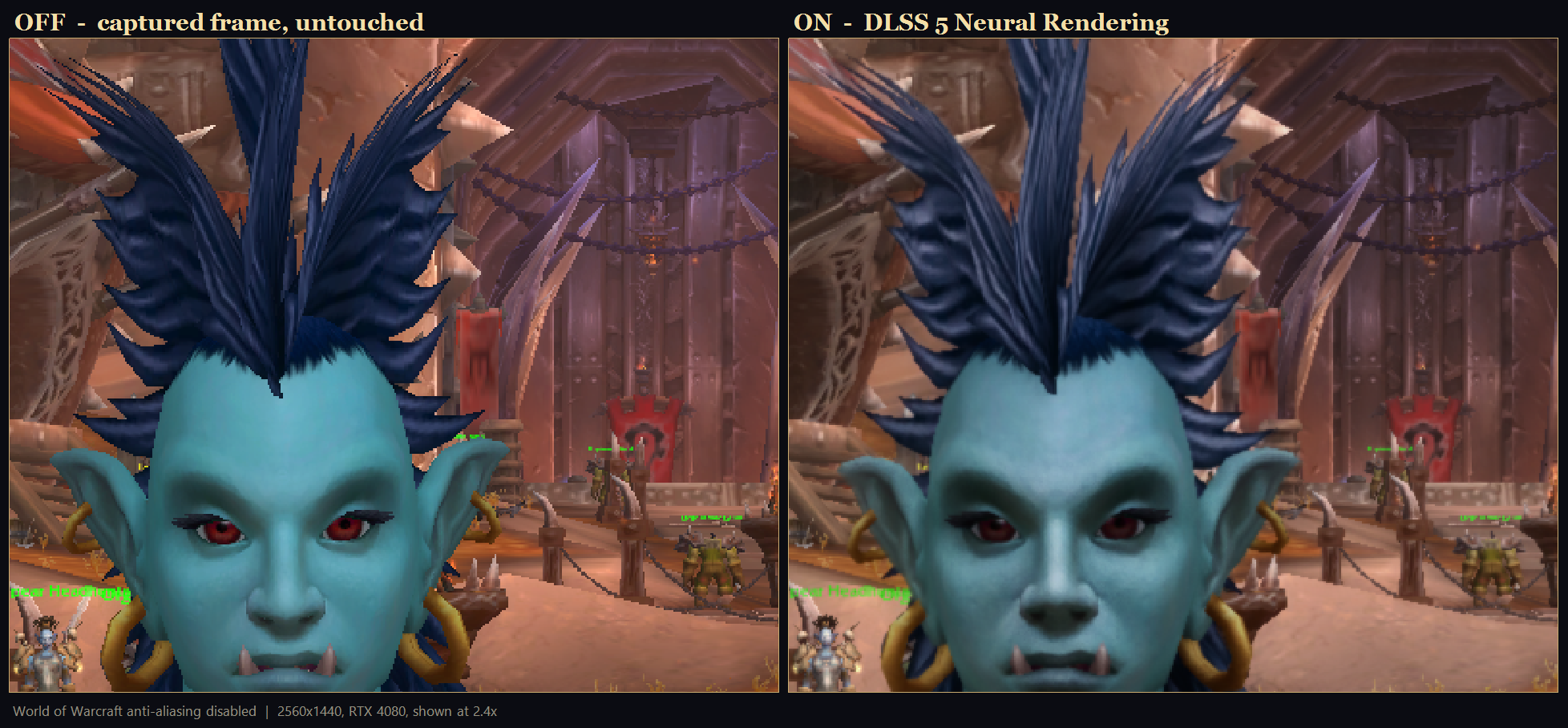
Retail WoW at 2560x1440 on an RTX 4080, shown at 2.4x, with the game's own anti-aliasing disabled so the neural pass is working on raw aliased edges.
Fixed since v0.1.1
The Status page no longer moves under your cursor. Advisories sat above the buttons, so every time one appeared or disappeared the whole page jumped and buttons slid away mid-click. The buttons now sit above the diagnosis, the advisory lives in a fixed-height box that says something in every state, and each condition switches with hysteresis so a frame rate sitting on a threshold no longer strobes the message on and off.
GPU memory now reports what actually matters. The old bar showed the sidecar's usage against a per-process budget that Windows keeps generous until contention bites — so it read 1256 of 15280 MB, eight percent, apparently plenty, while the card was full and the driver was already paging. It now also reports memory pushed out into system RAM, which is the real alarm: non-zero means every frame is waiting on the PCIe bus. It caught 105 MB spilled on the first run with a reading that had looked comfortable.
The bar is also relabelled to say it is the sidecar's own share, not the whole card, and that more of it would not be faster. A mostly-empty progress bar naturally reads as headroom you could spend, and that is not what it is.
Contents
Both executables, the DLSS 5 neural rendering runtime (Ada-patched), the DLSS upscaling runtime, ReShade 6.8 with add-on support, the RenoDX DLSS 5 add-on, and a sidecar.toml set to the Recommended preset.
Requires an RTX 40 or RTX 50 card, Windows 11, and WoW in borderless windowed mode. Read About frame rate in the README before judging performance.
The four third-party binaries belong to their authors and are covered by their own terms, not this project's MIT licence. See THIRD-PARTY-NOTICES.md in the zip.
v0.1.1 - DLSS 5 Sidecar
Everything needed to run, in one download.
Unzip anywhere — not into your World of Warcraft folder — and run wowsidecar-manager.exe. sidecar.toml ships set to the Recommended preset.
Fixed since v0.1.0
Only the DLSS 5 add-on runs. ReShade's default pointed its effect search at the sidecar's own directory, so any .fx dropped in beside it would have been compiled and blended on top of the neural pass with nothing to say so. The search paths are now pinned at a directory that does not exist. One add-on loads; no effects, ever.
Clearing an advanced strength now actually clears it. "Unset" meant "skip the key", and skipping a key in a merge leaves whatever was there before — so a value from an earlier session, or one the add-on's own overlay wrote, survived every later save while the manager reported the setting as untouched. Unset now removes the key. If you tuned with v0.1.0, re-check your settings: they may not have been what the app told you.
The runtime exits when the game closes. Restarting WoW used to leave a zombie: the render loop stopped and the overlay hid itself, but the process stayed up with its control channel open, so the manager went on reporting "Overlay: running". It now shuts down cleanly and the manager returns to "stopped".
The Status page explains a bad frame rate instead of leaving you to guess. It shows captured-versus-presented frames, a GPU memory bar, and a four-way split of where each frame's time goes. When the overlay falls short of the capture rate it says the game is competing for the GPU and points at the fix.
Before you judge the frame rate
Read About frame rate in the README. Three things dominate, and none is the neural pass:
- The capture rate is a hard ceiling. Windows delivers ~60 frames a second regardless of your monitor. Nothing here can present a frame that was never captured.
- Video memory. Measured on the development machine, same build and scene: 40 fps at 24 ms with memory comfortable, 6.5 fps at 153 ms with the card 91% full — while a GPU utilisation counter read 8.8%. That time is PCIe paging, not compute.
- The game competing for the GPU. 11.7 fps with WoW focused and uncapped, 35.2 fps with it in the background. Capping WoW's Max Foreground FPS near the captured figure costs nothing, because frames beyond that are discarded before they reach the sidecar.
Contents
wowsidecar.exe |
the overlay runtime |
wowsidecar-manager.exe |
the control panel |
nvngx_dlssnr.dll |
DLSS 5 neural rendering runtime, Ada-patched build |
nvngx_dlss.dll |
DLSS upscaling runtime (optional) |
dxgi.dll |
ReShade 6.8, add-on enabled |
renodx-dlss5.addon64 |
RenoDX DLSS 5 add-on |
Requires an RTX 40 or RTX 50 card, Windows 11, and WoW in borderless windowed mode.
The four third-party binaries belong to their authors and are covered by their own terms, not this project's MIT licence. See THIRD-PARTY-NOTICES.md in the zip.
v0.1.0 - DLSS 5 Sidecar
Superseded by v0.1.1. Use that instead.
This build has three problems fixed in v0.1.1:
- ReShade's effect search pointed at the sidecar's own directory, so any
.fxplaced beside it would be blended on top of the neural pass. - Clearing one of the three advanced strengths did not actually clear it — a previously written value survived, and the manager reported the setting as untouched while the add-on still used it.
- Restarting World of Warcraft left the runtime running with a dead render loop, while the manager still reported the overlay as running.
The original notes follow.
Everything needed to run, in one download.
Unzip anywhere — not into your World of Warcraft folder — and run wowsidecar-manager.exe. sidecar.toml is already set to the Recommended preset.
Requires an RTX 40 or RTX 50 card, Windows 11, and WoW in borderless windowed mode.
The four third-party binaries belong to their authors and are covered by their own terms, not this project's MIT licence. See THIRD-PARTY-NOTICES.md in the zip.