Repository navigation
1.10.1

Changelog
💚 Enhancement
Workfiles tool: fix choose different context overlay message - #2208
Fix label having visible <br/>< in the string on the workfiles tool Published > Choose Different Context overlay message.
UI style: Set color for inactive state - #2200
Set color for inactive state to avoid fallback to black color.
AYMenu: Keep submenu caret clear of the label - #2195
Submenu rows in AYMenu (e.g. the Browser's right-click loader menu) no longer have their label squeezed right up against the submenu caret. The caret now has a clear gap to the longest label and sits closer to the right border of the menu, and the icon on the left of a menu row is drawn slightly further from its label.
| Before / After |
|---|
 |
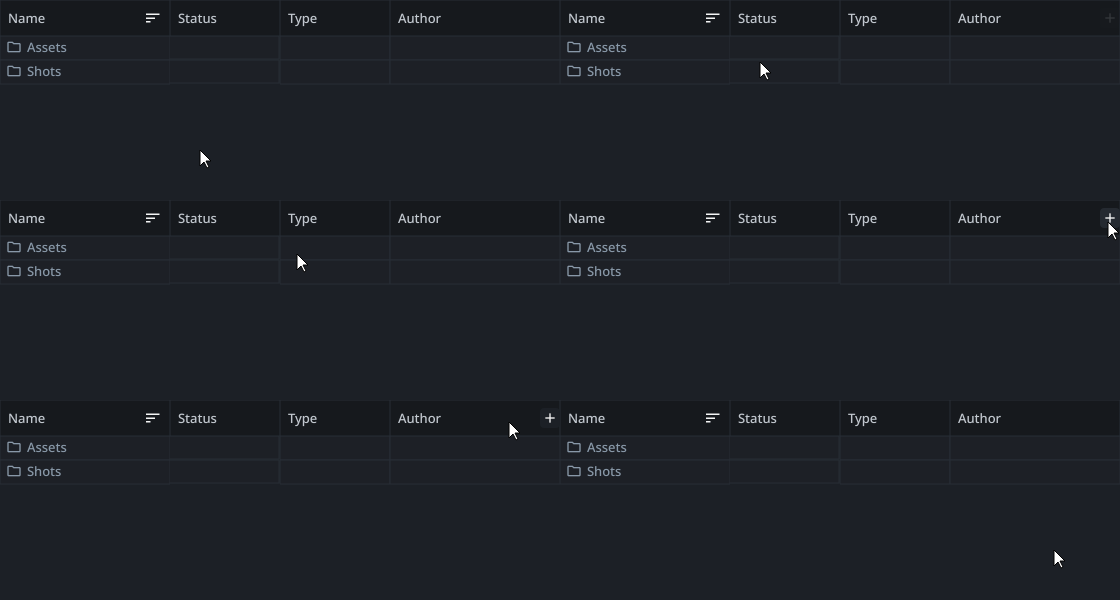
Browser: Make the header add-column button opaque - #2194
Browser: the "add or remove columns" plus button on the right of the table header now has an opaque, dark background whenever the mouse is anywhere over the header, instead of a transparent icon that only got a background when hovering the button itself. Hovering the button still highlights it. The button fades in when the mouse enters the header and fades out when it leaves, and it is no longer visible when the Browser opens before the header has been hovered.
AYCheckBox: Animate toggle slider - #2191
AYCheckBox now animates its toggle slider when toggled, similar to the Publisher NiceCheckbox: the knob slides across and the indicator colors blend between the unchecked and checked states.
Workfiles, Launcher: Show user avatars - #2189
Show user avatars in the Workfiles tool and in the workfiles of the Launcher.
- Workfiles tool: the Author column of the work area and published files shows the avatar of the user to the left of the name.
- Launcher: the Modified column of workfiles shows the avatar of the user who made the last change, to the left of the time. The tooltip of the column is the full name of the user.
Users without an uploaded avatar get their initials.
Multiselection combobox: Avoid expanding the widget - #2181
Multiselection combobox does not change size of the widget instead show all possible selections and add +N item at the end.
Publisher: Log search and level filters - #2173
The publisher report viewer now includes a log search field with case-insensitive matching and highlighted results. It also provides a multi-select log-level filter for Debug, Info, Warning, and Error output, plus configurable surrounding log context around each search match.
Comment editor: Mention versions and tasks with @@ and @@@ - #2141
The comment editor of the activity panel can now mention versions with @@ and tasks with @@@, next to mentioning users with @, like the web frontend does.
- Typing
@@or@@@at the start of a word opens a picker listing the versions or tasks; Enter or Tab picks one, Escape closes it. - The picker shows the product type or task type icon in its color,
context - label, and for versions the creation date on the right. - Mentions are stored the way the web frontend stores them, e.g.
[v003](version:<id>)and[compositing](task:<id>). - Only mentions picked from the picker are mentions, like in the web frontend. A name typed as
@Full Namewithout picking the user stays text, and mentions are not completed or converted in code. - The
@@and@@@buttons below the editor are enabled. Clicking another one while a mention is being typed switches its type. - Backspace or Delete next to or inside a mention removes the mention as a whole.
- Ctrl+B and Ctrl+I toggle bold and italic.
- Fix the Bold, Italic, H1 and Code buttons doing nothing when no text is selected.


Scene Inventory: Version up, down and latest shortcuts - #2139
Scene Inventory: add keyboard shortcuts to quickly step the version of the selected containers, and matching context menu entries.
Ctrl+Up: version upCtrl+Down: version downCtrl+Shift+Up: update to latest
The selection is kept after the update, so you can keep pressing the shortcuts to toggle back and forth between versions.
The context menu gets Version up and Version down entries below Set version, and the shortcuts are shown next to the entries so users can discover them.

Add extra note to description of the copied file - #2080
Injecting extra note to the description as described in the issue.
USD Contributions: Generalize adding contributions and expose plug-in to configure additional contributions to asset/shot USD - #1747
Implement more generic USD contributions that can be added into an Instance from other plug-ins.
Expose these to usdAsset and usdLayer and implement a plug-in to target usdAsset (family) instances so we can sublayer things into asset / shot USDs from a custom source on the initial publish.
Show Folder thumbnails in Launcher, Workfiles tool, Loader in the Folder Widget. - #1144
Show entity thumbnails in the folders and tasks views of the desktop tools. Thumbnails are painted on the far right of the name cell (left of the status column) and are loaded deferred, so they do not slow down the main thread.
Available in Launcher, Workfiles tool, Browser (folders), Loader (folders), Publisher (create context and "Select folder" dialog), context dialog and push to project.


🐛 Bug
Tray: Remove menu click guard that swallowed fast clicks - #2206
Clicking a tray menu item right after the menu opened did nothing. Right click on the tray icon followed by a quick click on e.g. Exit was ignored unless you waited a moment first. The tray menu now reacts to clicks immediately again.
Hierarchy model: Skip inactive folders - #2205
Hierarchy model used by UI tools no longer shows inactive folders.
Browser: Fix failing queries on AYON servers older than 1.16.1 - #2204
Fix the Browser listing nothing on AYON servers older than 1.16.1. On servers older than 1.15.0 the legacy Loader is shown instead of the Browser, and the minimum required AYON server is raised to 1.14.0.
The Browser passed GraphQL arguments that older servers do not have, so the server rejected every versions query. Optional arguments are now only part of a query when the server's GraphQL schema lists them, and what a server lacks is left out of the UI.
| Server | Missing on the server | Browser on that server |
|---|---|---|
| 1.16.7+ | - | Everything |
| 1.16.1 - 1.16.6 | representationFilter |
No Representation filters (was already handled) |
| 1.15.5 - 1.16.0 | folderFilter, latestPerFolder |
No Folder filters, "Latest per folder" is disabled with a tooltip |
| 1.15.0 - 1.15.4 | Version statistics | Group headers show the counts of the grouping metadata instead of counts matching the filters, product groups show no count |
| 1.14.x | Too much, see below | The legacy Loader is shown instead, with a warning in the log |
Browser: Clip card view thumbnails to the rounded corners of the card - #2203
Browser: thumbnails in the card view are now clipped to the rounded corners of the card, instead of having sharp corners that poke outside the card.
UI style: Set color for inactive state - #2200
Set color for inactive state to avoid fallback to black color.
Tray: Fix left click handling (on windows) - #2197
Fix double click handling and left click menu position on windows.
Tests: Fix random crash of unit tests at exit caused by task queue thread that never stops - #2196
Fix AsyncTaskQueue.stop() being ignored when it is called right after start(). The dispatch thread then ran forever, which randomly crashed the unit tests CI job at the very end of an otherwise green run (exit code 134).
UI: Download user avatar to memory instead of a temporary file - #2190
Download user avatars to memory instead of a temporary file. Each avatar cache miss left one orphaned file in the system temp directory.
UI: Fix image cache used by multiple processes at once - #2188
Fix user avatars and other cached images failing to load when multiple AYON processes cache the same image at the same moment.
The image cache (ImageCache) is shared by all AYON processes on a machine. On Windows a file cannot be replaced while another process has it open, so when more processes missed the same key at once, all but one failed with Failed to cache file: [WinError 5] Access is denied. For avatars the failure is remembered, so that process kept showing initials for the user until it was restarted.
ImageCache.getuses the file another process already stored for the key instead of replacing it, also when it shows up right before the replace.UserAvatarCacherepeats the read of a cached avatar for a short time when the file is being stored by another process at that moment.UserAvatarCachedownloads an avatar again when its file was evicted from the shared cache, instead of drawing an empty image.
Workfiles tool: Do not open workfile on duplicate - #2186
Workfiles tool: the Duplicate context-menu action no longer opens the duplicated workfile in the host. It only creates the copy (and its workfile entity), as it did before and as its docstring states.
Publisher: Fix log messages taking the color of clicked text - #2182
Fix the logs in the publisher report viewer all turning into a single color after clicking on colored text in the logs, e.g. on an orange WARNING: prefix.
AYCheckBox: Proper sizes - #2180
AYCheckBox does define minimum size hint and properly detects mouse hit.
Publisher: Hide label of hidden attributes - #2179
Hide label of attribute that should be hidden in precreate widget.
UI: Draw initials locally for users without an avatar - #2174
Fix off-center initials in the avatar of users who have no avatar uploaded, e.g. in the author column of the Browser.
For such a user the avatar endpoint responds with a generated SVG of the initials, centered with the dominant-baseline attribute. Qt does not support that attribute, so the initials were drawn towards the top of the circle. That response is now skipped and the initials are rendered locally, like for a user whose avatar could not be fetched at all.

Rendered offscreen at 56px and 20px. "Before" draws the SVG built from the template of the server (create_initials_svg in ayon-backend api/users/avatar.py), it is not a response of a running server.
USD Contributions: Remove stale contribution when variant or contribution type changes - #2172
Fix stale contributions remaining in a USD layer when a contribution is republished to a different target prim path, variant set name or variant name, or when it switches between contributing as a sublayer and as a reference/variant. Variants left empty by that cleanup are removed as well.
Browser: Fix featured version of product groups with a featured version filter and hero actions - #2165
Browser: the product group headers now follow an active featured version filter, and a product group featured as "hero" acts on the hero version.
Publish: Match excluded families of `CleanUp` exactly - #2103
CleanUp compared the product base type as a substring of the configured
excluded families, so a product base type was also excluded when it happened to
be part of another excluded name. With prerender excluded, render instances
were skipped as well and their staging directories were left behind in temp.
Opened as a draft because studios may unknowingly rely on the current, wider
matching. This resolves the TODO that already asks for exactly this change.