Repository navigation
Feature Request: Display QR Code Directly in Share Menu #6217
aalokkamble
started this conversation in
Ideas

Replies: 0 comments
Sign up for free
to join this conversation on GitHub.
Already have an account?
Sign in to comment

Uh oh!
There was an error while loading. Please reload this page.
Problem
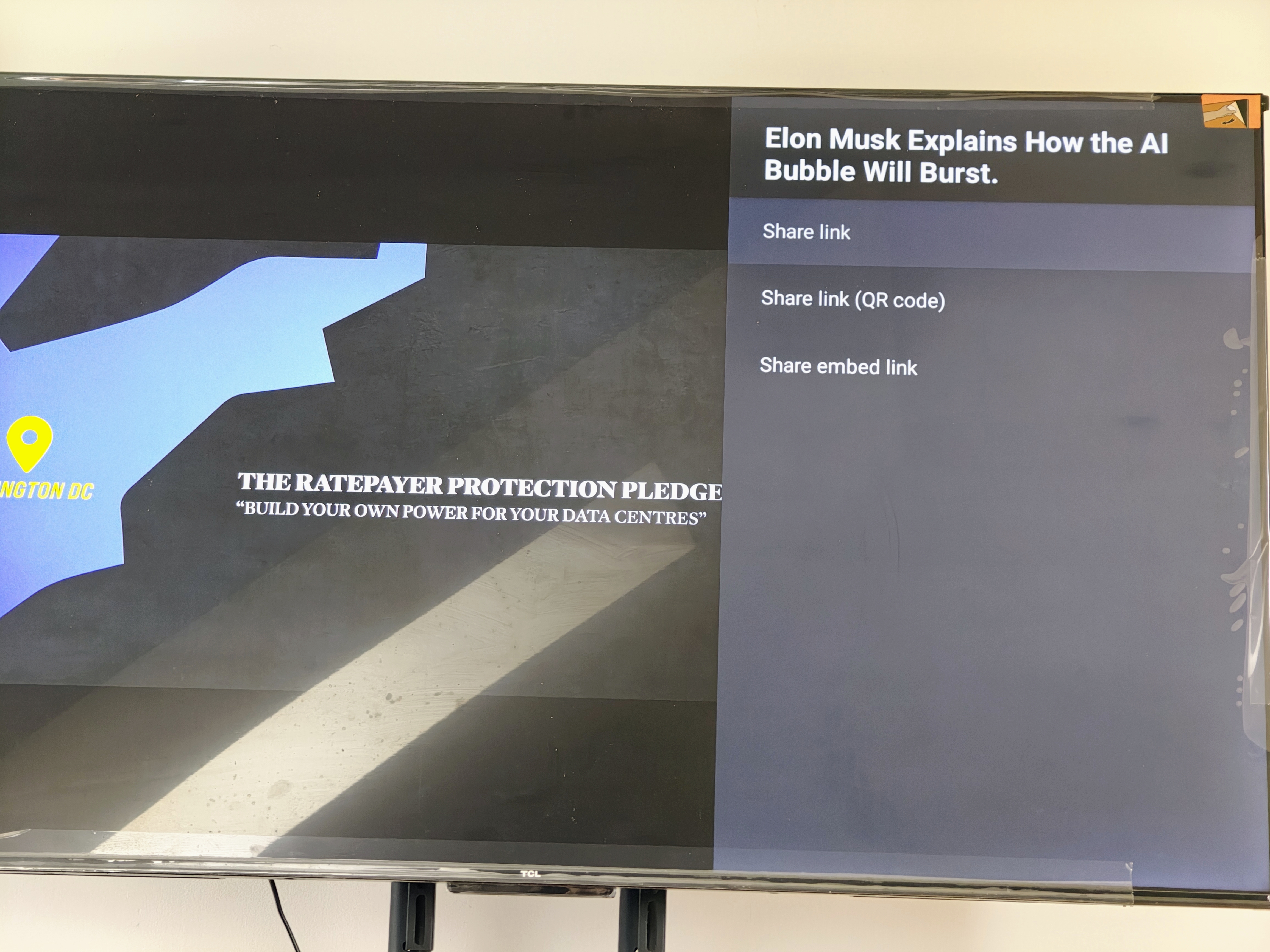
In the Snaptube TV app, selecting Share opens a side panel containing options such as:
At present, selecting Share link (QR code) pauses the video and opens the QR code in a full-screen view. This interrupts playback and creates an unnecessary extra step for users who simply want to scan the code.
Proposed Improvement
Display the QR code directly within the existing Share panel, preferably in the empty space below the share options.
When the user selects Share link (QR code):
Benefits
This would make the sharing experience faster and less disruptive, particularly for users watching content on a TV. It would also make better use of the available space in the Share panel and eliminate the need to pause the video or navigate to a separate screen.
Suggested User Flow
This change would preserve the current sharing functionality while providing a more convenient and TV-friendly user experience.
All reactions