Repository navigation
Releases
Fretty VST v0.8.8


Sampled guitars (acoustic archtop, electric), harps, strumstick, violin, dan tranh and psaltery on a six-string playing model, with a synth layer, chord pads, drive, chorus, echo and space. All samples CC0.
Requirements
- A first-generation MPC OS standalone device (32-bit ARM, like the Force, MPC Live / Live II, One, X and Key 61).
The installer refuses anything else. Newer models are untested. - Root shell access (SSH) to the device. Stock MPC OS doesn't offer this; you need a modded unit.
- Tested on MPC OS with a Force. Installing plugins this way is unofficial: back up first, use at your own risk.
Install (scripted)
- Unzip, then copy the whole folder to the device, e.g.
scp -r Fretty-0.8.8 root@<device-ip>:/tmp/ - Run it:
ssh root@<device-ip> sh /tmp/Fretty-0.8.8/install.sh
The installer checks the device, stops MPC (save your project first), copies portable/3dthc - VST - Fretty/ (the plugin, its skin
and its data, as one folder) into /sdcard/Synths, backs up MPC.settings, adds the plugin to MPC's plugin list from the
folder's plugin-meta.xml and starts MPC again. Running it again upgrades in place, keeping your own files.
An older install of this plugin (the previous layout, with the .so in /sdcard/vst) is replaced, not duplicated.
-y skips the confirmation prompt; -t <folder> installs into another Synths folder (for example on a card).
Then add Fretty to a track from the plugin browser (Instrument plugins). Its screen appears in the plugin view,
and the Q-Links follow the page.
Full instructions, including installing by hand, are in INSTALL.md inside the zip.
Built by GitHub Actions from 35515e9 with mpc-vst-plugins@9460e6c.
Fretty VST v0.8.7
Fretty v0.8.7
What's new
- Instruments browser card: Fretty now shows as its own card in Sounds > INSTRUMENTS. Tapping it opens the plugin's preset list (after the restart the installer does).
Fixed
- Preset name on the MPC: picking a preset on the BROWSE page now changes the preset name MPC shows (and its PRESET menu's selection) to that preset. Before, the sound changed but the name stayed on the last preset picked in MPC's own menu. The same holds in the desktop VST3 and Audio Unit.
- MPC's PRESET list closing or jumping while you play: every note made Fretty ask MPC to redraw its whole screen (to refresh a chord name that isn't shown anywhere), and each redraw closed or moved the open PRESET list. Playing no longer redraws the screen; the fretboard still animates.
- Presets on the Instruments card: tapping the Fretty card in Sounds > INSTRUMENTS now lists all 110 factory presets; pick one to load Fretty with that sound.
- Updated zips (2026-11-17): if you downloaded this release earlier today, download it again and reinstall: the presets on the Instruments card are now grouped in their category folders, and preset names with a hyphen no longer split into their own folders. Projects are not affected.
Install: see INSTALL.md inside the zip.
Built by GitHub Actions from 073d040 with mpc-vst-plugins@c4bef5d.
Fretty v0.8.6 — Now on Desktop: VST3 (Mac & Windows) + AU
Fretty v0.8.6
What's new
- BROWSE page: a preset browser on its own page (on the MPC and the desktop): 10 categories on the left, the presets in two columns, the loaded preset's name at the top (
*once edited), ▲ ▼ to page through ALL. Saved projects and MPC's PRESET menu work as before. - Mono output option: in Logic (and other hosts) the plugin can also go on a mono instrument track; the sound is the stereo sound folded to one channel.
- MPC OS 3.10.1: the plugin folder carries a
plugin.json, so it can be copied straight intoVST2 Plugins, and an Akai SDK-format zip (-mpc-sdk.zip, one folder for every MPC) comes with the release. - Lower notes: C1–D♯1 (the four keys below E1) now play notes on every instrument except the acoustic, which keeps its body knocks there. Those keys were silent before, so existing beats sound the same, and every note that played before is unchanged.
- Gen2 MPCs: a
-mpc-aarch64.zipfor Gen2 devices (MPC Live III, Key 37, XL), next to the Gen1-mpc-armv7.zip. - Desktop VST3 for MPC Desktop and DAWs:
Fretty-0.8.6-macos-vst3.zip(one file for Apple Silicon and Intel Macs, with the same touchscreen skin in the plugin window) andFretty-0.8.6-windows-vst3.zip(64-bit, with the same skin in the plugin window). - Audio Unit for Logic Pro and GarageBand:
Fretty-0.8.6-macos-au.ziphas the plugin as an Audio Unit (.component, Apple Silicon and Intel), with the same sound, skin window, presets and saved settings as the VST3. It passes Apple'sauvalvalidation. It's a separate download from the VST3 zip. - Device projects open on the computer: the VST3 has the VST2's official replacement ID, so a project saved on the MPC with this plugin loads it in MPC Desktop (controller mode) instead of showing a missing plugin, with the same sound and settings. A project saved on the desktop opens on the MPC the same way.
- Window size on the desktop: right-click the plugin window (Control-click on a Mac) and pick 50% to 125%. It opens at 75% and remembers your choice for all of these plugins.
Fixed
- Desktop: a safety net on the plugin's output: if a block ever came out broken (not a number, or far past full scale), it plays as silence instead of blasting the mix.
- Windows: MPC 3 now loads the plugin (before, it was listed but couldn't be added: a Windows-only interface ID layout bug). It's a single
.vst3file with its skin and sounds inside (unpacked once on first load), the format MPC 3 scans; no extra folders. - Desktop parameter list: in MPC 3 (controller mode, the MPC's screen) and in DAWs the plugin now lists only its sound controls, the knobs, switches and Q-Link controls, instead of every internal value (themes, browser, screen text). Picking a preset no longer marks it as edited (no "*").
- Mac: macOS no longer blocks the plugin as "can't be verified" when installed with the one-line Terminal command in the zip's README.txt (it also unblocks copies you already installed).
- Saved MPC projects now keep this plugin's settings. Before, the plugin saved nothing into the project, so it came back at its default sound when the project was reopened.
Installing on macOS (Audio Unit and VST3)
Which zip?
- Logic Pro / GarageBand:
Fretty-0.8.6-macos-au.zip(the Audio Unit) - MPC Desktop / other VST3 hosts:
Fretty-0.8.6-macos-vst3.zip(the VST3)
Both work on Apple Silicon and Intel Macs. Download one or both.
1. Leave the zip(s) in your Downloads folder. Unzipped or not, both are fine.
2. Open Terminal (Applications › Utilities › Terminal), paste this and press Return. It installs the plugins and clears macOS's "can't be verified" block. No password needed.
curl -fsSL https://raw.githubusercontent.com/3dthc/mpc-vst-plugins/desktop-vst3-openmpc/tools/install_mac_vst3.sh | bash
3. Check the Audio Unit: paste this and press Return. Every plugin should say PASS.
curl -fsSL https://raw.githubusercontent.com/3dthc/mpc-vst-plugins/desktop-vst3-openmpc/tools/install_mac_vst3.sh | bash -s -- --check
4. Restart Logic Pro (it looks for new Audio Units when it starts), or rescan plugins in MPC Desktop.
To check just this plugin: auval -v aumu FrTy 3Dth
Install: see INSTALL.md inside the zip.
Built by GitHub Actions from 5a96b5f with mpc-vst-plugins@8608070.
Fretty VST v0.8.5
Sampled guitars (acoustic archtop, electric), harps, strumstick, violin, dan tranh and psaltery on a six-string playing model, with a synth layer, chord pads, drive, chorus, echo and space. All samples CC0.
Requirements
- A first-generation MPC OS standalone device (32-bit ARM, like the Force, MPC Live / Live II, One, X and Key 61).
The installer refuses anything else. Newer models are untested. - Root shell access (SSH) to the device. Stock MPC OS doesn't offer this; you need a modded unit.
- Tested on MPC OS with a Force. Installing plugins this way is unofficial: back up first, use at your own risk.
Install (scripted)
- Unzip, then copy the whole folder to the device, e.g.
scp -r Fretty-0.8.5 root@<device-ip>:/tmp/ - Run it:
ssh root@<device-ip> sh /tmp/Fretty-0.8.5/install.sh
The installer checks the device, stops MPC (save your project first), copies portable/3dthc - VST - Fretty/ (the plugin, its skin
and its data, as one folder) into /sdcard/Synths, backs up MPC.settings, adds the plugin to MPC's plugin list from the
folder's plugin-meta.xml and starts MPC again. Running it again upgrades in place, keeping your own files.
An older install of this plugin (the previous layout, with the .so in /sdcard/vst) is replaced, not duplicated.
-y skips the confirmation prompt; -t <folder> installs into another Synths folder (for example on a card).
Then add Fretty to a track from the plugin browser (Instrument plugins). Its screen appears in the plugin view,
and the Q-Links follow the page.
Full instructions, including installing by hand, are in INSTALL.md inside the zip.
Built by GitHub Actions from d7a3ee2 with mpc-vst-plugins@c6b4bb0.
Fretty VST v0.8.4
Sampled guitars (acoustic archtop, electric), harps, strumstick, violin, dan tranh and psaltery on a six-string playing model, with a synth layer, chord pads, drive, chorus, echo and space. All samples CC0.
Requirements
- A first-generation MPC OS standalone device (32-bit ARM, like the Force, MPC Live / Live II, One, X and Key 61).
The installer refuses anything else. Newer models are untested. - Root shell access (SSH) to the device. Stock MPC OS doesn't offer this; you need a modded unit.
- Tested on MPC OS with a Force. Installing plugins this way is unofficial: back up first, use at your own risk.
Install (scripted)
- Unzip, then copy the whole folder to the device, e.g.
scp -r Fretty-0.8.4 root@<device-ip>:/tmp/ - Run it:
ssh root@<device-ip> sh /tmp/Fretty-0.8.4/install.sh
The installer checks the device, stops MPC (save your project first), copies portable/3dthc - VST - Fretty/ (the plugin, its skin
and its data, as one folder) into /sdcard/Synths, backs up MPC.settings, adds the plugin to MPC's plugin list from the
folder's plugin-meta.xml and starts MPC again. Running it again upgrades in place, keeping your own files.
An older install of this plugin (the previous layout, with the .so in /sdcard/vst) is replaced, not duplicated.
-y skips the confirmation prompt; -t <folder> installs into another Synths folder (for example on a card).
Then add Fretty to a track from the plugin browser (Instrument plugins). Its screen appears in the plugin view,
and the Q-Links follow the page.
Full instructions, including installing by hand, are in INSTALL.md inside the zip.
Built by GitHub Actions from a9b51c2 with mpc-vst-plugins@8aa8d35.
Fretty VST v0.8.3
Fretty 0.8.3
- Refined UI typography and improved font consistency for selector values.
- Standardized 80s preset category names.
- Includes an updated catalog of 110 presets.
- Improved skin-generation and live-preview tooling.
Fretty v0.8.1

Fretty is a guitar instrument for MPC standalone. It plays real, clean recordings on a six-string model with an animated fretboard, and adds a synth layer, chord pads and effects. Every sample is CC0, so it's free to share.

Instruments
Acoustic archtop (pickup + mic), Electric, Folk Harp, Concert Harp, Strumstick, Violin, Violin Pizz, Dan Tranh, Psaltery, Bowed Psaltery. Velocity picks soft, medium or hard recordings. Each instrument loads the first time you pick it.
Pages
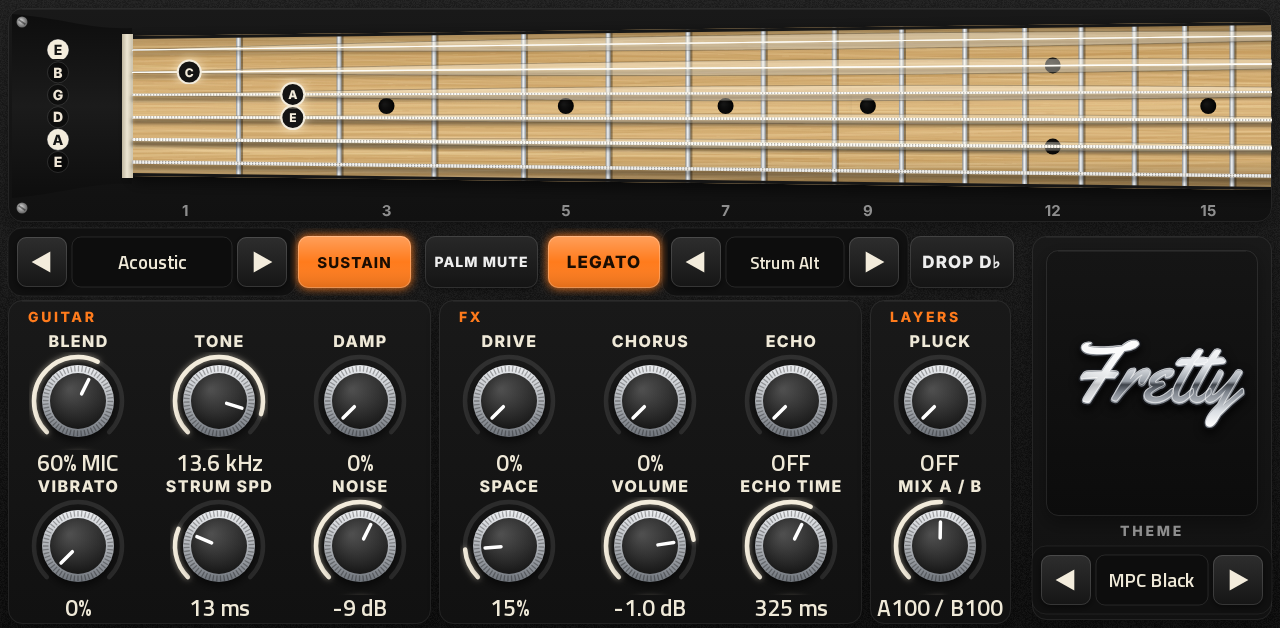
PLAY: the neck shows each played string and fret.
- Instrument ◀ ▶ and Strum (Down, Up, Alternate, Off).
- Sustain / Palm Mute, Legato (hammer-ons and slides on the same string) and Drop D♭.
- Guitar: Blend (pickup ↔ mic), Tone, Damp, Vibrato, Strum Speed and Noise. Knobs that don't apply to the current instrument are dimmed.
- FX: Drive, Chorus, Echo with Echo Time, Space (reverb) and Volume. Each effect is off at zero.
- Layers: Pluck (a plucked-string layer) and Mix A / B.
| LAYER A | LAYER B |
|---|---|
 |
 |
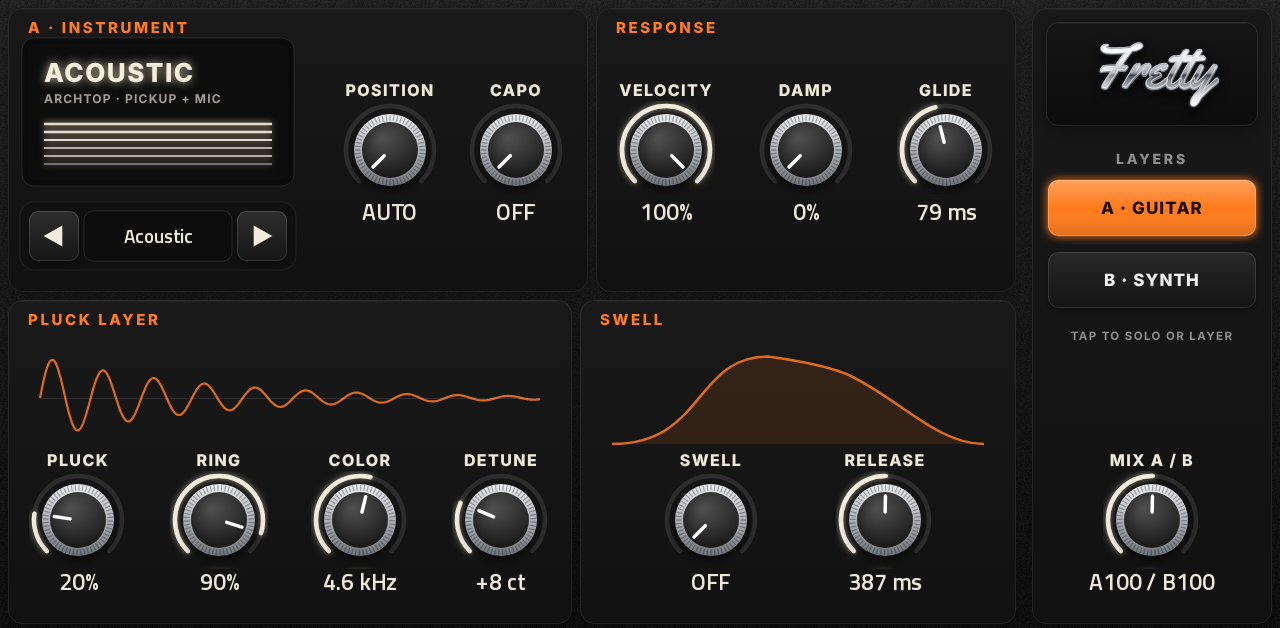
LAYER A (the instrument): Position and Capo; Velocity, Damp and Glide (slide into overlapped notes, steel-guitar style); the Pluck layer (level, ring, color, detune); Swell (fade notes in) and Release (let notes ring on).
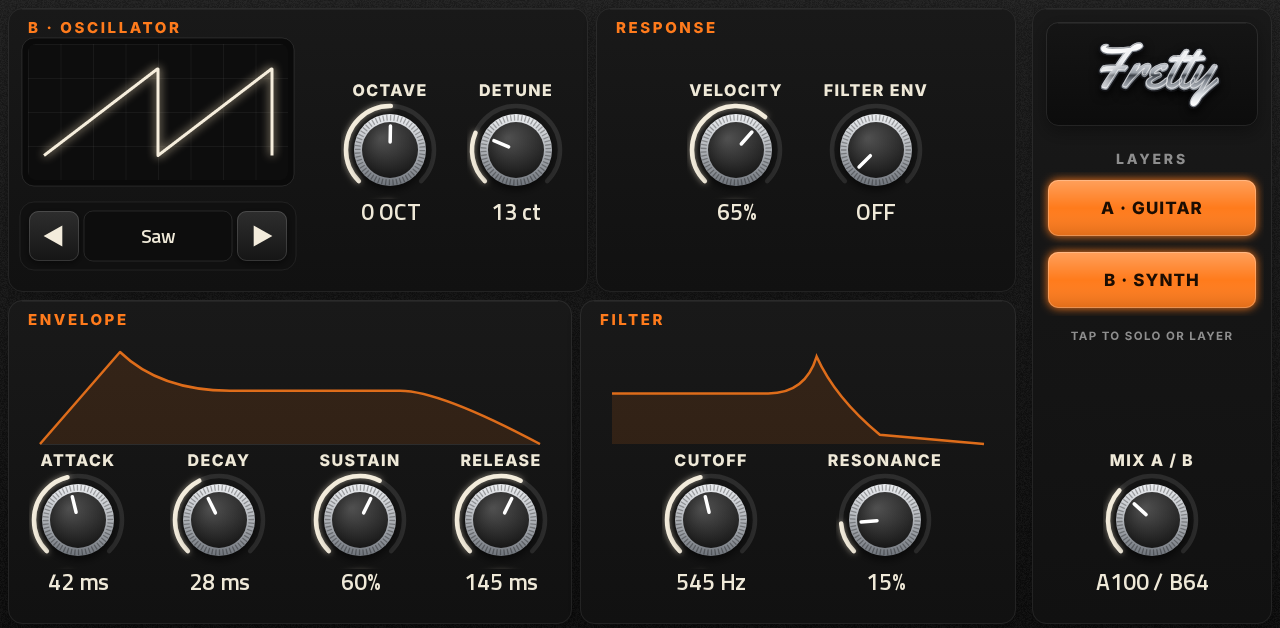
LAYER B (the synth): Sine, Triangle, Saw or Square, with Octave and Detune; Velocity and Filter Env; an ADSR envelope; Cutoff and Resonance. A · Guitar and B · Synth turn each layer on or off, and Mix A / B balances them. In the middle, both play at full.
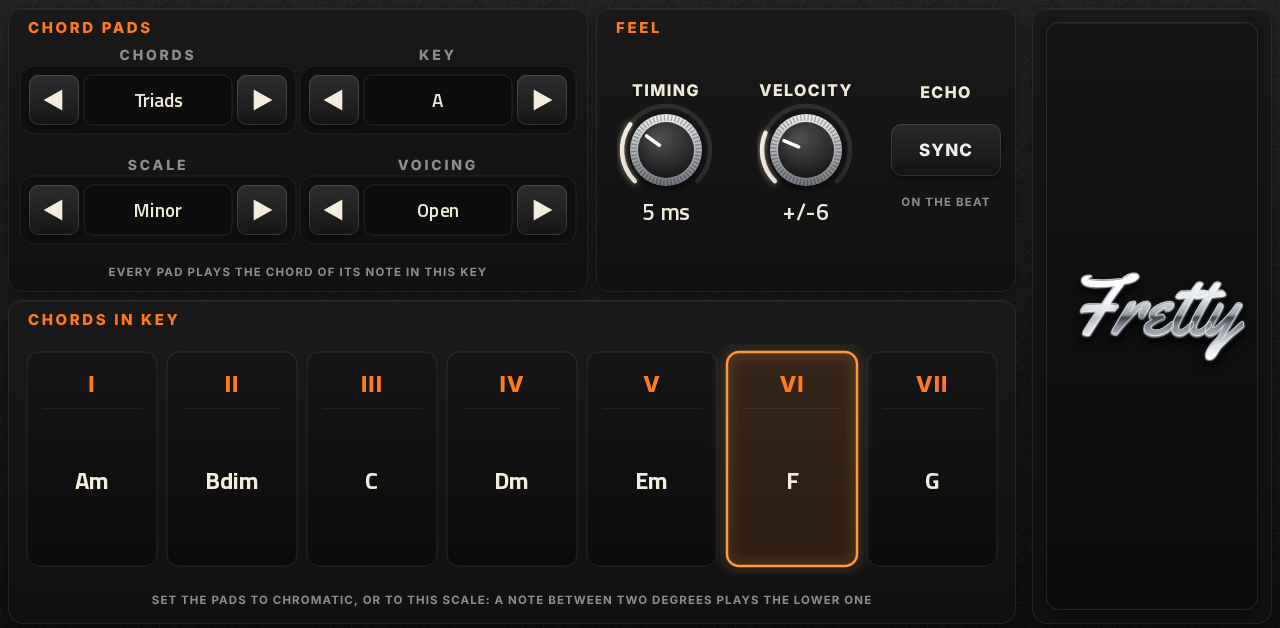
PERFORM: Chord pads. Pick a key, a scale (Major, Minor, Dorian, Mixolydian, Harmonic Minor or Phrygian), Triads or 7ths, and a voicing (Open, Barre or High). Each pad then strums a full chord, and the tiles light the chord that's playing. Feel adds humanized timing and velocity, and Echo Sync locks the echo to your project's tempo.
Presets
50 starters in the PRESET menu, grouped by tag: ACO acoustic, ELE electric, 80S chorus-wash and post-punk, STL steel and slide, HRP harps, VLN violin, ZTH zithers and dulcimer, FLK folk, and SYN guitar + synth. Presets never change the theme or the PERFORM settings.
Three themes: MPC Black, Sunburst and MPC Grey.
Install
Requires a first-generation MPC OS standalone device (32-bit ARM: MPC Live / Live II, One, X, Key 61 or Force) with root SSH access. Installing plugins this way is unofficial, so back up first.
- Unzip Fretty-0.8.1-mpc-armv7.zip and copy the folder to the device:
scp -r Fretty-0.8.1 root@<device-ip>:/tmp/ - Run
ssh root@<device-ip> sh /tmp/Fretty-0.8.1/install.sh. It stops MPC (save first), installs into/sdcard/Synths, backs upMPC.settingsand starts MPC again. - Add Fretty from the plugin browser (Instrument plugins).
Full instructions are in INSTALL.md inside the zip. Code: MIT. Samples: CC0 (Karoryfer Lecolds, Versilian Studios). Font: Yellowtail (Apache 2.0).
Fretty VST v0.8.2
Sampled guitars (acoustic archtop, electric), harps, strumstick, violin, dan tranh and psaltery on a six-string playing model, with a synth layer, chord pads, drive, chorus, echo and space. All samples CC0.
Requirements
- A first-generation MPC OS standalone device (32-bit ARM, like the Force, MPC Live / Live II, One, X and Key 61).
The installer refuses anything else. Newer models are untested. - Root shell access (SSH) to the device. Stock MPC OS doesn't offer this; you need a modded unit.
- Tested on MPC OS with a Force. Installing plugins this way is unofficial: back up first, use at your own risk.
Install (scripted)
- Unzip, then copy the whole folder to the device, e.g.
scp -r Fretty-0.8.2 root@<device-ip>:/tmp/ - Run it:
ssh root@<device-ip> sh /tmp/Fretty-0.8.2/install.sh
The installer checks the device, stops MPC (save your project first), copies portable/3dthc - VST - Fretty/ (the plugin, its skin
and its data, as one folder) into /sdcard/Synths, backs up MPC.settings, adds the plugin to MPC's plugin list from the
folder's plugin-meta.xml and starts MPC again. Running it again upgrades in place, keeping your own files.
An older install of this plugin (the previous layout, with the .so in /sdcard/vst) is replaced, not duplicated.
-y skips the confirmation prompt; -t <folder> installs into another Synths folder (for example on a card).
Then add Fretty to a track from the plugin browser (Instrument plugins). Its screen appears in the plugin view,
and the Q-Links follow the page.
Full instructions, including installing by hand, are in INSTALL.md inside the zip.
Built by GitHub Actions from 0a4ce7c with mpc-vst-plugins@e18a0a1.