Repository navigation
v1.0.0 — Cut AI Context Bloat & Token Waste


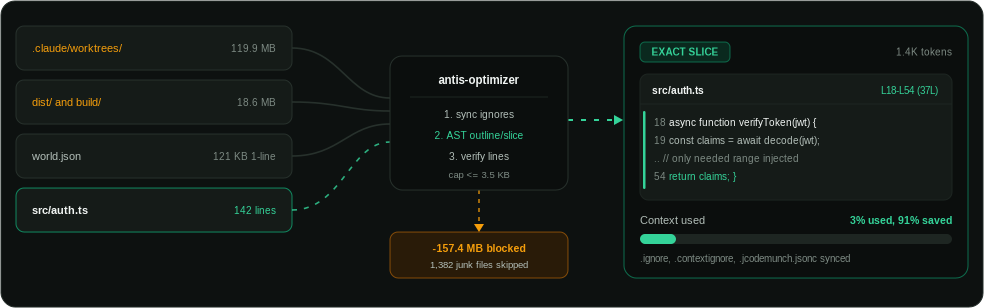
What Is antis-optimizer?
AI coding assistants (Claude Code, Cursor, Codex, and Antigravity) quietly waste huge chunks of your context window reading build folders (dist/, node_modules/, lockfiles), giant JSON dumps, and entire 800-line files just to inspect one function.
v1.0.0 gives you a fast, zero-dependency CLI and lightweight repo setup to stop the waste.
What's Inside v1.0.0
- Find what's eating your tokens (
--audit): Scans your repo for junk folders, oversized bundles, and huge files, then recommends the lightest setup that pays off. - Sync ignore files in one shot (
--sync-ignores --write): Mirrors ignore rules across.ignore,.contextignore, and.jcodemunch.jsoncwithout wiping your existing comments. - Read exact line ranges, not whole files (
--outline,--slice): Maps functions, classes, HTML sections, CSS blocks, and JSON keys tofile:Lstart-Lendranges across TS/JS/JSX/TSX, Python, Rust, Go, C/C++, C#, HTML, CSS, and JSON (uses TypeScript's real parser if installed, or its own built-in parser with zero required dependencies). - Auto-update shifted line numbers (
--sync-landmarks --write&--verify): KeepsAGENTS.md/INDEX.mdline numbers accurate after edits, strips secrets automatically, and checks everything in one cleanPASSline.
Quick Start
Try it right away without cloning:
npx github:4anti/antis-optimizer --auditOr install globally:
npm install -g git+https://github.com/4anti/antis-optimizer.git
antis-optimizer --help- Tested: 29/29 automated checks passing on Linux & Windows (Node 18 and Node 22).
- Attached archive:
antis-optimizer-1.0.0.tgz(v1.0.0npm package bundle).