Repository navigation
2.7.0

2.7.0 - 2026-10-13
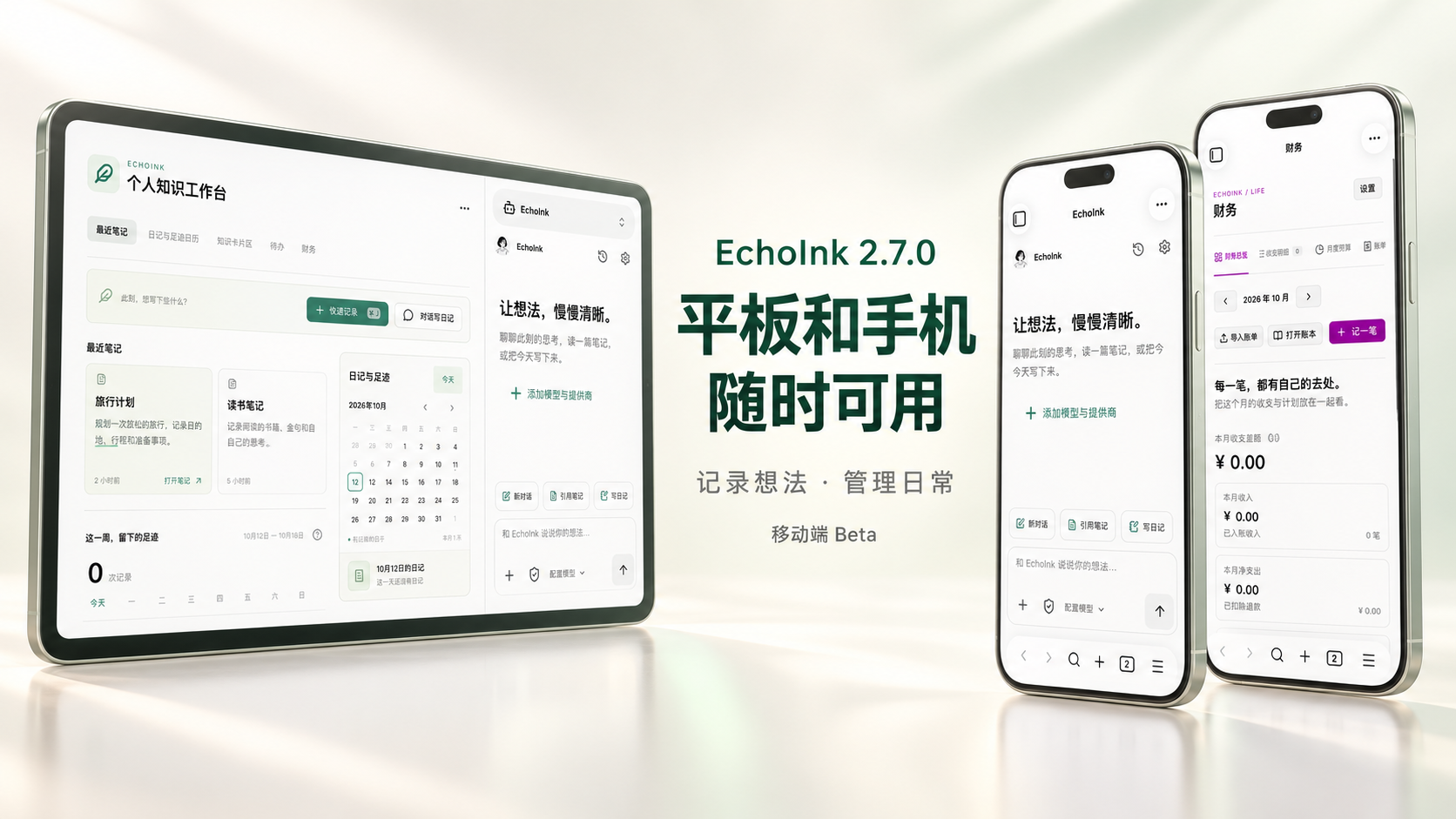
EchoInk:平板与手机,随时可用。
中文
- 手机和平板接入账号与财务。 可登录账号、激活 PRO,使用账目、预算、账单计划和财务分析。首页、设置、人格编辑与财务控件按手机单列、iPad 宽屏分别调整,对话输入区适配 Obsidian 移动工具栏。
- 在桌面对话里处理财务。 用自然语言查询、记账、修改或删除指定记录、调整预算、创建账单并关联记录。明确的操作可以直接执行;对象或范围不清时先确认,保存结果会回读核对。
- 财务分析留下历史,账单预算分到分类。 报告按月份与版本保存为 Markdown,并保留当时的数据;保存失败可重试,无需重新生成。分析会参考已有历史记录和可比同期,缺失记录不会算作零。账单计划可分配分类额度,查看各类进度与未分配金额。
- 桌面待办到期提醒。 开启后在 Obsidian 运行期间提醒未完成的到期事项;只填日期默认按本地 09:00 提醒,重新启动或恢复运行时合并漏报,完全退出后不提醒。
- 知识整理与上手引导。 修复知识库初始化批次冲突、恢复后的错误警告和目录调整后的链接同步。新增纸页式功能引导,每轮回答后可继续选择功能。
- 桌面记忆与用量。 开启长期记忆和做梦后,可点击“立即做梦”手动整理已有记忆。本地 Token 用量采用统一估算口径并累计工具往返;统计不等同于模型服务商的计费账单。
- 阅读和界面细节。 减少首页与表达库重复刷新,回答完成后收起工作记录并保留阅读位置,改善不同主题下的字体、图片、输入提示与控件显示。
开始使用
在手机或平板的 EchoInk 设置中登录账号,启用财务后即可从首页进入。财务需要有效 PRO,AI 分析仍使用自己的模型服务;PRO 不包含模型额度。移动端按笔记库的客户端实例激活,同一设备的不同库可能占用不同名额。
桌面端启用财务后,可以在对话中说“记一下,我今天早餐吃了 12 块钱”。待办通知在设置中的“桌面提醒”开启,允许 Obsidian 发送系统通知后可先发送一条测试通知。
移动端继续为 Beta。英文日记生成、附件、CLI、对话内财务操作和桌面后台知识/记忆任务尚未接通;Skills 只使用移动端已有工具,MCP 暂只保存配置。iOS、iPadOS 与 Android 的完整实机验收尚未完成。
下载与升级
需要 Obsidian 1.11.4 及以上。前往官网下载安装,或下载本页的 main.js、manifest.json、styles.css,放入 Vault 的 .obsidian/plugins/codex-echoink/,保留已有设置和数据文件,再重新启用插件。无需手动迁移数据。
社区目录同步后可在 Obsidian 社区插件页面检查更新。插件文件超过 Obsidian Sync Standard 的单文件 5 MB 限制,请在各设备分别安装或更新。
English
EchoInk is ready on your tablet and phone.
- Accounts and Finance on phones and tablets. Sign in, activate PRO, and work with transactions, budgets, bill plans, and financial analysis. Home, settings, persona editing, and Finance controls adapt to phone and wide iPad layouts, with the chat input accommodating Obsidian's mobile toolbar.
- Handle finances in desktop chat. Use natural language to query, add, edit, or delete specific records, adjust budgets, create bill plans, and link records. Clear instructions can run directly; unclear targets or scope are confirmed first, and saved results are read back for verification.
- Keep analysis history and allocate bill budgets by category. Reports are saved as Markdown by month and version, alongside the data used at the time. Failed saves can be retried without generating the report again. Analysis uses available history and comparable periods without treating missing records as zero. Bill plans show category allocations, progress, and unallocated amounts.
- Desktop to-do reminders. Enable alerts for unfinished due items while Obsidian is running. A date without a time uses 09:00 locally; missed reminders are combined on restart or resume. Reminders stop when the app is closed.
- Knowledge setup and onboarding. Fixed initialization batch conflicts, stale warnings after recovery, and link updates after folder changes. A new paper-style guide lets you choose another feature after each answer.
- Desktop memory and usage. With long-term memory and Dream enabled, select Dream now to consolidate existing memories manually. Local token usage follows a consistent estimation method and includes tool exchanges; these estimates are not a model provider's billing statement.
- Reading and interface refinements. Reduced repeated Home and expression-library refreshes, collapsed work logs after replies while preserving reading position, and improved fonts, images, input hints, and controls across themes.
Get started
Sign in through EchoInk settings on your phone or tablet, enable Finance, and open it from Home. Finance requires active PRO. AI analysis uses your own model service; PRO does not include model credits. Mobile activation applies to each vault's client instance, so different vaults on the same device may occupy separate slots.
With Finance enabled on desktop, try “Log 12 yuan for breakfast today” in chat. Enable to-do notifications under Desktop reminders in settings, allow system notifications for Obsidian, and send a test notification first.
Mobile remains Beta. English Diary generation, attachments, CLI, financial operations in chat, and desktop background knowledge/memory tasks are not yet available. Skills use only the available mobile tools, and MCP currently saves configuration only. Full device validation across iOS, iPadOS, and Android is still incomplete.
Download and upgrade
Requires Obsidian 1.11.4 or later. Visit the official installation page, or download main.js, manifest.json, and styles.css from this release and place them in the vault's .obsidian/plugins/codex-echoink/ folder. Keep your settings and data files, then re-enable the plugin. No manual data migration is required.
You can check for updates in Obsidian Community plugins once its directory picks up this version. The plugin file exceeds Obsidian Sync Standard's 5 MB per-file limit; install or update it independently on each device.