Repository navigation
Releases: AbadOrangeCat/TheALL
Release list
TheAll 0.1.10 — Readable Tables, Code & Images

English
TheAll 0.1.10 makes AI replies easier to read on macOS, Windows and the mobile Web App.
- Tables: clear headers, aligned columns, row separators and horizontal scrolling inside narrow chats. Blank lines between table rows are supported.
- Code: language labels, preserved indentation and line breaks, and one-click copying.
- Images: proportional previews that open on click. External Markdown images remain explicit links.
- Consistency: existing themes and colors are preserved; saved conversation text and user prompts are unchanged. Expanded Thinking messages use the same formatting.
Regression checks cover adjacent tables, escaped pipes, list continuations, incomplete streamed code blocks and unsafe links. Mac native tests, web tests and native Windows validation passed. Windows packages include the dependency and packaged-startup checks introduced in earlier releases.
Download and update
- Mac: macOS 14+ on Apple Silicon (arm64). Choose the DMG or ZIP. This build uses the existing local signing certificate and is not notarized by Apple. After verifying the download and choosing to trust it, use the system's Privacy & Security → Open Anyway option if offered.
- Windows: Windows 10 (1809+) or Windows 11, x64 or ARM64. Choose the NSIS installer, portable EXE or ZIP. Packages are unsigned previews; SmartScreen may show a notice. x64 packaged startup is tested on Windows; ARM64 packages are cross-built and their production archive is tested on host Electron, not on an ARM64 device.
- Mac 0.1.7 and Windows 0.1.8 or later support in-app updates. Older versions need one manual installation. Install over the existing app and keep the application data directory to retain chats, drafts and saved connections.
- Claude Code and/or Codex must be installed separately. An API connection is required; model/API usage is provided by your chosen service.
SHA256SUMS.txtcovers all downloads.appcast.xmlprovides the signed Mac update feed. Application and third-party corresponding source archives are included.
中文
TheAll 0.1.10 改善 macOS、Windows 和手机 Web App 中 AI 回答的阅读体验。
- 表格: 清晰表头、列对齐、行分隔,窄聊天区可在表格内部横向滚动,兼容表格行间的空行。
- 代码: 显示语言,保留缩进和换行,支持一键复制。
- 图片: 保持比例并支持点击预览;外部 Markdown 图片提供明确的打开链接。
- 一致性: 现有主题与配色保持不变,保存的聊天原文和用户提问不变;展开的 Thinking 内容使用相同排版。
回归检查覆盖相邻表格、转义竖线、列表续段、尚未闭合的流式代码块和不安全链接。Mac 原生测试、网页测试及 Windows 原生验证均通过,Windows 安装包继续执行依赖完整性和打包后启动检查。
下载与更新
- Mac: 需要 macOS 14+、Apple Silicon(arm64),可下载 DMG 或 ZIP。沿用固定本地签名证书,尚未经过 Apple 公证。核对下载并确认信任后,可使用系统提供的「隐私与安全性 → 仍要打开」。
- Windows: 支持 Windows 10(1809+)或 Windows 11,提供 x64 / ARM64 的安装包、便携 EXE 和 ZIP。当前为未签名预览包,可能显示 SmartScreen 提示。x64 已在 Windows 实际启动验证;ARM64 为交叉构建,并在宿主 Electron 上测试生产归档,尚未在 ARM64 设备实测。
- Mac 0.1.7、Windows 0.1.8 或更新版本支持应用内更新;更早版本需手动安装一次。覆盖安装时保留应用数据目录,以保留对话、草稿和已保存连接。
- Claude Code / Codex 需另行安装,并配置 API 连接;模型服务及费用由所选服务商提供。
SHA256SUMS.txt提供下载校验,appcast.xml提供 Mac 签名更新源;同时附带项目源码和第三方对应源码包。
TheAll 0.1.9 — Mac-style Windows interface
English
TheAll 0.1.9 gives the Windows app the same look and controls as the Mac app.
- Integrated window: the sidebar and content run to the top edge. Windows keeps its native minimize, maximize and close buttons over the tab row, colored to match the theme.
- Mac icons and layout: line icons drawn after the Mac's SF Symbols replace the previous text symbols. The sidebar, workspace rows, status indicators, tabs, provider chooser, connection form, chat header, transcript and composer follow the Mac sizes, spacing and wording.
- Tabs and panes like the Mac: tabs no longer show a close button; middle-click a tab or use its right-click menu. Panes no longer have a toolbar; split and close them from the tab menu or with Ctrl+D, Ctrl+Shift+D and Ctrl+W.
- Provider chooser: Claude and OpenAI cards with a separate connection-settings button, a clickable working folder and the Mac connection form ("Save and open").
- System font for chat: new Windows installations use Segoe UI, as the Mac chat uses its system font.
Upgrade
Mac 0.1.7 and Windows 0.1.8 or later can use the in-app update button; older releases need one manual installation. Chats, drafts and saved connections are kept. Existing Windows installations keep their saved chat font; choose Segoe UI in Settings → Font to match the Mac.
The Mac app is unchanged apart from its version and signed update feed. macOS requires Apple Silicon and macOS 14+. Mac packages retain the existing local signature and are not notarized by Apple. Windows preview packages are unsigned; x64 and ARM64 NSIS, portable EXE and ZIP downloads are provided, and ARM64 is cross-built without hardware validation. Claude Code or Codex CLI must be installed separately. No hosted relay is included.
See SHA256SUMS.txt and BUILD-INFO.txt for package hashes and verification details. Application source, corresponding third-party sources and licenses are included. TheAll use/distribution follows LICENSE and separately granted permissions.
中文
TheAll 0.1.9 让 Windows 版的外观和操作与 Mac 版一致。
- 一体化窗口: 侧栏和内容区延伸到窗口顶端。Windows 原生的最小化、最大化和关闭按钮叠放在标签栏右侧,颜色跟随主题。
- Mac 的图标与布局: 仿照 Mac SF Symbols 绘制的线条图标取代原来的文字符号。侧栏、工作区行、状态指示、标签、AI 选择页、连接表单、聊天顶栏、对话区和输入框沿用 Mac 的尺寸、间距和文案。
- 标签与窗格与 Mac 一致: 标签不再显示关闭按钮,可用鼠标中键或标签右键菜单关闭。窗格不再有工具栏,分屏和关闭在标签右键菜单中,或使用 Ctrl+D、Ctrl+Shift+D、Ctrl+W。
- AI 选择页: Claude 与 OpenAI 卡片各带独立的连接设置按钮,工作文件夹可直接点击修改,连接表单与 Mac 相同(「保存并打开」)。
- 聊天使用系统字体: 新安装的 Windows 版使用 Segoe UI,与 Mac 聊天使用系统字体一致。
如何升级
Mac 0.1.7、Windows 0.1.8 及以上可使用应用内更新按钮,更早的版本需手动安装一次。聊天记录、草稿和已保存的连接都会保留。已有的 Windows 安装会保留原来保存的聊天字体;如需与 Mac 一致,可在「设置 → 字体」中选择 Segoe UI。
Mac 版除版本号和签名更新源外没有变化,支持 Apple Silicon、macOS 14 及以上。Mac 沿用固定本地签名,尚未经过 Apple 公证;Windows 预览包未签名,提供 x64、ARM64 安装版、便携 EXE 和 ZIP,ARM64 为交叉构建、尚未实机验证。Claude Code / Codex CLI 仍需单独安装;未提供托管中继。
SHA256SUMS.txt 和 BUILD-INFO.txt 提供校验值与验证记录。应用源码、第三方对应源码与许可证一并提供,使用和分发遵循 LICENSE 及单独授予的许可。
TheAll 0.1.8 — Windows Startup Fix
English
TheAll 0.1.8 fixes the Windows startup crash in 0.1.7: ERR_MODULE_NOT_FOUND for @peculiar/asn1-schema.
- Include both required certificate-library peers,
@peculiar/asn1-schemaandasn1js, as production dependencies. Their versions remain unchanged. - Every Windows build now verifies its actual ASAR dependency tree, including required peers, and runs real certificate generation/restoration from bundled modules.
- Builds start a copy outside the source checkout so development dependencies cannot hide missing files. Native Windows x64 validation launches the packaged
TheAll.exeand exercises chat, attachments, Steer, encrypted credentials and history across Quit/reopen. ARM64 cross-builds test their production ASAR with host Electron; ARM64 hardware execution remains unverified.
Upgrade
If 0.1.7 cannot open, download and install 0.1.8 manually over the existing installation. You do not need to install npm packages or re-enter your API key to fix this error. Existing chat and credential storage locations are unchanged; do not delete the application data folder. Working installations with the updater can use the in-app update button.
Mac behavior is unchanged; its version and signed update feed are synchronized to 0.1.8. macOS requires Apple Silicon and macOS 14+. Mac packages retain the existing local signature and are not notarized by Apple. Windows preview packages are unsigned; x64 and ARM64 NSIS, portable EXE and ZIP downloads are provided. Claude Code or Codex CLI must be installed separately. No hosted relay is included.
See SHA256SUMS.txt and BUILD-INFO.txt for package hashes and verification details. Application source, corresponding third-party sources and licenses are included. TheAll use/distribution follows LICENSE and separately granted permissions.
中文
TheAll 0.1.8 修复 0.1.7 的 Windows 启动崩溃:ERR_MODULE_NOT_FOUND,找不到 @peculiar/asn1-schema。
- 将证书库必需的
@peculiar/asn1-schema和asn1js明确加入生产依赖,保留原有版本。 - 每次 Windows 打包都检查实际 ASAR 的完整依赖及必需 peer,并使用包内模块验证真实证书生成与恢复。
- 将打包产物复制到源码目录之外运行,避免开发依赖掩盖缺包。Windows x64 直接启动打包后的
TheAll.exe,验证聊天、附件、Steer、加密凭据及退出重开后的历史恢复。ARM64 在构建机上验证实际 ASAR,尚未完成 ARM64 实机执行验收。
如何升级
如果 0.1.7 无法打开,请手动下载 0.1.8,直接覆盖安装。不需要安装 npm 依赖,也不需要为修复这个错误重新填写 API Key。聊天记录和凭据的存储位置保持不变,请不要删除应用数据目录。能够正常打开且支持更新的版本可使用应用内更新按钮。
Mac 功能不变,版本与签名更新源同步到 0.1.8,支持 Apple Silicon、macOS 14 及以上。Mac 沿用固定本地签名,尚未经过 Apple 公证;Windows 预览包未签名,提供 x64、ARM64 安装版、便携 EXE 和 ZIP。Claude Code / Codex CLI 仍需单独安装;未提供托管中继。
SHA256SUMS.txt 和 BUILD-INFO.txt 提供校验值与验证记录。应用源码、第三方对应源码与许可证一并提供,使用和分发遵循 LICENSE 及单独授予的许可。
TheAll 0.1.7 — Files, Steer & Updates
English
Windows startup issue: the Windows packages in 0.1.7 omit required runtime dependencies and can fail before opening a window. Install v0.1.8 over the existing app. Keep the application data directory.
TheAll 0.1.7 adds ordinary file attachments and live task steering across Mac, Windows and mobile, and ships the new aligned interface and desktop updater.
What's new
- One attachment button: choose, drag or paste files and photos together. Attach up to 5 ordinary files (10 MiB each, 20 MiB total) and 4 photos. Drafts and saved conversations retain private copies; original files remain unchanged.
- Steer running work: send more instructions, with optional attachments, while Claude Code or Codex works. The same task keeps its model, context and elapsed time. Claude processes input at a safe boundary or immediately after a finishing answer; Stop also cancels queued instructions. Rejected or cancelled input is shown clearly.
- Updates in the app: Mac and Windows check for new versions automatically. A button above Connect Phone downloads and installs an update after active work and draft saving finish. Mac uses a signed Sparkle feed; Windows verifies the published download digest.
- Aligned UI: consistent spacing, controls and reading widths, with the existing themes and colors preserved.
Download and upgrade
| Platform | Packages |
|---|---|
| macOS 14+ / Apple Silicon | TheAll-0.1.7-macos-arm64.dmg or .zip |
| Windows x64 preview | TheAll-0.1.7-windows-x64-nsis.exe, -portable.exe or -zip.zip |
| Windows ARM64 preview | The corresponding windows-arm64 packages |
Users of 0.1.6 and earlier must install 0.1.7 manually once; later releases can be installed in the app. Ordinary-file conversations require 0.1.7 or later. Update a self-hosted relay to this version for larger uploads. Development and release editions have separate history stores; open the same edition to retain access to its conversations.
Install the Claude Code or Codex CLI separately on the desktop and provide your own API connection. Recent Claude command-lifecycle support is required for Steer. Agent tools execute automatically; explicit user questions still wait for an answer.
Mac packages use the existing local signing certificate and are not notarized by Apple. Windows preview packages are unsigned; ARM64 is cross-built, not device-tested. See Apple's first-launch guidance and the Windows setup guide. No hosted relay is included. Physical phone/watch delivery and installed-package upgrades still need device acceptance.
SHA256SUMS.txt covers release downloads, including the signed appcast.xml; BUILD-INFO.txt records the source and validation. Corresponding third-party sources and license notices are supplied. Use and distribution follow LICENSE and separately granted permissions.
中文
Windows 启动问题: 0.1.7 的 Windows 安装包遗漏运行依赖,可能在显示窗口前报错退出。请覆盖安装 v0.1.8,保留原应用数据目录。
TheAll 0.1.7 为 Mac、Windows 和手机端加入普通文件上传、任务中补充指令,并发布界面对齐和桌面自动更新功能。
更新内容
- 统一附件按钮: 照片和普通文件共用一个按钮,支持混合选择、拖入和粘贴。每条最多 5 个普通文件(单个 10 MiB、合计 20 MiB)及 4 张照片;副本随草稿和历史保存,原文件不变。
- 任务中 Steer: 运行时点击「补充」发送新要求,可附带照片和文件,保留当前任务的模型、上下文和计时。Claude 在合适节点或当前回答结束后继续处理;停止会取消尚未处理的补充指令,被拒绝或取消的指令会显示状态。
- 应用内更新: Mac 与 Windows 自动检查新版本,在「连接手机」上方点击更新按钮即可下载并安装;安装前等待任务完成并保存草稿。Mac 使用签名 Sparkle 更新源,Windows 校验发布资产摘要。
- 界面对齐: 改善间距、控件和阅读区域,保留现有主题与颜色。
安装与升级
Mac 支持 macOS 14 及以上、Apple Silicon(arm64),提供 DMG 和 ZIP。Windows 提供 x64、ARM64 的安装包、便携 EXE 和 ZIP。
0.1.6 及更早版本用户需先手动安装 0.1.7,之后可在应用内更新。含普通文件的聊天需要 0.1.7 或更新版本;自建中继也请同步更新。开发版与发布版的历史目录相互独立,请打开原来使用的同一版本类型。
请在电脑端单独安装 Claude Code 或 Codex CLI 并配置 API 连接;Claude Steer 需要较新的命令生命周期协议支持。Agent 工具操作自动执行,需要用户回答的问题仍会等待输入。
Mac 使用原有固定本地证书签名,尚未经过 Apple 公证;Windows 预览包未签名,ARM64 为交叉构建,尚未完成实机运行验收。详见 Apple 首次打开说明和 Windows 安装指南。未提供托管中继;安装包升级与实体手机、手表提醒仍需实机验收。
SHA256SUMS.txt 提供发布文件校验值,appcast.xml 是签名更新源,BUILD-INFO.txt 记录源码与验证结果。第三方配套源码和许可证一并提供;使用与分发遵循 LICENSE 和单独授予的许可。
TheAll 0.1.6 — Windows preview, reasoning effort and completion alerts
English
What's new
TheAll 0.1.6 adds a Windows desktop preview, model-specific reasoning-effort controls, saved completion timestamps and durations, and optional HTTPS Web Push completion alerts. Claude effort is applied and read back before every message; an unsupported or mismatched setting preserves the draft and prevents unintended submission. Completion footers distinguish CLI-confirmed Claude effort from requested Codex effort. Model self-reports are not protocol evidence, and CLI confirmation does not reveal a custom gateway's internal budget.
Windows includes local providers, encrypted credentials, workspaces/tabs/splits, restored conversations and drafts, photos, five languages and mobile access. Startup and Quit IPC authorization are fixed. Packages are unsigned previews. ARM64 is cross-built and not device-tested; installed-package upgrades, real Windows providers and physical phone/watch delivery remain unverified. macOS requires Apple Silicon and macOS 14+, uses a persistent local certificate and is not notarized.
Install Claude Code or Codex separately and bring your own API connection. Tool actions execute automatically, including edits, deletion, dependency installs and Git pushes. Explicit user questions still pause. Quick phone pairing uses HTTP on trusted local Wi-Fi; background notifications require HTTPS, and iOS uses a Home Screen Web App. Watches follow phone/OS notification routing. No hosted relay or automatic update feed is included.
See Windows setup, mobile setup and the project website.
Downloads
| Platform | Files |
|---|---|
| macOS 14+ / Apple Silicon | TheAll-0.1.6-macos-arm64.dmg or .zip |
| Windows x64 preview | TheAll-0.1.6-windows-x64-nsis.exe, -portable.exe or -zip.zip |
| Windows ARM64 preview | The same filenames with arm64 in place of x64 |
SHA256SUMS.txt covers all release files. BUILD-INFO.txt records source and validation evidence. The corresponding-source archive and bundled third-party notices preserve dependency license obligations; use and distribution of TheAll follow the repository LICENSE and separately granted permissions.
Validation
528 Swift tests plus 14 final focused regressions passed. Native Windows CI passed 129 desktop, 51 mobile and 21 relay tests, plus real Electron/DPAPI/restart smoke. Two optional real-provider tests are skipped on Windows; those CLIs were tested on the build Mac against an offline fake gateway. Both Windows packaging jobs succeeded. Mac DMG/ZIP signatures and runtime, Windows architecture/version/bundled sources, and corresponding-source hashes were verified. See the successful Windows build.
中文
更新内容
- Windows 桌面预览版: Windows 本机运行 Claude Code / Codex,提供工作区、标签页、分屏、历史与草稿恢复、图片、五种语言和手机连接。修复启动及退出时的 IPC 授权报错。
- 思考强度修复: 模型下拉框旁提供模型支持的强度;Claude 每轮发送前应用设置并读取 CLI 确认值,设置不一致时保留草稿并停止发送。回答底部显示已确认或已请求的强度;修复环境覆盖、跨聊天能力混用和 Default 恢复问题。
- 完成时间与耗时: 每个新完成的回合显示完成时间和使用时长,随聊天历史保存。
- 手机与手表提醒: HTTPS 手机 Web App 可订阅任务完成通知,兼容手表通过手机系统转发。iOS 需添加到主屏幕;HTTP 局域网扫码聊天不支持后台推送。
下载
| 平台 | 文件 |
|---|---|
| macOS 14+ / Apple Silicon | TheAll-0.1.6-macos-arm64.dmg 或 .zip |
| Windows x64 预览 | TheAll-0.1.6-windows-x64-nsis.exe、-portable.exe 或 -zip.zip |
| Windows ARM64 预览 | 对应文件名中的 x64 改为 arm64 |
CLI 与 API 连接需自行安装和配置。Windows 安装版与便携版共享 %APPDATA%\TheAll;Mac 正式版保留 com.theall.app 身份。开发版与正式版的历史目录相互独立。
Mac 包使用固定本地证书签名,尚未经过 Apple 公证;首次安装请参阅 Apple 的打开说明。Windows 预览包未签名,可能显示 SmartScreen 提示。ARM64 是交叉构建,尚未完成实机运行验收;安装升级、真实 Windows CLI 和实体手机/手表投递也仍待验收。没有配置自动更新或托管中继。
验证
528 项 Swift 测试及 14 项最终专项回归测试通过。原生 Windows CI 通过 129 项桌面、51 项手机端和 21 项中继测试,以及真实 Electron / DPAPI / 重启冒烟测试。两项可选的真实提供商测试在 Windows 上跳过;这些 CLI 已在构建用的 Mac 上对离线假网关完成测试。两个 Windows 打包任务均成功。Mac DMG / ZIP 的签名与运行环境、Windows 架构 / 版本 / 内置源码,以及对应源码的哈希均已核验。参见成功的 Windows 构建。
TheAll 0.1.5 — Scan and connect your phone
English
TheAll 0.1.5 makes phone pairing a direct scan-and-connect flow. On the same trusted Wi-Fi, click Connect phone in the Mac sidebar, scan the QR code, and open the link to pair automatically.
- A prominent sidebar shortcut opens the pairing QR sheet directly. The Settings entry remains available.
- Quick pairing removes certificate installation, address entry, device naming, and a second Connect action.
- Advanced HTTPS, self-hosted remote relay, workspace permissions, and device revocation remain available. Existing HTTPS setups keep their mode.
- Improved UUID generation outside secure contexts, repeated scans, retry handling, and pairing state.
- Isolated XCTest output and identity prevent tests from replacing the development app and making its history appear missing. This is not a history-format migration; development and release editions retain separate stores.
- Updated all five UI languages, mobile documentation, bilingual READMEs, and the project website.
Installation and connection notes
The DMG and ZIP target Apple Silicon / macOS 14+. Install Claude Code or Codex CLI separately. Quick pairing uses unencrypted private-LAN HTTP and is intended for trusted Wi-Fi. Advanced HTTPS is available; an offline-capable installed PWA requires HTTPS, while quick HTTP can be used as an online browser shortcut. The Mac must remain awake and online. Remote access requires a self-hosted relay.
The application identifier and fixed local signing certificate match 0.1.4. This build is locally signed, not Apple-notarized. Verify SHA256SUMS.txt and follow Apple’s installation guidance if you choose to trust the download. Automatic updates are not configured. Use the same app edition to access its existing history.
Validation passed: 505 native, 31 web and 21 relay tests, plus browser smoke flows on actual private-LAN HTTP and in a secure context. The mounted DMG and extracted ZIP passed signature, architecture, runtime, notices, and corresponding-source verification. Physical iOS/Android device acceptance remains pending.
Included assets
TheAll-0.1.5-macos-arm64.dmg— Mac installer imageTheAll-0.1.5-macos-arm64.zip— portable download of the same appTheAll-0.1.5-third-party-sources.tar.gz— corresponding third-party sources and rebuild instructionsSHA256SUMS.txt— download checksumsBUILD-INFO.txt— source revision, build, and validation details
Source and binary use/distribution follow the repository LICENSE and separately granted permissions. Third-party component licenses remain applicable.
中文
TheAll 0.1.5 简化了手机连接:让手机与 Mac 处于同一可信 Wi-Fi,在 Mac 侧栏点击 连接手机,然后扫码并打开链接,即可自动配对。
- 主界面直达二维码:新增醒目的连接手机按钮,设置中的入口继续保留。
- 扫码自动连接:无需安装证书、手填地址、输入设备名或再次点击连接;可查看工作区、历史记录并继续操作。
- 保留高级连接:HTTPS 加密模式、自建公网中继、工作区授权和设备撤销继续可用;已有 HTTPS 配置保留原模式。
- 改善浏览器兼容性:完善局域网 HTTP 下的请求 ID、重复扫码、连接失败重试和配对状态处理。
- 隔离开发测试构建:测试不再覆盖日常开发版的应用身份,避免打开测试宿主后误以为历史丢失。这不是历史格式迁移;开发版与发布版仍使用独立的数据目录。
- 更新五种界面语言、手机指南、中英文 README 与项目网站。
下载与使用
下载下方 DMG 或 ZIP,将 TheAll.app 移入「应用程序」。需要 Apple Silicon Mac、macOS 14 或更新版本,Claude Code / Codex CLI 需单独安装。
快捷连接使用未加密的局域网 HTTP,请只在可信 Wi-Fi 使用;高级设置提供 HTTPS。HTTP 可作为在线浏览器快捷方式使用,具备离线能力的已安装 PWA 需要 HTTPS。Mac 必须保持运行且未休眠;外网连接需自行部署中继。
本版保持与 0.1.4 相同的应用标识和固定本地签名证书,尚未经过 Apple 公证。核对 SHA256SUMS.txt 并确认信任后,可按 Apple 说明 使用系统提供的「隐私与安全性 → 仍要打开」。自动更新尚未配置。查看原对话请使用同一应用类型,勿把开发版与发布版的数据目录混为一谈。
验证通过:505 项 macOS 测试、31 项网页测试、21 项中继测试,以及实际局域网 HTTP/安全上下文两套浏览器流程。DMG 和 ZIP 已分别挂载、解压并校验签名、版本、运行库和许可证;iPhone/Android 真机验收尚未完成。
TheAll 0.1.4 — Photos in your conversations
English
Photos in your conversations
Desktop users can select photos, paste screenshots, or drag pictures into the conversation or composer. Up to four attachments can be previewed, removed, and sent with text or on their own. Mobile uploads and photo history use the existing device/workspace authorization. Persistent attachments and asynchronous CLI writes keep conversations recoverable and the interface responsive.
Upgrade notes
- Requires an image-capable model and endpoint.
- Photo conversations require 0.1.4 or later.
- Update a self-hosted relay alongside the Mac app.
Downloads
macOS 14+ · Apple Silicon (arm64). Download the DMG or ZIP below and move TheAll.app to Applications. Claude Code or Codex CLI must be installed separately.
This build is locally signed, not signed with an Apple Developer ID or notarized. Verify the supplied SHA-256 checksums. If you choose to trust the download, follow Apple’s opening guidance. Automatic updates and a hosted relay are not included. Mobile access requires your Mac to remain awake and online.
The assets include DMG, ZIP, corresponding third-party sources, build information, and checksums. Source and binary use/distribution follow LICENSE and separately granted permissions; third-party licenses remain applicable.
Validation
498 Swift tests, 28 mobile web tests, 21 relay tests, and the browser smoke flow passed. Release and Debug builds, DMG checksum, strict signatures of mounted/extracted apps, runtime dependencies, bundled mobile assets, and corresponding-source checks passed. Claude/Codex image payload tests used a local fake gateway without live AI requests.
中文
照片加入对话
- Mac: 点击照片按钮、用 ⌘V 粘贴截图,或直接把图片拖入聊天区和输入框。每条最多 4 张,可预览、移除,也可只发图片。
- 手机: iPhone / Android Web App 可上传照片,并在同一工作区查看带图片的历史。
- 保留上下文: 图片与聊天记录、桌面草稿一起保存;发送失败时保留附件。手机发送不会清空 Mac 上的草稿。
- 流畅发送: 大图片请求在后台写入 Claude Code / Codex,避免阻塞界面。导入会校正方向、缩小尺寸并去除原始元数据,不修改原图。
升级说明
- 请使用支持图片输入的模型及 API。
- 含照片的历史记录需要 TheAll 0.1.4 或更新版本;原有纯文字历史继续兼容。
- 使用自建手机中继时,请同步更新中继代码以支持较大的照片请求。
下载与安装
macOS 14+ · Apple Silicon(arm64)。 下载下方 DMG 或 ZIP,将 TheAll.app 移到「应用程序」。Claude Code 或 Codex CLI 需单独安装。
本版使用固定本地证书签名,尚未经过 Apple 公证,暂未配置自动更新。首次打开可能被 macOS 拦截;核对 SHA256SUMS.txt 并确认信任后,可使用系统提供的「系统设置 → 隐私与安全性 → 仍要打开」。请保留系统安全保护。
安装包包括 DMG、ZIP、对应第三方源码、构建信息和校验文件。源码及安装包的使用与分发遵循 LICENSE 和单独授予的许可;第三方许可证继续适用。
验证
498 项 Swift 测试、28 项手机网页测试、21 项中继测试及浏览器冒烟流程通过。Release 与 Debug 构建、DMG 校验和、挂载及解压后应用的严格签名、运行时依赖、内置手机端资源和对应源码检查均通过。Claude / Codex 图片请求测试使用本地假网关,未发送真实 AI 请求。
TheAll 0.1.3
TheAll 0.1.3 brings Claude Code and OpenAI Codex into one native macOS workspace, with saved conversations and a mobile web companion.
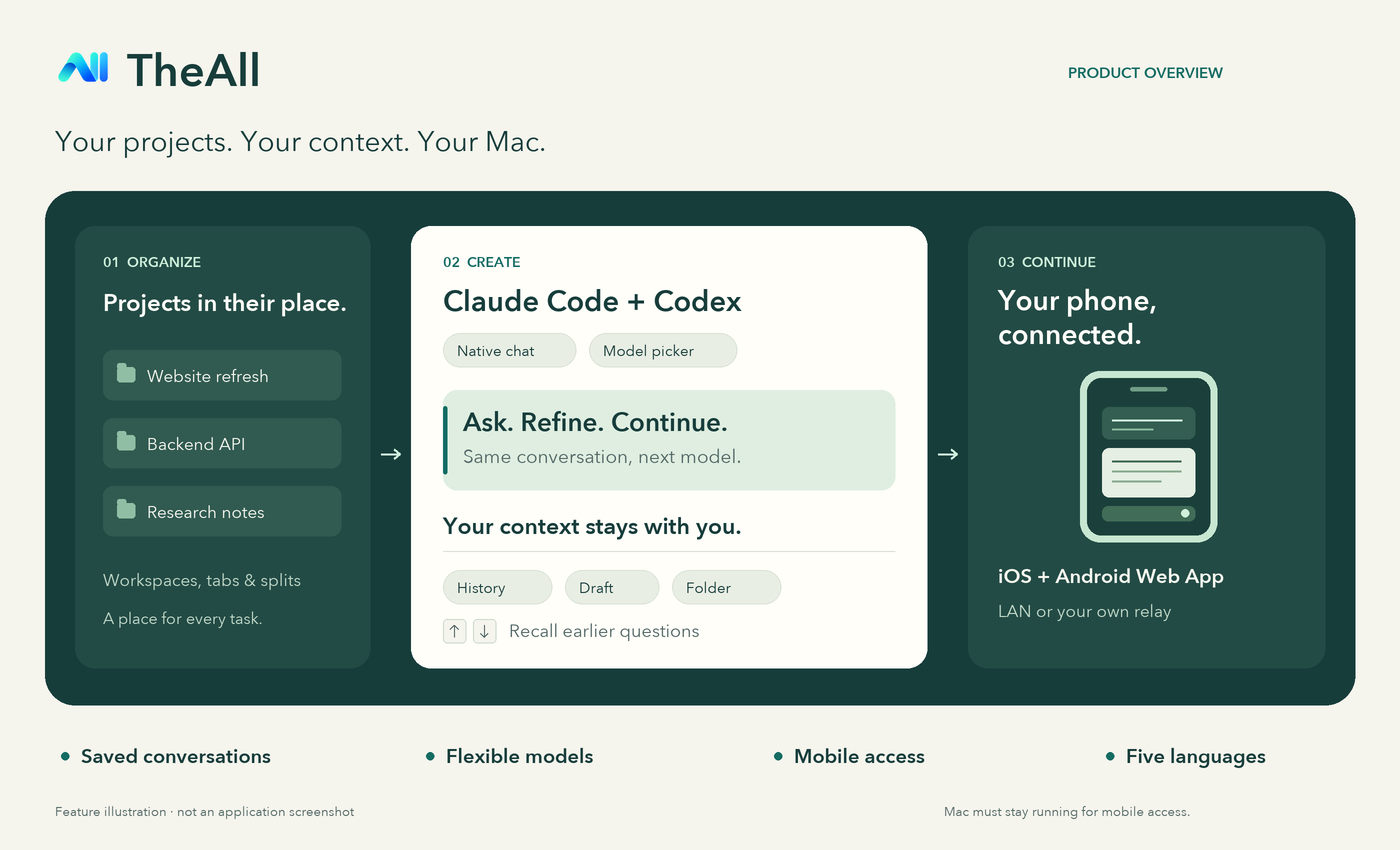
Feature illustration, not an application screenshot.
- Organize projects with workspaces, tabs and split panes.
- Choose a model from a dropdown while keeping your conversation and draft.
- Reopen saved conversations; use ↑ / ↓ in the composer to recall earlier questions.
- Read distinct question cards and answers, with collapsible thinking/progress and a jump-to-bottom button.
- Continue from iOS or Android through the Web App. Local HTTPS connects directly to your Mac; external access uses the included self-hosted relay.
- Use English, 简体中文, Français, 日本語 or 한국어.
Website · English introduction · 中文介绍 · Mobile setup
Download and install
Download TheAll-0.1.3-macos-arm64.dmg or .zip and move TheAll.app into Applications. Requires macOS 14+ and Apple Silicon. Install Claude Code or Codex CLI separately and configure your API connection.
This build uses a persistent local signing certificate and is not notarized by Apple. After verifying SHA256SUMS.txt and choosing to trust the download, follow Apple’s first-launch guidance. Automatic updates are not configured.
Agent tools run automatically, including changes, deletion, dependency installation and Git pushes. Structured questions still wait for your input. Your Mac must stay online and awake for mobile access; no hosted relay is included.
Source and binary use/distribution follow LICENSE and separately granted permissions. Third-party rights remain applicable. TheAll-0.1.3-third-party-sources.tar.gz provides gettext and z2d corresponding sources; see component notices and library replacement.
Validated with 460 passing Swift tests, strict DMG/ZIP signature checks, runtime/dependency checks, and desktop/mobile website previews. Source commit: cdf8a87af5a850879fd5d71a4353c457125bcd7e.
中文说明
本版整合 Claude Code / Codex 原生聊天、工作区、模型切换、对话持久化、上下键历史输入,以及 iOS / Android 手机 Web App。桌面与手机支持五种语言。
下载 DMG 或 ZIP,将 TheAll.app 移到「应用程序」。要求 macOS 14+ / Apple Silicon,并需单独安装对应 CLI、填写自己的 API。安装包使用固定本地证书签名,尚未经过 Apple 公证;首次打开请按 Apple 系统提示操作。工具操作自动执行,手机外网连接需自行部署中继,Mac 必须保持在线。源码及安装包的使用与分发遵循 LICENSE 和单独授予的许可。