Repository navigation

Since the beta of AdGuard Home v1.0 was released in late September, we collected feedback and acted accordingly. The product has gone through major overhaul both under the hood and appearance-wise in the beta versions. The stable release adds the fine-tuning that users asked for. Today, we are releasing AdGuard Home v1.0.
A redesign you don’t have to relearn
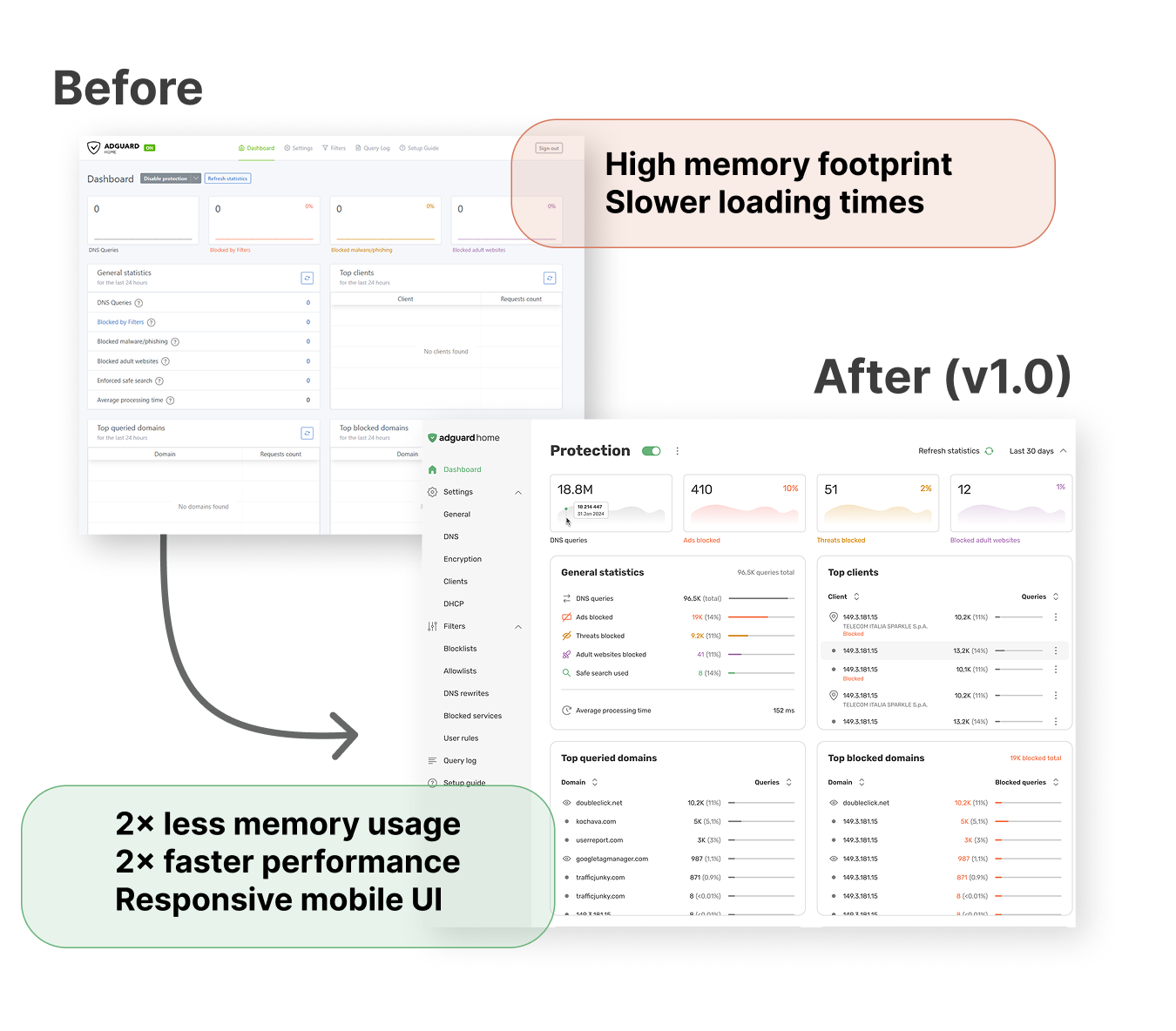
The web interface for AdGuard Home has been completely updated to look cleaner, more modern, and fully aligned with the rest of the AdGuard ecosystem. Avoiding overall layout changes was intentional — we didn’t wish for you to stress out while relearning where every button is. We refreshed the visual style while preserving the familiar logic. We wrote extensively about it in our article on the beta version, it is worth a look if you need more information.
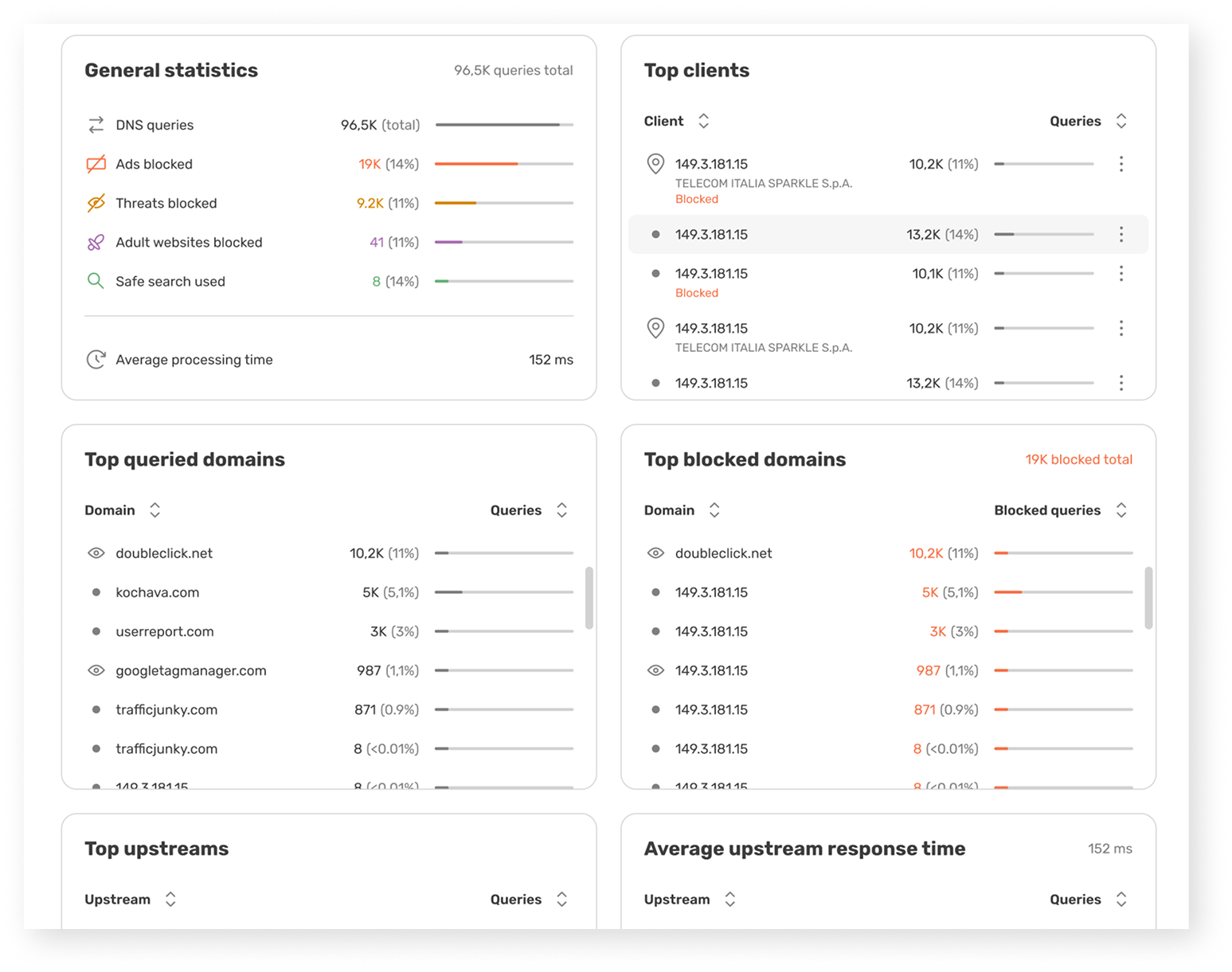
But this overhaul goes deeper than looks. The new frontend shares the backend’s strict optimization philosophy. Rebuilt with fine-grained reactivity, it is now significantly lighter and faster. This update also resolves memory consumption issues linked to the old interface, making AdGuard Home run smoothly on low-power devices, and introduces a fully responsive mobile UI.
New release model
We are adopting a more flexible development and versioning model used by other AdGuard products. Minor releases may now include backward-incompatible changes, which lets us ship features faster.
What does this mean for you? Moving forward, the new release cycle will focus on delivering features and tools, not just patches and library updates.
No migration needed: v1.0 keeps the same configuration schema as v0.107.x, , so your existing configuration works as is.
What changed since the beta
While the first beta of v1.0 introduced a globally changed interface, the second beta was all about stability. 18 changes were included in it, we will highlight the most important ones below; you can consult the full list in the changelog.
- DHCP: IPv4 settings can now be saved alongside an IPv6-compatible interface, DHCP starts with a DHCPv6-only configuration, and subnet validation works as expected.
- Clients and ClientIDs: IPv6 CIDRs with an embedded IPv4 address are accepted, malformed MAC addresses and leading-zero octets are rejected, and per-client schedules survive saving.
- Interface: long values no longer overflow dialogs, encrypted DNS addresses appear in the Setup Guide right away, and emoji passwords work in the wizard.
- DNS: DDR returns a valid SVCB record with empty DoH routes, schedules no longer shift on clock changes, and command-line updates work with private reverse DNS enabled.
- Everything else:
--check-configbehaves correctly on first launch, andlog.enabled: falsenow disables the legacy logger.
One change deserves a special mention. New installations now use Cloudflare DNS as the default upstream and bootstrap servers instead of Quad9.
The new defaults are https://cloudflare-dns.com/dns-query for the upstream and 1.1.1.1, 1.0.0.1, 2606:4700:4700::1111, 2606:4700:4700::1001 for the bootstrap. Previously we used https://dns10.quad9.net/dns-query with 9.9.9.10, 149.112.112.10, 2620:fe::10, 2620:fe::fe:10. Existing configurations are not migrated automatically.
Users whose traffic goes through France, should update the upstream and bootstrap addresses before November 24, when Quad9 stops serving the country.
Also, client settings are now more specified: Use global settings covers Protection only, blocked services have their own switch, and upstream and cache settings stay editable. You can apply global settings when you want many clients to share the same configuration, or set things up per-client when you want an individual approach.
Our plans for future releases
AdGuard Home v1.0 won’t be the last version to bring major changes — we plan to keep improving it until it reaches its full potential. A self-diagnostics page, mass-importing of filtering lists, a built-in search tool for the interface and the ability to automatically issue and renew TLS certificates are currently in the works. We intend to move the product forward at a faster pace from now on.
How to update or switch to v1.0
If you are using the beta or edge channel: You don’t need to do anything. The update will go through automatically via the built-in updater.
If you are on the stable version: Follow the UI prompt to update.
If you prefer using CLI: Run the command ./AdGuardHome --update -v
If you are updating through Docker: Set the image tag to :latest, then recreate and restart the container.
Your feedback is important for our development
Found a bug or have a suggestion? Let us know on GitHub.
Tip
Use the search bar first to check if someone else has already reported the issue. If it’s a new one, open a ticket, and we’ll dive right into it.
Full changelog
See also the v1.0.0 GitHub milestone.
Security
- Go version has been updated to mitigate the possibility of exploiting the Go vulnerabilities fixed in 1.27.4.
Changed
-
The default upstream and bootstrap addresses have been changed from Quad9 to Cloudflare DNS, since Quad9 is adding geography-based restrictions (#8686).
NOTE: If you live in the affected area (France) and still have not changed your upstream, bootstrap, and possibly fallback addresses, it is recommended that you do so.
See our list of known DNS providers.
-
Client settings in the new web interface: Use global settings now applies to Protection only, blocked services have a separate Use global blocked services switch, and upstream DNS servers and the DNS cache are always editable.
Fixed
-
The new web interface install wizard counting the minimum password length in UTF-8 bytes and letting the server reject a password it had accepted; the minimum is now counted in characters, as the server does.
-
Changing the theme in the new web interface failing with
unknown language: ""on installations that never selected a language. -
Init script actions not being passed to System V and OpenWrt services.
-
DNS rewrites with trailing dots not matching (#8674).
-
Shutdown deadlock when looking up clients for query accounting (#8658).
-
CLI update failing when an upstream is specified by a hostname defined only in
/etc/hosts. -
The Check the filtering result in the new web interface showing only the first matched rule (#8677).
-
Panic on binding to a busy port (#8656).
-
Expired dynamic leases are served by DNS (#8671).
-
The Check for updates button disappearing and raw or untranslated error messages being shown when the update check or the DNS server status check failed in the new web interface (#8681).
-
The theme selected in the new web interface not being saved to the server (#8699).
-
Invalid SVCB record from DDR when DoH routes are empty.
-
Schedule shift on clock change cases (#8670).
-
Incorrect behaviour on the first launch with the
--check-configflag. -
Reading partially received TCP prefix.
-
A panic when updating AdGuard Home binary via the command line with
use_private_ptr_resolversset to true (#8613). -
log.enabledset tofalseleaving the legacy logger enabled (#8565). -
DHCP server persisting uncommitted leases with zero expiry after
DHCPDISCOVERmessages (#8572). -
DHCPv4 settings not being saved when an IPv6-capable interface is selected and DHCPv6 is not configured (#8608).
-
DHCP not being enabled when only the DHCPv6 section is configured.
-
DHCP IPv4 range subnet validation not working (#8609).
-
Client ID validation rejecting valid IPv6 CIDRs with an embedded dotted-decimal IPv4 address (#8610).
-
Client ID validation accepting IPv4 addresses with leading-zero octets (
192.168.01.1), malformed MAC addresses, and ClientIDs with leading or trailing hyphens. -
IP addresses being sorted lexicographically instead of numerically in the web interface (#8636).
-
Invalid secondary bootstrap resolver IPv4 address (#8637).
-
The Server addresses dialog overflowing horizontally when a long value is entered. Long unbreakable values in the settings rows overflowing the page.
-
Encrypted DNS server addresses not appearing in the Setup Guide until the page was reloaded after enabling encryption.
-
Passwords containing emoji being rejected by the first-run setup wizard in the new web interface.
-
Cache size and TTL override rows being locked while the DNS cache was disabled in the new web interface (#8644).
-
Tables staying on an empty page after the last row of that page was deleted in the new web interface (#8644).
-
The Log out button opening the login page in a new tab in the new web interface (#8661).
-
Per-client blocked services schedules being reset when a client was saved in the new web interface (#8638).
-
Client sub-pages of the new web interface showing the default values instead of the client's settings when opened directly or reloaded.
Removed
-
The following deprecated HTTP APIs:
GET /control/blocked_services/listGET /control/blocked_services/servicesGET /control/clients/findGET /control/i18n/current_languageGET /control/querylog_infoGET /control/stats_infoPOST /control/blocked_services/setPOST /control/i18n/change_languagePOST /control/querylog_configPOST /control/safesearch/disablePOST /control/safesearch/enablePOST /control/stats_config
-
The following deprecated properties and query parameters in HTTP APIs:
- Properties
"filterId"and"rule"in the response of theGET /control/querylogHTTP API. - Properties
"filter_id"and"rule"in the response of theGET /control/filtering/check_hostHTTP API. - Property
"safesearch_enabled"in the client APIs. - Query parameter
response_statusin theGET /control/querylogHTTP API.
- Properties
-
The deprecated usage of an empty value for the
"upstream_mode"property in theGET /control/dns_infoandPOST /control/dns_configHTTP APIs. -
The following deprecated command-line flags:
--host/-hfor the bind host; now it is only used to show the help message along with--help.--no-mem-optimization.--no-etc-hosts.--port/-p.