Repository navigation
2.10

Disclaimer Adguard for Mac is not an open-source project. We use GitHub as an open bug tracker for users to see what developers are working on.
AdGuard v2.10 for Mac brings many new features and various changes.
DNS filtering enabled by default
DNS protection is now enabled by default for all users. If you are not using any DNS server, the system DNS server with the AdGuard DNS filter will be automatically selected. This change was partially necessary to implement another important feature: experimental support for Encrypted ClientHello (ECH).
Experimental Encrypted ClientHello support
What is Encrypted ClientHello?
Nowadays, almost every HTTPS connection is encrypted and no one can see what’s inside it. However, the very first packet of the connection, called ClientHello, indicates the name of the server you are connecting to. Say you want to open www.google.com, your ISP cannot see what exactly you send and receive from it, but they know what website you are communicating with. This is where Encrypted ClientHello (ECH) comes in handy. It encrypts this last bit of unencrypted information, making your HTTPS connection fully encrypted. This means that third parties, such as your ISP, will not be able to see what is inside the connection or which site the connection was made to.
AdGuard is not the only one working to support ECH. Browsers such as Chrome and Firefox are also in the process of adding ECH support. However, AdGuard has a significant advantage.
Assuming that Chrome has added support for ECH, it means it only works within Chrome and does not extend to other apps and browsers. In contrast, AdGuard's ECH support automatically works in all apps and browsers that AdGuard filters. Therefore, you don't have to wait for operating systems or apps to support this feature, as it is automatically available in your pocket with AdGuard.
How to enable ECH support
To enable ECH support, follow these steps:
-
Make sure that DNS protection is on. ECH relies on data obtained through DNS, so in order for AdGuard to receive this data and enable ECH globally for users, DNS filtering is necessary.
-
Check if the
dns.proxy.block.encrypted.client.hello.response.parametersoption is turned off in the Advanced settings, as it may interfere with this feature. -
Go to Advanced Settings and turn on
network.https.ech.enabled.

To make sure ECH is working, use one of the following methods:
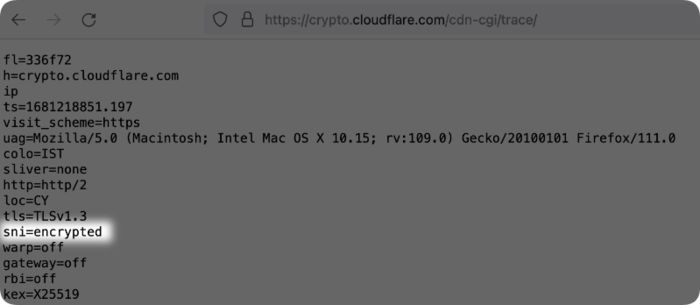
- Go to https://crypto.cloudflare.com/cdn-cgi/trace/ and check if it says
sni=encrypted.
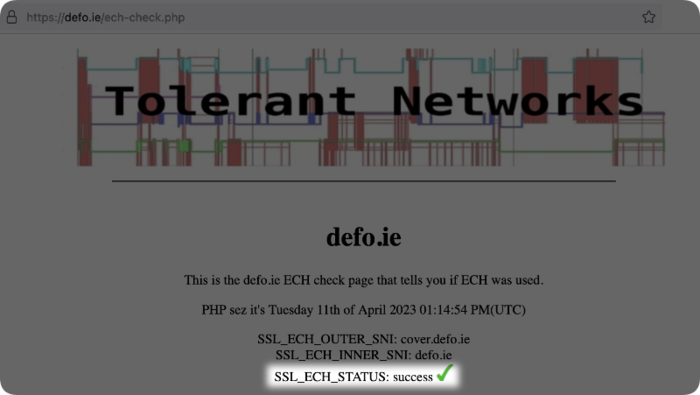
- Go to https://defo.ie/ech-check.php and check if it says
SSL_ECH_STATUS: success.
Limitations and issues
ECH is a new technology, so you may encounter some issues when using it.
-
ECH support may slow down your browsing speed a bit. However, we are already working on improving this!
-
ECH support must be implemented on both sides. AdGuard supporting it is not enough; the server must also support it. Currently, these servers are few, because the technology is new and has not yet been finalized. However, the number of servers supporting ECH is expected to grow.
New Advanced Settings
In the Advanced settings you'll find a bunch of new features that can be divided into 4 categories:
-
Anti-DPI options allow low-level modification of filtering requests to protect user traffic from Deep Packet Inspection (DPI)
stealth.antidpi.clienthello.split.fragment.sizestealth.antidpi.http.space.jugglingstealth.antidpi.http.split.fragment.size
-
Keepalive options let you configure settings for working with Keepalive connections
network.tcp.keepalive.enablednetwork.tcp.keepalive.interval.secondsnetwork.tcp.keepalive.timeout.seconds
-
DNS-related options help you fine-tune DNS settings
network.https.ech.enableddns.proxy.fallback.on.upstreams.failure.enableddns.proxy.http3.enableddns.proxy.parallel.upstream.queries.enableddns.proxy.servfail.on.upstreams.failure.enabled
-
Certificate security options allow you to check the certificates of websites and web services by various criteria
network.https.enforce.certificate.transparency
CoreLibs, DnsLibs, Scriptlets, and ExtendedCSS have undergone many changes. Furthermore, the Ukrainian filter has been added.
Changelog
Features
- DNS filtering and system DNS are enabled by default for all users #1217
- Added Tor Browser support #1045
- Added Arc Browser support #1188
- When reporting in Safari, a new tab opens by default instead of a window #1100
Fixes
- Export fails when object names contain invalid characters for a file system #1198
- Network service is not connected if the app starts with Filter update check interval disabled #1190
- The number of remaining days of the license period on the main screen and the License screen does not match #1177
- The filtering service crashes when reading the system certificate store on MacOS 13 #1151
Versions
CoreLibs
- Updated CoreLibs to v1.11.79 #1221
- Encrypted ClientHello support #1565
- Added exact match syntax for HTTPS exclusions #1691
- Implemented "Protect from DPI" for plain HTTP #1629
- Improved failure detection when starting network extension due to "no network" #1679
- "Protect from DPI" allows to configure HTTPS fragmentation #1649
- Added signed Certificate Timestamps (SCT) support #1529
- Netbiosd process starts using a lot of CPU when pausing AdGuard #937
- Fixed dropped TCP/HTTP connections #1658
- Ads are not blocked by Brook #1641
- Using NEAppProxyFlow.networkInterface, if installed, instead of RouteResolver #1677
- Fixed incorrect work of the
@matchfield for userscripts #1650 - HTTPS filtration breaks trading.finam.ru #1724
- elearning.ual.pt doesn't open with "Protect from DPI" enabled #4451
- Filtering does not work on websites with dot at the end #1741
pathmodifier does not work on yandex.ru/images/ #1738
DnsLibs
- Updated DnsLibs to v2.1.27 #1211
- Added tplinkdeco.net to fallback domains #175
- Added tplinkextender.net to fallback domains #183
- Crash in IPv6-only networks on Android #182
- Timing out DNS upstream leads to many requests pending #40
Scriptlets
- Updated Scriptlets to v1.9.1
- Added new
m3u-prunescriptlet #277 - Added more possible values in the
set-attrscriptlet
#283 - Improved 'adjust-setTimeout
andadjust-setInterval` scriptlets #262 - Improved
json-prunescriptlet #282 - Fixed compatibility for the
noopcssredirect #299 - Fixed compatibility issue for the
google-imaredirect #272 - Fixed compatibility issue between
prevent-addEventListenerand userscripts #271 - Fixed error in
prevent-element-src-loading#270 - Fixed
xml-prune-related errors #289
ExtendedCss
- Updated ExtendedCss to v2.0.51
- The
content' property instyle' inIAffectedElementis now optional
#163
Important for filter maintainers
- Added
$permissionsmodifier #419 - Added regexp support for
$domainmodifier #1550 - Added
$urlmodifier #1551 - Improved compatibility of
$redirectsyntax with uBO #1605 - Improved
$jsonprune#1710 $jsonprunemodifier should be able to handlejsonp#1717- Send the original rule to the filtering log when applying the converted uBO-syntax HTML rule
##^script:has-text()#1709 - The problem of converting HTML filtering to uBO has been solved #1708
$generichide+$generichide,badfiltercauses that protection can't be enabled/disabled #1681- In some cases
$importantmodifier doesn't work #1695 $removeparamexclusions don't work #1704- The correct rule is marked as invalid #1625
- The element hiding exception doesn't work if the rule contains
~domain#1673