Repository navigation
Releases
Nova 0.1.1 — History, bookmarks, and command palette

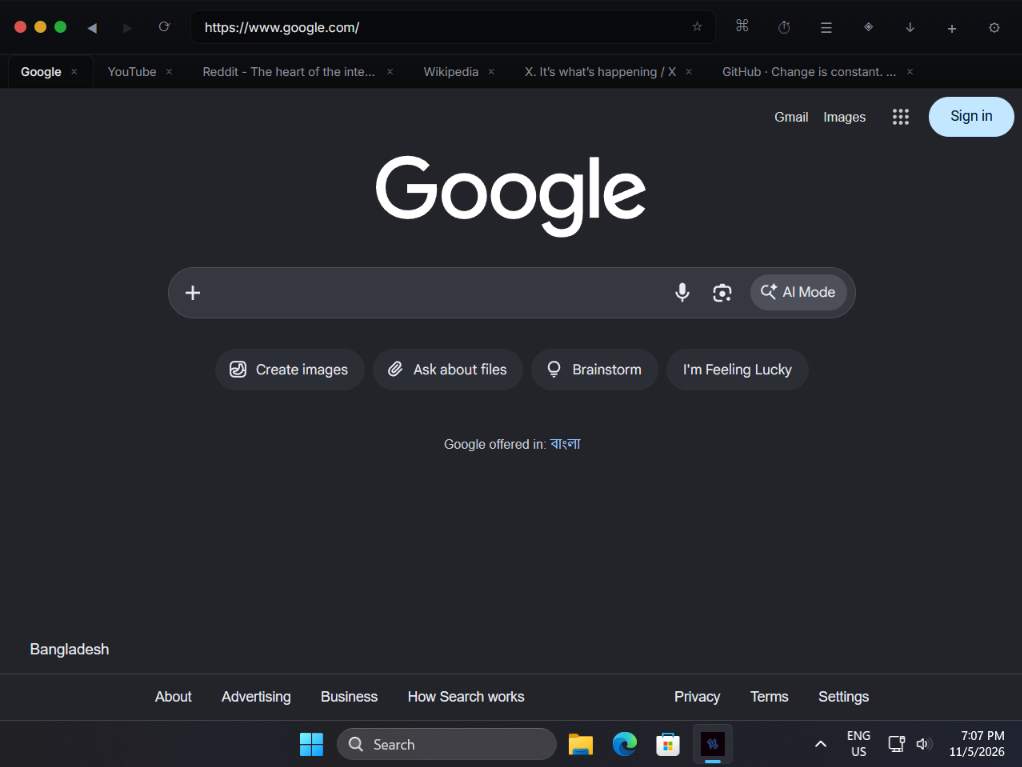
Nova is a futuristic, extensible desktop browser built with Tauri v2 and React 19. This release adds history, bookmarks, session restore, a command palette, extension side panels, a full keyboard shortcut layer, and a complete visual redesign.
Windows only. The ad blocker is still in progress. See the caveats below.
What's new in 0.1.1
History and bookmarks
- Every successful page load records its title and visit time to browsing history
nova://history— grouped by date, with live search, per-entry removal, and clear-all- Bookmarks with a star toggle in the address bar (
☆→★) Ctrl+Dtoggles the bookmark from anywhere, including when a page has focus- Bookmarks bar (off by default) appears below the tab strip, toggle with
Ctrl+Shift+B nova://bookmarks— searchable list with per-entry removal- The command palette surfaces "Bookmark this page" as the first row when the query mentions bookmark or is empty
Search history
- Queries that aren't URLs are recorded to a separate search history
- Recent searches appear in the command palette and on the history page
- Search history clears independently from browsing history
Session restore
- Open tabs, per-tab history, history position, and the active tab come back on next launch
- Toggle in Settings → Behavior to disable, which also clears the saved session immediately
- Restore is debounced by 500 ms so rapid tab changes don't thrash the disk
Command palette
Ctrl+Kopens from anywhere, including a focused page- Unified search across history, bookmarks, recent searches, and browser actions
- Domain detection — typing
github.comoffers "Go to" as the top result - Search fallback — anything else offers "Search for" as the top result
Ctrl+Enteropens any URL result in a new tab; the current tab stays put- Arrow-key navigation, Enter to select, Escape to close
- Selected row is highlighted with an accent bar and a
⌘↵ new tabhint
Extension side panels
- Extensions declaring
"ui": { "panel": "panel.html" }in their manifest get a toolbar entry - Clicking it opens the extension's HTML in the right sidebar, sharing the slot with the AI assistant
- The two surfaces are mutually exclusive — opening one closes the other
- Extensions with only a
popupfield are surfaced in the same slot as a fallback
Customizable UI
- Window controls style — choose between macOS traffic lights (default) or Windows-style minimize / maximize / close buttons, in Settings → Appearance
- Reorderable toolbar — move any of ten items up or down in Settings → Toolbar
- Hide toolbar items — toggle any button's visibility with the eye icon in the layout editor. The address bar is protected so you can't accidentally lock yourself out
- Items that depend on state (AI when disabled, extensions when none have panels, bookmark star on internal pages) render nothing when inapplicable
Keyboard shortcuts
Full shortcut layer that works whether the page or the chrome has focus. Page-level keydowns are captured by the injected navigation script and routed through the same sentinel-navigation mechanism already used for downloads and context menus.
| Shortcut | Action |
|---|---|
Ctrl+T |
New tab |
Ctrl+W |
Close active tab |
Ctrl+Shift+T |
Reopen last closed tab (up to 20) |
Ctrl+Tab / Ctrl+Shift+Tab |
Cycle tabs forward / backward |
Ctrl+1 … Ctrl+8 |
Jump to tab N |
Ctrl+9 |
Jump to last tab |
Ctrl+L / F6 |
Focus address bar |
Ctrl+R / F5 |
Reload |
Alt+← / Alt+→ |
Back / forward |
Ctrl+D |
Bookmark toggle |
Ctrl+K |
Command palette |
Ctrl+Shift+B |
Toggle bookmarks bar |
Escape |
Close overlay, or revert address bar |
Tab management
- Middle-click any tab in the strip or overflow menu to close it
- Closing a background tab doesn't activate it first — the handler runs on
mousedownso the tab closes without a flicker
Visual redesign
The previous build used heavily glassmorphic styling — backdrop-filter on every surface, cyan glow shadows on hover, animated backgrounds, drifting grids. The 0.1.1 redesign keeps the cyberpunk identity but moves the depth and motion to where they're earned.
- Solid surfaces with three elevation levels instead of translucent glass everywhere. Glass is now reserved for floating elements: command palette, tabs overflow menu, downloads popover
- Real shadows for elevation instead of glow halos. Buttons lift 0.5px on hover and press down 0.5px on click
- One accent color, used sparingly — focus rings, the active AI button, the current tab indicator, the loading bar, and primary buttons
- Choreographed entrance animations on every modal, panel, and page
- The AI orb is now the single ambient animation — two rings rotating slowly in opposite directions with a breathing core
- The accent color setting actually works now — earlier builds hardcoded cyan and silently ignored the user's choice
Fixed
- Address bar not updating on navigation — clicking a link or being redirected now updates the address bar and tab title correctly, without destroying and recreating the webview
- Reload loading the wrong URL — fixed as a side effect of the address bar sync bug
- DPI scaling — child webviews were rendering at the wrong size on high-DPI displays after a WebView2 update. Now uses
LogicalPosition/LogicalSizethroughout Ctrl+DandCtrl+Kdidn't work when a page had focus — both now work regardless of which webview has focus
Removed
- Zoom —
Ctrl+=,Ctrl+-,Ctrl+0, andCtrl+scrollwere unreliable and have been removed. Those key combinations pass through to the page's own handlers now
⚠️ Known limitations
The ad blocker does not currently work reliably. Unchanged from 0.1.0. EasyList loads correctly (~82,000 rules) and the engine evaluates URLs correctly when tested via the diagnostic panel in Settings, but the WebResourceRequested interception layer is not firing for most requests in the live browser. On adblocktester.com, Nova scores around 8–11% blocked vs. 80–90% for Brave and uBlock Origin. This is a tracked issue.
macOS is untested. The Rust modules, capabilities, and WebKit Content Rule List integration exist, but no macOS binary has ever been produced because the developer doesn't own a Mac. If you build on macOS and it works, open an issue to say so.
Linux and mobile are not supported. Child webviews require X11 on Linux (broken under Wayland), and Tauri's mobile platform doesn't expose child webviews at all.
Other gaps: no extension popup UI (side panel only), no history/bookmark export or import, no tab groups, no custom new-tab layout editor, no auto-update yet.
Installation
| Platform | File | Notes |
|---|---|---|
| Windows 10/11 | Nova_0.1.1_x64-setup.exe |
Recommended. Adds a Start Menu entry and uninstaller. |
| Windows 10/11 | Nova_0.1.1_x64_en-US.msi |
For enterprise / Group Policy deployment. |
| macOS | — | Not available until validated on macOS. |
The Windows installer isn't code-signed, so Defender SmartScreen will warn you on first launch. Click More info → Run anyway. This is a signing certificate cost, not a safety warning — the full source is in this repository.
Enabling the AI assistant
The AI runs locally against llama.cpp and is disabled by default.
- Download
llama-serverfrom the llama.cpp releases page - Download a GGUF model — Llama 3.2 3B or Qwen 2.5 7B are good starting points
- Run
./llama-server -m your-model.gguf -c 4096 --host 127.0.0.1 --port 8080 - In Nova, open Settings → AI Assistant and toggle Enable
- Click the ◈ button in the toolbar
Full setup guide and configuration reference: aetex.is-a.dev/nova
Upgrading from 0.1.0
Install the new version over the old one. Your settings, bookmarks, history, and session are all preserved — the settings storage key is unchanged and new fields default sanely, and the toolbar layout is migrated from the old shape automatically.
If you had a custom toolbar layout, it's preserved. Any items you had in the old layout are visible by default in 0.1.1; use the new eye toggle in Settings → Toolbar to hide the ones you don't want.
What's next
Tracked in CHANGELOG.md:
- Complete the Windows ad blocker interception layer
- Validate the macOS build path on real hardware
- Extension popup surface
- History and bookmarks export / import
- Tab groups
- Custom new-tab layout editor
- Auto-update via the Tauri updater
Links
- Documentation: aetex.is-a.dev/nova
- Full changelog: CHANGELOG.md
- Architecture: docs/ARCHITECTURE.md
- Extension SDK: docs/EXTENSIONS.md
- Report a bug: Issues
Contributions are especially welcome for macOS validation and Windows ad blocker interception — those are the two biggest gaps in this release.
Built by AeteX
Nova 0.1.0 — First public release
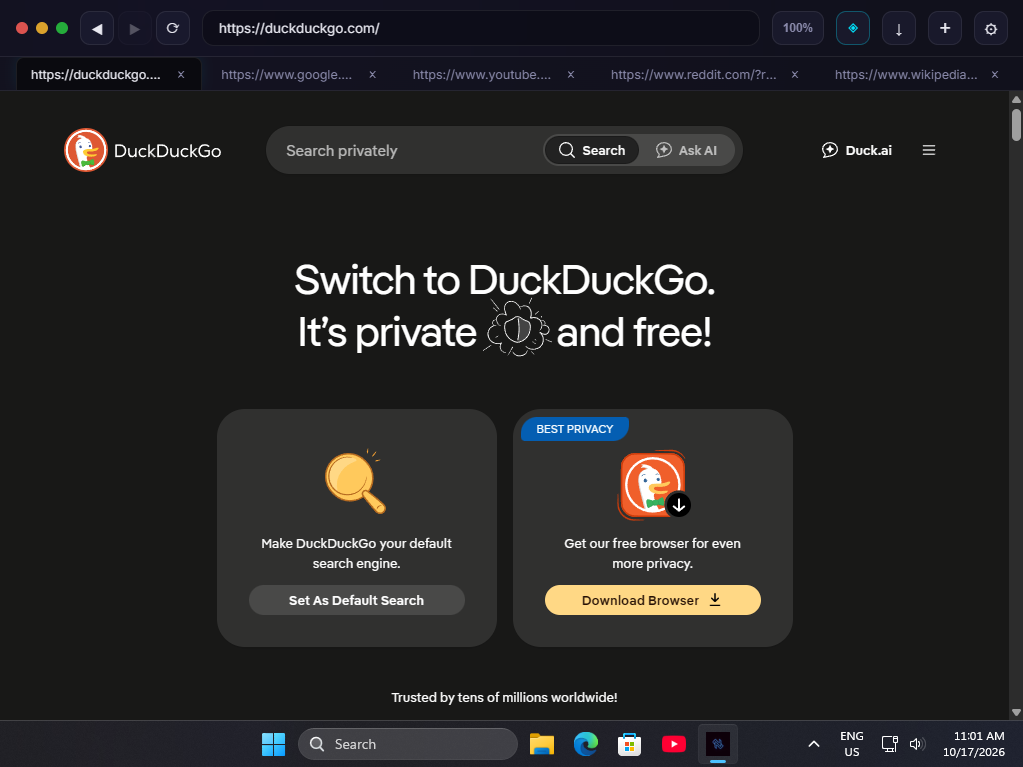
Nova is a futuristic, extensible and lightweight desktop browser built with Tauri v2 and React 19. Native child webviews per tab, a local-first AI assistant with tool calling, a sandboxed extension system, and a customizable cyberpunk homepage.
This is the first public release. Windows only. The ad blocker is a work in progress. See the caveats below.
What's in this release
Native browser core
- Real OS-level child webviews per tab — not iframes
- Working back / forward / reload with per-tab history
- Tab strip with shrinking tabs, horizontal scroll, overflow menu
- Per-tab zoom via Ctrl+=, Ctrl+-, Ctrl+0, Ctrl+scroll
Custom homepage (nova://home)
- Live clock, time-aware greeting, central search bar
- Customizable quick links with automatic favicon fetching
- Recent downloads strip
AI assistant
- Streams from any llama.cpp server — no cloud, no API key
- Tool calling: the model can navigate, open tabs, search, close tabs, change settings
- Animated tool cards with scanning beams, success flashes, error shakes
Extension system
- Sandboxed cross-origin iframes served over
nova-ext:// - Typed SDK with tabs, storage, messaging, content scripts, and UI namespaces
- Two-layer permission enforcement (frontend + Rust validator)
Downloads manager
- Native Tauri window popover — completely immune to page-level event loop contention
- Pause / resume / cancel per download
- Full
nova://downloadspage with source page URLs and saved paths
⚠️ Known limitations
The ad blocker does not currently work reliably. EasyList loads correctly (~82,000 rules) and the engine evaluates URLs correctly when tested via the diagnostic panel. But the WebResourceRequested interception layer is not firing for most requests in the live browser. On adblocktester.com, Nova scores around 8–11% blocked vs. 80–90% for Brave and uBlock Origin. This is a known, tracked issue — do not file "ad blocker doesn't work" as a bug.
macOS is untested. The Rust modules, capabilities, and WebKit Content Rule List integration exist, but no macOS binary has ever been produced because the developer doesn't own a Mac. If you build on macOS and it works, open an issue — it would be the first confirmation.
Linux and mobile are not supported. Child webviews require X11 on Linux (broken under Wayland), and Tauri's mobile platform doesn't expose child webviews at all. Both are out of scope for 0.1.x.
Other gaps: no history, bookmarks, session restore, extension popup UI, or auto-update yet.
Installation
| Platform | File | Notes |
|---|---|---|
| Windows 10/11 | Nova_0.1.0_x64-setup.exe |
Recommended. Adds a Start Menu entry and uninstaller. |
| Windows 10/11 | Nova_0.1.0_x64_en-US.msi |
For enterprise / Group Policy deployment. |
| macOS | — | Not available until validated on macOS. |
The Windows installer isn't code-signed, so Defender SmartScreen will warn you on first launch. Click More info → Run anyway. This is a signing certificate cost, not a safety warning — the full source is in this repository.
Enabling the AI assistant
The AI runs locally against llama.cpp and is disabled by default.
- Download
llama-serverfrom the llama.cpp releases page - Download a GGUF model — Llama 3.2 3B or Qwen 2.5 7B are good starting points
- Run
./llama-server -m your-model.gguf -c 4096 --host 127.0.0.1 --port 8080 - In Nova, open Settings → AI Assistant and toggle Enable
- Click the ◈ button in the toolbar
Full setup guide and configuration reference: aetex.is-a.dev/nova
What's next
Tracked in CHANGELOG.md:
- Complete the Windows ad blocker interception layer
- Validate the macOS build path on real hardware
- Extension side panel and popup surfaces
- Command palette (
Ctrl+K) - History and bookmarks
- Session restore
- EasyList → WebKit JSON converter for macOS filter coverage
Links
- Documentation: aetex.is-a.dev/nova
- Architecture: docs/ARCHITECTURE.md
- Extension SDK: docs/EXTENSIONS.md
- Changelog: CHANGELOG.md
- Report a bug: Issues
Contributions are especially welcome for macOS validation and Windows ad blocker interception — those are the two biggest gaps in this release.
Built by AeteX